
1. Уводзіны
The tenlamp G1 Live Sound Card is an integrated audio mixer designed for live streaming, podcasting, recording, singing, and gaming. This equipment bundle includes the G1 audio console and two 3.5mm studio condenser microphones, providing a comprehensive solution for audio production. This manual provides detailed instructions for setting up, operating, maintaining, and troubleshooting your G1 system.
2. Змесціва ўпакоўкі
Перш чым працягнуць, пераканайцеся, што ў вашай упакоўцы ёсць усе неабходныя рэчы:
- тэнлamp Гукавая кансоль G1
- 2 x 3.5mm Studio Condenser Microphones
- Microphone Stands and Pop Filters
- USB-C to USB-A Cable (for power and data)
- 3.5mm TRRS Audio Cables (for mobile device connection)
- Кіраўніцтва карыстальніка
3. Прадукт скончыўсяview
The tenlamp G1 audio console features multiple inputs and outputs, along with various controls for audio mixing and effects. Familiarize yourself with the layout before setup.

Image: The tenlamp G1 Live Sound Card and two condenser microphones set up for a two-person podcast, demonstrating a typical usage scenario.
3.1 Элементы кіравання пярэдняй панэлі
- Mic VOL Fader: Adjusts the input volume of the connected microphones.
- Music VOL Fader: Adjusts the volume of the background music input.
- Monitor VOL Knob: Controls the volume of the monitoring headphones.
- Output VOL Knob: Рэгулюе гучнасць асноўнага выхаднога гуку.
- Reverb Effect Fader: Adjusts the intensity of the reverb effect.
- Эквалайзер высокіх / нізкіх частот: Adjusts high and low frequencies for microphone input.
- Voice-change Buttons: Activates various voice modulation effects.
- Sound Pad Buttons: Triggers pre-loaded sound effects.
- Noise Reduction Buttons: Activates different levels of intelligent noise reduction.
3.2 Злучэнні задняй панэлі

Выява: Падрабязны view of the tenlamp G1 audio console's rear panel, showing various input and output ports including USB-C, Output, Music, Monitor, Headset, and Mic inputs.
- Порт USB-C: For power supply, data transfer to computer, and digital audio I/O. Note: Does not support USB mic connection via this port.
- Output Ports (TRRS): Connects to mobile devices for live streaming or recording.
- Увод музыкі: Connects external audio sources (e.g., phone, tablet) for background music.
- Выхад манітора: Connects monitoring headphones.
- Уваход для гарнітуры: Connects a headset with integrated microphone.
- Mic Inputs (3.5mm): Connects the included 3.5mm condenser microphones.
4. Кіраўніцтва па наладцы
Follow these steps to set up your tenlamp G1 Live Sound Card for optimal performance.
- Падключэнне мікрафонаў: Insert the 3.5mm plugs of the condenser microphones into the designated мікрафон input jacks on the rear panel of the G1 console. Secure microphones on their stands.
- Connect Monitoring Headphones: Падключыце навушнікі да Манітор выхадны гняздо.
- Connect to Power/Computer: Падключыце USB-C канец кабеля з камплекта да USB-C port on the G1 console and the USB-A end to your computer's USB port or a power adapter. The device will power on.
- Connect to Mobile Device (Optional): If live streaming or recording on a mobile device, use the TRRS audio cables to connect the Выхад ports on the G1 to your mobile device's headphone jack.
- Connect Music Source (Optional): If using external background music, connect your music device to the Музыка ўваходны гняздо.
5. Інструкцыя па эксплуатацыі
This section details how to use the various features of your tenlamp G1 Live Sound Card.
5.1 Асноўныя метады міксавання гуку
- Адрэгуляваць гучнасць мікрафона: Выкарыстоўвайце Mic VOL fader to control the loudness of your voice.
- Рэгуляванне гучнасці музыкі: Выкарыстоўвайце Music VOL fader to balance the background music with your voice.
- Monitor Your Audio: Адрэгулюйце Monitor VOL knob to set a comfortable listening level in your headphones.
- Control Output Volume: The Output VOL knob controls the overall volume sent to your recording device or live stream.

Image: A close-up of the tenlamp G1 audio console, illustrating the various knobs and faders for fine-tuning audio parameters such as microphone volume, music volume, monitoring, output, reverb, treble/bass, and voice effects.
5.2 Зніжэнне шуму
The G1 features intelligent noise reduction to enhance audio clarity.
- Націсніце спецыяльны Зніжэнне шуму buttons (e.g., "Denoise1", "Denoise2", "Denoise3") to activate different levels of noise cancellation. Experiment to find the best setting for your environment.

Image: The tenlamp G1 audio console displaying its noise reduction capabilities, with three distinct levels labeled "Cheer Denoise1", "Kiss Denoise2", and "Guffaw Denoise3" for clear and clean audio recording.
5.3 Special Streaming Features
Enhance your live streams and recordings with these integrated functions:
- Dodge (Auto Ducking): When activated, this feature automatically lowers background music volume when you speak into the microphone, making your voice clearer.
- Выдаліць вакал: This function attempts to remove the vocal track from accompaniment music, allowing you to sing over instrumental versions.
- Петля: Enables recording of internal PC audio along with your microphone input via the USB-C connection.

Image: The tenlamp G1 audio console showcasing convenient features for streaming, including "Dodge" for auto-ducking microphone input, "Remove Vocals" to eliminate vocals from accompaniment, and "Loopback" for recording PC internal audio via USB-C.
5.4 Creating Atmosphere
Utilize the built-in effects to customize your audio environment:
- Voice Changers: Select from 4 different voice modulation effects.
- Рэжымы рэверберацыі: Choose from 5 preset reverb modes to add depth to your vocals.
- Аўтаматычная настройка: Apply 12-step auto-tune for pitch correction.
- Гукавыя падушачкі: Trigger various sound effects using the dedicated buttons.
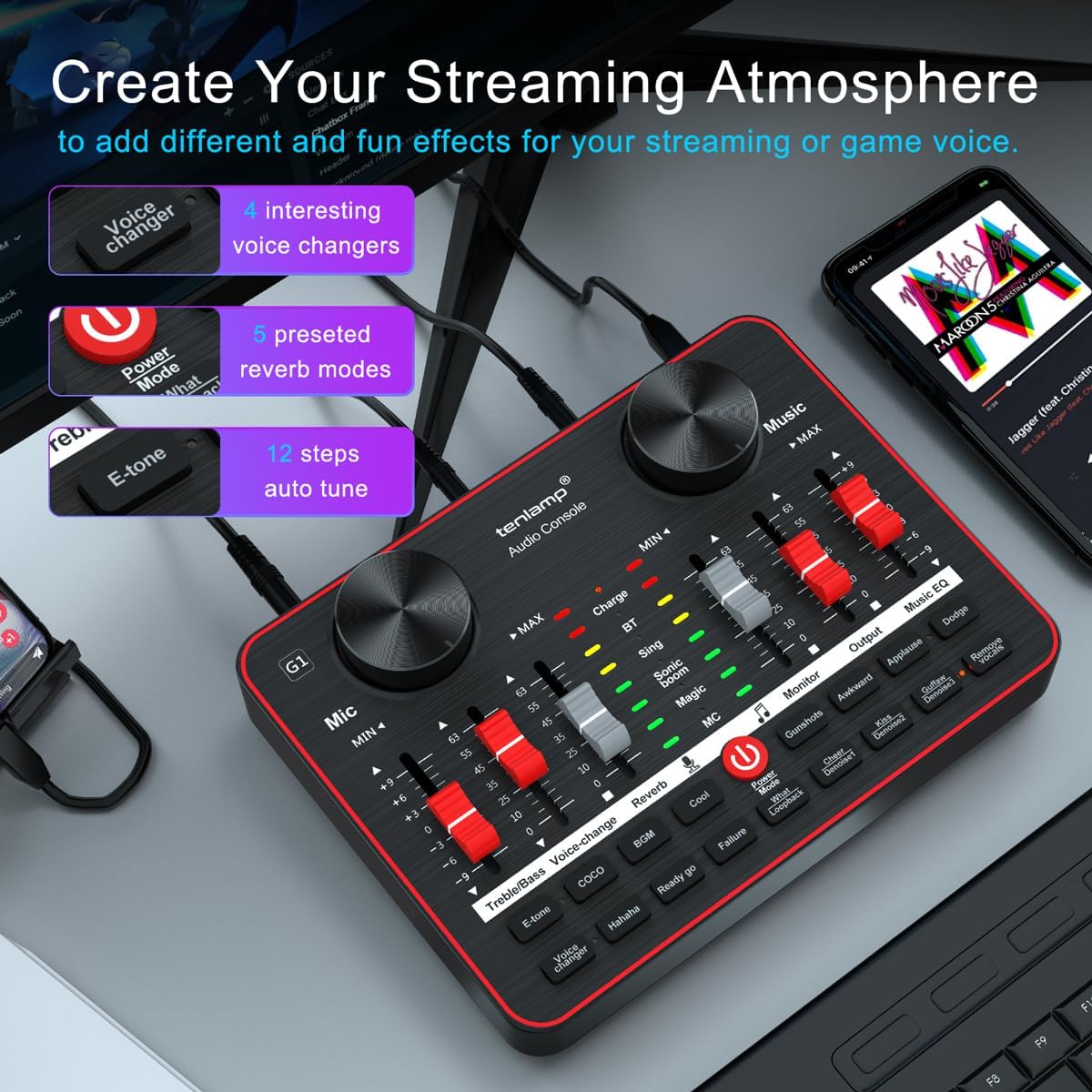
Image: The tenlamp G1 audio console highlighting features designed to create a streaming atmosphere, such as 4 interesting voice changers, 5 preset reverb modes, and 12 steps of auto-tune.
6. Тэхнічнае абслугоўванне
Proper care ensures the longevity and performance of your tenlamp Сістэма G1.
- Уборка: Use a soft, dry cloth to wipe the surface of the audio console and microphones. Avoid liquid cleaners or abrasive materials.
- захоўванне: Захоўвайце прыладу ў прахалодным, сухім месцы, удалечыні ад прамых сонечных прамянёў і экстрэмальных тэмператур, калі яна не выкарыстоўваецца.
- Кабельнае кіраванне: Avoid bending or crimping cables excessively to prevent damage.
- Сыход за мікрафонам: Keep microphones dry and free from dust. Use pop filters to protect against moisture and plosives.
7. Выпраўленне непаладак
Калі ў вас узнікнуць праблемы, звярніцеся да наступных распаўсюджаных праблем і рашэнняў:
| праблема | Магчымая прычына | Рашэнне |
|---|---|---|
| Няма выхаду гуку | Incorrect cable connection, low volume settings, device not powered on. | Check all cable connections. Ensure G1 is powered. Adjust Mic VOL, Music VOL, Monitor VOL, and Output VOL faders/knobs. Verify computer/mobile device audio settings. |
| Не працуе мікрафон | Microphone not properly connected, Mic VOL too low, faulty microphone. | Ensure microphone is securely plugged into the correct 3.5mm Mic input. Increase Mic VOL. Test with the second microphone to rule out a faulty unit. |
| Дрэнная якасць гуку/шум | High gain, environmental noise, incorrect noise reduction setting. | Lower Mic VOL if distortion occurs. Activate or adjust noise reduction levels. Ensure proper microphone placement (e.g., close to mouth, away from noise sources). |
| Прылада не распазнаецца камп'ютарам | USB cable issue, driver problem (rare for plug-and-play), computer settings. | Try a different USB port or cable. Restart your computer. Check your computer's sound settings to ensure the G1 is selected as the input/output device. |
8. Тэхнічныя характарыстыкі
Key technical specifications for the tenlamp G1 Live Sound Card:
- Марка: тэнлamp
- мадэль: G1
- Колькасць каналаў: 5
- Тэхналогія падключэння: USB
- Крыніца харчавання: Электрычны шнур (праз USB)
- Тып выхаднога раздыма: TRS
- Аўдыё ўваход: USB, XLR (via 3.5mm adapter for condenser mics)
9. Гарантыя і падтрымка
For warranty information or technical support, please refer to the documentation included with your purchase or visit the official tenlamp website. You can also contact tenlamp customer service through their brand store on Amazon: