
Уводзіны
Дзякуй за пакупкуasing the Yaheetech Height Adjustable White Art Desk. This manual provides essential information for the safe and efficient assembly, operation, and maintenance of your new art desk. Please read this manual thoroughly before use and retain it for future reference.

Image: The Yaheetech Height Adjustable White Art Desk, featuring a white tilting tabletop, black metal frame, two fabric drawers, a mesh shelf, and a black stool. An artwork is displayed on the tilted surface, and art supplies are visible on the side tray.
Інфармацыя па бяспецы
Каб забяспечыць бяспечную працу і пазбегнуць пашкоджанняў, калі ласка, выконвайце наступныя правілы бяспекі:
- Ёмістасць вагі: Do not overload the tabletop beyond 220 lb (100 kg). Exceeding this limit may cause structural damage or injury.
- зборка: Assembly requires two people. Ensure all components are securely fastened before use.
- Стабільнасць: Пастаўце стол на роўную, устойлівую паверхню, каб прадухіліць яго перакульванне.
- Перасоўванне стала: When moving the desk, ensure the tabletop is flat and all drawers are secured to prevent items from falling.
- Дзеці і хатнія жывёлы: Keep children and pets away from the desk during assembly and adjustment to prevent accidents.
Змест пакета
Перад пачаткам зборкі пераканайцеся, што ўсе кампаненты наяўныя. Калі якія-небудзь дэталі адсутнічаюць або пашкоджаныя, звярніцеся ў службу падтрымкі кліентаў.
- Height Adjustable White Art Desk Frame and Tabletop Components
- зэдлік
- Fabric Drawers (2)
- Detachable Tabletop Side Tray
- Зборныя крапежныя элементы (шрубы, балты, інструменты, калі яны ўключаны)
- Інструкцыя па эксплуатацыі (гэты дакумент)
Ўстаноўка і зборка
Assembly of the Yaheetech Art Desk is required and is recommended for two people. While specific step-by-step instructions are typically provided in a separate assembly guide, the general process involves:
- Распакаванне: Акуратна распакуйце ўсе кампаненты і раскладзеце іх на чыстай мяккай паверхні, каб пазбегнуць драпін.
- Зборка рамы: Assemble the metal frame components according to the provided diagrams, ensuring all connections are secure.
- Tabletop Attachment: Attach the main tabletop and the side slide-out tabletop to the assembled frame.
- Drawer and Accessory Installation: Install the fabric drawers into their designated slots and attach the detachable side tray and pencil ledge.
- Stool Assembly: Збярыце прыкладаемы табурэт.
- Канчатковая праверка: Before use, double-check all screws and bolts to ensure they are tightened.

Image: Dimensional diagram of the art desk and stool, indicating overall width, depth, height, and specific measurements for the tabletop, drawers, and stool.

Выява: Падрабязная views highlighting key features such as the retractable side desktop, anti-skid base, anti-scratch foot pads, integrated pen holder, and the adjustable lift mechanism.
Інструкцыя па эксплуатацыі
Your Yaheetech Art Desk is designed with versatility in mind. Here’s how to utilize its key features:
1. Tabletop Angle Adjustment
The main tabletop can be adjusted from 0 to 60 degrees, allowing for various activities from writing to drawing.
- Каб наладзіць: Gently lift the front edge of the tabletop. The internal mechanism will allow you to set it to your desired angle.
- Flat Position (0°): Ideal for general desk use, laptop work, or reading.
- Slight Tilt (0-20°): Suitable for writing and comfortable reading.
- Medium Tilt (20-40°): Optimal for reading and light sketching.
- Steep Tilt (40-60°): Best for drafting, drawing, and painting, providing an ergonomic working posture.
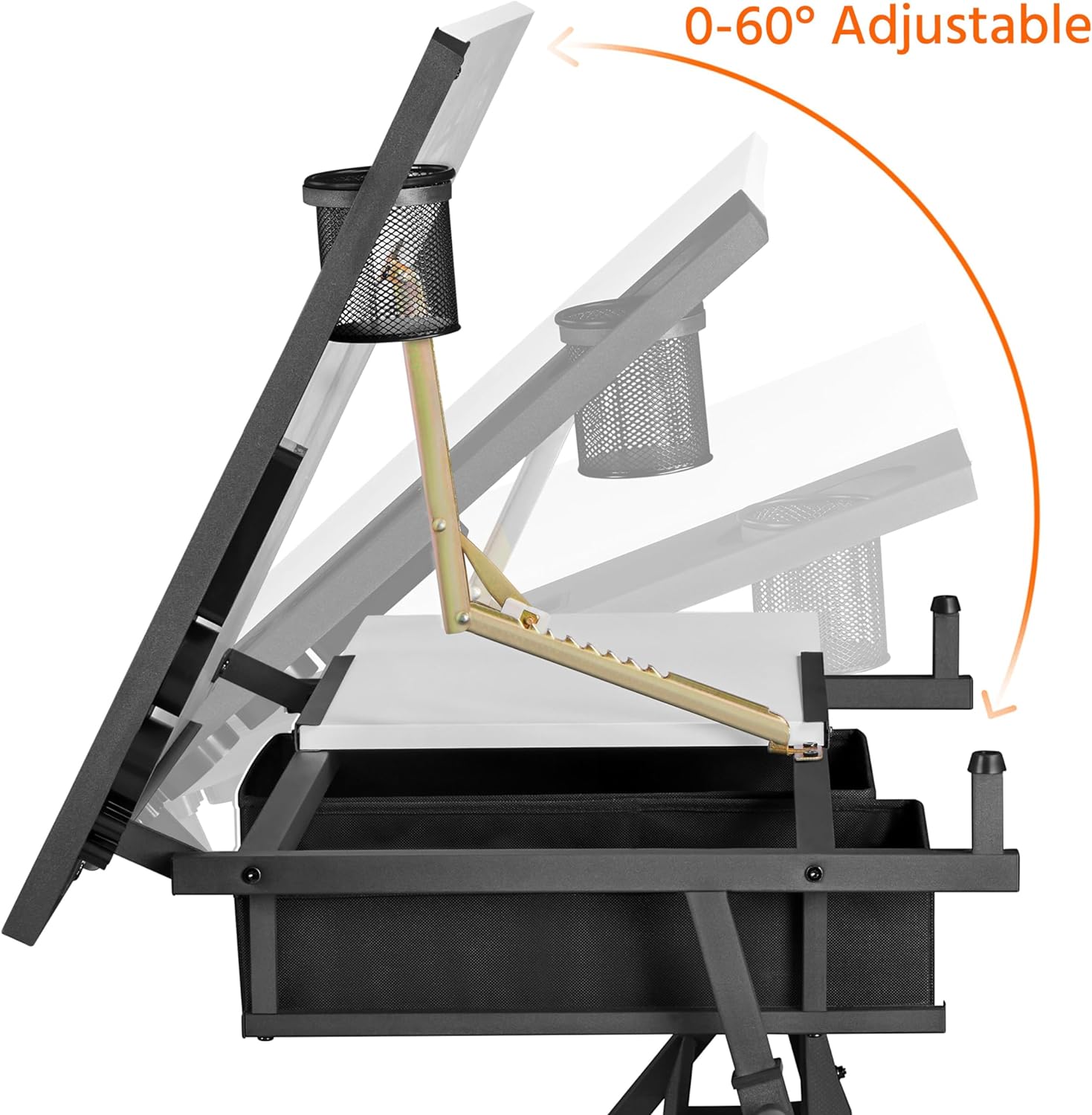
Image: Illustration demonstrating the tabletop's adjustable tilt range from 0 to 60 degrees, with a pen holder attached.

Image: Visual guide for optimal tilt angles: 0-20° for writing, 20-40° for reading, and 40-60° for drawing.
2. Рэгуляванне вышыні
The desk's height can be adjusted from 27.5 inches (minimum) to 36.5 inches (maximum) to suit your preference, whether sitting or standing.
- Каб наладзіць: Loosen the adjustment knobs on the legs, slide the desk to the desired height, and then securely tighten the knobs.
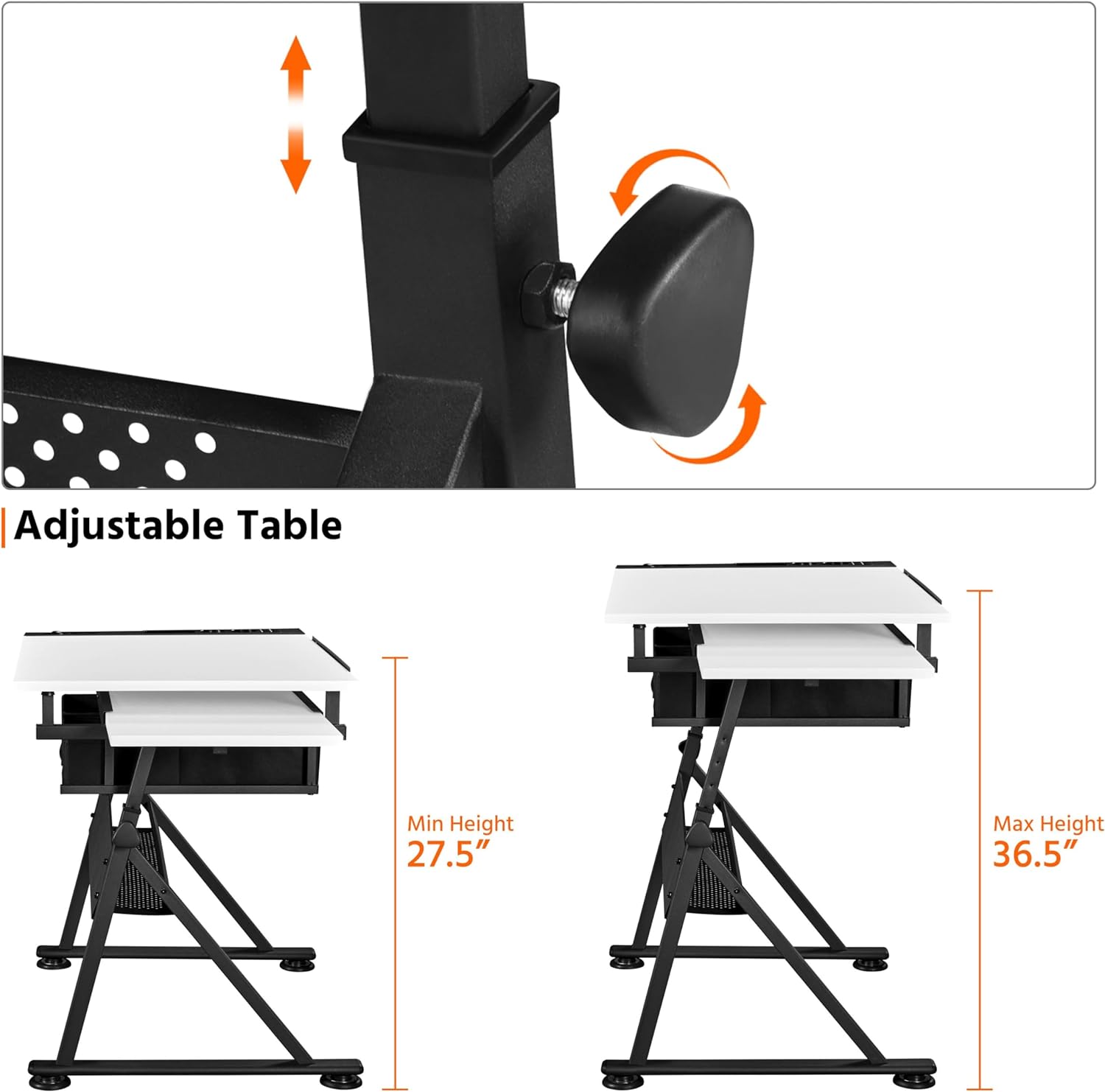
Image: Detail of the adjustable height mechanism, showing the knob and sliding leg components.

Image: A split image illustrating the desk's versatility as an art desk (tilted) and a workstation (flat), emphasizing its adjustable angle, height, and retractable tabletop.
3. Slide-out Side Top
A convenient 23.6 x 15 inch (60 x 38 cm) surface on the left side can be pulled out for additional workspace or storage.
- Каб падоўжыць: Gently pull the side tabletop outwards from beneath the main tabletop.
- выкарыстанне: Ideal for placing a laptop, tablet (for reference), palettes, or documents.
- Каб адклікаць: Push the side tabletop back under the main tabletop when not in use to save space.

Image: A visual representation of the retractable side tabletop, indicating its ability to slide out for extra space.
4. Handy and Organized Storage
The desk includes multiple storage options to keep your workspace tidy:
- Detachable Tabletop Side Tray: Located on the right side, this tray has separate slots for various stationery items like pens, brushes, and cups.
- Тканкавыя скрыні: Two fabric drawers beneath the tabletop provide discreet storage for supplies.
- Extra Open Shelf: A mesh shelf below the drawers offers additional space for larger items like paper rolls or paint cans.

Выява: Крупны план views of the integrated stationery organizer, the two fabric drawers with the open mesh shelf below, and the mechanism for the adjustable pencil ledge.
5. Flexible Pencil Ledge
An adjustable metal pencil ledge prevents items from rolling off when the tabletop is tilted.
- Для ўдзелу: Lift the pencil ledge into the upright position. It will lock into place.
- Каб адклікаць: Use the special adjustment fitting to loosen and lower the pencil ledge, allowing for a flat desktop surface when not needed.
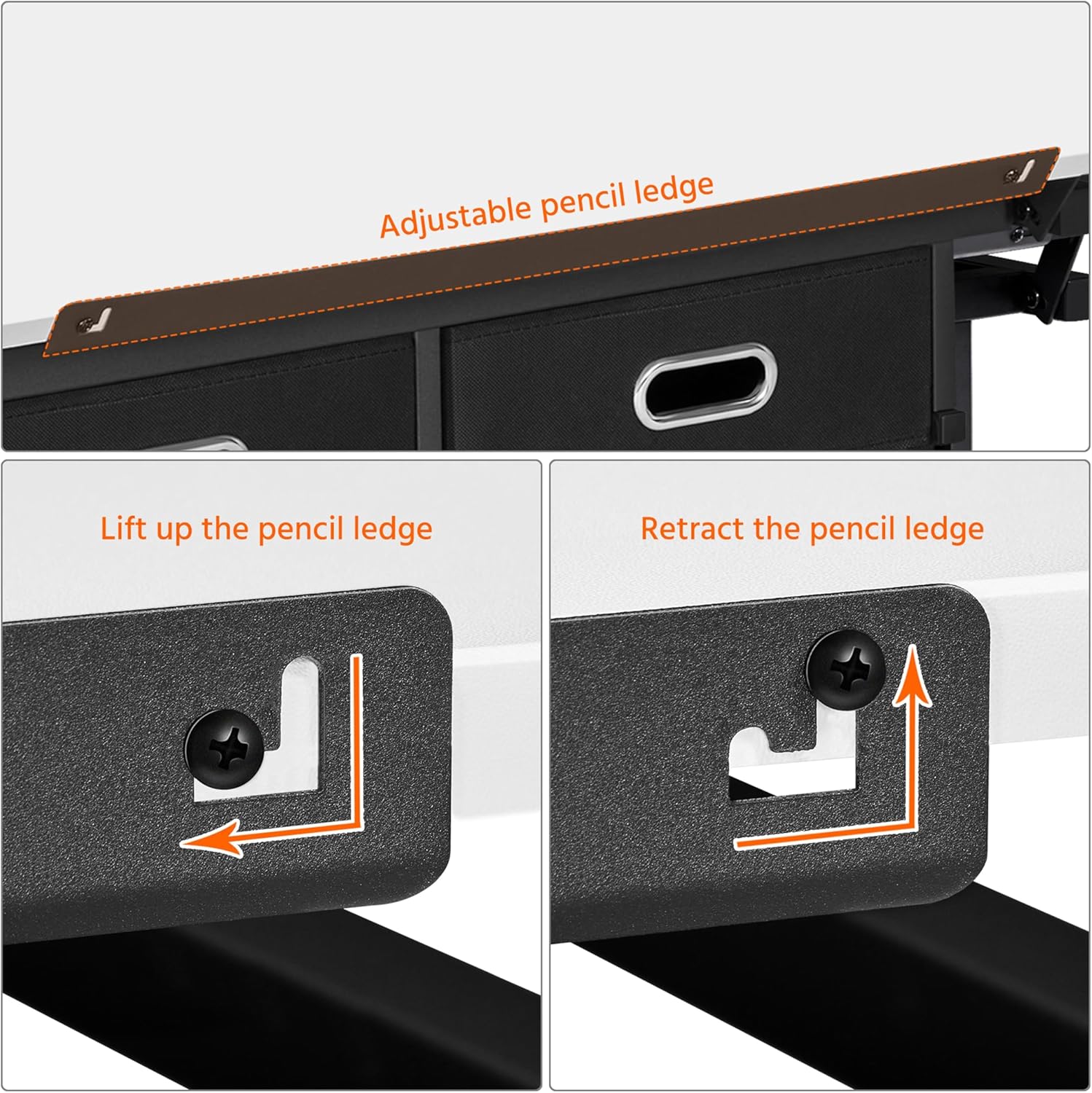
Image: Instructions showing the lifting and retracting mechanism of the adjustable pencil ledge.
Тэхнічнае абслугоўванне
Proper maintenance will extend the life of your art desk:
- Уборка: Працярыце паверхні мяккай, damp тканінай. Пазбягайце абразіўных ачышчальнікаў або агрэсіўных хімічных рэчываў, якія могуць пашкодзіць пакрыццё.
- Разлівы: Clean up spills immediately to prevent staining, especially on the MDF desktop with veneer.
- Абсталяванне: Перыядычна правярайце ўсе шрубы і балты і пры неабходнасці падцягвайце іх для падтрымання стабільнасці.
- Рухомыя часткі: Ensure the tilting mechanism and height adjustment components are free of debris for smooth operation.
Ліквідацыю непаладак
If you encounter any issues with your Yaheetech Art Desk, refer to the following common problems and solutions:
| праблема | Магчымая прычына | Рашэнне |
|---|---|---|
| Стол хістаецца або стаіць няўстойліва. | Няроўная фурнітура; няроўная падлога. | Ensure all screws and bolts are tightened. Adjust the foot pads on the base to level the desk on uneven surfaces. |
| Tabletop does not tilt smoothly. | Механізм заблакаваны або забруджаны. | Check for any debris or foreign objects obstructing the tilting mechanism. Clean the moving parts if necessary. |
| Рэгуляванне вышыні складанае. | Adjustment knobs are too tight; mechanism is stiff. | Loosen the adjustment knobs sufficiently. If stiff, apply a small amount of silicone lubricant to the sliding parts. |
| Side slide-out top is stuck. | Obstruction in the sliding track. | Check the track for any debris or items blocking the movement. Ensure it is aligned correctly. |
If the problem persists, please contact Yaheetech customer support for further assistance.
Тэхнічныя характарыстыкі
Detailed specifications for the Yaheetech Height Adjustable White Art Desk:
- Назва мадэлі: Мастацкі стол
- Марка: Yaheetech
- колер: Белы
- стыль: Сучасны
- Памеры вырабу (Г х Ш х В): 23.6" x 47.5" x 36.5"
- Вага прадмета: 51.8 фунта
- Матэрыял асновы: Метал
- Тып верхняга матэрыялу: Wood (MDF with waterproof and scratch-proof veneer)
- Тып аздаблення: Wood (Veneer)
- асаблівасць: Adjustable Height, Tilting Tabletop
- Тып нумара: Classroom, Home, Office
- Рэкамендуемае выкарыстанне: Drafting, Drawing, Painting, Writing, Reading, Workstation
- Уключаныя кампаненты: Height Adjustable White Art Desk, Stool
- Максімальны вага Рэкамендацыя: 220 фунтаў (100 кг)
- Рэкамендуемая колькасць людзей для зборкі: 2
- Колькасць скрынь: 2 (fabric)
- Колькасць паліц: 1 (open mesh shelf)
- Максімальны кут нахілу: 60 градусаў
- Мінімальная вышыня: 27.36 цалі (69.5 см)
- Максімальная вышыня: 36.5 цалі
- Даўжыня дыяганалі працоўнай паверхні: 53.45 цалі
- Патрабуецца зборка: так
Гарантыя і падтрымка
For warranty information or technical support, please contact Yaheetech customer service. You can typically find contact details on the Yaheetech official webна сайце або праз прадаўца, у якога вы набылі тавар.
For more information about Yaheetech products, visit their official store: Yaheetech Store on Amazon.