
ECHO e40c8026-5752-4c6b-9f6c-f5735f7e9eaf
Кіраўніцтва карыстальніка разумнага гадзінніка ECHO RAINBOW PRO
Model: e40c8026-5752-4c6b-9f6c-f5735f7e9eaf
Уводзіны
Welcome to the user manual for your new ECHO RAINBOW PRO Smartwatch. This device is designed to seamlessly integrate into your daily life, offering advanced health monitoring, sports tracking, and smart connectivity features. With its elegant rose metal finish and interchangeable straps, it combines style with functionality. This manual provides essential information on setting up, operating, maintaining, and troubleshooting your smartwatch to ensure optimal performance and a satisfying user experience.
Інфармацыя па бяспецы
- Не спрабуйце разбіраць, рамантаваць або мадыфікаваць прыладу. Гэта можа прывесці да пашкоджання, пажару або паражэння электрычным токам.
- Трымайце прыладу далей ад экстрэмальных тэмператур, прамых сонечных прамянёў і высокай вільготнасці.
- Пазбягайце ўздзеяння моцных удараў або вібрацыі на прыладу.
- Выкарыстоўвайце толькі зарадны кабель, які ўваходзіць у камплект, і сумяшчальны адаптар сілкавання.
- Consult a medical professional before starting any new exercise regimen or if you have pre-existing health conditions, especially if relying on the health monitoring features. The health data provided by this device is for reference only and should not be used for medical diagnosis or treatment.
- If you experience skin irritation or discomfort while wearing the watch, discontinue use and consult a doctor.
Змест пакета
Калі ласка, пастаўце галачку для наступных пунктаў:
- ECHO RAINBOW PRO Smartwatch (with metal strap attached)
- 1 x Silicone Strap (interchangeable)
- Зарадны кабель
- Кіраўніцтва карыстальніка (гэты дакумент)

Image: The ECHO RAINBOW PRO Smartwatch in rose metal, shown with its pre-attached metal strap and a separate light pink silicone strap, highlighting the interchangeable design.

Image: The ECHO RAINBOW PRO Smartwatch body displayed alongside its detached light pink silicone strap and rose metal mesh strap, illustrating the modular design.

Image: The retail packaging for the ECHO RAINBOW PRO Smartwatch, showing the watch and its accessories through a clear window, with product features listed on the box.
Прадукт скончаныview
Familiarize yourself with the components of your ECHO RAINBOW PRO Smartwatch.
- Дысплей: High-resolution touchscreen for interactive use.
- Бакавая кнопка/Каронка: Used for power on/off, screen wake/sleep, and navigating menus.
- Датчыкі: Located on the back of the watch for health monitoring (heart rate, SpO2, blood pressure, ECG).
- Strap Attachment Points: Allows for easy changing of straps.
- Кантакты для зарадкі: Магнітныя кантакты на задняй панэлі для зарадкі.

Выява: Падрабязны view of the ECHO RAINBOW PRO Smartwatch's display, showcasing a watch face with a mechanical gear design, current time, date, temperature, and health metrics.

Выява: Пабочны прафесіяналfile view of the ECHO RAINBOW PRO Smartwatch, highlighting its slim design and the functional side button/crown.
Настройка
1. Зарадка разумнага гадзінніка
Перад першым выкарыстаннем цалкам зарадзіце свой разумны гадзіннік.
- Падключыце магнітны зарадны кабель да зарадных кантактаў на задняй панэлі гадзінніка.
- Plug the USB end of the cable into a USB power adapter (not included) or a computer's USB port.
- The watch display will show a charging indicator. A full charge typically takes about 2 hours.
2. Мацаванне/замена рамянёў
Your ECHO RAINBOW PRO Smartwatch comes with interchangeable straps, allowing you to customize its look.
- To remove a strap, locate the quick-release pin on the underside of the strap near the watch body.
- Slide the pin inwards to detach the strap from the watch.
- To attach a new strap, insert one end of the pin into the watch lug.
- Slide the quick-release pin inwards and align the other end with the opposite lug hole. Release the pin to secure the strap. Gently pull on the strap to ensure it is properly locked in place.

Image: Two ECHO RAINBOW PRO Smartwatches are shown side-by-side, one fitted with the rose metal mesh strap and the other with the light pink silicone strap, demonstrating the versatility of interchangeable bands.
3. Спалучэнне са смартфонам
To unlock the full potential of your smartwatch, pair it with your smartphone via the dedicated app.
- Спампаваць прыкладанне: Пошук the "ECHO Fit" app (or similar, check packaging for exact name) on your smartphone's app store (Google Play Store for Android, Apple App Store for iOS). Install the app.
- Уключыць Bluetooth: Пераканайцеся, што Bluetooth уключаны на вашым смартфоне.
- Адкрыйце прыкладанне: Launch the ECHO Fit app and follow the on-screen instructions to create an account or log in.
- Дадаць прыладу: In the app, navigate to the "Device" or "Add Device" section. The app will search for nearby smartwatches.
- Выберыце свой гадзіннік: Select "ECHO RAINBOW PRO" from the list of found devices. A pairing request may appear on your watch and phone. Confirm the pairing on both devices.
- Поўная ўстаноўка: Once paired, the app will guide you through initial settings such as personal information, notification preferences, and health goals.
Кіраванне разумным гадзіннікам
Базавая навігацыя
- Экран абуджэння: Press the side button or raise your wrist.
- Жэсты на сэнсарным экране:
- Swipe Up/Down: Scroll through menus or notifications.
- Swipe Left/Right: Access quick widgets or different functions.
- Tap: Select an item or confirm an action.
- Press and Hold: Customize watch faces (from home screen).
- Side Button Function:
- Short Press: Return to home screen, or go back in a menu.
- Long Press: Power on/off, or access a shortcut menu (e.g., restart).
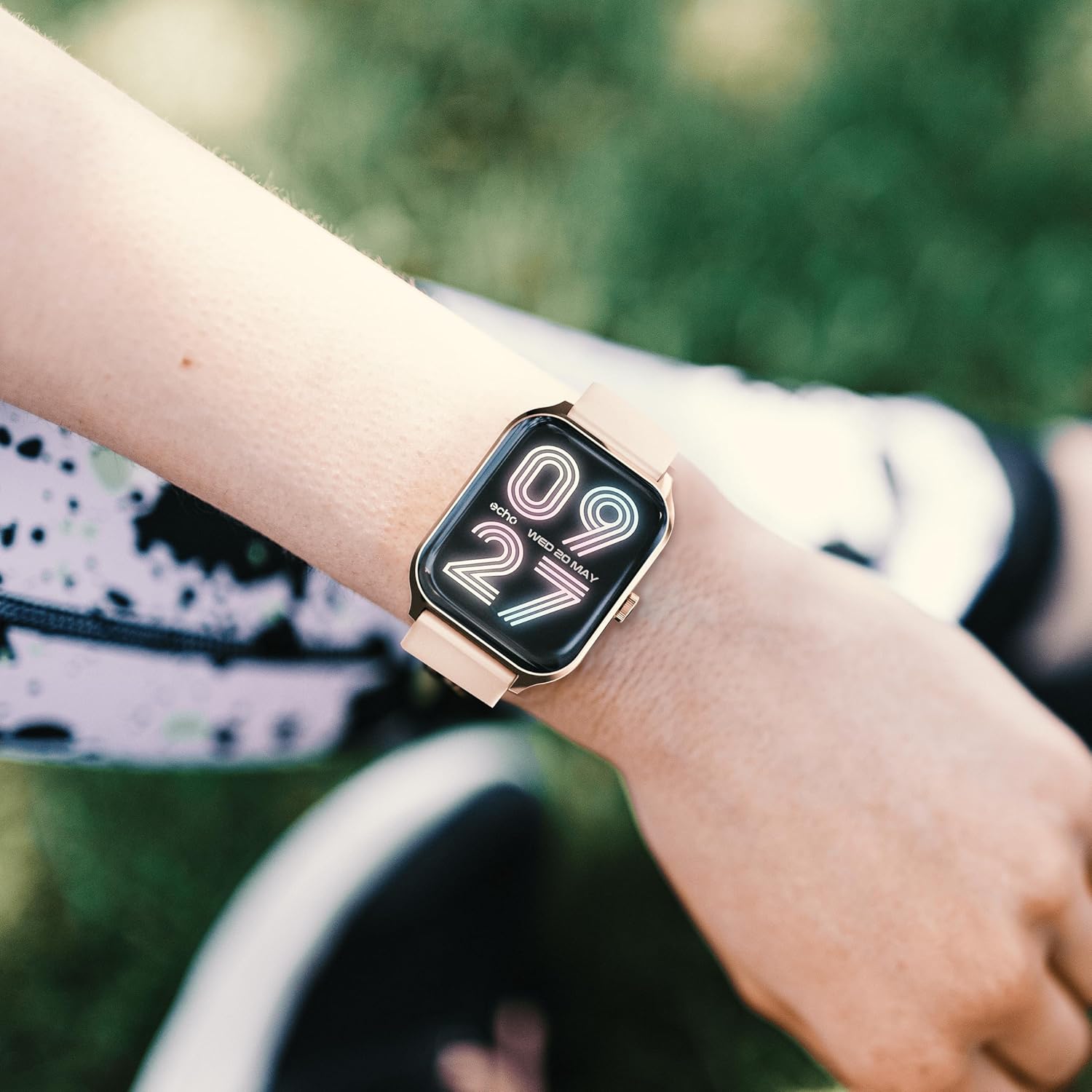
Image: The ECHO RAINBOW PRO Smartwatch worn on a wrist, displaying a digital watch face with the current time and date.

Image: A close-up of the ECHO RAINBOW PRO Smartwatch's screen, showing a clear digital time display along with battery status, step count, and temperature.
Маніторынг здароўя
Your smartwatch is equipped with advanced sensors to help you monitor your health.
- Частата сардэчных скарачэнняў: Access the heart rate function on your watch or through the app. Ensure the watch is snug on your wrist for accurate readings.
- Артэрыяльны ціск: Follow the instructions on the watch screen or app for taking a blood pressure measurement.
- Кісларод крыві (SpO2): Measure your blood oxygen saturation levels. Remain still during the measurement.
- ЭКГ (электракардыяграма): Use the ECG function as directed by the app to record your heart's electrical activity.
Важна: The health data provided by this device is for reference only and should not be used for medical diagnosis or treatment. Always consult a qualified medical professional for any health concerns.
Activity and Sports Modes
Track your daily activity and specific workouts.
- Шагомер: The watch automatically tracks your steps, distance, and calories burned throughout the day.
- Спартыўныя рэжымы: Select from various sports modes (e.g., running, cycling, walking) to track specific workout data like duration, heart rate zones, and calories.
- Personalized Goals: Set daily activity goals within the companion app to stay motivated.
Маніторынг сну
Wear your smartwatch to bed to monitor your sleep patterns. The app will provide detailed analysis of your sleep stages (deep, light, REM) and sleep quality.
Адсочванне менструальнага цыклу
For female users, the app offers menstrual cycle tracking. Input your cycle data into the app to receive predictions and insights.
Разумнае падключэнне
Stay connected without constantly checking your phone.
- Апавяшчэнні: Receive call, message, and app notifications directly on your wrist. Customize notification settings in the app.
- Кіраванне смартфонам: Control certain smartphone functions, such as music playback or camera shutter, directly from your watch.
Тэрмін службы батарэі
The ECHO RAINBOW PRO Smartwatch offers an extended battery life, typically requiring a recharge only every 5 days, depending on usage. To maximize battery life:
- Паменшыць яркасць экрана.
- Disable continuous heart rate monitoring (if continuous monitoring is enabled).
- Адключыце непатрэбныя апавяшчэнні.
Тэхнічнае абслугоўванне
Чыстка вашага смарт-гадзінніка
- Працярыце экран і корпус гадзінніка мяккай тканінай без ворса. Пры неабходнасці...ampзлёгку намачыце тканіну вадой.
- For the metal strap, use a soft brush to gently clean between links. For the silicone strap, wash with mild soap and water, then rinse thoroughly.
- Перад зарадкай або нашэннем гадзінніка пераканайцеся, што ён цалкам сухі.
- Пазбягайце выкарыстання агрэсіўных хімікатаў, абразіўных ачышчальнікаў або растваральнікаў, бо яны могуць пашкодзіць пакрыццё гадзінніка.
Воданепранікальнасць
The ECHO RAINBOW PRO Smartwatch is designed to be resistant to splashes and sweat. It is suitable for daily use and light exercise. However, it is not recommended for swimming, showering, or diving. Prolonged exposure to water or use in high-pressure water environments may cause damage.
Ліквідацыю непаладак
| праблема | Магчымая прычына / рашэнне |
|---|---|
| Гадзіннік не ўключаецца. | Battery might be depleted. Charge the watch for at least 30 minutes. If it still doesn't turn on, try a different charging port or adapter. |
| Немагчыма спалучыць са смартфонам. |
|
| Inaccurate health readings. |
|
| Апавяшчэнні не атрыманы. |
|
| Кароткі тэрмін службы батарэі. |
|
Тэхнічныя характарыстыкі
| Асаблівасць | Дэталь |
|---|---|
| Нумар мадэлі | e40c8026-5752-4c6b-9f6c-f5735f7e9eaf |
| Тып батарэі | 1 літый-іённы акумулятар (у камплекце) |
| Тыповы тэрмін службы батарэі | Да 5 дзён (у залежнасці ад выкарыстання) |
| Памеры ўпакоўкі | 18.1 х 10.6 х 3.5 см |
| Вага прадмета | 20 grams (watch body only, approximate) |
| Вытворца | Samsung (as per product data) |
| Краіна паходжання | Кітай |
| Сувязь | Bluetooth (compatible with all smartphones) |
| Датчыкі здароўя | ECG, Blood Pressure, Blood Oxygen (SpO2), Heart Rate, Sleep Tracker, Pedometer |
| У камплекце рамяні | 1 Metal Strap, 1 Silicone Strap |
Гарантыя і падтрымка
For warranty information and customer support, please refer to the warranty card included in your product packaging or visit the official ECHO webсайт.
If you encounter any issues not covered in this manual, please contact our customer service team for assistance.
- Інтэрнэт-падтрымка: www.echo.com/support (напрample link, please refer to actual product documentation)
- Падтрымка па электроннай пошце: support@echo.com (exampэлектронная пошта)
Ask a question about this manual
Ask about setup, troubleshooting, compatibility, parts, safety, or missing instructions. Manuals+ will review the question and use this page’s manual context to help answer it.