
1. Прадукт скончыўсяview
This manual provides instructions for the CHUNGHOP ASK-STI6220 Voice Remote Control. This remote is designed as a replacement for specific Verizon Stream TV Box models, offering intelligent voice control and responsive button functionality for an enhanced entertainment experience.
2. Інфармацыя аб сумяшчальнасці
The ASK-STI6220 Voice Remote Control is specifically designed to work ONLY with Verizon Stream TV Box voice remote control V2 ARRIS CCAM21LP1890T2, 2AGOFRC451A, RC451A, STI6220-D315, ASK-STI6220. It is NOT a universal remote for Verizon FiOS and is NOT compatible with Verizon Stream TV JS8V, Verizon FiOS TV 2019 - MG3-R32140B VRC4100 BLE Remote, or any Verizon remote with a "LAST" button. Please ensure your original remote's design and button layout match this model for proper functionality.
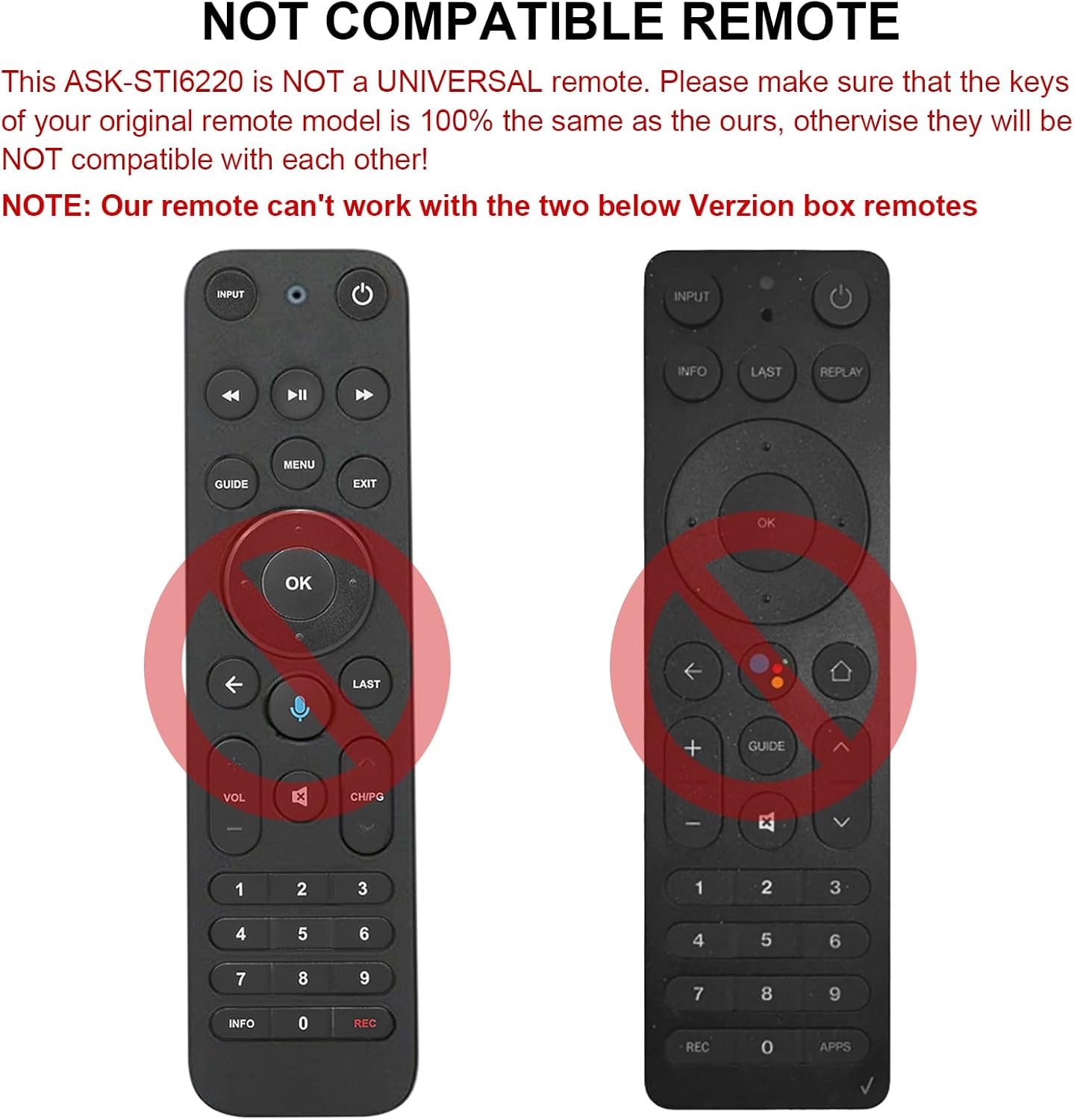
Малюнак 2.1: Выпamples of incompatible Verizon remotes. Ensure your original remote's buttons match the ASK-STI6220 model.

Figure 2.2: The ASK-STI6220 Voice Remote Control, compatible with Verizon Stream TV Box.
3. Настройка і ўстаноўка
3.1 Устаноўка батарэі
Для пульта дыстанцыйнага кіравання патрэбныя дзве батарэйкі тыпу ААА (не ўваходзяць у камплект). Каб усталяваць батарэйкі:
- Зніміце крышку батарэйнага адсека з задняй часткі пульта дыстанцыйнага кіравання.
- Insert two AAA batteries, ensuring correct polarity (+ and - ends match the markings inside the compartment).
- Надзейна заменіце крышку батарэйнага адсека.

Малюнак 3.1: Адсек для двух батарэек тыпу ААА.
Video 3.1: Demonstration of battery installation and initial setup for the ASK-STI6220 Voice Remote.
3.2 Інструкцыі па спалучэнні
To use the voice remote, it must first be paired with your Verizon Stream TV Box. Follow one of the methods below:
- Спосаб 1: Націсніце кнопку "Вярнуцца" і "АРР" buttons simultaneously to initiate pairing.
- Спосаб 2: Alternatively, press the "OK" і "ДОМ" buttons simultaneously to initiate pairing.
Важная заўвага:
- A device can only be paired with one voice remote at a time. Before pairing this new remote, please disconnect your old remote control (e.g., by removing its batteries).
- If pairing fails on the first attempt, try turning your TV Box off and then back on. If you continue to experience issues, clear any existing remote settings on your TV Box before attempting to pair again.

Figure 3.2: Visual guide for pairing the remote control.
4. Інструкцыя па эксплуатацыі
4.1 General Button Functions
The ASK-STI6220 remote features a standard layout for easy navigation and control of your Verizon Stream TV Box:
- Кнопка харчавання: Уключае або выключае тэлевізійную прыстаўку.
- Кнопка ўводу: Switches input sources on your TV.
- Навігацыйная панэль (Уверх/Уніз/Улева/Управа/ОК): Выкарыстоўваецца для навігацыі па меню і выбару.
- Павялічыць/паменшыць гучнасць: Рэгулюе гучнасць.
- Канал уверх/уніз: Мяняе каналы.
- Прайграванне/Паўза, перамотка наперад, перамотка назад: Элементы кіравання прайграваннем мультымедыя.
- Кнопка дадому: Вяртаецца на галоўны экран.
- Кнопка кіраўніцтва: Accesses the program guide.
- Лічбавая клавіятура (0-9): Прамы ўваход у канал.
- Інфармацыйная кнопка: Адлюстроўвае інфармацыю аб праграме.
- APPs Button: Accesses applications.
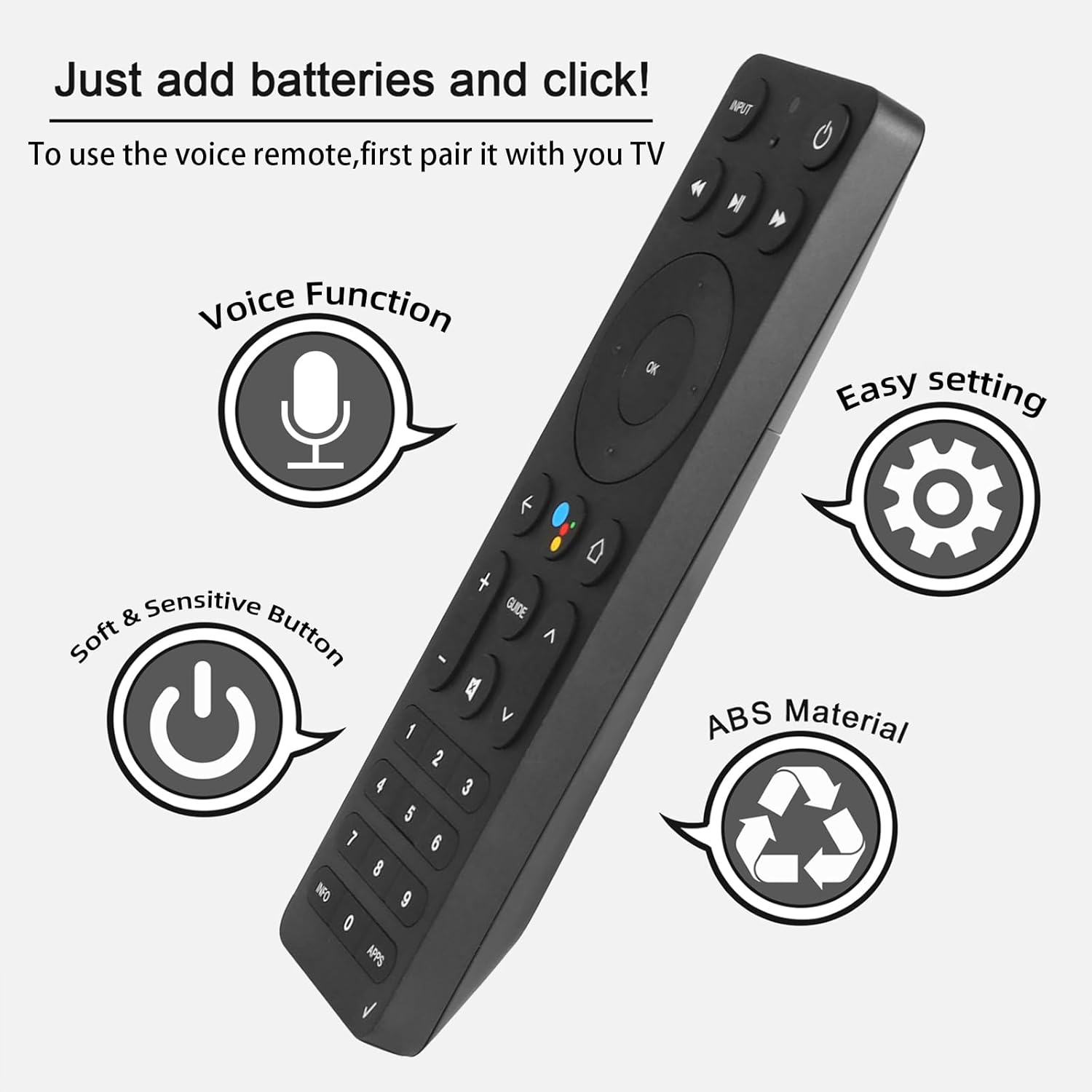
Figure 4.1: Key features and button layout of the remote control.
4.2 Інтэлектуальнае галасавое кіраванне
The remote features an intelligent voice function, allowing you to control your TV Box with voice commands. Press the dedicated voice button (often represented by a microphone icon) and speak clearly into the remote.
Exampфайлы галасавых каманд:
- "Launch channels"
- "Lower the volume"
- "Play action movie"
If the voice function does not work correctly, follow these steps:
- Go to the home page of your TV Box.
- Press the "Settings" button on the remote control.
- Select "Remote Controls and Accessories" and then "Remote Controls."
- Select to add a new remote control and follow the on-screen steps to complete the setup.

Figure 4.2: Using intelligent voice search and control.

Figure 4.3: The remote offers a 0.2-second fast response and a 33-foot transmitting distance for accurate control.
5. Тэхнічнае абслугоўванне
Каб забяспечыць даўгавечнасць і аптымальную працу вашага пульта дыстанцыйнага кіравання:
- Keep the remote clean by wiping it with a soft, dry cloth. Avoid using liquid cleaners or abrasive materials.
- Replace batteries promptly when the remote's responsiveness decreases. Always use fresh AAA batteries.
- Avoid exposing the remote to extreme temperatures, direct sunlight, or moisture.
- Не кідайце пульт дыстанцыйнага кіравання і не падвяргайце яго моцным ударам.
6. Выпраўленне непаладак
If you encounter issues with your ASK-STI6220 remote control, please refer to the following common solutions:
- Пульт не адказвае:
- Пераканайцеся, што батарэйкі ўсталяваны правільна і не разраджаны. Пры неабходнасці замяніце іх новымі батарэйкамі тыпу AAA.
- Verify that the remote is properly paired with your Verizon Stream TV Box (refer to Section 3.2).
- Пераканайцеся, што паміж пультам дыстанцыйнага кіравання і тэлевізійнай прыстаўкай няма перашкод.
- Праблемы спалучэння:
- Confirm that your original remote is disconnected (e.g., by removing its batteries) as only one Bluetooth remote can be paired at a time.
- If pairing fails, try turning the TV Box off and on again, then re-attempt the pairing process.
- Clear existing remote settings on your TV Box before trying to pair again.
- Галасавое кіраванне не працуе:
- Ensure the remote is successfully paired and the voice function is enabled on your TV Box.
- Follow the voice control setup steps outlined in Section 4.2.
- Гаварыце выразна і непасрэдна ў мікрафон пульта дыстанцыйнага кіравання.
- Remote not compatible with my device:
- This remote is specifically designed for Verizon Stream TV Box voice remote control V2 ARRIS CCAM21LP1890T2, 2AGOFRC451A, RC451A, STI6220-D315, ASK-STI6220. It is not a universal remote. Please verify your device's model number and compare your original remote's buttons with the ASK-STI6220.

Figure 6.1: Common questions and answers regarding the remote's functionality and compatibility.
7. Тэхнічныя характарыстыкі
| Асаблівасць | Дэталь |
|---|---|
| Марка | CHUNGHOP |
| Нумар мадэлі | ASK-STI6220 |
| Сумяшчальныя прылады | Verizon Stream TV Box (specific models as listed in Section 2) |
| Максімальная колькасць падтрымоўваных прылад | 1 |
| Асаблівасць | Эрганамічны, галасавое кіраванне |
| Колер | As Shown (typically black) |
| Патрабуюцца батарэі | 2 батарэйкі ААА |
| Вага прадмета | 3.2 унцыі |
| Памеры ўпакоўкі | 8.19 х 3.54 х 0.94 цалі |
8. Гарантыя і падтрымка
For any questions or concerns regarding your CHUNGHOP ASK-STI6220 Voice Remote Control, including pairing, setup, or functionality, please contact the seller directly. Refer to your purchase documentation for specific warranty details, as these may vary.
The manufacturer, CHUNGHOP, is committed to providing support for their products.