
Mycket Portable DAB Radio
Mycket Portable DAB/DAB+/FM Radio with Bluetooth User Manual
Model: Portable DAB Radio (HS-D009)
Уводзіны
This user manual provides comprehensive instructions for the operation, maintenance, and troubleshooting of your Mycket Portable DAB/DAB+/FM Radio with Bluetooth. Please read this manual thoroughly before using the device to ensure proper functionality and to maximize your listening experience.

Figure 1: Mycket Portable DAB Radio. This image shows the radio's front panel, including the speaker grille on the left, the 2.4-inch color display on the right showing "BBC AsianNetwork" and DAB+ logo, and control buttons below the screen. An extendable antenna is visible at the top right.
Што ў скрынцы
Upon unboxing your Mycket Portable DAB Radio, please ensure all the following items are present:
- 1 x Mycket Portable DAB Radio
- 1 х кабель для зарадкі Micro USB
- 1 х Кіраўніцтва карыстальніка (гэты дакумент)
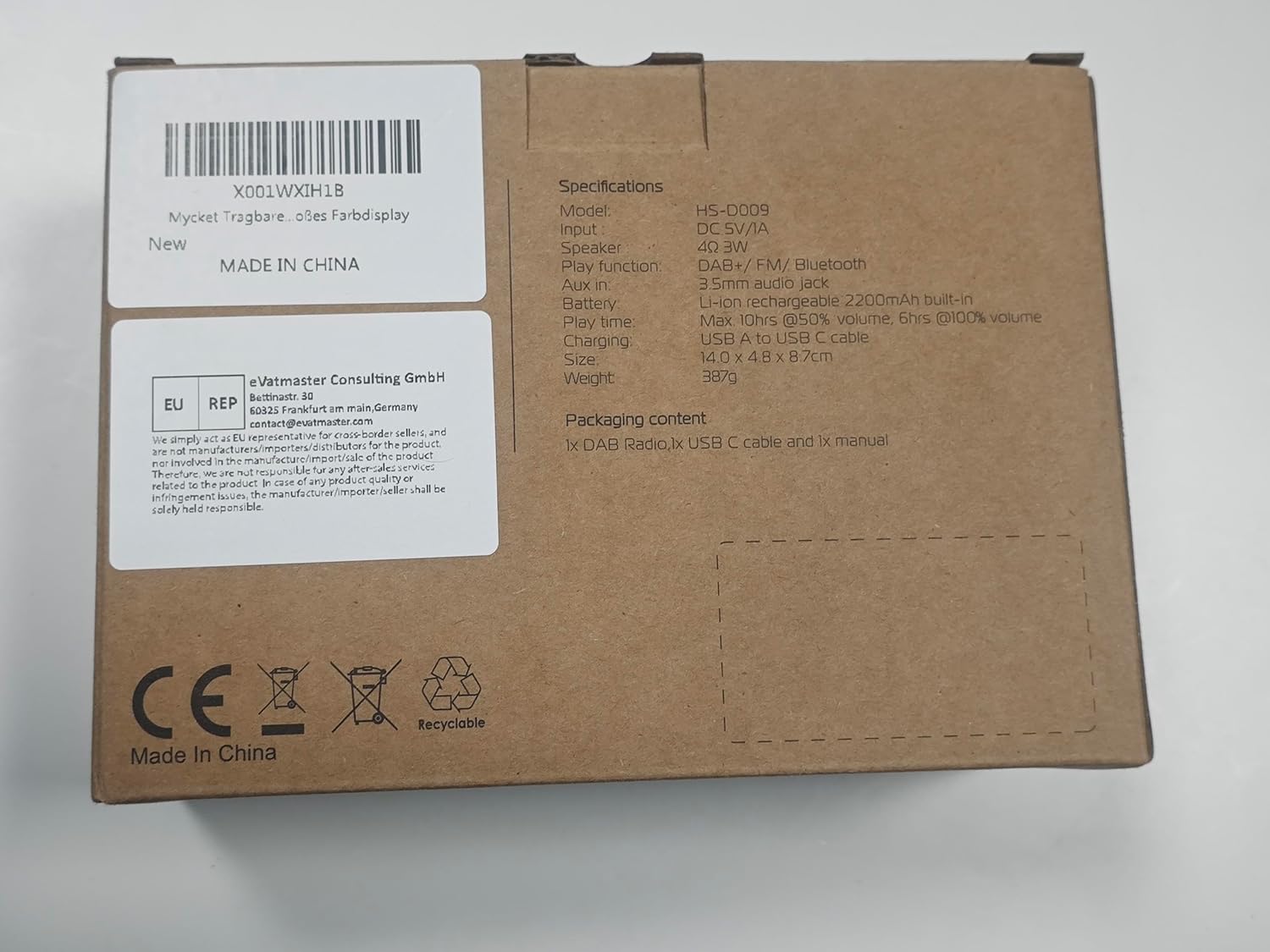
Figure 2: Packaging box for the Mycket Portable DAB Radio. The box lists specifications including model HS-D009, DC 5V/1A input, 3W speaker, DAB+/FM/Bluetooth functions, 3.5mm audio jack, 2200mAh lithium battery, 10+ hours play time at 50% volume, 6+ hours at 100% volume, USB-C charging, and dimensions of 14.0 x 4.0 x 8.7 cm. It also states "MADE IN CHINA" and includes CE and Recyclable symbols.
Прадукт скончаныview
The Mycket Portable DAB Radio is a versatile audio device offering multiple listening options. It features DAB/DAB+ and FM radio reception, Bluetooth 5.0 connectivity, and a built-in rechargeable battery for portability. The device includes a 2.4-inch color display for easy navigation and information display.
Асноўныя характарыстыкі:
- DAB/DAB+ and FM Radio with RDS
- Bluetooth 5.0 для бесправадной перадачы аўдыя
- 2.4-inch Large Colour Display
- Built-in 2200mAh Rechargeable Lithium Battery (up to 12 hours playback)
- 40 Preset Stations (20 DAB, 20 FM)
- Dual Alarms and Sleep Timer Function
- Гняздо для навушнікаў 3.5 мм
- Зарадка USB-C

Figure 3: Mycket Portable DAB Radio with its dimensions. The radio measures approximately 5.5 inches (13.9 cm) in length, 1.6 inches (4 cm) in width, and 3.1 inches (8 cm) in height. This compact size highlights its portability.
Настройка
1. Пачатковая аплата
Before first use, fully charge the radio. Connect the supplied Micro USB charging cable to the DC 5V port on the side of the radio and the other end to a USB power adapter (not included) or a computer USB port. The charging indicator on the display will show charging status. A full charge takes approximately 2.5 hours.
2. Уключэнне/выключэнне харчавання
Націсніце і ўтрымлівайце Магутнасць/рэжым кнопку, каб уключыць або выключыць радыё.
3. Рэгуляванне антэны
For optimal reception, fully extend and adjust the telescopic antenna. Position the antenna vertically for best results.
Інструкцыя па эксплуатацыі
Выбар рэжыму
Націсніце Рэжым button to switch between DAB, FM, and Bluetooth modes.
Праца радыё DAB/DAB+
- Пераключыцеся ў рэжым DAB з дапамогай Рэжым кнопка.
- The radio will automatically perform a full scan for available DAB/DAB+ stations upon first use or if no stations are found.
- To manually initiate a full scan, press and hold the OK button, then navigate to "Full Scan" and confirm.
- Выкарыстоўвайце Налева/направа arrow buttons to browse through the list of available stations.
- Прэса OK выбраць станцыю.
- Каб захаваць станцыю ў якасці прадусталяванай налады, націсніце і ўтрымлівайце АБРАШАНАЕ button, then select a preset number (1-20) using the arrow buttons and press OK каб пацвердзіць.
- Каб выклікаць папярэднюю наладу, коратка націсніце кнопку АБРАШАНАЕ кнопку, затым выберыце патрэбны нумар запраграмаванай налады і націсніце OK. Alternatively, use the numbered preset buttons (1-4) for quick access.

Figure 4: The radio's screen showing "AUTO SCAN & 40 PRESET". This feature allows the radio to automatically find and save up to 40 stations (20 DAB and 20 FM) for easy access via the FAV button.
Праца FM-радыё
- Пераключыцеся ў рэжым FM з дапамогай Рэжым кнопка.
- To auto-scan for FM stations, press and hold the OK кнопка. Радыё пачне пошук і захавае даступныя станцыі.
- Каб наладзіць уручную, коратка націсніце Налева/направа arrow buttons for fine-tuning, or press and hold for automatic scanning to the next strong station.
- To save an FM station as a preset, press and hold the АБРАШАНАЕ button, then select a preset number (1-20) and press OK каб пацвердзіць.
- Каб выклікаць папярэднюю наладу, коратка націсніце кнопку АБРАШАНАЕ кнопку, затым выберыце патрэбны нумар запраграмаванай налады і націсніце OK.
Аперацыя Bluetooth
- Пераключыцеся ў рэжым Bluetooth з дапамогай Рэжым button. The display will show "Bluetooth Pairing" or similar.
- На мабільнай прыладзе (смартфоне, планшэце і г.д.) уключыце Bluetooth і знайдзіце даступныя прылады.
- Select "Mycket D009" from the list of devices.
- Once paired, the radio will confirm the connection, and you can now stream audio from your device to the radio.

Figure 5: The radio's screen displaying "BLUETOOTH 5.0" and an iPhone screen showing "Mycket D009" as a connected Bluetooth device. This illustrates the process of connecting a mobile device to the radio for audio streaming.
Рэгулятар гучнасці
Rotate the large knob on the top of the radio clockwise to increase volume and counter-clockwise to decrease volume.
Выкарыстанне навушнікаў
Connect standard 3.5mm headphones to the headphone jack on the side of the radio for private listening. The radio's speaker will automatically mute when headphones are connected.

Figure 6: A close-up of the Mycket Portable DAB Radio's side, highlighting the 3.5mm headphone jack. This port allows for personal listening without disturbing others.
Функцыя будзільніка
The radio supports dual alarms. To set an alarm:
- Націсніце і ўтрымлівайце OK кнопку для ўваходу ў меню.
- Navigate to "System Settings" then "Alarm".
- Выберыце Будзільнік 1 або Будзільнік 2.
- Configure the alarm time, source (Buzzer, DAB, or FM), frequency (Once, Daily, Weekdays, Weekends), and volume.
- Прэса OK каб захаваць налады.

Figure 7: The radio's display showing the "Alarm" menu, with options for Alarm 1 and Alarm 2. This feature allows users to set two independent alarms for waking up or reminders.
Таймер сну Функцыя
The sleep timer allows the radio to automatically turn off after a set period.
- Націсніце і ўтрымлівайце OK кнопку для ўваходу ў меню.
- Navigate to "System Settings" then "Sleep".
- Select the desired sleep duration (e.g., 15, 30, 45, 60 minutes, or 1 hour 15 minutes).
- Прэса OK to activate the sleep timer.

Figure 8: The radio's display showing the "Sleep" menu with various time options (OFF, 15 minutes, 30 minutes, etc.). This function allows the radio to automatically power off after a specified duration, useful for falling asleep to music or radio.
Налады эквалайзера
The radio offers 8 basic equalizer settings to customize the audio output.
- Націсніце і ўтрымлівайце OK кнопку для ўваходу ў меню.
- Navigate to "System Settings" then "EQ".
- Select from options such as Classical, Jazz, Pop, etc.
- Прэса OK каб прымяніць наладу.

Figure 9: A diagram illustrating the internal structure of the Mycket Portable DAB Radio's Hi-Fi speaker. This visual emphasizes the speaker's design for providing deeper, richer, and clearer audio quality.
Тэхнічнае абслугоўванне
Уборка
Wipe the radio with a soft, dry cloth. Do not use abrasive cleaners, waxes, or solvents as they may damage the surface. Avoid spraying liquids directly onto the radio.
Сыход за батарэяй
The radio contains a built-in rechargeable lithium battery. To prolong battery life:
- Пазбягайце частай поўнай разрадкі акумулятара.
- Charge the radio regularly, even if not in use, to maintain battery health.
- Захоўвайце радыёпрыёмнік у прахалодным, сухім месцы, калі ён не выкарыстоўваецца працяглы час.

Figure 10: The radio's screen displaying a full battery indicator and text indicating "PLAY MORE THAN 12 HOURS". This highlights the radio's long battery life of up to 12 hours on a single charge, powered by its 2200mAh rechargeable battery.
Ліквідацыю непаладак
| праблема | Магчымая прычына | Рашэнне |
|---|---|---|
| No power/Radio does not turn on. | Акумулятар разраджаны. | Connect the radio to a power source using the USB cable and allow it to charge for at least 30 minutes before attempting to power on. |
| Слабы прыём DAB/FM. | Antenna not fully extended or positioned incorrectly. Weak signal in the area. | Fully extend the telescopic antenna and adjust its position. Try moving the radio to a different location, preferably near a window. Perform a full scan for stations. |
| Праблемы са спалучэннем Bluetooth. | Radio not in Bluetooth mode. Device too far from radio. Bluetooth not enabled on source device. | Ensure the radio is in Bluetooth mode. Keep the source device within 10 meters (33 feet) of the radio. Ensure Bluetooth is enabled on your source device and "Mycket D009" is selected. |
| Няма гуку з дынаміка. | Гучнасць занадта нізкая. Падключаны навушнікі. | Increase the volume using the top knob. Disconnect headphones if not intended for private listening. |
| Дысплей пусты або завісае. | Сістэмная памылка. | Locate the small "Reset" pinhole on the side of the radio (near the USB port). Use a thin object (like a paperclip) to gently press the reset button. This will restart the device without losing presets. |
Тэхнічныя характарыстыкі
| Нумар мадэлі | Portable DAB Radio (HS-D009) |
| Памеры (Д х Ш х У) | 13.9 х 4 х 8 см (5.5 х 1.6 х 3.1 цалі) |
| Вага | 380 г |
| Крыніца харчавання | Built-in 2200mAh Lithium Battery / DC 5V/1A via Micro USB |
| Тэрмін службы батарэі | Да 12 гадзін (пры гучнасці 50%) |
| Час зарадкі | Прыбл. 2.5 гадзіны |
| Дысплей | 2.4-inch TFT Colour Display |
| Тэхналогія цюнэра | DAB/DAB+, FM |
| Частата DAB/DAB+ | 174.928-239.20 MHz (Band III) |
| Частата FM | 87.5-108 MHz (with RDS) |
| Версія Bluetooth | 5.0 |
| Аўдыёвыхад | Убудаваны дынамік, раз'ём для навушнікаў 3.5 мм |
| Прасэты | 40 (20 DAB, 20 FM) |
Гарантыя і падтрымка
Mycket provides a 12-month warranty for this product from the date of purchase. This warranty covers manufacturing defects and material faults under normal use. It does not cover damage caused by misuse, accidents, unauthorized modifications, or normal wear and tear.
For technical support, warranty claims, or any inquiries, please contact Mycket customer service. Contact information can typically be found on the product packaging or the official Mycket website. Mycket aims to provide 24/7 customer service.

Figure 11: Mycket's commitment to customer satisfaction, highlighting a 12-month warranty and 24-hour customer support.
Ask a question about this manual
Ask about setup, troubleshooting, compatibility, parts, safety, or missing instructions. Manuals+ will review the question and use this page’s manual context to help answer it.