
1. Уводзіны
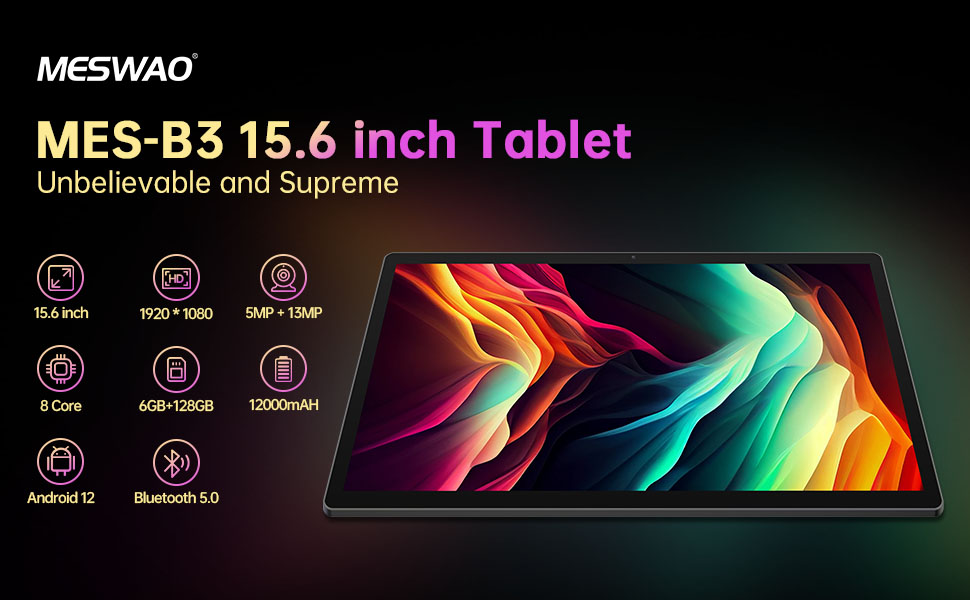
Welcome to the user manual for your MESWAO MES-B3 15.6-inch Android 13 Tablet. This document provides essential information for setting up, operating, maintaining, and troubleshooting your device. The MES-B3 tablet features a large 15.6-inch IPS HD display, an Octa-Core processor, 6GB RAM, 128GB internal storage (expandable), and a 12000mAh battery, designed for a versatile user experience.

Figure 1: MESWAO MES-B3 Tablet Overview
2. Інфармацыя па бяспецы
Please read all safety instructions carefully before using your tablet to prevent injury or damage to the device. Keep this manual for future reference.
- Бяспека акумулятара: Do not attempt to replace the battery yourself. Do not expose the tablet to extreme temperatures, direct sunlight, or fire. Do not puncture, drop, or disassemble the battery.
- Вада і вільгаць: This tablet is not waterproof. Avoid exposing it to water, rain, or high humidity.
- Уборка: Use a soft, dry cloth to clean the tablet. Do not use liquid cleaners or aerosols.
- Апрацоўка: Пазбягайце падзення планшэта або моцных удараў.
- Абарона слыху: When using headphones, set the volume to a moderate level to avoid hearing damage.
3. Змесціва ўпакоўкі
Праверце наяўнасць усіх прадметаў у камплекце:
- MESWAO MES-B3 15.6-inch Android 13 Tablet
- Адаптар сілкавання
- USB-кабель C
- Кіраўніцтва карыстальніка (гэты дакумент)
4. Прылада скончанаview
Familiarize yourself with the physical components of your MESWAO MES-B3 tablet.

Figure 2: Buttons and Connectors
- Кнопка харчавання: Press and hold to turn the tablet on or off. Press briefly to turn the screen on or off.
- Кнопкі гучнасці: Адрэгулюйце гучнасць гуку.
- Пярэдняя камера: For video calls and selfies (5MP).
- Rear Camera with Flashlight: For taking photos and videos (13MP).
- Порт тыпу C: Для зарадкі планшэта і падключэння да кампутара.
- Слот TF карты: Insert a MicroSD card to expand storage.
- Стэрэадынамікі: Забяспечыць выхад гуку.
5. Настройка
5.1 Зарадка планшэта
Before first use, fully charge your tablet. Connect the USB-C cable to the tablet's Type-C port and the other end to the power adapter. Plug the adapter into a wall outlet. The battery indicator on the screen will show charging status.
5.2 Уключэнне/выключэнне
- Каб уключыць: Press and hold the Power Button until the MESWAO logo appears.
- Каб выключыць: Press and hold the Power Button until the power options appear, then select 'Power off'.
- Каб перазапусціць: Press and hold the Power Button until the power options appear, then select 'Restart'.
5.3 Майстар пачатковай налады
Пры першым уключэнні планшэт правядзе вас праз працэс пачатковай налады:
- Выберыце жаданую мову.
- Падключыцеся да сеткі Wi-Fi.
- Увайдзіце ў свой уліковы запіс Google або стварыце новы.
- Review і прыняць умовы.
- Наладзьце блакаванне экрана (PIN-код, ключ, пароль).
5.4 Устаўка карты MicroSD
To expand the tablet's storage, you can insert a MicroSD card (up to 256GB, as per some product information, though 1TB is also mentioned in images, please verify with product packaging for exact maximum). Locate the TF card slot on the side of the tablet. Gently insert the MicroSD card with the gold contacts facing down until it clicks into place.

Figure 3: Storage Expansion with MicroSD Card
6. Кіраванне планшэтам
6.1 Асноўная навігацыя
The MESWAO MES-B3 runs on Android 13, offering an intuitive touch interface.
- Націсніце: Выберыце элемент або адкрыйце праграму.
- Правядзіце пальцам: Перамяшчайцеся па экранах, пракручвайце спісы або адхіляйце апавяшчэнні.
- Звядзенне пальцамі для павелічэння: Павялічыць або паменшыць змесціва на экране.
- Галоўны экран: Access your apps and widgets. Swipe down from the top for notifications and quick settings.
Малюнак 4: Інтэрфейс Android 13
6.2 Падключэнне Wi-Fi
- Перайсці да Налады > Сетка і інтэрнэт > Інтэрнэт.
- Уключыце Wi-Fi.
- Выберыце патрэбную сетку са спісу і ўвядзіце пароль, калі будзе прапанавана.
6.3 Спалучэнне па Bluetooth
The tablet supports Bluetooth 5.0 for connecting wireless accessories.
- Перайсці да Налады > Падключаныя прылады > Параметры злучэння > Bluetooth.
- Уключыце Bluetooth.
- Пераканайцеся, што ваша прылада Bluetooth знаходзіцца ў рэжыме спалучэння.
- Select your device from the 'Available devices' list and follow on-screen prompts to pair.
6.4 Кіраванне праграмамі
- Усталяваць праграмы: Адкрыйце праграму Google Play Store, знайдзіце патрэбную праграму і націсніце «Усталяваць».
- Выдаленне праграм: Press and hold an app icon on the home screen or app drawer, then drag it to 'Uninstall' or select 'App info' and choose 'Uninstall'.
- Кіраванне праграмамі: Перайсці да Налады > Праграмы каб view, force stop, or clear data for installed applications.
6.5 Налады дысплея
Наладзьце свой viewвопыт:
- Перайсці да Налады > Дысплей.
- Адрэгулюйце Узровень яркасці.
- Набор Тайм-аўт экрана (sleep duration).
- Змена Памер шрыфта і Памер дысплея.
- Уключыць Цёмная тэма for reduced eye strain.
6.6 Кіраванне батарэяй
The MES-B3 features a 12000mAh battery for extended use.

Малюнак 5: Павялічаны тэрмін службы батарэі
- Перайсці да Налады > акумулятар каб view usage and optimize settings.
- Уключыць Эканомія батарэі mode to extend battery life when needed.
- Зачыніце праграмы, якія не выкарыстоўваюцца ў фонавым рэжыме.
- Паменшыць яркасць экрана.
7. Тэхнічнае абслугоўванне
7.1 Ачыстка
- Выкарыстоўвайце мяккую тканіну без ворса, каб акуратна працерці экран і корпус.
- Для ўстойлівых плям злёгкуampпрацярыце тканіну вадой або сродкам для чысткі экранаў, спецыяльна прызначаным для электронікі.
- Avoid using abrasive materials, alcohol, or chemical solvents.
7.2 Захоўванне
- Захоўвайце таблетку ў прахалодным, сухім месцы, удалечыні ад прамых сонечных прамянёў і экстрэмальных тэмператур.
- Пры працяглым захоўванні пераканайцеся, што акумулятар зараджаны прыкладна на 50%, каб падоўжыць тэрмін яго службы.
7.3 Абнаўленне праграмнага забеспячэння
Рэгулярна правярайце наяўнасць абнаўленняў праграмнага забеспячэння, каб забяспечыць аптымальную прадукцыйнасць і бяспеку.
- Перайсці да Налады > сістэма > Абнаўленне сістэмы.
- The tablet will check for available updates. Follow the on-screen instructions to download and install any updates.
8. Выпраўленне непаладак
Вось рашэнні распаўсюджаных праблем, з якімі вы можаце сутыкнуцца:
| праблема | Рашэнне |
|---|---|
| Планшэт не ўключаецца | Ensure the tablet is charged. Connect it to the charger for at least 30 minutes, then try powering it on again. |
| Праблемы з падключэннем да Wi-Fi | Restart your Wi-Fi router and the tablet. Go to Settings > Network & internet > Internet, forget the network, and reconnect. |
| Павольнае выкананне | Close unused apps. Clear cache for frequently used apps (Settings > Apps > [App Name] > Storage & cache > Clear cache). Restart the tablet. |
| Акумулятар хутка разраджаецца | Reduce screen brightness. Disable Wi-Fi/Bluetooth when not in use. Close background apps. Check battery usage in Settings > Battery to identify power-hungry apps. |
| Збоі або завісанні праграм | Force stop the app (Settings > Apps > [App Name] > Force stop). Clear the app's cache. If the problem persists, uninstall and reinstall the app. |
9. Тэхнічныя характарыстыкі
Detailed technical specifications for the MESWAO MES-B3 tablet:

Малюнак 6: Асноўныя характарыстыкі і характарыстыкі
| Асаблівасць | Спецыфікацыя |
|---|---|
| Марка | МЕСВАО |
| Нумар мадэлі | MES-B3 |
| Аперацыйная сістэма | Android 13 |
| Працэсар | MediaTek Octa-Core (MTK6789) |
| АЗП | 6 ГБ |
| Унутраная памяць | 128 ГБ |
| Сховішча з магчымасцю пашырэння | Up to 256 GB (via TF/MicroSD card) |
| Памер экрана | 15.6 цалі |
| Дазвол экрана | 1920 x 1080 пікселяў (IPS HD) |
| Пярэдняя камера | 5 МП |
| Задняя камера | 13 МП |
| Ёмістасць батарэі | 12000 мАг |
| Тэрмін службы батарэі | Approximately 10 hours (usage dependent) |
| Сувязь | Bluetooth 5.0, Wi-Fi (802.11ac, 2.4G/5G) |
| Парты | USB Type-C, TF Card Slot |
| Колер | Шэры |
| Памеры (Д х Ш х У) | 36.85 х 22.25 х 0.93 см |
| Вага | 1.1 кілаграма |
10. Гарантыя і падтрымка
Your MESWAO MES-B3 tablet is covered by a standard manufacturer's warranty. Please refer to the warranty card included in your package for specific terms and conditions, including warranty duration and coverage details.
For technical support, troubleshooting assistance beyond this manual, or warranty claims, please contact MESWAO customer service through the retailer where you purchased the product or visit the official MESWAO webсайт для кантактнай інфармацыі.