
1. Уводзіны
Welcome to the user manual for your MAXCOM FW67 Titan Pro Smartwatch. This device is designed to enhance your daily life by providing convenient access to notifications, health monitoring, and fitness tracking features directly from your wrist. Please read this manual carefully to ensure proper use and to fully understand the capabilities of your new smartwatch.
2. Інфармацыя па бяспецы
- Не спрабуйце разбіраць, рамантаваць або мадыфікаваць прыладу. Гэта можа ануляваць гарантыю і прывесці да пашкоджанняў.
- Трымайце прыладу далей ад экстрэмальных тэмператур, прамых сонечных прамянёў і адкрытага агню.
- Пазбягайце ўздзеяння моцных удараў або вібрацыі на прыладу.
- This device is water-resistant (IP69K rating), suitable for splashes and swimming. However, avoid hot water, steam, or prolonged submersion in deep water.
- Consult a medical professional before starting any new exercise regimen or if you have any health concerns. The health data provided by the smartwatch is for reference only and should not be used for medical diagnosis or treatment.
- Выкарыстоўвайце толькі зарадны кабель, які ўваходзіць у камплект, і сумяшчальны адаптар сілкавання.
3. Змесціва ўпакоўкі
Калі ласка, праверце ўпакоўку на наяўнасць наступных прадметаў:
- MAXCOM FW67 Titan Pro Smartwatch (Orange)
- Зарадны кабель
- Кіраўніцтва карыстальніка
4. Прылада скончанаview
Азнаёмцеся з асноўнымі кампанентамі вашага разумнага гадзінніка.

Малюнак 4.1: Фронт view of the MAXCOM FW67 Titan Pro Smartwatch, displaying the main watch face with time, date, weather, battery level, and activity metrics like calories burned and step count.

Малюнак 4.2: Збоку view of the smartwatch, highlighting the 'POWER' button at the top and the 'BACK' button below it, both located on the right side of the watch casing.
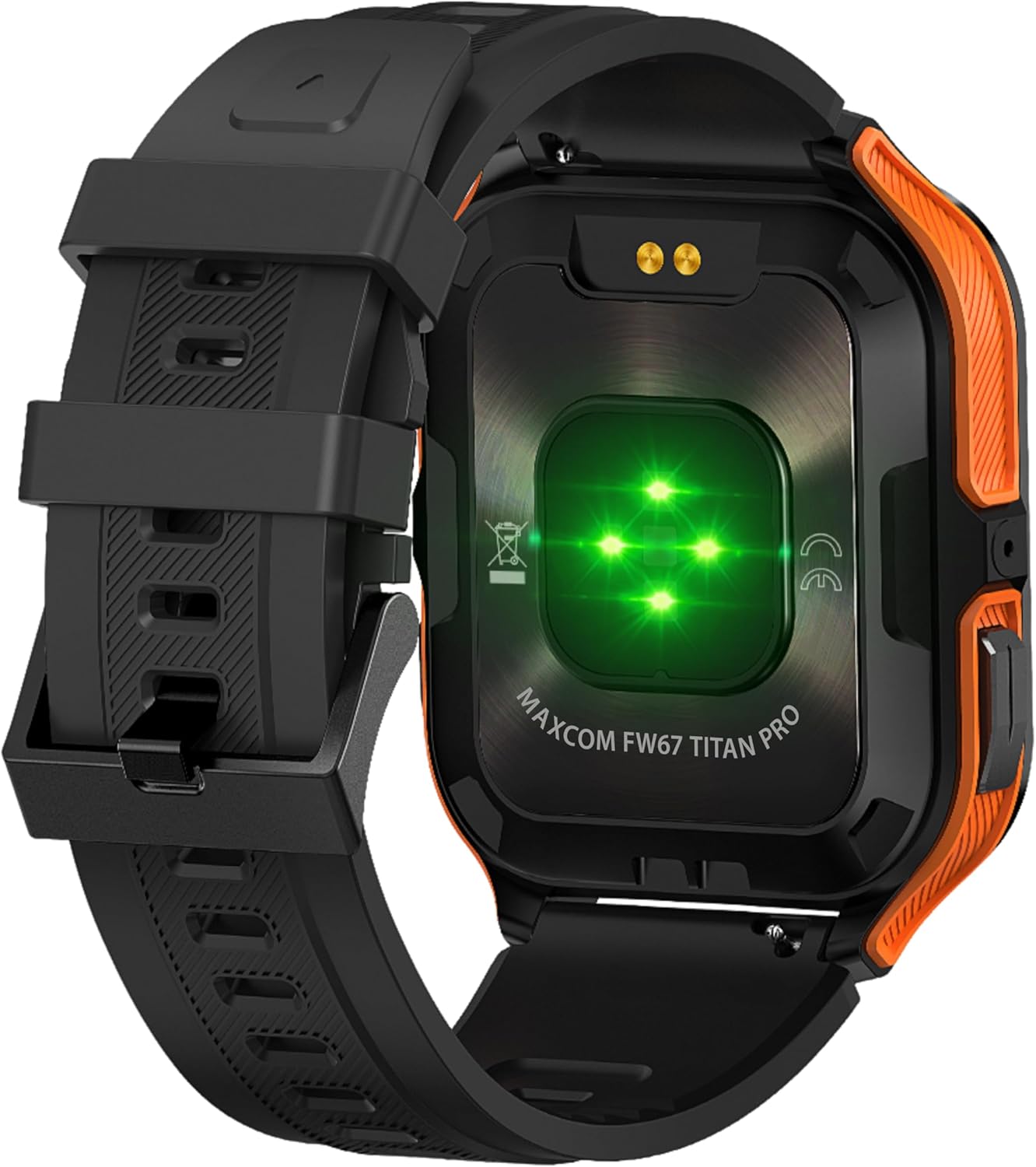
Малюнак 4.3: Тыл view of the smartwatch, showing the optical heart rate sensors (glowing green) and the magnetic charging pins. The model name 'MAXCOM FW67 TITAN PRO' is also visible.
5. Настройка
5.1. Пачатковая зарадка
Перад першым выкарыстаннем цалкам зарадзіце свой разумны гадзіннік.
- Connect the charging cable to the magnetic charging pins on the back of the smartwatch. Ensure the pins align correctly.
- Plug the USB end of the charging cable into a compatible USB power adapter (e.g., 5V/1A) or a computer's USB port.
- На дысплеі гадзінніка будзе паказвацца стан зарадкі. Поўная зарадка звычайна займае прыблізна 2-3 гадзіны.
5.2. Усталёўка праграмы і спалучэнне
To unlock the full potential of your smartwatch, you need to pair it with your smartphone via the dedicated companion application.
- Спампаваць прыкладанне: Пошук the official MAXCOM smartwatch application (e.g., 'GloryFit' or similar, refer to packaging for exact app name) on the Google Play Store (for Android) or Apple App Store (for iOS). Install the app on your smartphone.
- Уключыць Bluetooth: Пераканайцеся, што Bluetooth уключаны на вашым смартфоне.
- Адкрыйце прыкладанне: Запусціце ўсталяваную праграму і выконвайце інструкцыі на экране, каб стварыць уліковы запіс або ўвайсці ў сістэму.
- Дадаць прыладу: Within the app, navigate to the 'Device' or 'Add Device' section. The app will search for available smartwatches.
- Выберыце свой разумны гадзіннік: Select 'FW67 Titan Pro' from the list of discovered devices.
- Пацвердзіць спалучэнне: Запыт на спалучэнне можа з'явіцца як на вашым тэлефоне, так і на разумным гадзінніку. Пацвердзіце спалучэнне на абедзвюх прыладах.
- Поўная ўстаноўка: Выконвайце ўсе астатнія падказкі ў дадатку, каб наладзіць свой прафесіяналfile, permissions, and preferences.
6. Кіраванне разумным гадзіннікам
6.1. Базавая навігацыя
- Кнопка харчавання: Press and hold to power on/off. Short press to wake the screen or return to the main watch face.
- Кнопка "Назад": Short press to go back to the previous screen or exit a function.
- Жэсты на сэнсарным экране:
- Правядзіце пальцам уверх: Access quick settings/control center.
- Правядзіце пальцам уніз: View апавяшчэнні.
- Правядзіце пальцам улева/управа: Navigate through widgets (e.g., activity, heart rate, weather).
- Націсніце: Выберыце элемент або ўвайдзіце ў меню.
6.2. Асноўныя магчымасці

Малюнак 6.1: Прэзентацыя разумных гадзіннікаўasing various health metrics including steps taken, calories burned, heart rate, blood oxygen saturation (SpO2), and blood pressure, along with battery status.
- Маніторынг сардэчнага рытму: The watch continuously monitors your heart rate. Access this feature from the main menu or by swiping to the heart rate widget.
- Адсочванне актыўнасці: Tracks steps, distance, and calories burned throughout the day. Set daily goals in the companion app.
- Маніторынг сну: Automatically tracks your sleep patterns, including deep sleep, light sleep, and wake times. View падрабязны аналіз у дадатку.
- Спартыўныя рэжымы: Select from various sports modes (e.g., running, walking, cycling) to track specific workout data. Start a workout from the 'Sport' menu.
- Апавяшчэнні: Receive call, message, and app notifications directly on your wrist. Ensure notification permissions are granted in the companion app.
- Blood Oxygen (SpO2) & Blood Pressure: The watch can measure SpO2 and blood pressure. These measurements are for reference only and not for medical use.
- Надвор'е: View current weather conditions after syncing with the app and granting location permissions.
- Кіраванне музыкай: Кіруйце прайграваннем музыкі на смартфоне непасрэдна з гадзінніка.
7. Тэхнічнае абслугоўванне
- Уборка: Regularly clean your smartwatch and strap with a soft, dry, lint-free cloth. If necessary, use a slightly damp тканіну з мяккім мылам, затым старанна прапалашчыце і высушыце.
- Пазбягайце хімічных рэчываў: Не выкарыстоўвайце агрэсіўныя хімікаты, ачышчальныя растваральнікі або моцныя мыйныя сродкі, бо яны могуць пашкодзіць пакрыццё і ўшчыльняльнікі гадзінніка.
- Порт для зарадкі: Keep the charging pins clean and dry to ensure proper charging.
- захоўванне: Калі разумны гадзіннік не выкарыстоўваецца працяглы час, захоўвайце яго ў прахалодным, сухім месцы.
- Воданепранікальнасць: While the watch is IP69K water-resistant, it is not recommended for diving or high-pressure water activities. Always dry the watch thoroughly after exposure to water.
8. Выпраўленне непаладак
Калі ў вас узніклі праблемы са разумным гадзіннікам, звярніцеся да наступных распаўсюджаных праблем і рашэнняў:
| праблема | Рашэнне |
|---|---|
| Разумны гадзіннік не ўключаецца | Пераканайцеся, што гадзіннік цалкам зараджаны. Падключыце яго да зараднай прылады як мінімум на 30 хвілін. |
| Немагчыма спалучыць прыладу са смартфонам | 1. Ensure Bluetooth is enabled on your phone. 2. Make sure the smartwatch is within range. 3. Restart both the smartwatch and your phone. 4. Clear Bluetooth cache on your phone. 5. Try pairing through the app, not directly via phone's Bluetooth settings. |
| Апавяшчэнні не атрымліваюцца | 1. Check if the smartwatch is connected to the app. 2. Ensure notification permissions are granted for the app on your phone. 3. Verify that app notifications are enabled within the smartwatch app settings. 4. Disable 'Do Not Disturb' mode on both the watch and phone. |
| Недакладныя дадзеныя пра здароўе | 1. Ensure the watch is worn snugly on your wrist, not too loose or too tight. 2. Clean the sensors on the back of the watch. 3. Avoid excessive movement during measurements. 4. Remember that data is for reference and not medical diagnosis. |
| Кароткі тэрмін службы батарэі | 1. Reduce screen brightness. 2. Limit continuous heart rate monitoring if not needed. 3. Turn off unnecessary notifications. 4. Ensure the watch is fully charged each time. |
9. Тэхнічныя характарыстыкі
Key technical specifications for the MAXCOM FW67 Titan Pro Smartwatch:
| Асаблівасць | Спецыфікацыя |
|---|---|
| Марка | MAXCOM |
| мадэль | FW67 Titan Pro |
| Колер | Аранжавы |
| Аперацыйная сістэма | Proprietary OS (compatible with Android/iOS) |
| Памер экрана | 1.85 цалі |
| Сувязь | Bluetooth |
| Асаблівасці | Heart Rate Monitor, Notifications, SpO2, Blood Pressure, Activity Tracking |
| Сумяшчальныя прылады | Смартфон |
| Склад батарэі | Літый-іённы |
| Ёмістасць батарэі | 380 мАг |
| GPS | GPS праз смартфон |
| Форма | Прамавугольны |
10. Гарантыя і падтрымка
Your MAXCOM FW67 Titan Pro Smartwatch comes with a standard manufacturer's warranty. Please refer to the warranty card included in your package for specific terms and conditions, including warranty duration and coverage details. For technical support, troubleshooting assistance beyond this manual, or warranty claims, please contact MAXCOM customer service through their official webсайт або кантактную інфармацыю, прадстаўленую ў дакументацыі да вашага прадукту.