
Sharp KC-35T7
Sharp Plasmacluster Humidifying Air Purifier
Model: KC-35T7
1. Уводзіны
Дзякуй за пакупкуasing the Sharp Plasmacluster Humidifying Air Purifier, Model KC-35T7. This manual provides essential information for the safe and efficient operation, maintenance, and troubleshooting of your new appliance. Please read this manual thoroughly before use and keep it for future reference.
This advanced air purifier is designed to improve your indoor air quality by reducing harmful gases such as formaldehyde and other Volatile Organic Compounds (VOCs). It features a powerful purification function, integrated humidification, and a convenient display for humidity and temperature.
2. Інфармацыя па бяспецы
To ensure safe operation and prevent damage to the product or injury to yourself and others, please observe the following safety precautions:
- Заўсёды выкарыстоўвайце прыладу з правільным аб'ёмамtage as specified on the rating label.
- Do not block the air intake or outlet vents.
- Do not insert fingers or objects into any openings.
- Unplug the appliance before cleaning, performing maintenance, or when not in use for extended periods.
- Do not operate the appliance near flammable gases or combustible materials.
- Keep the appliance away from water and moisture. Do not immerse the unit in water.
- Ensure the water tank is properly installed before operating the humidification function. Use only clean tap water in the water tank.
- Гэты прыбор не прызначаны для выкарыстання асобамі (уключаючы дзяцей) з абмежаванымі фізічнымі, сэнсарнымі або разумовымі здольнасцямі або з адсутнасцю вопыту і ведаў, за выключэннем выпадкаў, калі яны знаходзяцца пад наглядам або праінструктаваныя адносна выкарыстання прыбора асобай, адказнай за іх бяспеку.
3. Ідэнтыфікацыя частак
Familiarize yourself with the main components of your Sharp Plasmacluster Humidifying Air Purifier:

Малюнак 3.1: Спераду View of the Air Purifier. This image displays the main body of the Sharp KC-35T7 air purifier, highlighting the control panel at the top, the air intake grille, and the Plasmacluster logo. The unit is white with black accents on the sides.
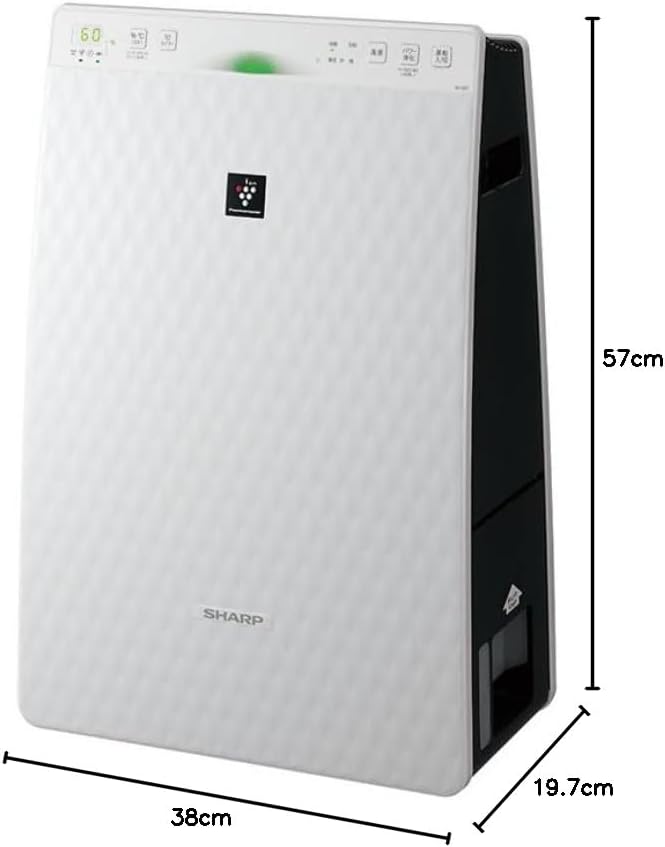
Figure 3.2: Air Purifier with Dimensions. Гэта выява дае перспектыву view of the Sharp KC-35T7, illustrating its approximate dimensions: 38 cm (width), 19.7 cm (depth), and 57 cm (height). These measurements are crucial for proper placement and space planning.
Ключавыя кампаненты:
- Панэль кіравання: Located on the top, with buttons for power, mode selection, fan speed, and display.
- Паветразаборнік: Located on the front and sides, where air is drawn into the unit.
- Выхад паветра: Размешчаны ўверсе, куды выходзіць ачышчанае і ўвільготненае паветра.
- Рэзервуар для вады: Здымны рэзервуар для ўвільгатнення, звычайна размешчаны збоку або ззаду.
- фільтры: Internal filters (e.g., HEPA, deodorizing) for air purification.
4. Настройка
Follow these steps for the initial setup of your air purifier:
- Распакаванне: Carefully remove the air purifier from its packaging. Retain the packaging materials for future transport or storage.
- Ўстаноўка фільтра: Open the rear panel of the unit. Remove all protective plastic bags from the filters (e.g., HEPA filter, deodorizing filter) and install them according to the markings inside the unit. Ensure they are securely in place. Close the rear panel.
- Fill Water Tank (for Humidification): Remove the water tank from the unit. Open the water tank cap and fill it with clean tap water up to the maximum fill line. Close the cap securely and reinsert the water tank into the unit until it clicks into place.
- Размяшчэнне: Place the air purifier on a flat, stable surface, ensuring there is adequate space (at least 20 cm) around the air intake and outlet for optimal airflow. Avoid placing it directly against a wall or near heat sources.
- Падключэнне сілкавання: Падключыце шнур сілкавання да адпаведнай электрычнай разеткі.
5. Інструкцыя па эксплуатацыі
Learn how to operate your Sharp Plasmacluster Humidifying Air Purifier:
Уключэнне/выключэнне харчавання:
- Націсніце Магутнасць кнопку на панэлі кіравання, каб уключыць або выключыць прыладу.
Выбар рэжыму:
The unit typically offers several operating modes:
- Аўтаматычны рэжым: The unit automatically adjusts fan speed and humidification based on detected air quality and humidity levels.
- Рэжым ачысткі паветра: Operates solely as an air purifier.
- Рэжым увільгатнення: Operates with humidification function active.
- Plasmacluster Spot Mode: Concentrates Plasmacluster ions for targeted deodorization or purification.
Націсніце Рэжым button repeatedly to cycle through available modes.
Рэгуляванне хуткасці вентылятара:
Adjust the fan speed to your preference:
- Націсніце Хуткасць вентылятара button to select between Low, Medium, High, or Silent settings.
Humidity/Temperature Display:
The display shows current room humidity and temperature. This information helps you monitor your indoor environment and adjust settings as needed.
6. Тэхнічнае абслугоўванне
Regular maintenance ensures optimal performance and extends the lifespan of your air purifier. Always unplug the unit before cleaning.
Ачыстка і замена фільтра:
- Папярэдні фільтр: Clean the pre-filter (mesh filter) regularly, approximately once a month, or more often if used in a dusty environment. Use a vacuum cleaner to remove dust or wash it with water and mild detergent. Ensure it is completely dry before reinstallation.
- HEPA-фільтр: The HEPA filter cannot be washed. Replace it approximately every 2-5 years, depending on usage and air quality. Refer to the indicator light on the control panel for replacement timing.
- Дэзадаруе фільтр: The deodorizing filter also cannot be washed. Replace it at the same interval as the HEPA filter.
Water Tank and Humidifying Filter Cleaning:
- Рэзервуар для вады: Clean the water tank weekly to prevent mold and bacteria growth. Rinse with clean water and use a soft brush or cloth to remove any residue.
- Humidifying Filter/Tray: Clean the humidifying filter and tray monthly. Remove any mineral deposits or slime using a soft brush and a mild descaling solution (e.g., citric acid solution) if necessary. Rinse thoroughly with clean water and ensure all parts are dry before reassembly.
Знешняя ачыстка:
- Wipe the exterior of the unit with a soft, dry cloth. For stubborn stains, use a damp cloth with a mild detergent, then wipe dry. Do not use abrasive cleaners or solvents.
7. Выпраўленне непаладак
Калі ў вас узніклі праблемы з ачышчальнікам паветра, звярніцеся да наступных распаўсюджаных праблем і рашэнняў:
| праблема | Магчымая прычына | Рашэнне |
|---|---|---|
| Прылада не ўключаецца. | Шнур сілкавання ненадзейна падключаны. Няма электрычнасці ў разетцы. | Праверце падключэнне шнура харчавання. Праверце разетку з іншай прыладай. |
| Няма ўвільгатнення. | Water tank empty. Water tank not properly installed. Humidifying filter dirty. | Refill water tank. Reinstall water tank correctly. Clean humidifying filter. |
| Незвычайны шум. | Filters not properly installed. Foreign object in unit. | Праверце ўстаноўку фільтра. Адключыце ад сеткі і праверце на наяўнасць старонніх прадметаў. |
| Дрэнная ачыстка паветра. | Filters are dirty or clogged. Unit placed in an obstructed area. | Clean or replace filters. Ensure proper clearance around the unit. |
| Пах ідзе ад агрэгата. | Deodorizing filter saturated. Water tank/humidifying filter dirty. | Replace deodorizing filter. Clean water tank and humidifying filter. |
Калі праблема не знікне пасля спробы гэтых рашэнняў, звярніцеся ў службу падтрымкі кліентаў.
8. Тэхнічныя характарыстыкі
Detailed technical specifications for the Sharp Plasmacluster Humidifying Air Purifier KC-35T7:
| Асаблівасць | Спецыфікацыя |
|---|---|
| Марка | Востры |
| Нумар мадэлі | KC-35T7 |
| Колер | Белы |
| Памеры прадукту (Д х Ш х У) | 19.7 см х 38 см х 57 см |
| Памеры ўпакоўкі (Д х Ш х В) | 63 см х 43 см х 26 см |
| Вага ўпакоўкі | 7.88 кг |
| Іншыя функцыі | Humidification function, Plasmacluster technology, Humidity/Temperature display |
| Патрабуюцца батарэі | няма |
9. Гарантыя і падтрымка
Your Sharp Plasmacluster Humidifying Air Purifier is covered by a manufacturer's warranty. Please refer to the warranty card included in your product packaging for specific terms and conditions, including the warranty period and coverage details.
For technical assistance, service, or to inquire about replacement parts and filters, please contact Sharp customer support. Contact information can typically be found on the manufacturer's official webна сайце або ў чэку аб куплі.
When contacting support, please have your product model number (KC-35T7) and serial number (if applicable) ready.