1. Прадукт скончыўсяview
The I-SHUNFA Wi-Fi Smart E27 LED Bulb offers advanced lighting control for your smart home. Featuring stepless dimming, adjustable color temperature from warm white (2700K) to cool white (6500K), and compatibility with voice assistants like Amazon Alexa, these bulbs provide versatile illumination. Control your lighting remotely via the Smart Life or Tuya Smart app, set schedules, and create custom scenes to enhance your daily life.

Выява: Зверхуview of the I-SHUNFA Smart LED Bulbs, showing their design, app control interface on a smartphone, and an icon indicating voice control capability.
Асноўныя характарыстыкі:
- Падключэнне Wi-Fi: Connects directly to your 2.4GHz home Wi-Fi network.
- Зацямненне: Яркасць рэгулюецца ад 1% да 100%.
- Наладжвальны белы: Color temperature adjustable from 2700K (warm white) to 6500K (cool white).
- Галасавое кіраванне: Сумяшчальнасць з Amazon Alexa і Google Assistant.
- Кіраванне праграмамі: Remote control via Smart Life or Tuya Smart app.
- Расклад і сцэны: Set timers, schedules, and pre-defined lighting scenes.
2. Кіраўніцтва па наладцы
2.1. Ўстаноўка
- Перад устаноўкай пераканайцеся, што электрычнасць свяцільні адключана.
- Carefully screw the I-SHUNFA Smart E27 LED Bulb into a standard E27 light socket.
- Turn on the power to the light fixture. The bulb should flash rapidly, indicating it's in pairing mode. If not, turn the bulb off and on 3-5 times until it flashes.
2.2. App Download & Pairing
To control your smart bulb, you need to download the "Smart Life" or "Tuya Smart" app on your smartphone.
- Download the "Smart Life" or "Tuya Smart" app from the App Store (iOS) or Google Play Store (Android).
- Зарэгіструйцеся альбо ўвайдзіце ў свой рахунак.
- Ensure your smartphone is connected to a 2.4GHz Wi-Fi network. The smart bulb only supports 2.4GHz Wi-Fi.
- У дадатку націсніце значок «+» (звычайна ў правым верхнім куце), каб дадаць прыладу.
- Select "Lighting" or "Light Source (Wi-Fi)" from the device list.
- Confirm that the bulb is flashing rapidly. If it's not, reset it by turning it off and on 3-5 times until it flashes.
- Увядзіце пароль сеткі Wi-Fi 2.4 ГГц, калі будзе прапанавана.
- The app will begin pairing with the bulb. Once connected, you can rename the bulb for easier control.

Image: Visual guide to the bulb's features and compatibility, including app logos and Wi-Fi requirements.
3. Інструкцыя па эксплуатацыі
3.1. Кіраванне праграмамі
Once paired, you can control your I-SHUNFA Smart LED Bulb using the Smart Life or Tuya Smart app from anywhere with an internet connection.
- Укл/Выкл: Tap the power icon next to the bulb's name to turn it on or off.
- Рэгуляванне яркасці: Slide the brightness bar (1%-100%) to adjust the light intensity.
- Рэгуляванне каляровай тэмпературы: Slide the color temperature bar to switch between warm white (2700K) and cool white (6500K).
- Сцэны: Select from pre-defined scenes like "Reading," "Working," "Good Night," or "Relax," or create your own custom scenes.
- Таймер і расклад: Set specific times for the bulb to turn on or off, or to activate certain scenes.

Image: The app interface for adjusting brightness and color temperature, illustrating the range from warm to cool white light.

Image: Setting timers and schedules through the app, allowing automated lighting control for convenience and security.
3.2. Галасавое кіраванне
The I-SHUNFA Smart LED Bulb is compatible with Amazon Alexa and Google Assistant. To enable voice control, link your Smart Life/Tuya Smart account to your voice assistant app (e.g., Alexa app).
- Прывязка ўліковага запісу: Open your Alexa or Google Home app, navigate to "Skills" or "Works with Google," search for "Smart Life" or "Tuya Smart," and enable the skill. Log in with your app account credentials.
- Адкрыйце для сябе прылады: After linking, ask your voice assistant to "Discover devices" or manually discover them in the app.
- Галасавыя каманды Exampлес:
- «Алекса, уключы святло ў гасцінай».
- "Hey Google, dim the bedroom light to 50%."
- "Alexa, set the kitchen light to warm white."
- "Hey Google, change the office light to cool white."

Image: Demonstrating voice control functionality with Amazon Alexa, allowing hands-free operation of the smart bulbs.
4. Тэхнічнае абслугоўванне
The I-SHUNFA Smart E27 LED Bulbs are designed for long-term use with minimal maintenance.
- Уборка: Перад чысткай пераканайцеся, што лямпачка выключана і астыла. Працярыце лямпачку мяккай сухой тканінай. Не выкарыстоўвайце вадкія ачышчальнікі або абразіўныя матэрыялы.
- захоўванне: If storing the bulbs, keep them in a cool, dry place away from direct sunlight and extreme temperatures.
- Замена: These LED bulbs have an average lifespan of 30,000 hours. Replacement is only necessary at the end of their operational life.
5. Выпраўленне непаладак
If you encounter issues with your I-SHUNFA Smart E27 LED Bulb, please refer to the following common solutions:
| праблема | Магчымая прычына | Рашэнне |
|---|---|---|
| Лямпачка не спалучаецца/міргае. | Not in pairing mode; power cycle issue. | Turn the bulb off and on 3-5 times until it flashes rapidly. Ensure your Wi-Fi is 2.4GHz. |
| Немагчыма падключыцца да Wi-Fi. | Incorrect Wi-Fi band; weak signal; wrong password. | Ensure your router is broadcasting a 2.4GHz signal. Move the bulb closer to the router. Double-check your Wi-Fi password. |
| Галасавое кіраванне не працуе. | Уліковы запіс не звязаны; прылада не знойдзена. | Ensure your Smart Life/Tuya Smart account is correctly linked to Alexa/Google Assistant. Ask your voice assistant to "Discover devices." |
| Bulb unresponsive in app. | Loss of Wi-Fi connection; app glitch. | Check your Wi-Fi connection. Restart the app. Power cycle the bulb. |
| Bulb not dimming or changing color. | Not compatible with external dimmer switches. | These bulbs are controlled via the app or voice assistant. Do not use with traditional dimmer switches. |
6. Тэхнічныя характарыстыкі
| Асаблівасць | Дэталь |
|---|---|
| Нумар мадэлі | WIFI-E27 |
| Тып базы | E27 |
| Энергаспажыванне | 7 Вт (эквівалентна лямпе напальвання 70 Вт) |
| Светлавы струмень | 800 лм |
| Каляровая тэмпература | 2700K - 6500K (ад цёплага белага да халоднага белага) |
| Зацямненне | 1% - 100% (via app/voice control only) |
| тtage | Пераменны ток 220-240 В |
| Стандарт Wi-Fi | 2.4GHz (IEEE 802.11 b/g/n) |
| Працягласць жыцця | 30,000 гадзін |
| Кут прамяня | 360 градусаў |
| Памеры (Д х Ш х У) | 3 х 3 х 8.45 см |
| Вага | 64 грамаў |
| Атэстацыя | Энергаэфектыўны |
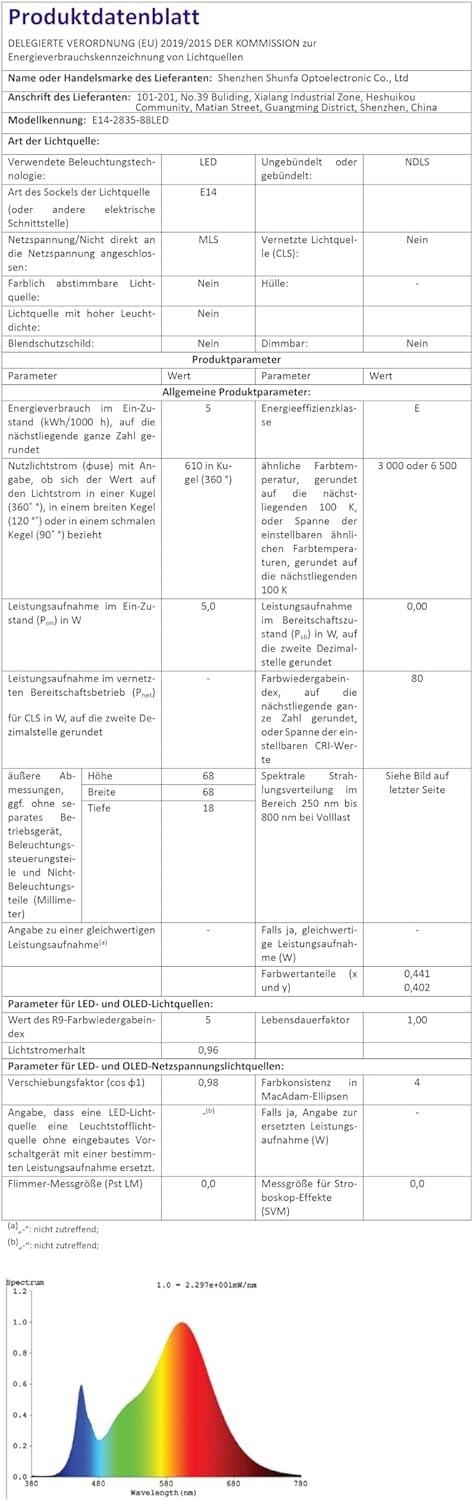
Image: Official product data sheet providing comprehensive technical specifications.
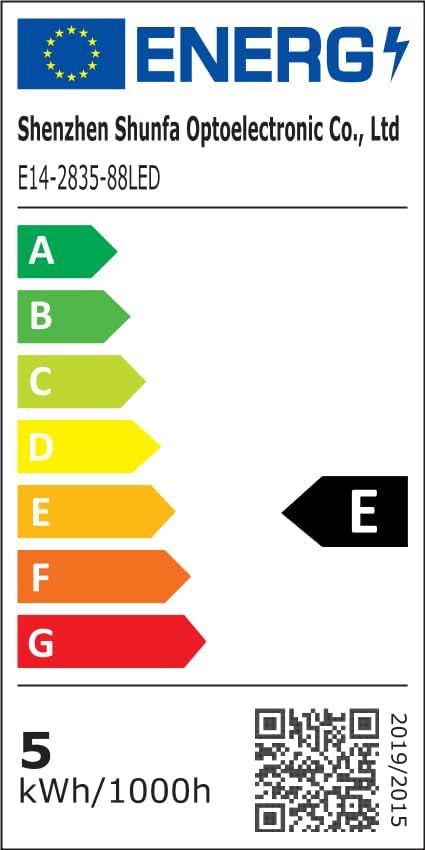
Image: EU Energy Label indicating the bulb's energy efficiency class and consumption. More details can be found via the QR code or by visiting eprel.ec.europa.eu/qr/1250502.
7. Гарантыя і падтрымка
I-SHUNFA is committed to providing high-quality products. For any issues or inquiries regarding your smart LED bulbs, please refer to your purchase documentation or contact our customer support.
- Гарантыя: Please refer to your purchase documentation or the retailer's policy for specific warranty details.
- Падтрымка кліентаў: For technical assistance or product support, please visit the I-SHUNFA brand store on Amazon or contact the seller directly.
- Запасныя часткі: Information regarding the availability of spare parts is not provided.

Image: The official I-SHUNFA brand logo.