
Уводзіны
Welcome to the iRobot Roomba i1 (1152) Robot Vacuum user manual. This guide provides essential information for setting up, operating, maintaining, and troubleshooting your robot vacuum. The Roomba i1 is designed to efficiently clean hard floors and carpets, utilizing Wi-Fi connected mapping technology to navigate your home.
Важная інфармацыя па бяспецы
Before using your Roomba i1 robot vacuum, please read all safety instructions carefully. Failure to follow these instructions may result in electric shock, fire, or serious injury.
- Гэтым прыборам могуць карыстацца дзеці ва ўзросце ад 8 гадоў і асобы з паніжанымі фізічнымі, сэнсарнымі або разумовымі здольнасцямі або з адсутнасцю вопыту і ведаў, калі яны знаходзяцца пад наглядам або атрымалі інструкцыі адносна бяспечнага выкарыстання прыбора і разумеюць звязаныя з гэтым небяспекі .
- Children should not play with the appliance. Cleaning and user maintenance shall not be made by children without supervision.
- Выкарыстоўвайце толькі так, як апісана ў гэтай інструкцыі.
- Не выкарыстоўвайце на вуліцы або на вільготных паверхнях.
- Не дазваляйце выкарыстоўваць у якасці цацкі. Неабходная пільная ўвага пры выкарыстанні дзецьмі або побач з імі.
- Не выкарыстоўвайце прыладу з пашкоджаным шнуром або вілкай. Калі прылада працуе неналежным чынам, яе ўпусцілі, пашкодзілі, пакінулі на вуліцы або ўпусцілі ў ваду, вярніце яе ў сэрвісны цэнтр.
- Не цягніце і не пераносіце за шнур, не выкарыстоўвайце шнур у якасці ручкі, не зачыняйце дзверы на шнуры і не нацягвайце шнур вакол вострых краёў або кутоў. Не запускайце прыбор праз шнур. Трымайце шнур далей ад нагрэтых паверхняў.
- Не адключайце вілку, цягнучы за шнур. Каб адключыць вілку, вазьміцеся за вілку, а не за шнур.
- Не бярыцеся за вілку або прыбор мокрымі рукамі.
- Не кладзіце ў адтуліны ніякіх прадметаў. Не выкарыстоўвайце пры заблакаваных адтулінах; беражыце ад пылу, варсінак, валасоў і ўсяго, што можа паменшыць паток паветра.
- Трымайце валасы, свабодную вопратку, пальцы і ўсе часткі цела далей ад адтулін і рухомых частак.
- Не падбірайце нічога, што гарыць або дыміцца, напрыклад, цыгарэты, запалкі або гарачы попел.
- Не выкарыстоўвайце для збору лёгкаўзгаральных або гаручых вадкасцей, такіх як бензін, і не выкарыстоўвайце ў месцах, дзе яны могуць прысутнічаць.
- Не выкарыстоўвайце без мяшка для пылу і/або фільтраў.
- Прадухіліць ненаўмысны запуск. Пераканайцеся, што пераключальнік знаходзіцца ў выключным становішчы, перш чым падключацца да акумулятара, падымаць або пераносіць прыладу.
- Зараджайце толькі зараднай прыладай, указанай вытворцам. Зарадная прылада, якая падыходзіць для аднаго тыпу акумулятара, можа стварыць рызыку пажару пры выкарыстанні з іншым акумулятарам.
- Карыстайцеся прыборамі толькі са спецыяльна прызначанымі батарэямі. Выкарыстанне любых іншых акумулятараў можа стварыць рызыку траўмаў і пажару.
- Калі акумулятар не выкарыстоўваецца, трымайце яго далей ад іншых металічных прадметаў, такіх як сашчэпкі, манеты, ключы, цвікі, шрубы або іншыя невялікія металічныя прадметы, якія могуць зрабіць злучэнне ад адной клемы да іншай. Замыканне клем батарэі можа прывесці да апёкаў або пажару.
- Пры няправільных умовах з батарэі можа выцякаць вадкасць; пазбягаць кантактаў. Пры выпадковым кантакце прамыйце вадой. Пры трапленні вадкасці ў вочы неабходна дадаткова звярнуцца па медыцынскую дапамогу. Вадкасць, якая выцякае з батарэі, можа выклікаць раздражненне або апёкі.
- Не выкарыстоўвайце акумулятар або прыбор, які пашкоджаны або мадыфікаваны. Пашкоджаныя або мадыфікаваныя батарэі могуць паводзіць сябе непрадказальна, што можа прывесці да пажару, выбуху або рызыкі атрымання траўмы.
- Не падвяргайце акумулятарную батарэю або прыбор агню або высокай тэмпературы. Ўздзеянне агню або тэмпературы вышэй 130 ° C (265 ° F) можа выклікаць выбух.
- Выконвайце ўсе інструкцыі па зарадцы і не зараджайце акумулятар або прыбор па-за тэмпературным дыяпазонам, указаным у інструкцыях. Няправільная зарадка або зарадка пры тэмпературы за межамі вызначанага дыяпазону можа пашкодзіць батарэю і павялічыць рызыку пажару.
- Тэхнічнае абслугоўванне павінна праводзіцца кваліфікаваным спецыялістам па рамонце з выкарыстаннем толькі ідэнтычных запасных частак. Гэта гарантуе бяспеку прадукту.
- Не мадыфікуйце і не спрабуйце адрамантаваць прыбор або акумулятар (у выпадку неабходнасці), за выключэннем выпадкаў, указаных у інструкцыях па выкарыстанні і догляду.
Змест пакета
Verify that all original components are included in your package:
- iRobot Roomba i1 Робат-пыласос
- Хатняя базавая зарадная станцыя
- Лінейны шнур
- 1 Lithium Ion Battery (pre-installed)
- Бакавая шчотка
- Filter (Cloth Type)
- Dual Multi-Surface Rubber Brushes
Настройка
Follow these steps to set up your Roomba i1 robot vacuum for first use:
- Выберыце месца для хатняй базы: Place the Home Base charging station against a wall in an open, uncluttered area. Ensure there is at least 1.5 feet (0.5 meters) of clear space on each side of the Home Base and 4 feet (1.2 meters) in front of it.
- Падключыце шнур сілкавання: Plug the line cord into the Home Base and then into a wall outlet. Ensure the Home Base is powered on.
- Зарадзіць робата: Place your Roomba i1 onto the Home Base. The robot will emit a tone to confirm it is properly docked and charging. Allow the robot to charge for at least 3 hours before its first cleaning mission. The light ring around the CLEAN button will pulse white while charging and turn solid white when fully charged.
- Спампуйце праграму iRobot Home: For full functionality, download the iRobot Home App on your smartphone or tablet. The app will guide you through connecting your robot to your Wi-Fi network and setting up cleaning schedules.
- Падключыцеся да Wi-Fi: Follow the in-app instructions to connect your Roomba i1 to your home Wi-Fi network. This enables smart features like mapping, scheduling, and integration with voice assistants.

Operating Your Roomba i1
Your Roomba i1 is designed for intelligent and efficient cleaning. Here's how to operate it:
Starting a Cleaning Job
- Using the CLEAN Button: Press the large CLEAN button on top of the robot once to wake it up, then press it again to start a cleaning cycle.
- Выкарыстанне праграмы iRobot Home: Open the app and tap the "CLEAN" button to start a cleaning job from anywhere. You can also schedule cleaning times and customize cleaning preferences through the app.
- Галасавое кіраванне: The Roomba i1 is compatible with Google Home. Once connected via the iRobot Home App, you can use voice commands like "Hey Google, ask Roomba to start cleaning."
Асаблівасці ачысткі
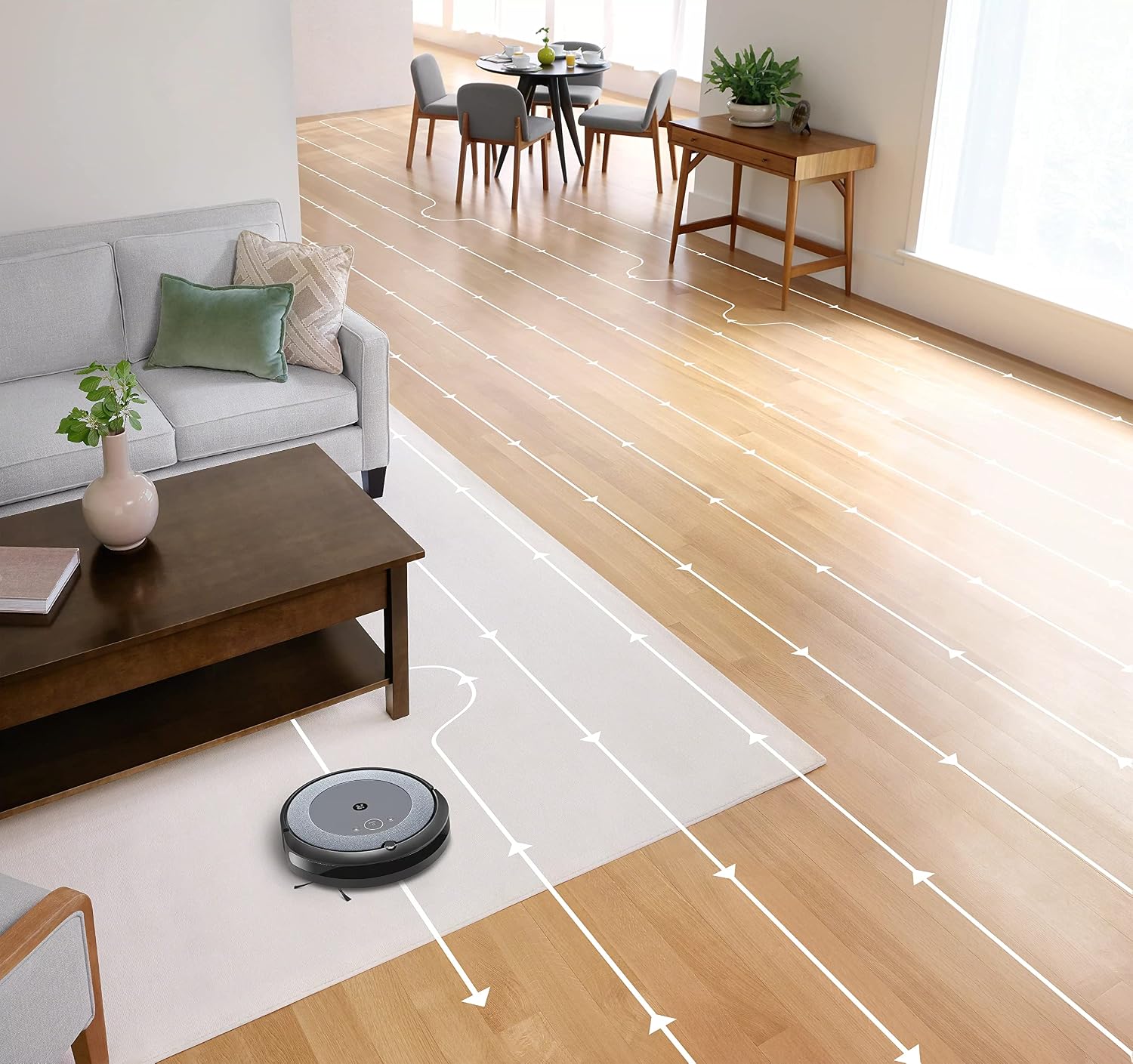
- Інтэлектуальная навігацыя: The robot cleans in neat, efficient rows, adapting to different floor types including carpets and hard floors.
- Dual Multi-Surface Rubber Brushes: These brushes are designed to prevent tangles with pet hair and effectively pick up dirt and debris from various surfaces.
- Dirt Detect™ Technology: The robot uses acoustic and optical sensors to find dirtier areas and spends more time cleaning them.
- Automatic Dirt Disposal (with compatible Clean Base): If you have a compatible Clean Base (sold separately), the robot will automatically empty its dustbin into an enclosed bag, allowing for weeks of hands-free cleaning.


Тэхнічнае абслугоўванне
Regular maintenance ensures your Roomba i1 operates at peak performance. Always turn off the robot and disconnect it from the Home Base before performing any maintenance.
Апарожненне кантэйнера для пылу
- Націсніце кнопку вызвалення кантэйнера і выцягніце яго.
- Адкрыйце дзверцы кантэйнера і высыпце смецце ў смеццевае вядро.
- Tap the bin against the trash can to dislodge any trapped debris.
Cleaning the Filter (Cloth Type)
- Зніміце фільтр з кантэйнера для смецця.
- Tap the filter against a trash can to remove debris. Do not wash the filter.
- Replace the filter every 2 months, or more frequently if you have pets.
Ачыстка пэндзляў
- Pinch the yellow brush release tabs to lift the brush frame.
- Remove the brushes and remove any hair or debris wrapped around them or trapped beneath the yellow caps.
- Reinstall the brushes, ensuring they click into place.
Ачыстка бакавой шчоткі
- Use a coin or small screwdriver to remove the screw holding the side brush.
- Remove the side brush and clean any hair or debris from the brush and its post.
- Зноў усталюйце бакавую шчотку і закруціце шрубу.
Ачыстка датчыкаў і зарадных кантактаў
- Wipe the charging contacts on the robot and Home Base with a clean, dry cloth.
- Wipe the cliff sensors (located on the bottom of the robot) and the front bumper sensor window with a clean, dry cloth.
Ліквідацыю непаладак
If your Roomba i1 encounters an issue, the robot will play an audible alert and the light ring around the CLEAN button will flash. Consult the iRobot Home App for specific error messages and solutions.
Агульныя праблемы і рашэнні:
- Робат не зараджаецца: Ensure the Home Base is plugged in and the robot is properly docked. Clean the charging contacts on both the robot and Home Base.
- Robot stuck or trapped: Clear obstacles from the robot's path. If it frequently gets stuck in the same area, consider using Virtual Wall Barriers (sold separately) or adjusting furniture.
- Слабая эфектыўнасць уборкі: Empty the dust bin, clean or replace the filter, and clean the main brushes and side brush. Ensure the robot's sensors are clean.
- Робат не падключаецца да Wi-Fi: Ensure your Wi-Fi router is on and within range. Restart your router and the robot. Follow the Wi-Fi setup instructions in the iRobot Home App again.
- Робат выдае незвычайныя гукі: Check the brushes and wheels for any trapped debris or hair. Clean them thoroughly.
For more detailed troubleshooting, refer to the iRobot Home App or the iRobot support webсайт.
Тэхнічныя характарыстыкі
| Марка | iRobot |
| Назва мадэлі | Roomba i1 (1152) |
| Асаблівасць | Smart, Wi-Fi Connected Mapping |
| Колер | Чорны/шэры |
| Уключаныя кампаненты | Robot Vacuum, Home Base, Line Cord, Battery, Side Brush, Filter, Dual Multi-Surface Rubber Brushes |
| Тып фільтра | Тканіна |
| Крыніца харчавання | Харчаванне ад батарэі |
| Батарэі | 1 літый-іённы акумулятар (у камплекце) |
| Метад кантролю | дадатак |
| Сумяшчальныя прылады | Галоўная старонка Google |
| Формаў-фактар | Рабатызаваны |
| Памеры прадукту | 13.5 х 3.6 х 13.4 цалі |
| Вага прадмета | 13.2 фунта |
| Рэкамендацыя па паверхні | Дываны, Цвёрдыя падлогі |
| UPC | 657768820809 |
| ASIN | B0CPQ3RVDK |
Гарантыя і падтрымка
This product is sold as a renewed item. Please refer to the specific warranty terms provided by the seller or Amazon Renewed at the time of purchase. For technical support, troubleshooting assistance, or to purchase replacement parts, please visit the official iRobot support website or contact iRobot customer service. You can also find helpful resources within the iRobot Home App.
Інтэрнэт-падтрымка: www.irobot.com/support