
1. Уводзіны
Thank you for choosing the ieGeek 5MP Outdoor Wi-Fi Security Camera. This manual provides essential information for the proper installation, operation, and maintenance of your camera. Please read these instructions carefully before use and retain them for future reference. This camera is designed to provide reliable outdoor surveillance with advanced features for enhanced security.
2. Прадукт скончыўсяview
The ieGeek 5MP Outdoor Wi-Fi Security Camera offers high-definition monitoring with flexible connectivity and smart detection capabilities.
Асноўныя характарыстыкі:
- 5MP HD-дазвол: Provides clear and vivid images and videos with 2880x1600 resolution and 4x digital zoom.
- Dual-Band Wi-Fi (2.4/5 GHz): Supports both 2.4 GHz and 5 GHz Wi-Fi for stable and faster network connection.
- 360° PTZ Monitoring: Pan (355° horizontal) and Tilt (120° vertical) functionality allows for comprehensive area coverage.
- Каляровы начны бачанне: Three night vision modes (color, infrared, smart) with a range of up to 15 meters (50 feet).
- PIR Humanoid Detection: Advanced human detection reduces false alarms caused by non-human movements.
- Гукавая і светлавая сігналізацыя: Deters intruders with customizable sound and light alerts.
- Бесперапынны запіс 24/7: Supports continuous recording and event-based recording.
- Лакальнае і воблачнае сховішча: Compatible with Micro SD cards (up to 128GB, not included) and cloud storage options.
- Сумеснае выкарыстанне для некалькіх карыстальнікаў: Share camera access with family members via the dedicated app.
- Устойлівасць да надвор'я IP65: Прызначаны для выкарыстання на вуліцы, устойлівы да пылу і вады.
Кампаненты камеры:
The camera unit typically includes the main camera body, dual Wi-Fi antennas, a power input port, and a Micro SD card slot.
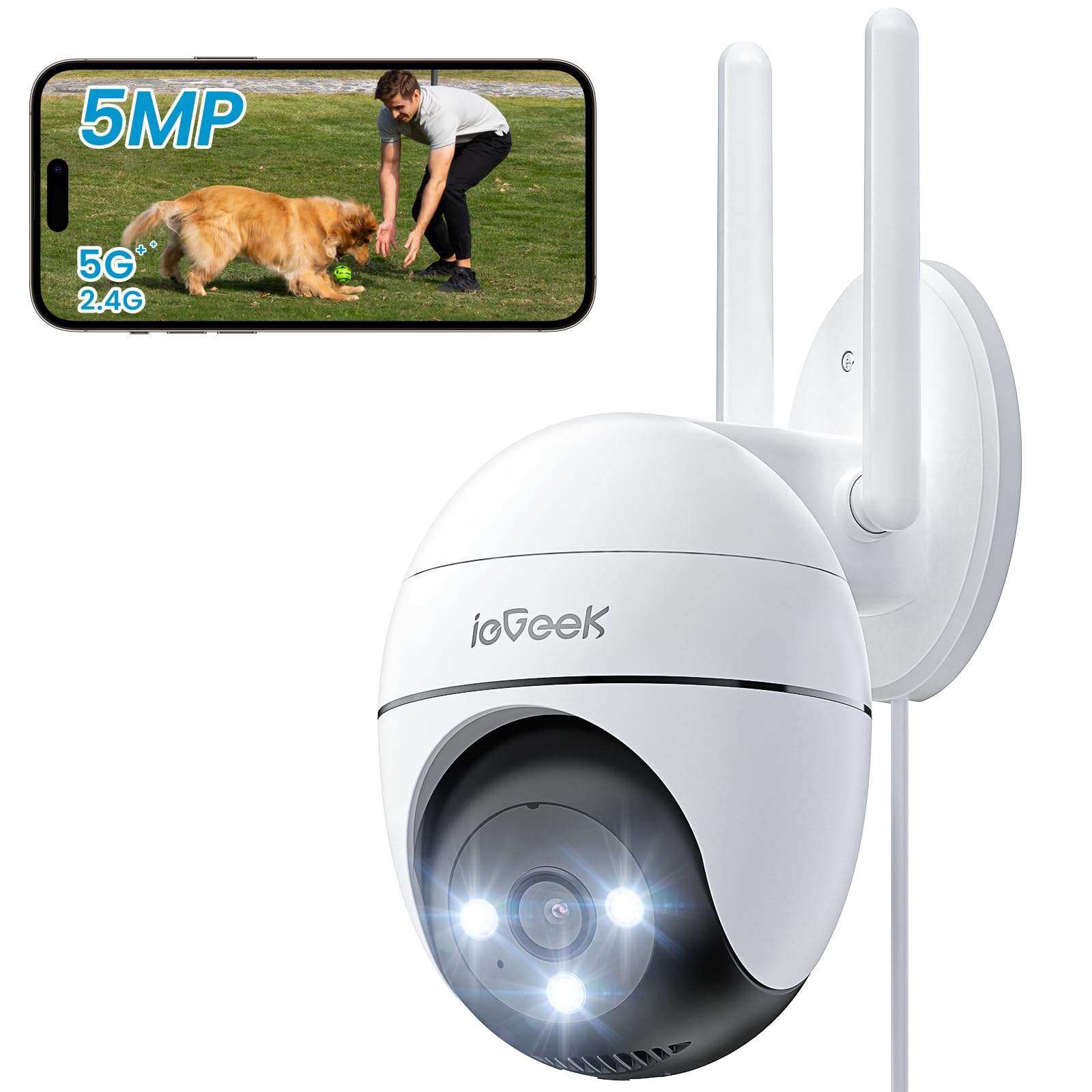
Figure 2.1: ieGeek 5MP Outdoor Wi-Fi Security Camera (Model ZS-GQ4)

Малюнак 2.2: Закончанаview of ieGeek 5MP Camera Features including PTZ, 24/7 recording, 2-way audio, humanoid tracking, Alexa compatibility, local and cloud storage, multi-user sharing, customizable alert areas, AI detection, and acoustic/light alarms.

Figure 2.3: The camera features a 5dBi antenna for improved Wi-Fi signal strength and stability.
3. Інструкцыі па ўсталёўцы
3.1 Змест пакета
- ieGeek 5MP Outdoor Wi-Fi Security Camera
- Адаптар сілкавання
- Мантажныя шрубы і анкеры
- Кіраўніцтва карыстальніка
3.2 Загрузка праграмы і рэгістрацыя ўліковага запісу
- Спампаваць ieGeek Cam or CloudEdge app from your smartphone's app store (iOS/Android).
- Register for an account using your email address and create a secure password.
3.3 Падключэнне камеры
- Power on the camera by connecting it to a power outlet using the provided adapter.
- Open the ieGeek Cam/CloudEdge app and tap the "+" icon to add a new device.
- Follow the on-screen instructions to connect the camera to your 2.4 GHz or 5 GHz Wi-Fi network. Ensure your phone is connected to the same Wi-Fi network during setup.
- Адсканіруйце QR-код, які адлюстроўваецца на вашым тэлефоне, з дапамогай аб'ектыва камеры, калі будзе запытана.
- Пасля падключэння вы можаце даць назву камеры і пачаць прамую трансляцыю viewінж.

Figure 3.1: Connecting the power adapter to the camera.
3.4 Фізічная ўстаноўка
- Choose a suitable outdoor location with a clear view і моцны сігнал Wi-Fi.
- Выкарыстоўвайце прадастаўлены шаблон для мацавання, каб адзначыць адтуліны для свідравання.
- Drill holes, insert anchors, and secure the camera base with screws.
- Пры неабходнасці адрэгулюйце кут камеры.

Figure 3.2: Ensure optimal Wi-Fi signal strength at the chosen installation location for stable performance.
4. Інструкцыя па эксплуатацыі
4.1 У прамым эфіры View і кіраванне PTZ
- Open the ieGeek Cam/CloudEdge app and select your camera to view жывы канал.
- Use the on-screen joystick or swipe gestures to control the camera's pan (horizontal 355°) and tilt (vertical 120°) movements.

Figure 4.1: Control the camera's 355° horizontal and 120° vertical rotation directly from your smartphone app.
4.2 Рэжымы начнога бачання
Камера прапануе тры рэжымы начнога бачання:
- Каляровы начны бачанне: Utilizes built-in spotlights to provide full-color images in low-light conditions.
- Інфрачырвонае начное бачанне: Uses infrared LEDs for black and white images in complete darkness.
- Разумнае начное бачанне: Automatically switches between infrared and color night vision upon detection of motion.
4.3 Выяўленне руху і сігналізацыя
- PIR Humanoid Detection: Configure sensitivity levels in the app to minimize false alarms.
- Наладжвальныя зоны выяўлення: Set specific areas for motion detection to focus on critical zones.
- Гукавая і светлавая сігналізацыя: When motion is detected, the camera can activate a siren and/or spotlights to deter intruders. You can choose between silent, spotlight only, siren only, or both siren and spotlight modes.

Figure 4.2: Select from silent, spotlight only, siren only, or both siren and spotlight alarm modes to suit your security needs.

Figure 4.3: The camera's humanoid motion tracking follows detected human figures, reducing false alarms from other movements.

Figure 4.4: AI smart monitoring can differentiate between various detection types such as people, animals, packages, and vehicles (some features may require a subscription).
4.4 Запіс і захоўванне
- Бесперапынная запіс: The camera supports 24/7 continuous recording to a Micro SD card (not included).
- Запіс падзеі: Records video clips when motion is detected.
- Micro SD-карта: Устаўце карту Micro SD (да 128 ГБ) у прызначаны слот для лакальнага захоўвання.
- Воблачнае сховішча: Optional cloud storage plans are available through the app for secure off-site backup.

Figure 4.5: The camera supports 24/7 continuous recording, ensuring constant surveillance.
5. Тэхнічнае абслугоўванне
5.1 Чыстка камеры
- Перад чысткай пераканайцеся, што камера выключана.
- Выкарыстоўвайце мяккі, damp тканіна для працірання корпуса камеры.
- For the lens, use a specialized lens cleaning cloth to avoid scratches. Do not use harsh chemicals or abrasive cleaners.
5.2 Экалагічныя меркаванні
- The camera has an IP65 weather resistance rating, making it suitable for outdoor use in various weather conditions.
- Дыяпазон рабочых тэмператур: ад -20°C да 50°C (ад -4°F да 122°F).

Figure 5.1: The camera is designed with IP65 weather resistance to withstand outdoor elements like rain.

Figure 5.2: The camera operates effectively within a wide temperature range of -20°C to 50°C.
6. Выпраўленне непаладак
If you encounter issues with your ieGeek camera, please refer to the following common troubleshooting steps:
6.1 Праблемы з падключэннем
- Камера ў аўтаномным рэжыме: Ensure the camera is powered on and within range of your Wi-Fi router. Check your Wi-Fi signal strength in the app. Try restarting the camera and your router.
- Failed to Connect to Wi-Fi: Verify your Wi-Fi password is correct. Ensure you are connecting to a 2.4 GHz or 5 GHz network as supported. If using a dual-band router, ensure the camera is connecting to the correct band.
6.2 Motion Detection Problems
- Too Many False Alarms: Adjust the PIR detection sensitivity in the app. Define specific detection zones to exclude areas with frequent irrelevant movements (e.g., trees swaying).
- Няма выяўлення руху: Ensure motion detection is enabled in the app settings. Check the camera's field of view for obstructions. Increase detection sensitivity if necessary.
6.3 Праблемы з якасцю выявы
- Размытая выява: Clean the camera lens carefully. Ensure there is no condensation on the lens.
- Дрэннае начное бачанне: Ensure the night vision mode is set correctly (color, infrared, or smart). Check for any obstructions blocking the infrared LEDs or spotlights.
6.4 Іншыя праблемы
- SD-карта не запісвае: Ensure the Micro SD card is inserted correctly and is not full. Format the SD card via the app if it's a new card or if issues persist.
- Праграма не адказвае: Close and restart the app. Ensure your smartphone's operating system is up to date.
If these steps do not resolve your issue, please contact ieGeek customer support for further assistance.
7. Тэхнічныя характарыстыкі
| мадэль | ZS-GQ4 |
| дазвол | 5MP (2880 x 1600) |
| Аб'ектыў | 3.6 мм |
| Лічбавы зум | 4x |
| Дыстанцыя начнога бачання | Да 15 метраў (50 футаў) |
| Падключэнне да Wi-Fi | 2.4 GHz / 5 GHz Dual-Band |
| Дыяпазон павароту/нахілу | Панарамаванне 355°, нахіл 120° |
| Параметры захоўвання | Карта Micro SD (да 128 ГБ, не ўваходзіць у камплект), воблачнае сховішча |
| Ўстойлівасць да надвор'я | IP65 |
| Працоўная тэмпература | -20°C да 50°C (-4°F да 122°F) |
| Памеры | 17 х 9 х 10 см |
| Метад кантролю | Mobile App (ieGeek Cam / CloudEdge) |
| Тып сігналізацыі | PIR Humanoid Motion Detection, Sound & Light Alarm |
8. Гарантыя і падтрымка
ieGeek імкнецца забяспечваць высакаякасную прадукцыю і выдатнае абслугоўванне кліентаў.
8.1 Інфармацыя аб гарантыі
- 2-гадовая гарантыя: Your ieGeek camera is covered by a 2-year warranty from the date of purchase, protecting against manufacturing defects.
- 30-дзённая гарантыя вяртання грошай: If you are not satisfied with your purchase, you may return the product for a full refund within 30 days.

Figure 8.1: ieGeek offers a 2-year warranty and a 30-day money-back guarantee, along with lifetime support.
8.2 Падтрымка кліентаў
For any questions, technical assistance, or warranty claims, please contact ieGeek customer support. Refer to the contact information provided with your product packaging or visit the official ieGeek webсайт для падрабязнай інфармацыі аб падтрымцы.
- Інтэрнэт-падтрымка: Наведайце www.iegeek.com/support (напрample link, please refer to actual webсайт)
- Падтрымка па электроннай пошце: support@iegeek.com (напрample email, please refer to actual contact)
- Пажыццёвая тэхнічная падтрымка: ieGeek provides lifetime technical support for its products.