
Lorex AZT2KIDPT-E
Кіраўніцтва карыстальніка для ўнутранай разумнай камеры бяспекі Lorex 4MP з паваротам і нахілам
Model: AZT2KIDPT-E
1. Прадукт скончыўсяview
The Lorex 4MP Pan & Tilt Indoor Smart Security Camera (Model: AZT2KIDPT-E) is a wireless 2K Wi-Fi camera designed for indoor surveillance. It features person detection, a privacy mode, two-way talk functionality, and smart home compatibility. With its 360° pan and tilt view, it offers comprehensive coverage for your indoor spaces. The camera includes a 16GB Micro SD card for local storage, eliminating the need for monthly fees.

Figure 1.1: Lorex 4MP Pan & Tilt Indoor Smart Security Camera, including its retail packaging and the bundled 16GB Micro SD card.
2. Што ўваходзіць у камплект
Праверце, ці ёсць у вашай упакоўцы ўсе пералічаныя ніжэй кампаненты:
- Унутраная камера Wi-Fi
- Карта MicroSD на 16 ГБ
- Power Cable & Adapter
- Mounting Bracket & Template
- Camera Mounting Kit & Quick Start Guide

Figure 2.1: Contents of the Lorex camera package, showing the camera, power supply, 16GB MicroSD card, mounting hardware, and quick start guide.
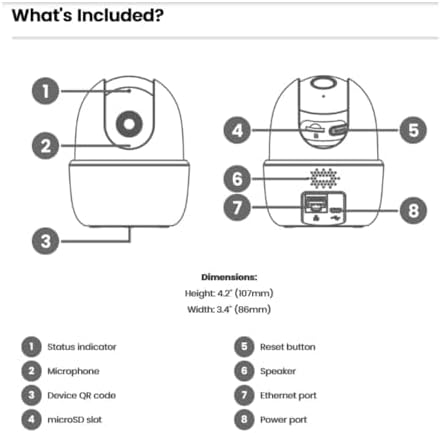
Figure 2.2: Detailed diagram of the camera's components and their functions, including ports and indicators.
3. Асноўныя магчымасці
- Выяўленне асобы: Receive notifications when a person is detected, minimizing unnecessary alerts.
- Двухбаковая размова: Communicate with individuals near the camera using the Lorex Home app.
- Панарамаванне і нахіл: The camera swivels horizontally and tilts vertically for expanded coverage. Digital zoom is available via the Lorex app. Night vision extends up to 32ft (10m).
- Smart Home Monitoring: Plug and Play setup with compatibility for Alexa and Google Assistant. Operates on 2.4 GHz Wi-Fi networks.
- Лакальнае сховішча: Secure your footage with the included 16GB MicroSD card (upgradable to 256GB), with no monthly fees.

Figure 3.1: Visual comparison demonstrating the enhanced clarity and detail of 2K Quad HD resolution compared to 1080p.

Figure 3.2: The camera's pan and tilt feature allows for a 360° view, providing extensive coverage of your indoor environment.

Figure 3.3: Smart AI Motion Detection provides instant alerts, such as when a person is detected in the camera's view.

Figure 3.4: Enable Privacy Mode through the Lorex app to temporarily disable recording and live view for enhanced privacy.

Figure 3.5: The camera supports local storage via a MicroSD card, ensuring your footage is kept private and secure without recurring fees.

Figure 3.6: The 2-Way Talk feature allows for instant communication through the camera, enabling you to hear and speak to those on the other end.
4. Кіраўніцтва па наладцы
Follow these steps to set up your Lorex 4MP Pan & Tilt Indoor Smart Security Camera:
- Download the Lorex Home App: Пошук "Lorex Home" in your smartphone's app store (available for Android and iOS).
- Стварыць уліковы запіс: Open the Lorex Home app and follow the on-screen instructions to create a new account or log in to an existing one.
- Уключыце камеру: Connect the provided power cable and adapter to the camera and plug it into a power outlet. The camera will power on and initiate its startup sequence.
- Дадаць прыладу: In the Lorex Home app, tap the '+' icon to add a new device. Select your camera model from the list.
- Сканаванне QR -кода: Use your phone's camera to scan the QR code located on the bottom of the camera (refer to Figure 2.2).
- Падключыцеся да Wi-Fi: Follow the app's prompts to connect the camera to your home Wi-Fi network. Ensure you are connecting to a 2.4 GHz Wi-Fi band.
- Усталюйце камеру (неабавязкова): If desired, use the included mounting bracket and kit to securely install the camera in your preferred indoor location.
- Поўная ўстаноўка: Once connected, the app will guide you through any final setup steps, including naming your camera and adjusting initial settings.
5. Інструкцыя па эксплуатацыі
Utilize the Lorex Home app to control and manage your camera:
- жыць View: Access the live video feed from your camera anytime, anywhere.
- Кіраванне панарамаваннем і нахілам: Выкарыстоўвайце элементы кіравання ў дадатку, каб дыстанцыйна рэгуляваць налады камеры viewing angle (360° pan and tilt).
- Лічбавае павелічэнне: Звядзіце пальцы, каб павялічыць прамую трансляцыю view to get a closer look at details.
- Двухбаковая размова: Tap the microphone icon in the app to speak through the camera's speaker and hear audio from the camera's microphone.
- Рэжым прыватнасці: Activate Privacy Mode via the app to temporarily disable video and audio recording for personal moments.
- Выяўленне асобы: Configure motion detection settings to specifically alert you when a person is detected.
- Лакальны запіс: Фуtage is automatically recorded to the installed 16GB MicroSD card upon event detection. You can review recorded events through the app's timeline.
- Начное бачанне: The camera automatically switches to night vision in low-light conditions, providing clear black and white video up to 32 feet.
Video 5.1: Demonstration of the Lorex W462 camera's panning capabilities, showcasinшырокае поле яго дзейнасці view.
6. Тэхнічнае абслугоўванне
To ensure optimal performance and longevity of your Lorex camera:
- Уборка: Акуратна працярыце аб'ектыў і корпус камеры мяккай сухой тканінай. Пазбягайце выкарыстання агрэсіўных хімікатаў або абразіўных ачышчальнікаў.
- Абнаўленні прашыўкі: Regularly check the Lorex Home app for available firmware updates. Updates often include performance improvements and security enhancements.
- Кіраванне карткай MicroSD: Periodically check the storage status of your MicroSD card in the app. While the camera overwrites old footage, you may want to back up important recordings.
- Стабільнасць сеткі: Ensure your Wi-Fi network is stable and provides a strong signal to the camera for consistent performance.
7. Выпраўленне непаладак
If you encounter issues with your Lorex camera, refer to the following common solutions:
| праблема | Магчымае рашэнне |
|---|---|
| Камера не падключаецца да Wi-Fi: |
|
| Дрэнная якасць выявы: |
|
| Two-way talk echo or distortion: |
|
| Camera loses connectivity intermittently: |
|
For further assistance, visit the Lorex support webсайт або звярніцеся ў службу падтрымкі.
8. Тэхнічныя характарыстыкі
| Асаблівасць | Дэталь |
|---|---|
| Марка | Лорэкс |
| Нумар мадэлі | AZT2KIDPT-E |
| Тэхналогія падлучэння | WiFi (2.4 GHz band only) |
| Дазвол відэазахопу | 2K |
| Асаблівасці | Adjustable, Night Vision, PTZ Control, Two-Way Audio, Person Detection |
| Колькасць каналаў | 1 |
| Ёмістасць памяці | 16 GB (MicroSD card included, upgradable to 256GB) |
| Колер | Белы |
| Крыніца харчавання | Правадная электрычная |
| Памеры прадмета (Д х Ш х У) | 5 х 6 х 5 цалі |
| Сумяшчальнасць аперацыйнай сістэмы | Android, iOS |
| Рэкамендуемае выкарыстанне | У памяшканні |
| Поле в View | 125° (дыяганаль) |
| Дыяпазон начнога бачання | Да 32 футаў (10 м) |
| Частата кадраў | 30 кадраў у секунду |
| Рэжым запісу | Event, Manual |
| Тэхналогія аптычнага датчыка | CMOS |
| Абсталяванне інтэрфейсу | 802.11 ac/b/g/n |
| Тып аб'ектыва | Выпраўлена |
| Вага прадмета | 1.04 фунта |
9. Гарантыя і падтрымка
For detailed warranty information and technical support, please visit the official Lorex website or contact their customer service. You can find more resources and contact options at the Lorex Brand Store on Amazon.