
Уводзіны
Thank you for choosing the Hecate G3m Pro Wireless Bluetooth Gaming Mouse. This manual provides detailed instructions for setting up, operating, and maintaining your new gaming mouse. Designed for performance and versatility, the G3m Pro offers three-mode connectivity, a high-precision sensor, and a lightweight, silent design to enhance your gaming experience.
Прадукт скончаныview
The Hecate G3m Pro features a robust design with multiple buttons and connectivity options. Familiarize yourself with the mouse components before use.
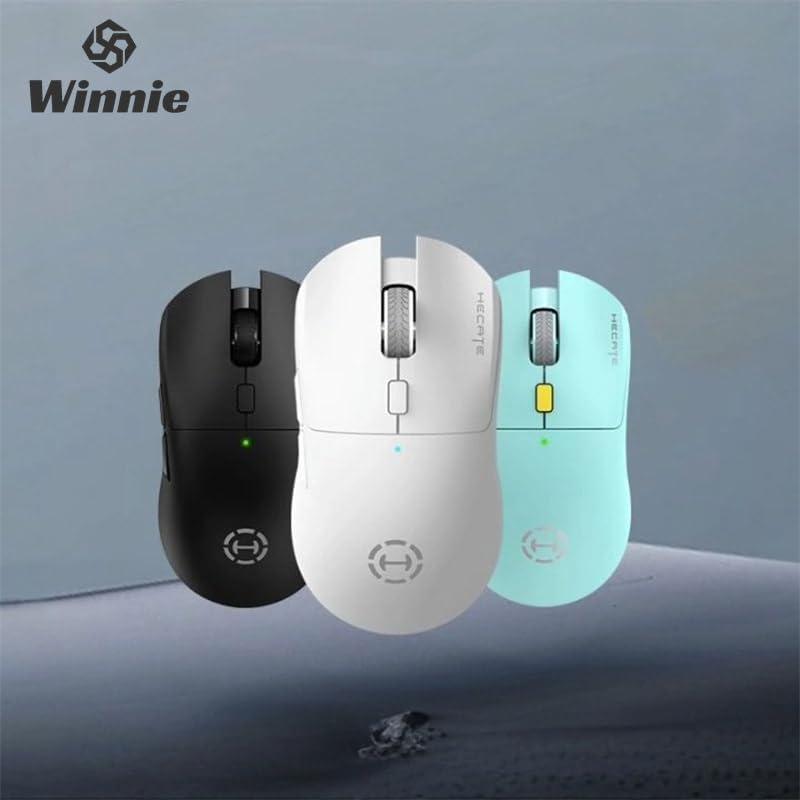
Figure 1: Hecate G3m Pro Wireless Gaming Mouse (Black)
- Левая/правая кнопкі мышы: Стандартныя функцыі мышы.
- Кола пракруткі: For scrolling and middle-click functionality.
- Кнопка пераключэння DPI: Adjusts the mouse sensitivity (DPI) on the fly.
- Бакавыя кнопкі: Programmable for various in-game actions or navigation.
- Connectivity Mode Switch: Located on the underside, allows switching between 2.4GHz, Bluetooth, and Wired modes.
- Порт USB-C: Для праваднога падключэння і зарадкі.
Настройка
Follow these steps to set up your Hecate G3m Pro mouse.
1. Зарадка мышы
Before first use, ensure the mouse is fully charged. Connect the provided USB-C cable to the mouse's USB-C port and the other end to a USB power source (e.g., computer, wall adapter). The LED indicator will show charging status.
2. Connecting via 2.4GHz Wireless (USB Dongle)
- Locate the USB 2.4GHz receiver (dongle) usually stored in a compartment on the underside of the mouse.
- Падключыце USB-прыёмнік да вольнага порта USB на вашым кампутары.
- Switch the connectivity mode selector on the mouse to the '2.4G' position.
- The mouse should automatically connect to your computer. The LED indicator may flash briefly and then become solid to indicate a successful connection.
3. Падключэнне праз Bluetooth
- Switch the connectivity mode selector on the mouse to the 'BT' (Bluetooth) position.
- На вашым кампутары або прыладзе перайдзіце ў налады Bluetooth і ўключыце Bluetooth.
- The mouse LED indicator will start flashing, indicating it is in pairing mode.
- Select 'Hecate G3m Pro' from the list of available Bluetooth devices on your computer/device to pair.
- Once paired, the LED indicator will become solid.
4. Падключэнне праз правадную сетку
- Connect the provided USB-C cable to the mouse's USB-C port.
- Падключыце другі канец кабеля USB-C да даступнага порта USB на вашым кампутары.
- Switch the connectivity mode selector on the mouse to the 'Wired' position.
- Мыш будзе працаваць як правадная мыш і таксама будзе зараджаць свой унутраны акумулятар.
Інструкцыя па эксплуатацыі
Understand the functions of your mouse for optimal use.
Рэгуляванне DPI
Press the DPI cycle button (usually located behind the scroll wheel) to cycle through different DPI settings. Each press will change the sensitivity, often indicated by a change in the LED color or a specific number of flashes. The mouse supports up to 26000 DPI.
Пераключэнне рэжымаў
Use the switch on the underside of the mouse to select your preferred connection mode: 2.4GHz, Bluetooth, or Wired. Switch modes according to your device and usage scenario.
Настройка кнопак
For advanced customization of buttons and macros, it is recommended to download the official Hecate software (if available) from the manufacturer's website. This software allows you to reassign button functions, create profiles, and fine-tune performance settings.
Тэхнічнае абслугоўванне
Правільнае абслугоўванне гарантуе даўгавечнасць і прадукцыйнасць вашай мышы.
Уборка
- Выкарыстоўвайце мяккую, сухую тканіну, каб працерці паверхню мышы.
- Для ўстойлівага бруду злёгку ачысціцеampпрацярыце тканіну вадой або мяккім ачышчальным растворам. Пазбягайце агрэсіўных хімічных рэчываў.
- Не дапускайце траплення вадкасцей ва ўнутраныя кампаненты мышы.
- Перыядычна чысціце аптычны датчык на ніжняй частцы ватным тампонам, каб забяспечыць дакладнае адсочванне.
Сыход за батарэяй
- Пазбягайце частай поўнай разрадкі акумулятара.
- Charge the mouse when the battery indicator suggests low power.
- If storing the mouse for an extended period, charge it to about 50% and store it in a cool, dry place.
Захоўванне
Store the mouse in a clean, dry environment away from extreme temperatures and direct sunlight. Keep it away from dust and moisture.
Ліквідацыю непаладак
If you encounter issues with your Hecate G3m Pro mouse, refer to the following common solutions.
Мыш не рэагуе
- Праверце акумулятар: Ensure the mouse is charged. Connect it via USB-C cable to charge.
- Праверце рэжым падключэння: Verify that the mode switch on the underside of the mouse is set to the correct mode (2.4G, BT, or Wired) for your connection type.
- Падключэнне 2.4 ГГц: Пераканайцеся, што USB-прыёмнік надзейна падключаны да спраўнага USB-порта. Паспрабуйце іншы USB-порт.
- Злучэнне Bluetooth: Re-pair the mouse with your device. Go to Bluetooth settings, remove the mouse, and then add it again. Ensure your device's Bluetooth is enabled.
- Правадное злучэнне: Пераканайцеся, што кабель USB-C надзейна падключаны як да мышы, так і да кампутара. Паспрабуйце іншы порт USB або кабель.
Inconsistent Tracking or Cursor Movement
- Чысты датчык: Ачысціце аптычны датчык на ніжняй частцы мышы.
- Кілімок для мышы: Use the mouse on a clean, uniform surface or a high-quality mouse pad. Avoid reflective or glass surfaces.
- Налада DPI: Adjust the DPI setting using the DPI cycle button to find a comfortable sensitivity.
Кнопкі не працуюць
- Праграмнае ўмяшанне: Калі вы карыстаецеся спецыяльным праграмным забеспячэннем, паспрабуйце скінуць прызначэнні кнопак да значэнняў па змаўчанні.
- Тэст на іншай прыладзе: Connect the mouse to another computer to determine if the issue is with the mouse or the original device's settings.
Тэхнічныя характарыстыкі
Detailed technical specifications for the Hecate G3m Pro Wireless Bluetooth Gaming Mouse.
| Асаблівасць | Апісанне |
|---|---|
| мадэль | G3m Pro |
| Марка | Hecate |
| Тэхналогія падлучэння | 2.4GHz Wireless, Bluetooth, Wired (USB-C) |
| Выяўленне руху | Optical (Paw3395 Sensor) |
| DPI (кропак на цалю) | Да 26000 DPI |
| Паскарэнне | 50G |
| IPS (цалі ў секунду) | 600 |
| Колькасць кнопак | 6 |
| Колькасць ролікаў | 1 (Кола пракруткі) |
| Рука арыентацыі | Амбідэкстр |
| Асаблівасць | Lightweight (Approx. 63g) |
| Тып харчавання | Акумулятарная батарэя |
| Рэкамендуемае выкарыстанне | Гульнявая |
| Сумяшчальныя прылады | Personal Computer, Laptop, Game Console |
| Аперацыйныя сістэмы | Linux, Windows XP (і больш новыя версіі) |
Гарантыя і падтрымка
Your Hecate G3m Pro Wireless Bluetooth Gaming Mouse comes with a warranty and dedicated support.
Інфармацыя аб гарантыі
All products are covered by a Гарантыя 12 месяцаў з даты пакупкі. Гэтая гарантыя распаўсюджваецца на вытворчыя дэфекты і праблемы, якія ўзніклі ў выніку нармальнага выкарыстання.
Падтрымка кліентаў
If you encounter any problems with your product, such as defective or incorrect items, please do not hesitate to contact us. We are committed to providing prompt assistance and will respond to your inquiries within 24 hours. Please refer to your purchase documentation for specific contact details or visit the official Hecate support webсайт.