
1. Уводзіны
This manual provides detailed instructions for the installation, configuration, and operation of your SODOLA 24 Port 2.5G Smart Web Managed Switch. This device is designed to enhance network performance with its multi-gigabit capabilities, offering 24x 2.5G Base-T ports and 2x 10G SFP+ ports for high-speed data transfer and flexible network expansion. Please read this manual thoroughly before using the product to ensure proper setup and functionality.
2. Інфармацыя па бяспецы
- Пераканайцеся, што прылада ўсталявана ў добра вентыляваным памяшканні, каб пазбегнуць перагрэву.
- Выкарыстоўвайце толькі адаптар сілкавання, які ўваходзіць у камплект.
- Do not expose the switch to water or excessive humidity.
- Пазбягайце размяшчэння цяжкіх прадметаў на выключальніку.
- Толькі для выкарыстання ў памяшканнях.
3. Змесціва ўпакоўкі
Праверце, ці ёсць усе прадметы ў вашай упакоўцы:
- 1 x SODOLA 24 Port 2.5G Smart Web Кіраваны камутатар
- 1 х Кіраўніцтва карыстальніка
- 1 х Шнур харчавання
4. Прадукт скончыўсяview
The SODOLA 24 Port 2.5G Smart Web Managed Switch is designed for robust network environments, offering a combination of high-speed Ethernet and SFP+ ports.

Малюнак 4.1: У цэлым view of the SODOLA 24 Port 2.5G Smart Web Кіраваны камутатар.
4.1 Пярэдняя панэль
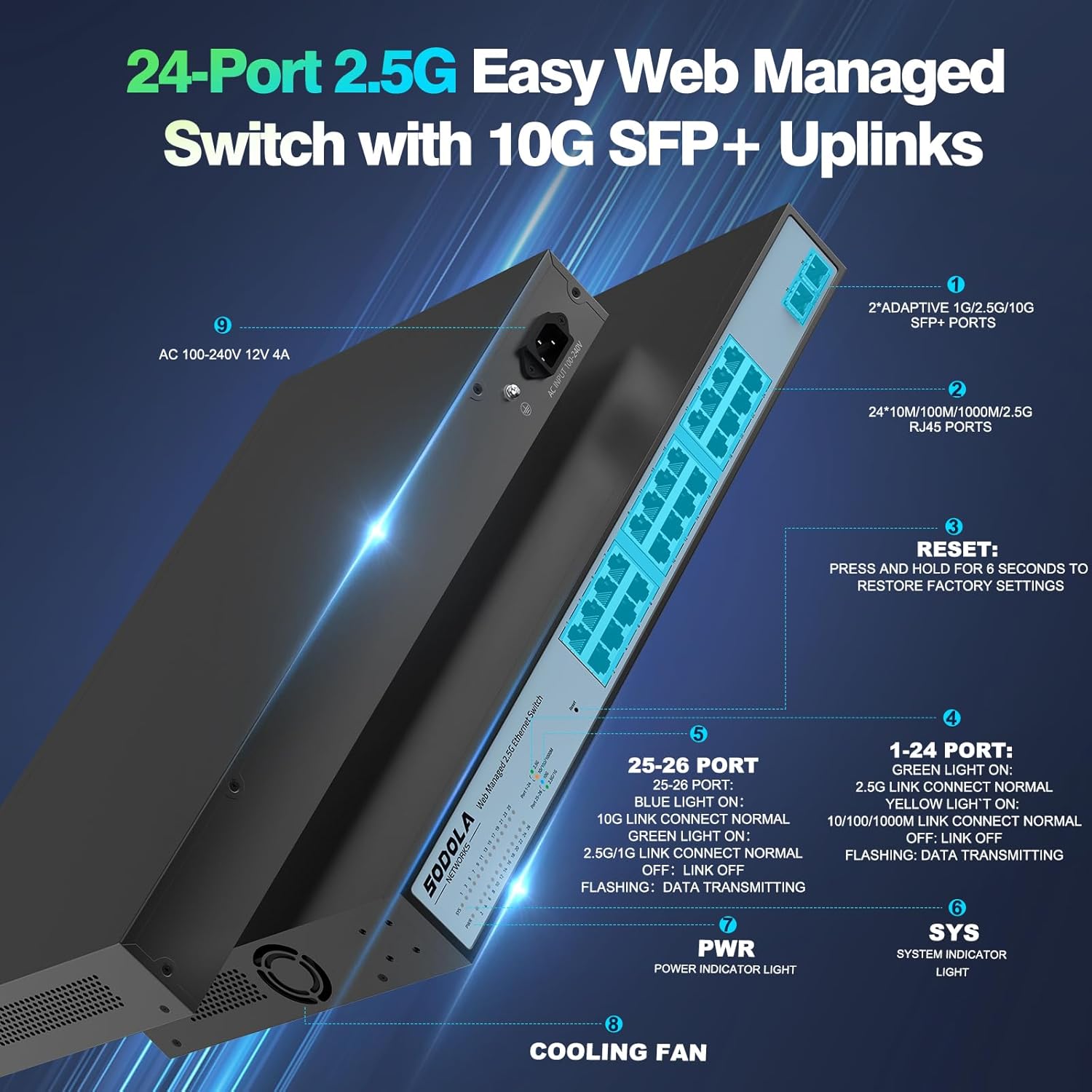
Малюнак 4.2: падрабязна view of the switch's front and rear panels, highlighting ports and indicators.
- 24 x 100/1000/2500M RJ45 Ports: These ports support 2.5 Gigabit Ethernet connectivity. Each port has Link/Act LEDs: Green for 2.5G Link/Act, Yellow for 10/100/1000M Link/Act, and flashing for data transmission.
- 2 парты 10G SFP+: These ports provide high-speed 10 Gigabit fiber connectivity for uplinks or connecting to high-bandwidth devices.
- Кнопка скіду: Націсніце і ўтрымлівайце 6 секунд, каб аднавіць заводскія налады.
- Святлодыёд PWR: Індыкатар харчавання.
- Святлодыёд SYS: System indicator light.
4.2 Задняя панэль
- Уваходнае напружанне пераменнага току 100-240 В: Connect the provided power cord here.
- Вентылятар астуджэння: The switch features a bilateral cooling design without a built-in fan for silent operation.
5. Інструкцыі па ўсталёўцы
5.1 Фізічная ўстаноўка
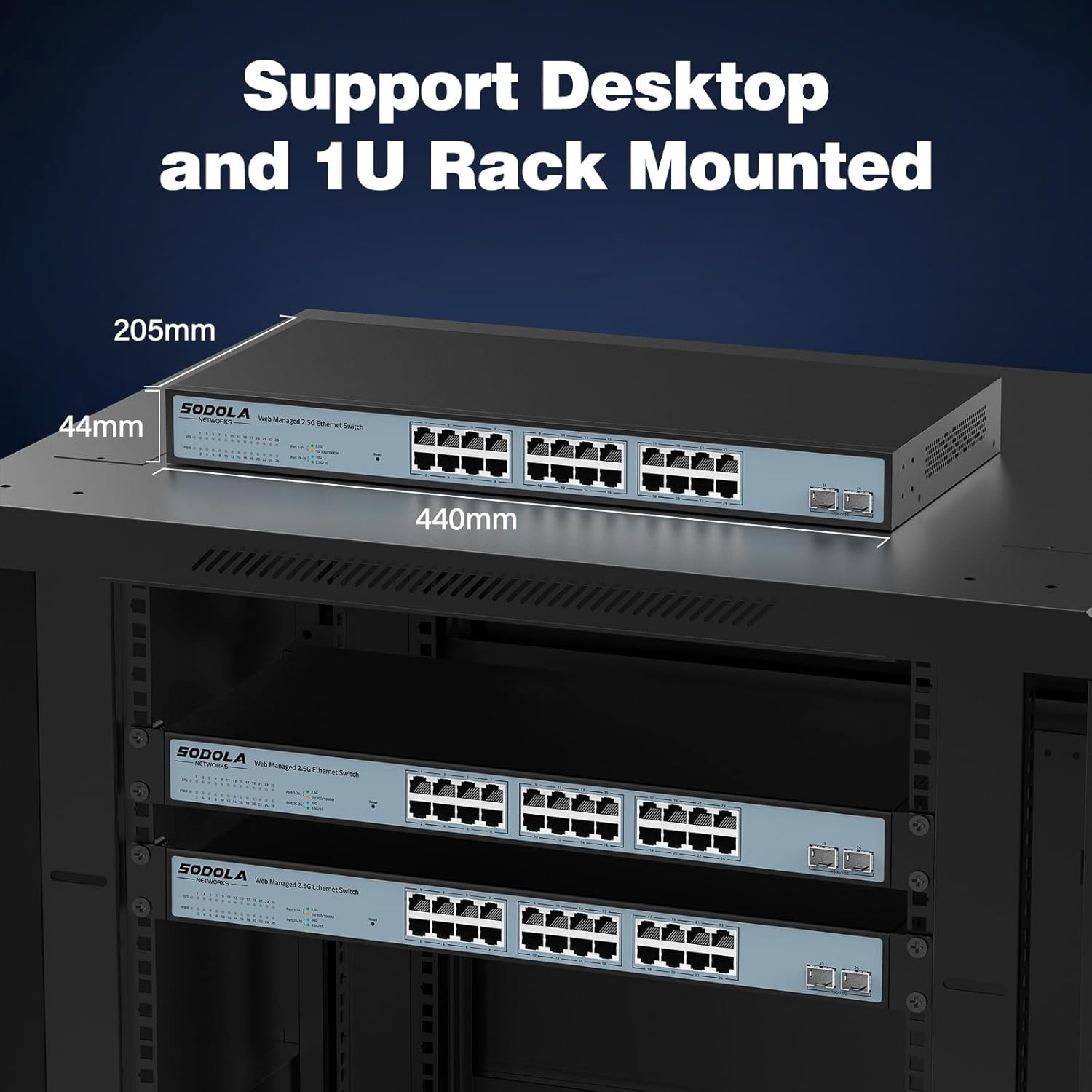
- Мантаж: The switch supports 1U rack mounting. Ensure adequate space for ventilation. It can also be placed on a desktop.
- Падключыце прылады: Connect your network devices (computers, servers, NAS, WiFi 6 APs) to the RJ45 ports using Cat5e, Cat6, or Cat6a Ethernet cables.
- Падключэнне ўзыходзячай лініі сувязі: Use the 10G SFP+ ports for high-speed connections to your router or other core network devices.
- Уключэнне: Connect the power cord to the switch and then to a power outlet. The PWR LED should illuminate.
5.2 Пачатковая Web Доступ да кіравання
Каб атрымаць доступ да web інтэрфейс кіравання:
- Канфігурацыя IP-адраса: Before logging in, ensure your computer's IP address is set within the same IPv4 subnet as the switch's default IP address (e.g., if the switch is 192.168.2.1, set your computer to 192.168.2.X, where X is not 1).
- Адкрыты Web Браўзэр: Выкарыстоўвайце сумяшчальны web browser (e.g., IE 9.0+, Chrome 23.0+, Firefox 20.0+).
- Увядзіце IP-адрас: Type the default IP address of the switch (192.168.2.1) into the browser's address bar and press Enter.
- Лагін: Увядзіце ўліковыя даныя па змаўчанні:
імя карыстальніка: адмін
Пароль: адмін
Малюнак 5.1: Здымак экрана web старонка ўваходу ў інтэрфейс кіравання.
6. Operating Instructions (Web Кіраванне)
The web management interface allows for configuration, monitoring, and troubleshooting without requiring command-line interface (CLI) expertise. Key features include:

Figure 6.1: Visual representation of the switch's basic management features.
- Link Aggregation (LACP): Combine multiple physical links into a single logical link for increased bandwidth and redundancy.
- VLAN (віртуальная лакальная сетка): Сегментуйце сваю сетку на меншыя, ізаляваныя дамены вяшчання для павышэння бяспекі і прадукцыйнасці.
- QoS (Якасць абслугоўвання): Прыярытэзуйце сеткавы трафік, каб забяспечыць дастатковую прапускную здольнасць крытычна важных праграм.
- Шматкарыстальная перадача: Efficiently deliver data to multiple recipients simultaneously.
- MAC Address Management: Control access to the network based on MAC addresses.
- RSTP (Rapid Spanning Tree Protocol): Прадухіляйце зацыкленні ў сетцы і забяспечвайце стабільнасць сеткі.
- Рамкі Jumbo: Support larger Ethernet frames for increased data throughput.
- Выяўленне цыкла: Identify and mitigate network loops.
- ERPS (Ethernet Ring Protection Switching): Provide fast protection and recovery switching in Ethernet ring topologies.
6.1 Захаванне канфігурацыі
Пасля ўнясення любых змяненняў у web інтэрфейс, перайдзіце да Tools > Save to ensure your settings are permanently stored and not lost upon power cycling the device.
7. Тэхнічнае абслугоўванне
- Уборка: Use a dry, soft cloth to clean the exterior of the switch. Do not use liquid or aerosol cleaners.
- Вентыляцыя: Ensure the ventilation openings on the sides of the switch are not obstructed. The fanless design relies on natural convection for cooling.
- Абнаўленні прашыўкі: Перыядычна правярайце інфармацыю вытворцы webсайт для атрымання даступных абнаўленняў прашыўкі, каб забяспечыць аптымальную прадукцыйнасць і бяспеку.
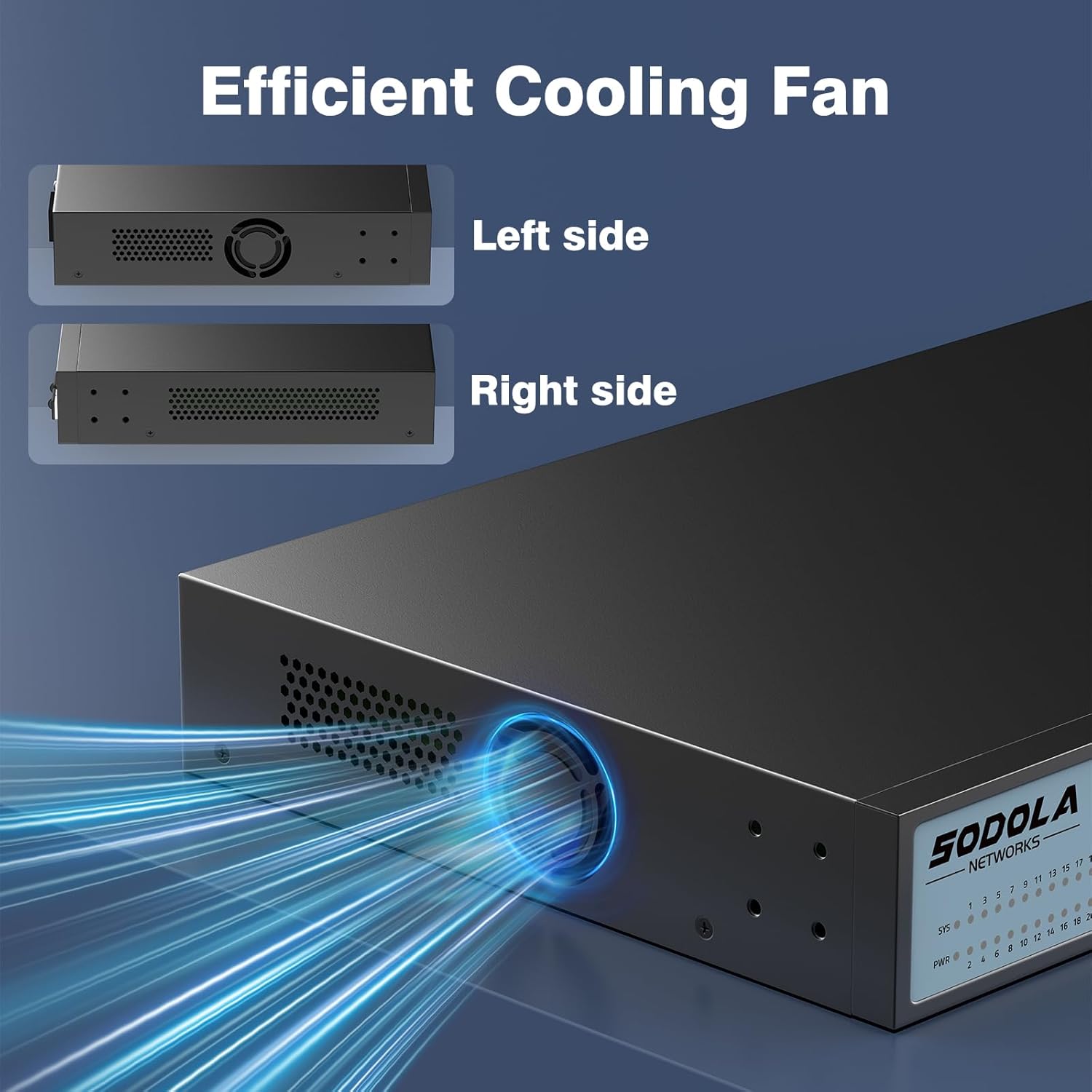
Figure 7.1: Illustration of the switch's efficient fanless cooling design.
8. Выпраўленне непаладак
8.1 Агульныя праблемы і рашэнні
- Няма харчавання: Check if the power cord is securely connected to both the switch and the power outlet. Verify the power outlet is functional.
- Няма спасылкі/актыўнасці на порце: Ensure the Ethernet cable is properly connected to both the switch port and the connected device. Verify the connected device is powered on and functioning correctly. Try a different cable or port.
- Павольная хуткасць сеткі: Ensure all connected devices and cables support 2.5G or 10G speeds for optimal performance. Check for network congestion or duplex mismatches in the web інтэрфейс.
- Немагчыма атрымаць доступ Web інтэрфейс:
- Verify your computer's IP address is in the same subnet as the switch's IP.
- Confirm the switch's IP address (default is 192.168.2.1).
- Забяспечце web browser is compatible.
- If the management interface becomes unresponsive, a power cycle may resolve the issue.
- Нестабільнасць сеткі: Ensure Spanning Tree Protocol (STP) or Rapid Spanning Tree Protocol (RSTP) is enabled to prevent network loops, especially in complex network topologies.
- Configuration Loss: Always remember to save your configuration changes via Tools > Save у web інтэрфейс.
8.2 Скід да заводскіх налад
If you encounter persistent issues or forget your login credentials, you can restore the switch to its factory default settings by pressing and holding the Скінуць кнопку на працягу 6 секунд.
9. Тэхнічныя характарыстыкі
| Марка | Sodola |
| Нумар мадэлі | 24X2.5G+2X10G SFP+(Managed) |
| Колькасць партоў | 26 (24x 2.5G RJ45, 2x 10G SFP+) |
| Тып інтэрфейсу | RJ45, SFP+ |
| Хуткасць перадачы даных | 2500 Megabytes Per Second (2.5Gbps per RJ45 port) |
| Камутацыйны патэнцыял | 160 Гбіт/с |
| Хуткасць перасылкі пакетаў | 119.04 Мпікс |
| Памер табліцы MAC-адрасоў | 16 тыс |
| Package Cache | 12 Мбіт |
| Матэрыял корпуса | Метал |
| Колер | Чорны |
| Памеры прадукту | 17.32 х 8.07 х 1.73 цалі |
| Вага прадмета | 5.89 фунта |
| Сумяшчальныя прылады | Laptop, Server |
10. Гарантыя і падтрымка
SODOLA provides a replacement for any quality issue within one year of purchase. For technical support or warranty claims, please refer to your purchase documentation or the retailer where the product was acquired. Please note that official SODOLA website, phone number, or email for direct support may not be readily available.