
Уводзіны
Дзякуй за пакупкуasing the WOOPKER AK45 Pro HiFi Amplifier. This manual provides detailed instructions for the proper setup, operation, and maintenance of your new audio amplifier. Please read this manual thoroughly before using the product to ensure optimal performance and safety. Keep this manual for future reference.
Інструкцыі па тэхніцы бяспекі
ПАПЯРЭДЖАННЕ: каб знізіць рызыку пажару або паразы электрычным токам, не падвяргайце гэты прыбор уздзеянню дажджу або вільгаці.
- Перад эксплуатацыяй прачытайце ўсе інструкцыі ampзадымнік.
- Трымайце ampзахоўвайце прыладу далей ад вады, вільгаці і прамых сонечных прамянёў.
- Не блакуйце вентыляцыйныя адтуліны. Усталюйце ў адпаведнасці з інструкцыямі вытворцы.
- Не ўстанаўлівайце побач з крыніцамі цяпла, такімі як радыятары, абагравальнікі, пліты або іншыя прылады (у тым ліку ampLifiers), якія вырабляюць цяпло.
- Абараніце сеткавы шнур ад наступання або заціскання, асабліва ў месцах вілкі, разеткі і месца выхаду з ampзадымнік.
- Выкарыстоўвайце толькі насадкі/аксэсуары, указаныя вытворцам.
- Адключыце гэта ampпад'ёмнік падчас навальніцы або калі ён не выкарыстоўваецца працяглы час.
- Звяртайцеся па абслугоўванні да кваліфікаванага абслуговага персаналу. Абслугоўванне патрабуецца, калі amplifier has been damaged in any way, such as power-supply cord or plug is damaged, liquid has been spilled or objects have fallen into the ampпадсілкавальнік, amplifier падвяргаўся ўздзеянню дажджу або вільгаці, не працуе належным чынам або ўпаў.
Змест пакета
Калі ласка, пастаўце галачку для наступных пунктаў:
- Прафесійная Hi-Fi сістэма WOOPKER AK45 Ampліфікатар х 1
- EU Power Cable x 1
- ІЧ-пульт дыстанцыйнага кіравання x 1
- FM-антэна х 1
- Кіраўніцтва карыстальніка x 1

Image: The complete package contents of the AK45 Pro amplifier, showing all included accessories.
Прадукт скончаныview
Пярэдняя панэль

Выява: Падрабязная view of the AK45 Pro amplifier's front panel, highlighting each control and input.
- Выключальнік сілкавання: Ператварае ampуключае або выключае пад'ёмнік.
- Слот USB/SD: For playing audio from USB drives or SD cards.
- Святлодыёдны дысплей: Паказвае бягучы рэжым і інфармацыю пра трэк.
- Кнопка рэжыму: Switches between input modes (Bluetooth, AUX, FM, USB, SD).
- Кнопка папярэдняга трэка: Пераход да папярэдняга трэка.
- Кнопка прайгравання/паўзы: Прайграе або прыпыняе прайграванне аўдыё.
- Кнопка наступнага трэка: Пераходзіць да наступнага трэка.
- Кнопка паўтарыць: Паўтарае бягучую кампазіцыю або спіс прайгравання.
- Кантроль высокіх частот: Adjusts the high-frequency audio level.
- Кантроль баса: Adjusts the low-frequency audio level.
- MIC/VOL Control: Рэгулюе гучнасць мікрафона.
- Уваходы MIC1/MIC2: Раздымы 6.35 мм для падлучэння мікрафонаў.
- Майстар рэгулявання гучнасці: Рэгулюе агульную гучнасць выхаднога гуку.
Задняя панэль

Выява: Падрабязная view of the AK45 Pro amplifier's rear panel, showing all connection ports.
- Аўдыёўваходны раз'ём (RCA): Для падлучэння знешніх аўдыёпрылад праз кабелі RCA.
- Раз'ём для FM-антэны: For connecting the FM antenna.
- Выхадныя клемы для дынамікаў: Для падлучэння пасіўных дынамікаў.
- DC 12V/5A Power Supply Input: Alternative power input for 12V DC.
- AC 240V Power Supply Input: Main power input for AC 110-240V.
Настройка
Падключэнне дынамікаў
The AK45 Pro amplifier supports passive speakers with 4-16 Ohm impedance.

Image: Visual guide for connecting speaker wires to the amplifier's output terminals.
- Before connecting speakers, identify the positive (+) and negative (-) terminals on your speakers. Typically, the positive terminal is red and the negative is black.
- Націсніце клamp on the back of the AK45 Pro amplifier and insert the bare speaker wires, ensuring positive matches positive and negative matches negative.
- Avoid inserting or removing USB drives, SD cards, RCA audio cables, or speaker cables while the amplifier уключаны.
Падключэнне сілкавання
Connect the provided power cable to the AC power input on the rear panel of the amplifier and then plug it into a suitable wall outlet (AC 110-240V). Alternatively, you can use a DC 12V/5A power supply (not included) with the DC input.
Падключэнне крыніц гуку
Злучэнне Bluetooth

Image: Illustration of a smartphone wirelessly connected to the AK45 Pro ampLifier праз Bluetooth.
- Уключыце ampзадымнік.
- Press the 'Mode' button on the front panel or remote control until 'BLUE' appears on the LED display.
- Уключыце Bluetooth на мабільнай прыладзе (тэлефоне, планшэце і г.д.).
- Пошук 'AK45 Pro' in your device's Bluetooth settings and select it to pair.
- Пасля падключэння вы можаце прайграваць аўдыя са сваёй прылады праз ampзадымнік.
Note: Maintain a distance of less than 10 meters (30 feet) between your device and the amplifier for stable Bluetooth connection. For TV or PC connections, keep the distance within 5 meters (15 feet).
AUX/RCA Connection
Use an RCA audio cable to connect external audio devices such as CD players, DVD players, TVs, or PCs to the 'Audio Input' jacks on the rear panel. Press the 'Mode' button to select the AUX input.
Прайграванне USB/SD карты
Insert a USB drive or SD card into the corresponding slot on the front panel. The amplifier аўтаматычна пераключыцца ў рэжым USB/SD і пачне прайграваць аўдыё files. Supported formats include MP3.
FM-радыё
Connect the provided FM antenna to the 'FM ANT' jack on the rear panel. Press the 'Mode' button to select FM radio mode. The amplifier will automatically scan and store available radio stations.
Мікрафонны ўваход
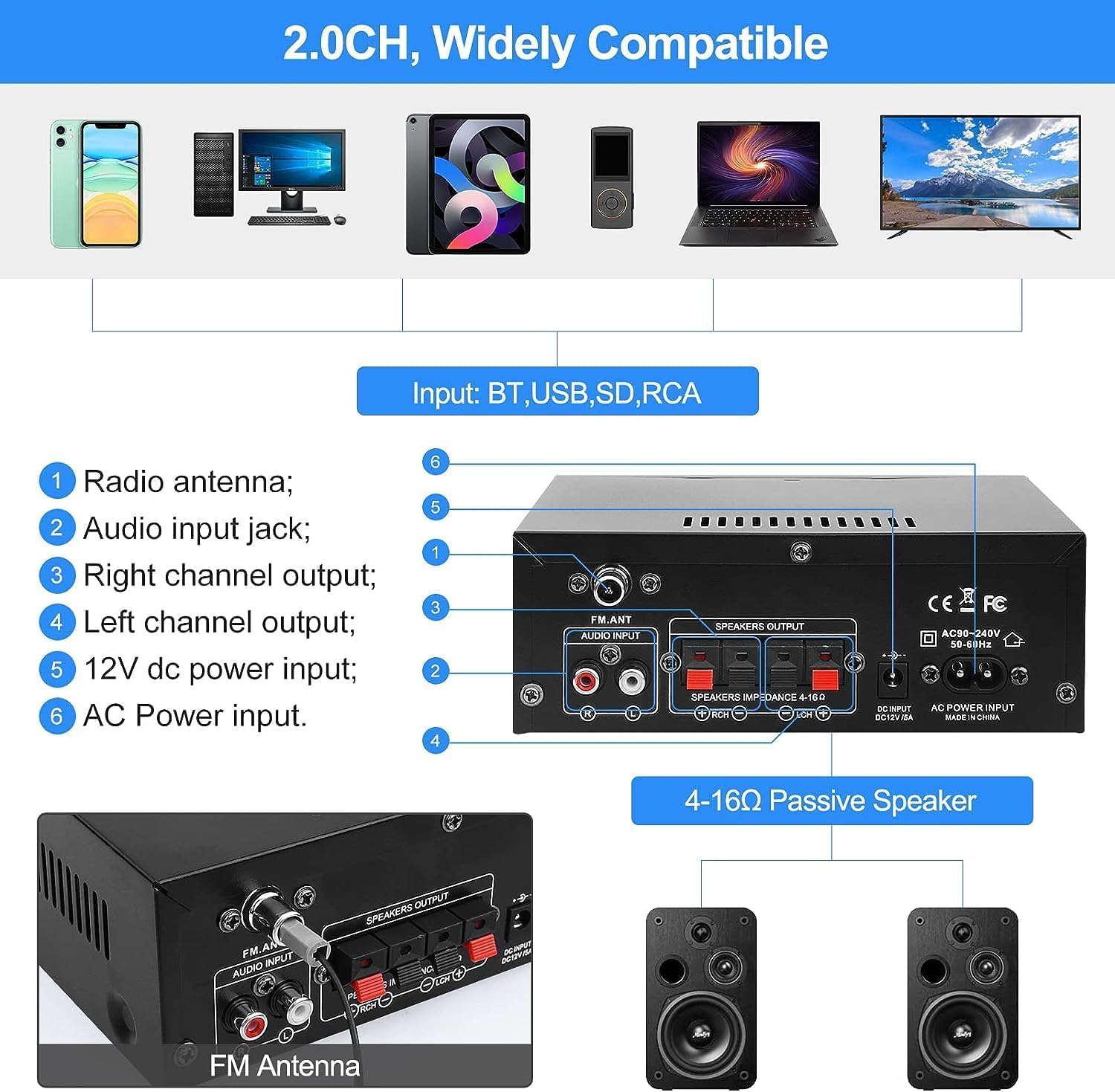
Image: Two individuals enjoying karaoke with microphones connected to the AK45 Pro ampзадымнік.
Connect up to two microphones to the 'MIC1' and 'MIC2' inputs on the front panel. Adjust the microphone volume using the 'MIC/VOL' knob. This feature is ideal for karaoke or public speaking.
Інструкцыя па эксплуатацыі
Уключэнне/выключэнне харчавання
Toggle the 'Power' switch on the front panel to turn the ampуключае або выключае пад'ёмнік.
Рэгулятар гучнасці
Rotate the large 'Volume' knob on the front panel clockwise to increase volume and counter-clockwise to decrease it. You can also adjust the volume using the remote control.
Выбар рэжыму
Press the 'Mode' button on the front panel or remote control to cycle through available input sources: Bluetooth, AUX, FM, USB, and SD.
Рэгуляванне высокіх і нізкіх частот
Use the 'Treble' and 'Bass' knobs on the front panel to fine-tune the high and low frequencies of the audio output according to your preference.
Пульт дыстанцыйнага кіравання

Image: A hand holding the infrared remote control, used for convenient operation of the ampліфіер на адлегласці.
The included IR remote control allows you to conveniently manage power, volume, mode selection, track skipping, and other functions from a distance.
Тэхнічнае абслугоўванне
- Уборка: Для чысткі выкарыстоўвайце мяккую сухую тканіну amplifier's exterior. Do not use liquid cleaners or aerosol sprays.
- захоўванне: Калі прылада не выкарыстоўваецца працяглы час, захоўвайце яе ampзахоўвайце ў прахалодным, сухім месцы, удалечыні ад прамых сонечных прамянёў і экстрэмальных тэмператур.
- Вентыляцыя: Забяспечце належную вентыляцыю вакол amplifier to prevent overheating. Do not cover the ventilation openings.
Ліквідацыю непаладак
| праблема | Магчымая прычына / рашэнне |
|---|---|
| Няма ўлады | Check if the power cable is securely connected. Ensure the power switch is in the 'ON' position. Verify the power outlet is functional. |
| Няма выхаду гуку | Check speaker connections (positive/negative). Ensure the correct input mode is selected. Increase the master volume. Check audio source device volume. |
| Bluetooth не падключаецца | Забяспечце amplifier is in Bluetooth mode. Make sure Bluetooth is enabled on your device. Move your device closer to the amplifier. Disconnect from other Bluetooth devices. |
| Праблемы з прайграваннем USB/SD | Ensure the USB drive/SD card is inserted correctly. Check if audio files are in a supported format (e.g., MP3). Try a different USB drive/SD card. |
| Дрэнны прыём FM-радыё | Ensure the FM antenna is properly connected and extended. Try repositioning the antenna for better signal. |
| Не працуе мікрафон | Ensure microphones are securely plugged in. Adjust the 'MIC/VOL' knob. Check microphone functionality. |
Тэхнічныя характарыстыкі
| Асаблівасць | Дэталь |
|---|---|
| мадэль | AK45 Pro |
| Намінальная магутнасць | Up to 50W x 2 |
| Каналы | 2.0 канала стэрэа |
| Імпеданс дынаміка | 4-16 Ом |
| Увод магутнасці | AC 110-240V; DC 12V/5A |
| Версія Bluetooth | Bluetooth 5.0 |
| Уваходы | Bluetooth, AUX (RCA), MIC, SD Card, USB |
| Дадатковыя магчымасці | FM Radio, Treble/Bass Adjustment, Remote Control |
| Памеры (прыбл.) | 180 мм х 138 мм х 65 мм (7.09 цалі х 5.44 цалі х 2.56 цалі) |
| Вага (прыбл.) | 880 грамаў |
Гарантыя і падтрымка
WOOPKER is committed to providing high-quality products and excellent customer service. For any inquiries or support needs, please refer to the following:
- 24 гадзіны: Quick response within 24 hours for customer queries.
- 30 Day Return: Вярніце тавар на працягу 30 дзён для абмену або вяртання грошай.
- Пажыццёвая тэхнічная падтрымка: Enjoy lifetime technical customer support for your product.

Image: WOOPKER's commitment to customer service, including response times and support duration.