
1. Уводзіны
Welcome to the AMAZTIM T3 Ultra GPS Smart Watch user manual. This guide provides detailed instructions to help you get the most out of your new smartwatch. The T3 Ultra is designed for durability and performance, featuring advanced GPS, comprehensive health monitoring, and robust construction.
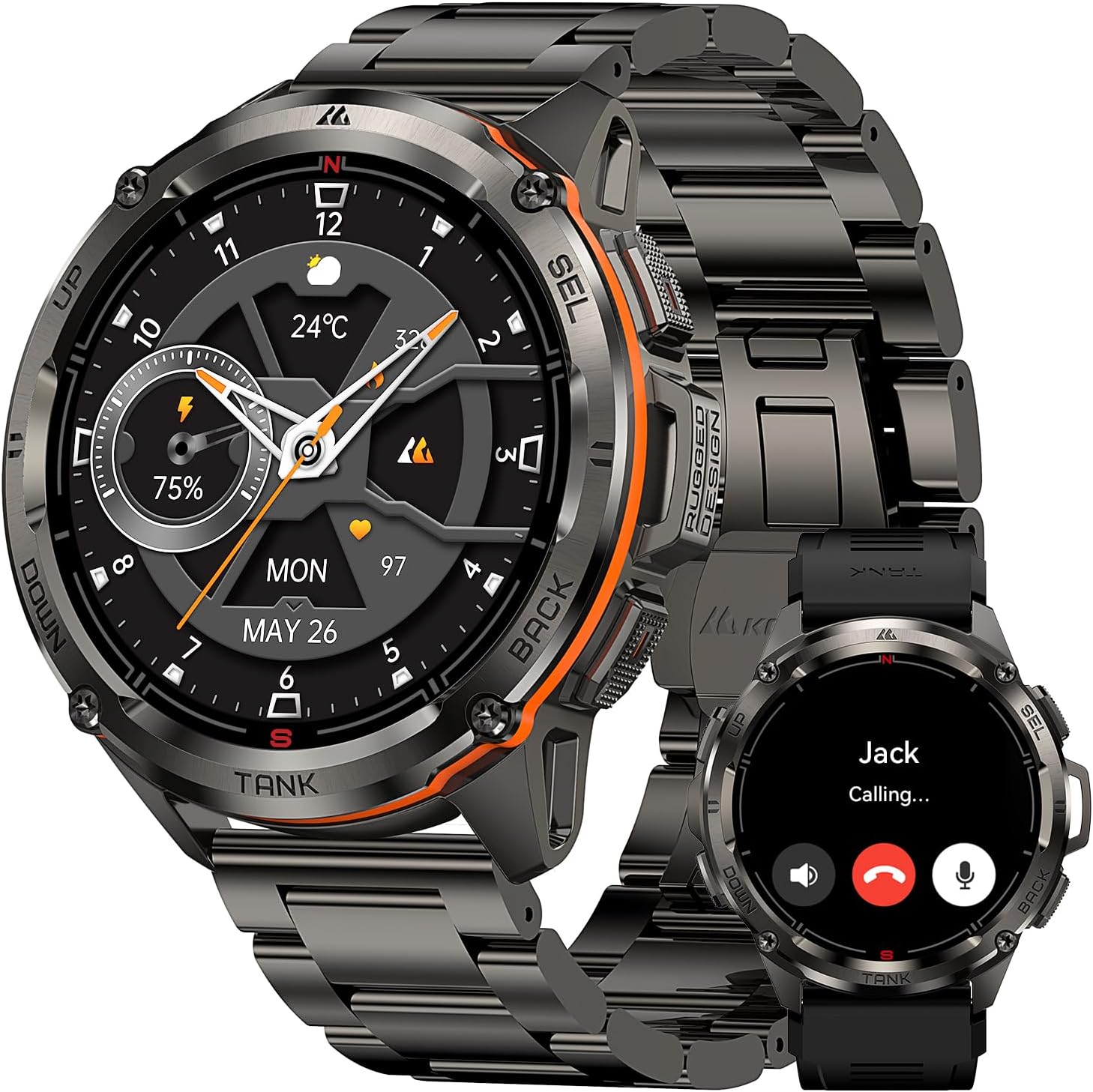
Image: The AMAZTIM T3 Ultra GPS Smart Watch, showcasing its design and a call notification feature.
2. Змесціва ўпакоўкі
Upon opening your AMAZTIM T3 Ultra package, you should find the following items:
- 1 x AMAZTIM T3 Ultra Smart Watch
- 1 x Magnetic Charging Base
- 1 x Stainless Steel Watchband
- 1 x Silicone Watchband
- 1 х Кіраўніцтва карыстальніка
- Tools for watchband adjustment (for metal band)

Image: Contents of the AMAZTIM T3 Ultra package.
3. Настройка
3.1 Зарадка разумнага гадзінніка
Before initial use, fully charge your AMAZTIM T3 Ultra. Connect the magnetic charging base to a USB power source and align the watch with the charging pins until it snaps into place. The watch display will indicate charging status.
3.2 Усталёўка прыкладання
Каб раскрыць увесь патэнцыял вашага разумнага гадзінніка, запампуйце KOSPET FIT дадатак на вашым смартфоне.
- Scan the QR code displayed on the watch screen or in the user manual.
- Alternatively, search for "KOSPET FIT" in the Google Play Store (for Android) or Apple App Store (for iOS).
- Усталюйце праграму на свой смартфон.

Image: Instructions for connecting the smartwatch to your phone via the KOSPET FIT app.
3.3 Спалучэнне прылад
Follow these steps to pair your smartwatch with the KOSPET FIT app:
- Пераканайцеся, што Bluetooth уключаны на вашым смартфоне.
- Open the KOSPET FIT app and create an account or log in.
- Перайдзіце ў раздзел «Прылада» ў дадатку.
- Tap "Add a new device" and select "T3 Ultra" from the list of available devices.
- Пацвердзіце запыт на спалучэнне як на гадзінніку, так і на смартфоне.
- Дайце неабходныя дазволы для апавяшчэнняў і сінхранізацыі дадзеных.
4. Інструкцыя па эксплуатацыі
4.1 Асноўная навігацыя
The AMAZTIM T3 Ultra features a 1.43" AMOLED touchscreen and physical buttons for navigation:
- Сэнсарны экран: Swipe up, down, left, or right to access different menus and features. Tap to select.
- Фізічныя кнопкі: The watch has multiple buttons (Power, Back, Sport, Select) for quick access to functions and navigation, especially useful when wearing gloves or in wet conditions.
4.2 Answering/Making Calls
With its built-in microphone and speaker, the T3 Ultra allows you to answer and make calls directly from your wrist when connected via Bluetooth to your smartphone.
4.3 Апавяшчэнні
Receive social media notifications, text messages, and app alerts directly on your watch. Ensure notification permissions are granted in the KOSPET FIT app and your phone settings.

Image: Steps to enable message and app notifications for iOS.

Image: Steps to enable message and app notifications for Android.
4.4 Маніторынг здароўя
The T3 Ultra provides comprehensive health data:
- Частата сардэчных скарачэнняў: 24-гадзінны бесперапынны маніторынг сардэчнага рытму.
- Кісларод крыві: Вымярэнне ўзроўню кіслароду ў крыві ў рэжыме рэальнага часу.
- Адсочванне сну: Маніторы снуtages (deep, light, REM) and daytime naps.
- Шагомер: Tracks steps taken and calories burned throughout the day.

Image: Personal Health Monitoring Partner features.
4.5 Спартыўныя рэжымы і GPS
The smartwatch supports over 170 sports modes and 6 intelligent sports recognition features. Its built-in dual-band, 6-satellite GPS system ensures fast and accurate positioning for tracking outdoor activities.

Image: Over 170 sports modes supported by the smartwatch.

Image: Trackable Adventures Await with built-in GPS.
4.6 Галасавы памочнік са штучным інтэлектам
Utilize the AI Voice Assistant for hands-free control. Give voice commands to check weather, play music, set alarms, or make calls.

Выява: Функцыянальнасць галасавога памочніка са штучным інтэлектам.
4.7 Compass, Altimeter & Barometric Pressure
For outdoor enthusiasts, the T3 Ultra includes an internal compass, altimeter, and barometric pressure sensors to provide real-time environmental data.

Image: Compass, Altitude, and Air Pressure features.
5. Налада
5.1 Цыферблаты
Personalize your smartwatch with over 500 dazzling watch faces available for download via the KOSPET FIT app, including options for "Always On Display" mode.

Выява: Параметры налады цыферблата гадзінніка.
5.2 Changing Watchbands
The AMAZTIM T3 Ultra comes with both a stainless steel and a silicone watchband. Use the provided tools to easily swap between bands to suit your activity or style.
Відэа: Афіцыйная відэапрэзентацыя прадуктуasing the AMAZTIM T3 Ultra with its stainless steel watchband, highlighting its design and ease of adjustment.
6. Тэхнічнае абслугоўванне
6.1 Гідраізаляцыя
The T3 Ultra is 5ATM waterproof and IP69K rated, allowing immersion in up to 50 meters of water. It is suitable for swimming and diving. Заўвага: Do not wear the smartwatch in a sauna to protect its sealing effectiveness from water vapor.

Image: The smartwatch's 5ATM and IP69K waterproof capabilities during swimming.
6.2 Ачыстка
Regularly clean your smartwatch and bands with a soft, damp тканіна. Пазбягайце рэзкіх хімікатаў, якія могуць пашкодзіць матэрыялы.
7. Выпраўленне непаладак
- Гадзіннік не ўключаецца: Пераканайцеся, што гадзіннік цалкам зараджаны.
- Немагчыма спалучыць з тэлефонам: Check if Bluetooth is enabled on your phone and the watch is within range. Restart both devices and try pairing again.
- Апавяшчэнні не атрыманы: Verify app permissions in KOSPET FIT and your phone's settings. Ensure the app is running in the background.
- Недакладныя дадзеныя пра здароўе: Ensure the watch is worn snugly on your wrist. Avoid excessive movement during measurements.
8. Тэхнічныя характарыстыкі
- мадэль: Т3 Ультра
- Дысплей: 1.43 Inches AMOLED, 1000NIT brightness
- Матэрыял корпуса: Stainless Steel (MIL-STD-810H certified)
- Матэрыял экрана: Corning Gorilla Glass, Mohs hardness up to 9H
- Ёмістасць батарэі: 470mAh літый-палімер
- Тэрмін службы батарэі: Up to 2 weeks (normal use), 40+ days (power saving mode)
- Воданепранікальнасць: 5ATM (50M), IP69K
- пазіцыянаванне: Built-in GPS, Dual-band & 6 Satellite Positioning Systems
- Датчыкі: Compass, Altimeter, Barometric Pressure, Heart Rate, Blood Oxygen
- Падключэнне: Bluetooth
- Сумяшчальнасць: Android 5.1+ / iOS 10.0+
- Спартыўныя рэжымы: 170+
9. Гарантыя і падтрымка
For warranty information and customer support, please refer to the official AMAZTIM website or contact their customer service directly. The user manual included in your package may also contain specific warranty details.