
Уводзіны
Thank you for choosing the BoyKeep Ease Life 1080P Indoor Security Camera, Model K11. This manual provides essential information for setting up, operating, and maintaining your camera to ensure optimal performance and security for your home. This camera features 1080P resolution, 2.4G Wi-Fi connectivity, motion detection, two-way audio, and night vision capabilities.
Што ў скрынцы
- BoyKeep Ease Life 1080P Indoor Security Camera (Model K11)
- Адаптар сілкавання
- Кіраўніцтва па эксплуатацыі
Кіраўніцтва па ўстаноўцы
1. Уключэнне
Connect the camera to the power adapter and plug it into a power outlet. The camera will initiate a self-calibration sequence.
Апісанне відэа: This video demonstrates the unboxing and initial power-on process of the BoyKeep K11 camera. It shows connecting the power cable and the camera performing its self-calibration, rotating to scan its environment.
2. Загрузка і ўстаноўка праграмы
Download the 'BoyKeep' app from the App Store (iOS) or Google Play Store (Android). Scan the QR code provided in the user manual or search directly for 'BoyKeep'.

Апісанне малюнка: A visual guide showing four steps to connect the camera: 1. Download the app, 2. Press and hold the reset button, 3. Scan the QR code, 4. Connect successfully.
3. Спалучэнне прылады
- Open the BoyKeep app and register an account if you haven't already.
- Select 'Add Device' and choose the K11 model (Lightbulb Cam).
- Follow the in-app instructions to connect to your 2.4G Wi-Fi network. Ensure your Wi-Fi password is correct.
- The app will generate a QR code. Present this QR code to the camera lens (4 to 12 inches away) until you hear a 'beep-beep' sound, indicating successful pairing.
4. Варыянты мантажу
The camera can be placed on a flat surface or mounted on a wall or ceiling. Ensure the camera is positioned to cover the desired surveillance area. For outdoor use, place the camera in a sheltered area to protect it from direct weather exposure.
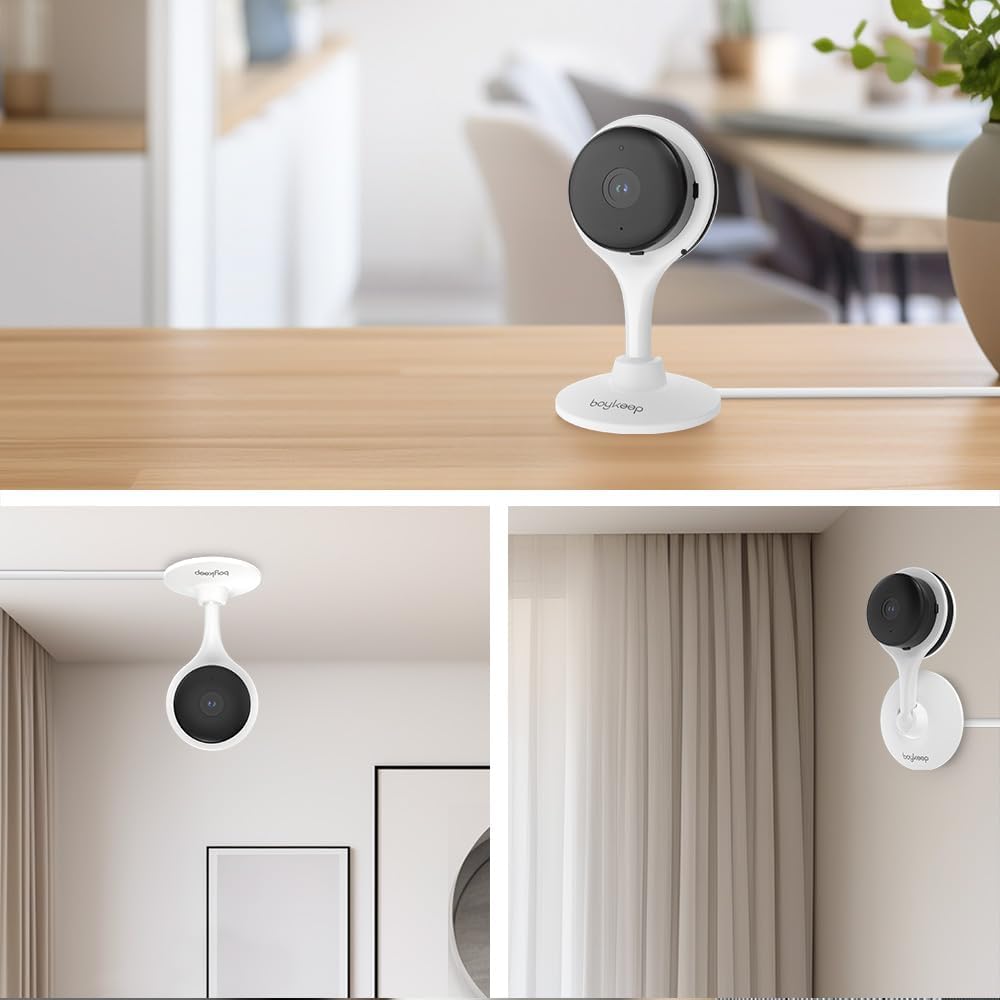
Апісанне малюнка: This image displays various mounting options for the BoyKeep K11 camera, including tabletop, ceiling, and wall mounting, demonstrating its versatile placement.

Апісанне малюнка: A notice illustrating the importance of sheltered operation for the camera. It shows correct placement under an eave and incorrect placement directly exposed to rain, emphasizing durability and performance.
Інструкцыя па эксплуатацыі
1. Жыць View і кіраванне PTZ
Once connected, access the live feed through the BoyKeep app. Use the on-screen controls to pan (355° horizontal) and tilt (60° vertical) the camera for a comprehensive view of your space. Digital zoom is also available.

Апісанне малюнка: An illustration showing the 360-degree pan and tilt capabilities of the camera, providing all-round coverage without blind spots.
2. Двухбаковая аўдыёсувязь
The camera features a built-in microphone and speaker, allowing for two-way communication. Tap the microphone icon in the app to speak through the camera, and listen to audio from the camera's surroundings.

Апісанне малюнка: A visual representation of the two-way audio feature, showing a dog saying "Woof Woof!" and a person responding "Baby, miss you!" through the camera.

Апісанне малюнка: This image highlights the clear communication of the two-way audio, showing a child and a dog interacting with a parent's voice message, "It's time to go home."
3. Выяўленне і адсочванне руху
Enable motion detection in the app settings to receive real-time alerts on your smartphone when movement is detected. The camera can also automatically track detected motion.

Апісанне малюнка: An image demonstrating the motion tracking feature, with a dog running in a yard and yellow boxes highlighting its movement as the camera follows.
4. Начное бачанне
The K11 camera offers both clear night vision (black and white) and color night vision, ensuring visibility even in low-light conditions. The light can be activated manually via the app.

Апісанне малюнка: A scene of an outdoor patio at night, illuminated by string lights, showcasing the camera's color night vision capability.

Апісанне малюнка: A black and white image of a dog looking at food on a table, demonstrating the camera's clear night vision in monochrome.
5. Запіс і захоўванне
The camera supports local storage via a MicroSD card (not included) for continuous recording or event-triggered recordings. Cloud storage options are also available through a subscription service.

Апісанне малюнка: This image illustrates the recording capabilities of the camera, showing options for cloud storage and memory card storage, with a filmstrip overlay of recorded moments.
Тэхнічнае абслугоўванне
- Уборка: Выкарыстоўвайце мяккую сухую тканіну для чысткі аб'ектыва і корпуса камеры. Пазбягайце выкарыстання агрэсіўных хімічных рэчываў або абразіўных ачышчальнікаў.
- Абнаўленні праграмнага забеспячэння: Regularly check the BoyKeep app for firmware updates to ensure your camera has the latest features and security enhancements.
- Цыкл харчавання: Калі ў камеры ўзніклі праблемы, паспрабуйце адключыць яе ад крыніцы харчавання на 10 секунд, а затым зноў падключыць.
Ліквідацыю непаладак
- Камера не падключаецца да Wi-Fi: Ensure your Wi-Fi network is 2.4G (the camera supports 5G, but some users report better stability on 2.4G). Verify the Wi-Fi password is correct. Try resetting the camera by holding the reset button for 30 seconds.
- Няма ў прамым эфіры view: Check your internet connection and ensure the camera is powered on. Restart the app.
- Папярэджанні аб руху не атрыманы: Verify motion detection is enabled in the app settings and that app notifications are allowed on your phone.
- Дрэнная якасць відэа: Ensure your Wi-Fi signal is strong. Adjust video resolution settings in the app if necessary.
Тэхнічныя характарыстыкі
| Асаблівасць | Дэталь |
|---|---|
| Назва мадэлі | К11 |
| Марка | BoyKeep |
| Дазвол відэазахопу | 2K (3 МП) |
| Тэхналогія падлучэння | Бесправадная сувязь (Wi-Fi) |
| Пратакол злучэння | Wi-Fi (2.4G) |
| Асаблівасць | 2-Way Audio, Motion Detection, Night Vision |
| Выкарыстанне ў памяшканні/на вуліцы | Indoor (Outdoor with shelter) |
| Сумяшчальныя прылады | Планшэт, смартфон |
| Крыніца харчавання | Правадная электрычная |
| Тып мацавання | Насценнае мацаванне |
| Формаў-фактар | Купал |
| Памеры прадмета Д х Ш х У | 5 х 3.2 х 2.7 цалі |
| Вага прадмета | 8.1 унцыі |
| Міжнародны рэйтынг абароны | IP65 |
Інфармацыя аб гарантыі
Please refer to the product packaging or contact BoyKeep customer support for detailed warranty information. Typically, products come with a limited manufacturer's warranty covering defects in materials and workmanship.
Падтрымка кліентаў
For any questions, technical assistance, or support needs, please contact BoyKeep customer service. Contact details can usually be found in the included instruction manual or on the official BoyKeep webсайт.
Апісанне відэа: Гэта відэа коратка апісваеview of the BoyKeep 3MP Bulb Security Camera, highlighting its features and ease of use. It serves as a general product introduction from the seller.