
1. Уводзіны
Thank you for choosing the Pulido F199B Smart Fingerprint Door Knob Lock. This device provides enhanced security and convenience with multiple unlocking methods. This manual will guide you through the installation, operation, and maintenance of your new smart lock.
The Pulido F199B offers four distinct unlocking modes: fingerprint, access code, IC card, and traditional physical key. It is designed for local data storage, ensuring your information remains secure without cloud dependency.
2. Інфармацыя па бяспецы
- Перад устаноўкай і выкарыстаннем уважліва прачытайце ўсе інструкцыі.
- Do not attempt to disassemble or repair the lock yourself. Contact customer support for assistance.
- Use only specified battery types. Incorrect battery usage may lead to damage or malfunction.
- Keep physical keys in a secure location outside the property to prevent lockout in case of electronic failure.
- Avoid exposing the lock to extreme temperatures or direct moisture.
3. Прадукт скончыўсяview
The Pulido F199B is a versatile smart door knob designed for various applications, including homes, studios, and offices. It features a sleek design and robust construction.

Image: The Pulido F199B Smart Fingerprint Door Knob Lock, showcasing its modern design, integrated keypad, fingerprint sensor, and accompanying IC cards and physical keys.
Асноўныя характарыстыкі:
- 4-in-1 Unlocking Modes: Fingerprint, Access Code, IC Card, and Physical Key.
- Лакальнае сховішча дадзеных: Stores up to 100 access codes and 100 fingerprints securely on the device.
- Enhanced Fingerprint Sensor: Larger, high-precision sensor with 99% recognition rate and 0.5-second unlock speed.
- Універсальная ўстаноўка: Compatible with both left-handed and right-handed doors without modification.
- Аварыйнае харчаванне: Micro USB interface for temporary power supply if batteries deplete.
- Рэжым праходжання: Allows temporary unrestricted access.

Image: A detailed diagram highlighting the key components of the Pulido F199B Smart Lock, including the mechanical keyhole, IC card reader, fingerprint sensor, Micro USB interface, passage mode setting button, and reset button.
4. Настройка і ўстаноўка
The Pulido F199B is designed for straightforward installation, typically requiring no modification to existing door holes. Ensure you have the necessary tools (screwdriver, measuring tape) before beginning.
Этапы ўстаноўкі:
- Падрыхтуйце дзверы: Ensure your door has standard boreholes for a door knob.
- Усталюйце зашчапку: Insert the latch mechanism into the door edge and secure it with screws.
- Усталюйце знешнюю зборку: Place the exterior handle assembly through the door, ensuring the spindle aligns with the latch.
- Усталяваць унутраную зборку: Connect the interior handle assembly to the exterior assembly, ensuring all wires are properly routed and not pinched. Secure with mounting screws.
- Устаўце батарэі: Open the battery cover on the interior assembly and insert the required batteries (typically 4 AAA batteries, not included).
- Тэставая аперацыя: After installation, test the mechanical operation of the handle and the electronic functions.

Image: A visual comparison illustrating how the Pulido F199B Smart Lock replaces a general mechanical lock, highlighting its modern design and ease of upgrade.
5. Інструкцыя па эксплуатацыі
The Pulido F199B offers multiple ways to secure and access your space.
Unlocking Modes:
- Разблакіроўка адбіткам пальца: Пакладзеце зарэгістраваны палец на датчык адбіткаў пальцаў. Замок разблакуецца, калі адбітак пальца будзе распазнаны.
- Access Code Unlock: Enter your registered access code on the keypad, followed by the '#' key.
- Разблакіроўка IC-карты: Паднясіце зарэгістраваную IC-карту да адведзенай зоны датчыка на замку.
- Разблакіроўка фізічным ключом: In case of electronic failure or dead batteries, use the provided physical key to unlock the door.
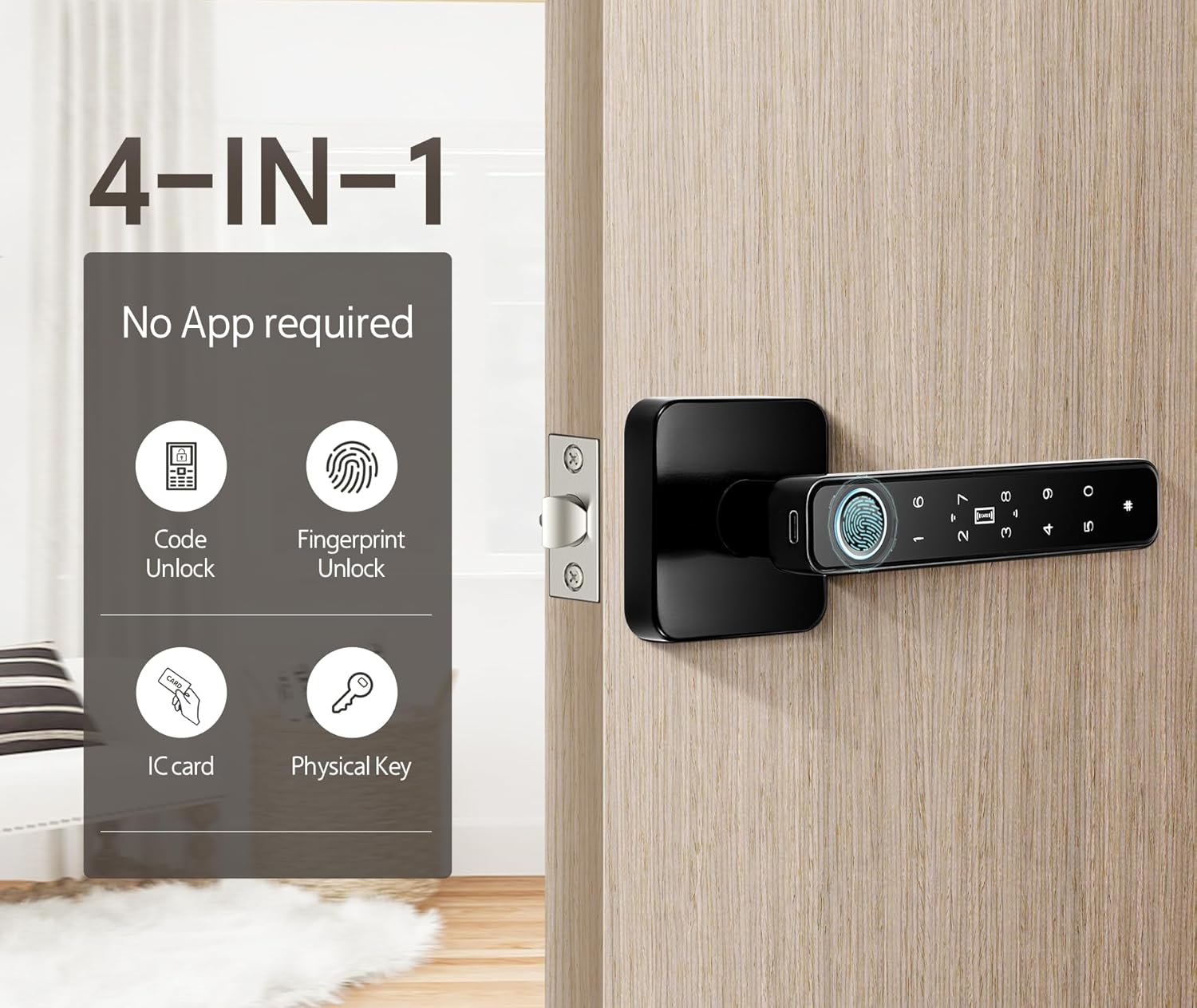
Image: The Pulido F199B Smart Lock illustrating its four unlocking methods: Code Unlock, Fingerprint Unlock, IC Card, and Physical Key.
Programming Fingerprints and Codes:
Refer to the detailed programming instructions included in the packaging for adding and deleting user fingerprints and access codes. This process is typically initiated by pressing a programming button on the interior side of the lock.
Рэжым праходжання:
To enable Passage Mode, press and hold the Passage Mode setting button (usually located on the interior handle) for 1 second. This allows the door to be opened without requiring a fingerprint or code. Press again for 1 second to disable Passage Mode.

Image: The Pulido F199B Smart Lock demonstrating Passage Mode, where the lock remains unlocked for convenient access.
Экстраная разблакіроўка:
If the batteries are completely depleted, the lock can be temporarily powered via the Micro USB interface located on the exterior handle. Connect a power bank or USB charger to provide temporary power for unlocking. Alternatively, use the physical backup key.

Image: The Pulido F199B Smart Lock showing emergency unlock options, including USB charging capability and the physical backup keyhole.
Відэадэманстрацыя:
Video: A brief demonstration of the Pulido F199B Smart Door Lock in use, showcasing the fingerprint unlocking function.
6. Тэхнічнае абслугоўванне
- Замена батарэі: Replace batteries when the low battery indicator appears or when the lock's response time slows. Use 4 AAA batteries.
- Уборка: Wipe the lock's surface with a soft, dry cloth. Avoid abrasive cleaners or solvents that could damage the finish or electronic components.
- Сыход за датчыкам адбіткаў пальцаў: Keep the fingerprint sensor clean and dry for optimal performance.
7. Выпраўленне непаладак
- Замак не рэагуе: Check battery levels. If batteries are dead, use the Micro USB emergency power or physical key.
- Адбітак пальца не распазнаны: Ensure your finger is clean and dry. Try re-registering your fingerprint. Remove any protective plastic film from the sensor.
- Access code not working: Verify the code is entered correctly, followed by the '#' key. Ensure the code is still active.
- ІЧ-карта не працуе: Ensure the card is properly registered and presented to the correct sensor area.
- Lock beeps continuously: This may indicate low battery. Replace batteries immediately.
Каб атрымаць дадатковую дапамогу, звярніцеся да кантактнай інфармацыі ў раздзеле «Падтрымка».
8. Тэхнічныя характарыстыкі
| Марка | Pulido |
| Нумар мадэлі | F199B |
| Метады разблакоўкі | Fingerprint, Access Code, IC Card, Physical Key |
| Хуткасць распазнавання адбіткаў пальцаў | 99% |
| Разблакіраваць хуткасць | 0.5 секунд |
| Ёмістасць карыстальніка | Up to 100 Fingerprints, 100 Access Codes |
| Электразабеспячэнне | 4 х ААА батарэі (не ўключаны) |
| Аварыйнае харчаванне | Micro USB |
| Матэрыял | Нержавеючая сталь |
| Памеры прадукту | 5.7"Д х 2.7"Ш |
| Вага прадмета | 1.64 фунта (0.75 кілаграма) |
9. Гарантыя і падтрымка
Pulido products are manufactured with quality and reliability in mind. For specific warranty details, please refer to the warranty card included with your product.
If you encounter any issues during use or installation, please contact our customer support team. We aim to reply within 8-12 hours.
Падтрымка кліентаў: Please refer to the contact information provided in your product packaging or visit the official Pulido webсайт для варыянтаў падтрымкі.