
SANPTENT B0CSFSRW39
SANPTENT Portable 9-inch FHD Touch Screen Car Stereo User Manual
Model: B0CSFSRW39
1. Прадукт скончыўсяview
The SANPTENT Portable 9-inch FHD Touch Screen Car Stereo is designed to enhance your in-car entertainment and navigation experience. It features wireless Apple CarPlay and Android Auto, Mirror Link functionality, Bluetooth connectivity, an FM transmitter, and support for a rear camera. This manual provides instructions for proper installation, operation, and maintenance.

Выява 1.1: Канецview of the SANPTENT Portable Car Stereo, showing the 9-inch display, included backup camera, and wireless connectivity options for Android Auto and Apple CarPlay.
2. Змесціва ўпакоўкі
Перад тым, як працягнуць усталёўку, пераканайцеся, што ўсе элементы ёсць у камплекце.
- 1 x 9-Inch Portable Car Stereo
- 1 x Waterproof AHD Rear Camera with 26.2ft cable
- 1 x 4.65ft Aux cable
- 1 x 4.92ft Car Charger Cable
- 1 х настольны кранштэйн

Image 2.1: Visual representation of the package contents, including the main unit, cables, and rear camera.
3. Настройка і ўстаноўка
3.1 Мантаж дысплея
The portable car stereo can be mounted on your dashboard using the provided desktop bracket. Ensure the mounting location does not obstruct your view або перашкаджаць кіраванню аўтамабілем.
- Attach the display unit to the desktop bracket.
- Clean the desired mounting surface on your dashboard thoroughly.
- Apply the provided gel sticker to the base of the desktop bracket.
- Securely press the bracket onto the cleaned dashboard surface. The gel sticker allows for secure attachment without drilling.

Image 3.1: The portable car stereo mounted on a dashboard, demonstrating its placement and integration with the car's interior.
3.2 Падключэнне харчавання
Connect the car charger cable to the portable stereo and plug the other end into your vehicle's 12V power outlet (cigarette lighter socket).
3.3 Падключэнне аўдыявыхаду
There are three primary methods to output audio from the portable stereo to your car's audio system:
- FM-перадатчык: Tune the portable stereo's FM transmitter to an unused FM frequency, then tune your car's radio to the same frequency.
- Кабель AUX: Connect the provided 4.65ft AUX cable from the portable stereo's AUX output to your car's AUX input.
- Убудаваны дынамік: The unit has a local 4Ω 3W speaker for direct audio output.

Image 3.2: Illustration of the three audio output methods: FM transmission, AUX connection, and the unit's internal speaker.
3.4 Устаноўка задняй камеры
The included waterproof AHD rear camera provides a 170° viewing angle and supports HD color night vision. Professional installation is recommended for optimal performance.
- Усталюйце заднюю камеру ззаду вашага аўтамабіля, забяспечыўшы выразны view.
- Route the 26.2ft camera cable from the rear of the vehicle to the portable stereo unit.
- Connect the camera cable to the "Rear Camera In" port on the portable stereo.
- Connect the camera's power cable to your vehicle's reverse light circuit so it activates automatically when shifting into reverse.

Image 3.3: Details of the backup camera, highlighting its waterproof design, wide-angle lens, night vision, and 1080P resolution.
4. Інструкцыя па эксплуатацыі
4.1 Уключэнне/выключэнне
- Уключэнне: The unit will power on automatically when connected to the car's power supply and the vehicle is started.
- Выключэнне: Disconnect the car charger cable or turn off your vehicle's ignition.
4.2 Wireless Apple CarPlay / Android Auto
This unit supports wireless connectivity for both Apple CarPlay and Android Auto, providing access to your phone's features on the 9-inch display.
- Пераканайцеся, што Bluetooth уключаны на вашым смартфоне.
- On the portable stereo, navigate to the CarPlay or Android Auto interface.
- On your phone, search for and connect to the portable stereo's Bluetooth device name.
- Follow any on-screen prompts on both your phone and the stereo to complete the pairing process.
- Once connected, your phone's CarPlay or Android Auto interface will appear on the stereo display.

Image 4.1: Step-by-step guide for wirelessly connecting an iPhone to Apple CarPlay on the SANPTENT stereo.

Image 4.2: Step-by-step guide for wirelessly connecting an Android phone to Android Auto on the SANPTENT stereo.
4.3 Функцыянальнасць люстранога спасылкі
Mirror Link allows you to display your smartphone's screen directly onto the portable stereo. This feature is useful for viewing content not natively supported by CarPlay or Android Auto, such as certain video streaming applications.
- Connect your iPhone and the portable stereo to the same Wi-Fi network.
- On your iPhone, access the Control Center and select "Screen Mirroring."
- Choose the portable stereo from the list of available devices (often labeled "SmartScreen").
- Your iPhone's screen will now be mirrored on the stereo display.
- For Android devices, connect via USB cable and follow on-screen prompts for screen mirroring.
Заўвага: This unit does not support Netflix via Mirror Link.

Image 4.3: Demonstration of Mirror Link, showing a smartphone screen duplicated on the car stereo display.
4.4 Галасавое кіраванне (Siri/Google Assistant)
Utilize voice commands for hands-free operation through Siri (for Apple CarPlay) or Google Assistant (for Android Auto). The built-in microphone ensures clear voice input.
- Activate Siri or Google Assistant by saying "Hey Siri" or "Hey Google," or by pressing the voice command button on the screen.
- Issue commands such as "Play music," "Get directions to [destination]," "Send message to [contact]," or "Make a phone call."
4.5 Backup Camera Operation
When the rear camera is properly installed and connected to your vehicle's reverse light circuit, the display will automatically switch to the camera view when you shift into reverse gear. This provides a visual aid for parking and reversing maneuvers.
Важна: The backup camera is an auxiliary reversing aid and does not record video. Always check your surroundings manually before and during reversing.
4.6 Налады дысплея
The 9-inch HD touchscreen offers various display adjustments for optimal viewінж.
- Яркасць: Adjust screen brightness through the settings menu to suit ambient light conditions.
- Дзень / Начны рэжым: The unit may automatically switch between day and night display modes or allow manual selection for improved visibility.
- дазвол: The screen supports 1080P video playback for a clear viewвопыту.

Image 4.4: Comparison of 1080P Full HD display quality versus 720P, highlighting the clarity of the SANPTENT unit's screen.
5. Тэхнічнае абслугоўванне
To ensure the longevity and optimal performance of your SANPTENT Portable Car Stereo, follow these maintenance guidelines:
- Ачыстка экрана: Выкарыстоўвайце мяккую тканіну без ворса, каб акуратна працерці сэнсарны экран. Для выдалення ўстойлівых плям злёгкуampПрацярыце тканіну вадой або сродкам для ачысткі экрана. Пазбягайце агрэсіўных хімічных рэчываў або абразіўных матэрыялаў.
- Кабельнае кіраванне: Пераканайцеся, што ўсе кабелі акуратна пракладзены і замацаваны, каб пазбегнуць пашкоджанняў ад заціскання або празмернага выгібу.
- Тэмпературнае ўздзеянне: Avoid exposing the unit to extreme temperatures for prolonged periods. While designed for automotive use, extreme heat or cold can affect performance and lifespan.
- Абнаўленні праграмнага забеспячэння: Праверце вытворцы website periodically for any available firmware updates to ensure the best performance and compatibility.
6. Выпраўленне непаладак
If you encounter issues with your portable car stereo, refer to the following common troubleshooting steps:
- Няма харчавання:
- Ensure the car charger cable is securely plugged into both the unit and the vehicle's 12V power outlet.
- Check if the vehicle's 12V power outlet is functioning (e.g., by plugging in another device).
- Verify the vehicle's fuse for the 12V power outlet is not blown.
- Няма аўдыявыхаду:
- FM-перадатчык: Confirm the stereo's FM frequency matches your car radio's frequency and that the chosen frequency is clear of other broadcasts.
- Кабель AUX: Ensure the AUX cable is fully inserted into both the portable stereo and your car's AUX input. Select the correct AUX input source on your car's audio system.
- Bluetooth: Verify your phone is connected via Bluetooth and the volume on both the phone and the stereo is turned up.
- Check the volume settings on the portable stereo itself.
- CarPlay/Android Auto не падключаецца:
- Ensure Bluetooth is enabled on your phone and the stereo.
- Выдаліце прыладу з налад Bluetooth тэлефона і зноў падключыце яе.
- Restart both your phone and the portable stereo.
- Confirm your phone's operating system is up to date and supports CarPlay/Android Auto.
- Touchscreen Unresponsive or Slow:
- Restart the unit by disconnecting and reconnecting the power.
- Пераканайцеся, што экран чысты і без смецця.
- Не адлюстроўваецца камера задняга віду:
- Check all camera cable connections, ensuring they are secure.
- Verify the camera's power connection to the reverse light circuit is correct.
- Ensure the vehicle is in reverse gear.
Калі гэтыя дзеянні не вырашаць праблему, звярніцеся ў службу падтрымкі кліентаў.
7. Тэхнічныя характарыстыкі
| Асаблівасць | Дэталь |
|---|---|
| Памеры прадукту | 10 х 4 х 6 цалі |
| Вага прадмета | 2 фунта |
| ASIN | B0CSFSRW39 |
| Тэхналогіі падключэння | Дапаможны, Bluetooth |
| Асаблівасці | Built-In Microphone, Reverse Assist, Siri/Google Assistant Voice Control, Touch Screen, Wireless & Wired Apple CarPlay Android Auto |
| Іншыя функцыі дысплея | Бесправадная сувязь |
| Колер | Чорны |
| Вытворца | САНПЦЭНТ |
| Тып абслугоўвання аўтамабіля | Аўтамабіль, Грузавік |
| Video Capture Resolution (Camera) | 1080p |
| Тып мацавання | Мацаванне прыборнай панэлі |
| Поле View (Камера) | 175 градусаў |
| Метад кантролю | Дакранацца |
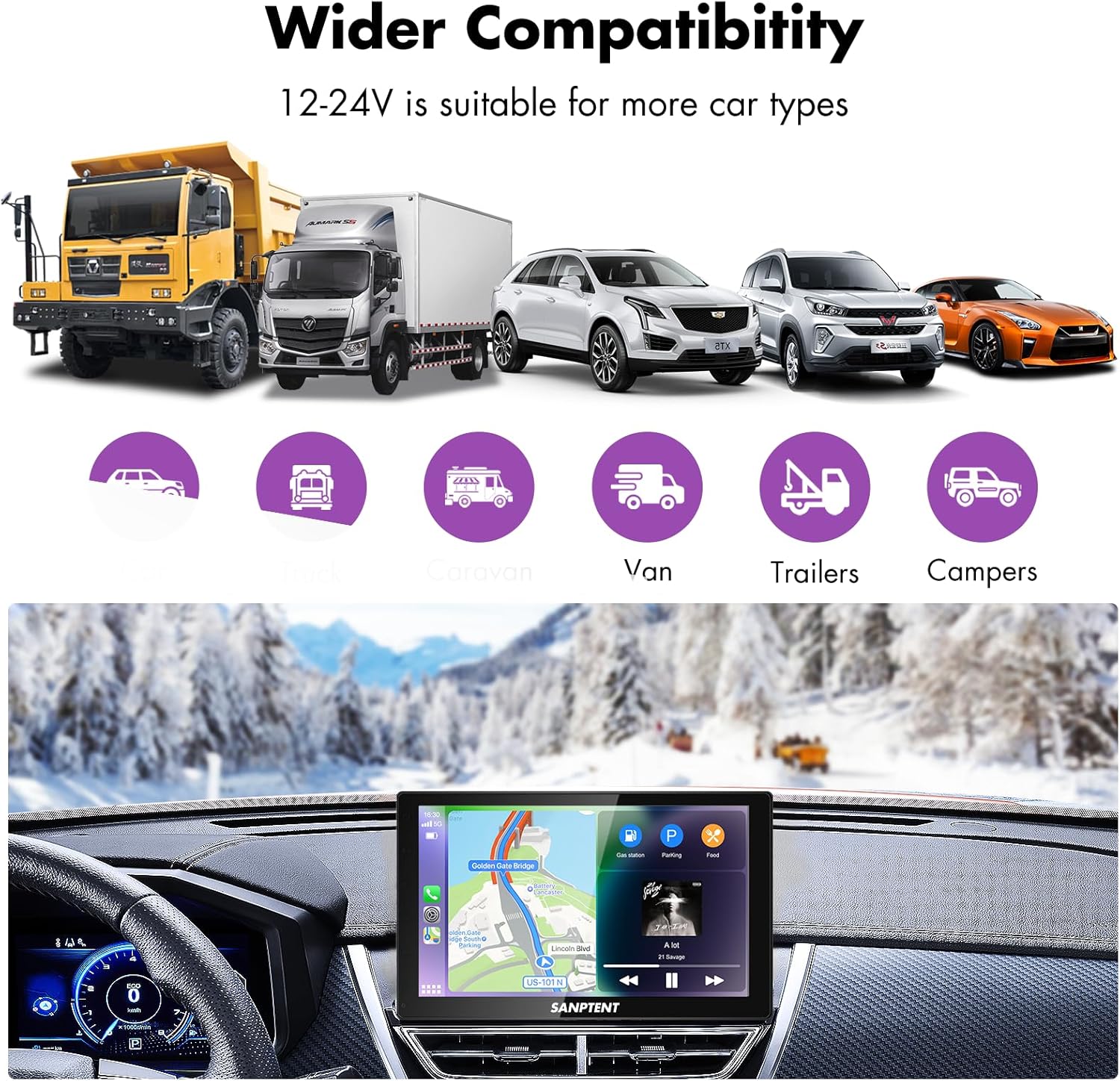
Image 7.1: The portable car stereo is compatible with 12-24V power systems, suitable for various vehicle types including cars, trucks, caravans, vans, trailers, and campERS.
8. Гарантыя і падтрымка
8.1 Абмежаваная гарантыя
SANPTENT products are covered by a limited warranty against defects in materials and workmanship from the date of purchase. Please refer to the warranty card included in your package or visit the official SANPTENT webпадрабязныя ўмовы гарантыі глядзіце на сайце. Захоўвайце пацвярджэнне пакупкі для прэтэнзій па гарантыі.
8.2 Падтрымка кліентаў
For technical assistance, troubleshooting, or warranty inquiries, please contact SANPTENT customer support. Contact information can typically be found on the product packaging, the official SANPTENT webсайце або праз вашага прадаўца.