
DEPSTECH DS520, WF028
DEPSTECH DS520 Triple Lens Sewer Camera & WF028 Wireless Endoscope User Manual
Models: DS520, WF028 | Brand: DEPSTECH
1. Уводзіны
This manual provides detailed instructions for the safe and effective operation of your DEPSTECH DS520 Triple Lens Sewer Camera and WF028 Wireless Endoscope. Please read this manual thoroughly before use and retain it for future reference.
2. Інфармацыя па бяспецы
- Не спрабуйце разабраць або мадыфікаваць прыладу.
- Keep the device away from extreme temperatures, corrosive liquids, and strong magnetic fields.
- Ensure the camera probe is clean before and after each use to maintain image clarity.
- The camera probe is IP67 waterproof; however, the main display unit is not. Avoid exposing the display unit to water.
- Use only the provided charging cable to prevent damage to the battery.
3. Змесціва ўпакоўкі
DS520 Triple Lens Sewer Camera
- DS520 Display Unit (5-inch IPS screen)
- Triple Lens Semi-Rigid Cable (50ft)
- Зарадны кабель USB-C
- Кіраўніцтва карыстальніка
- Accessories (e.g., hook, magnet, side mirror)
WF028 Wireless Endoscope
- Бесправадны модуль WF028
- Dual Lens Semi-Rigid Snake Cable (16.5ft)
- Зарадны кабель USB-C
- Кіраўніцтва карыстальніка
- Accessories (e.g., hook, magnet, side mirror)
4. Прадукт скончыўсяview
4.1 DS520 Triple Lens Sewer Camera

Figure 1: DS520 Display Unit and Cable
The DS520 features a 5-inch IPS screen for real-time viewing. It includes intuitive controls for navigation, image/video capture, and light adjustment. The triple-lens camera head is attached to a 50ft semi-rigid cable for extended reach.

Figure 2: DS520 Triple Lens Configuration
The triple-lens design provides direct front (Cam A) and two side views (Cam B and C). Focal ranges are 1.2-3.9in for Cam A, 0.8-2.4in for Cam B, and 0.6-0.9in for Cam C.
4.2 WF028 Wireless Endoscope
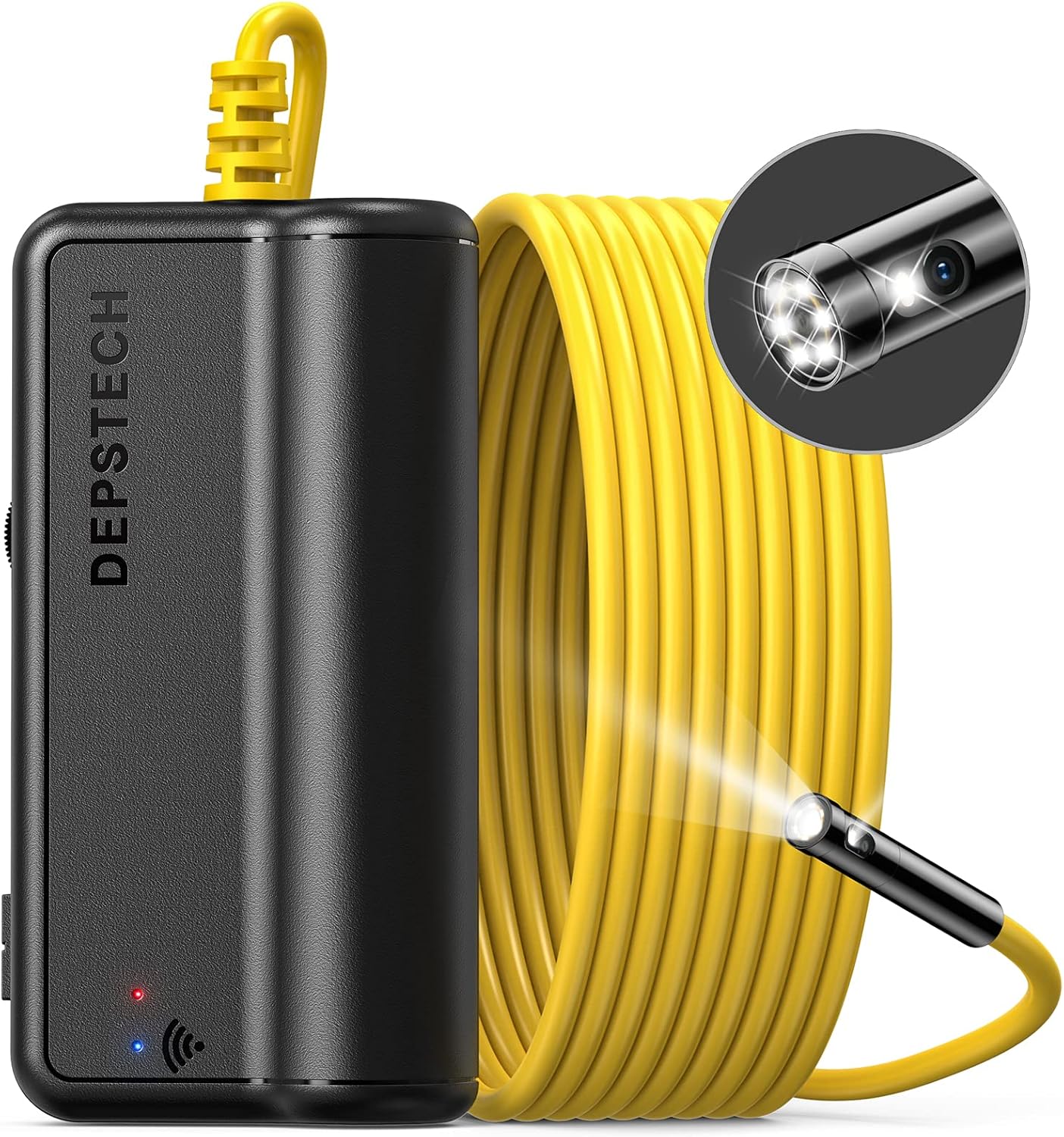
Figure 3: WF028 Wireless Module and Cable
The WF028 is a wireless dual-lens endoscope that connects to your smartphone or tablet via Wi-Fi. It features a 16.5ft semi-rigid snake cable with a 7.9mm probe lens. The dual lenses offer a 70° view in front and to the side.
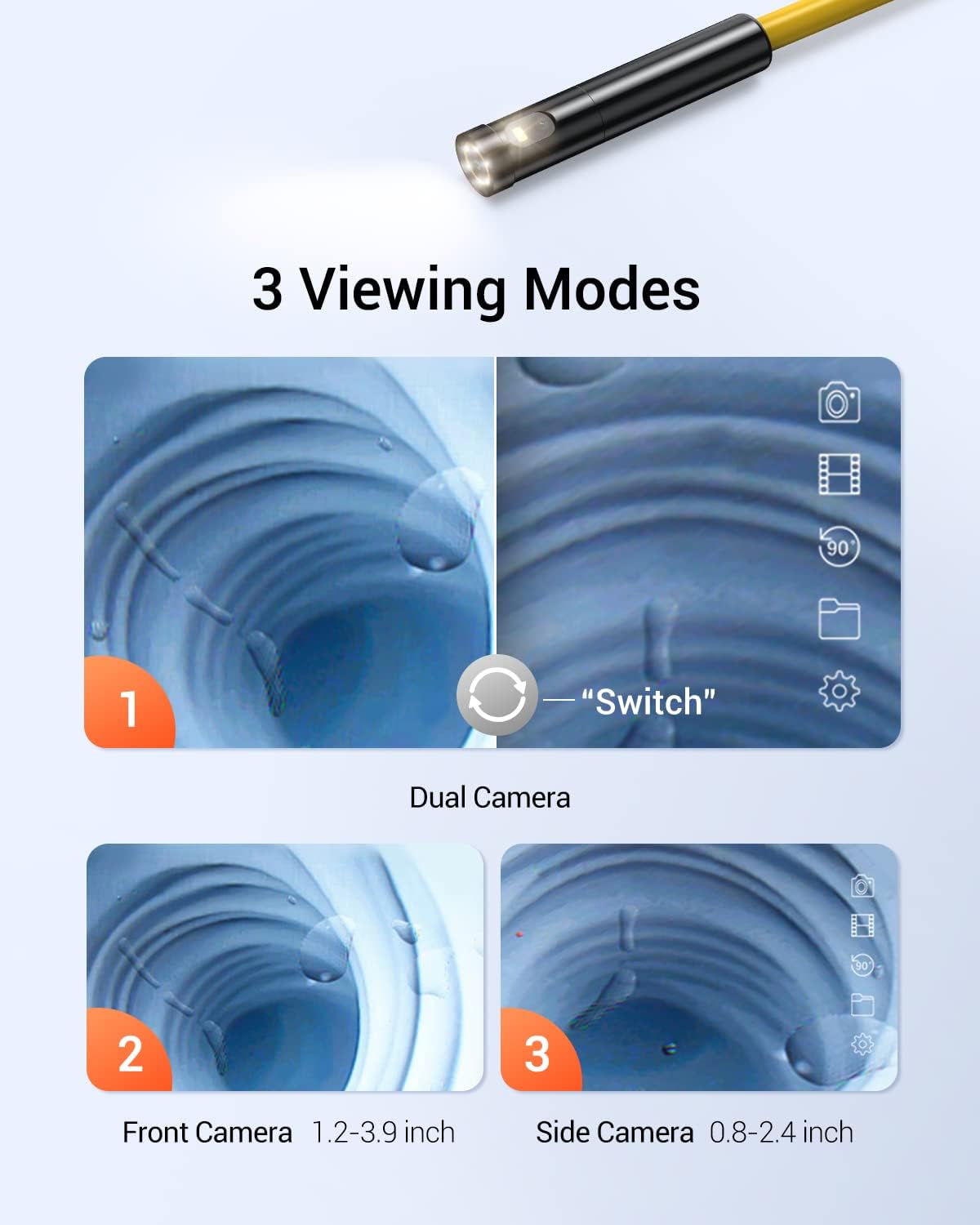
Figure 4: WF028 Dual Lens Viewрэжымы
The WF028 supports multiple viewing modes, including single front camera, single side camera, and split-screen views. Focal ranges are 3-8cm for the front camera and 2-6cm for the side camera.
5. Настройка
5.1 DS520 Setup
- Зарадзіць прыладу: Connect the USB-C charging cable to the DS520 display unit and a power source. The battery indicator will show charging status.
- Далучыце кабель: Securely connect the triple-lens semi-rigid cable to the designated port on the DS520 display unit.
- Уключэнне: Press and hold the power button on the display unit until the screen illuminates.
5.2 WF028 Setup
- Зарадзіць прыладу: Connect the USB-C charging cable to the WF028 wireless module and a power source.
- Далучыце кабель: Securely connect the dual-lens snake cable to the WF028 wireless module.
- Уключэнне: Press and hold the power button on the wireless module until the indicator light turns on.
- Падключыцеся да Wi-Fi: On your smartphone or tablet, go to Wi-Fi settings and connect to the WF028's Wi-Fi network (SSID usually starts with 'DEPSTECH').
- Запусціць праграму: Open the DEPSTECH app (downloaded from your device's app store) to view жывы канал.
6. Інструкцыя па эксплуатацыі
6.1 DS520 Operation
- Адрэгулюйце святлодыёдныя ліхтары: Use the dedicated buttons on the display unit to increase or decrease the brightness of the 7 LED lights on the camera head.
- Змена ViewРэжымы працы: Press the 180° flip button to cycle through five viewing modes (front camera, side camera B, side camera C, split screen views).
- Image/Video Capture: Press the photo/video button once to take a still image. Press and hold to start/stop video recording.
- Паварот выявы на 180°: Use the rotation button to flip the image 180° for correct orientation.
- Навігацыя: Use the directional buttons to navigate menus and review захопленыя медыя.
6.2 WF028 Operation
- Адрэгулюйце святлодыёдныя ліхтары: Control the brightness of the LED lights via the DEPSTECH app interface.
- Змена ViewРэжымы працы: Switch between dual lenses and split-screen views directly within the DEPSTECH app.
- Image/Video Capture: Use the dedicated buttons within the DEPSTECH app to capture photos or record videos.
7. Тэхнічнае абслугоўванне
- Уборка: After each use, gently wipe the camera lens and cable with a soft, dry cloth. For stubborn dirt, use a slightly damp тканінай, а затым старанна высушыце.
- захоўванне: Store both units and their cables in a cool, dry place, preferably in their original carrying cases, away from direct sunlight.
- Сыход за батарэяй: For optimal battery life, charge the devices regularly, even if not in frequent use. Avoid fully discharging the battery for extended periods.
8. Выпраўленне непаладак
- No Image on Screen (DS520): Ensure the camera cable is securely connected and the device is powered on. Check battery level.
- No Image on App (WF028): Verify Wi-Fi connection to the WF028 module. Ensure the module is powered on and the DEPSTECH app is open.
- Дрэнная якасць выявы: Clean the camera lens. Adjust LED brightness. Ensure the camera is within the optimal focal range.
- Прылада не зараджаецца: Check the USB-C cable and power adapter. Ensure connections are secure.
9. Тэхнічныя характарыстыкі
9.1 DS520 Triple Lens Sewer Camera
| Асаблівасць | Спецыфікацыя |
|---|---|
| Дысплей | 5-цалевы экран IPS |
| Аб'ектывы фотаапаратаў | Triple Lens (Front, Side B, Side C) |
| Даўжыня кабеля | 50ft Semi-Rigid |
| дазвол | 1080P |
| Святлодыёдныя ліхтары | 7 рэгуляваных святлодыёдаў |
| Рэйтынг воданепранікальнасці | IP67 (толькі зонд) |
| Viewрэжымы | Five (including Split Screen) |
| Focal Range (Front) | 1.2-3.9 цаляў |
| Focal Range (Side B) | 0.8-2.4 цаляў |
| Focal Range (Side C) | 0.6-0.9 цаляў |
9.2 WF028 Wireless Endoscope
| Асаблівасць | Спецыфікацыя |
|---|---|
| Сувязь | Бесправадная сувязь (Wi-Fi) |
| Аб'ектывы фотаапаратаў | Двайны аб'ектыў |
| Даўжыня кабеля | 16.5-футавы паўцвёрды кабель-змейка |
| дазвол | 1080P |
| Дыяметр зонда | 7.9 мм |
| Рэйтынг воданепранікальнасці | IP67 (толькі зонд) |
| Focal Range (Front) | 3-8 см (1.2-3.1 цаляў) |
| Focal Range (Side) | 2-6 см (0.8-2.4 цаляў) |
10. Гарантыя і падтрымка
DEPSTECH products come with a standard manufacturer's warranty. For detailed warranty information, technical support, or service inquiries, please refer to the warranty card included in your package or visit the official DEPSTECH webсайт.
Ask a question about this manual
Ask about setup, troubleshooting, compatibility, parts, safety, or missing instructions. Manuals+ will review the question and use this page’s manual context to help answer it.