
IXITAB FS8233Pro
FS8233Pro Touch Smart Digital Multimeter User Manual
Model: FS8233Pro | Brand: IXITAB
1. Уводзіны
The IXITAB FS8233Pro is an advanced, automatic smart digital multimeter designed for professional electricians and DIY enthusiasts. Featuring an intelligent sensing touch screen, this device offers convenient operation and clear display for various electrical measurements. Its rechargeable lithium battery ensures long-lasting performance without the need for frequent battery replacements. The FS8233Pro is equipped with intelligent anti-burning fuse protection and a durable silicone protective case, enhancing both safety and hardware longevity. This manual provides comprehensive instructions for safe and effective use of your multimeter.
2. Інфармацыя па бяспецы
Заўсёды выконвайце меры бяспекі пры працы з электрычным выпрабавальным абсталяваннем. Невыкананне гэтых мер можа прывесці да траўмаў або пашкоджання прылады.
- Не перавышайце максімальныя ўваходныя значэнні, указаныя для кожнага дыяпазону вымярэнняў.
- Перад вымярэннямі пераканайцеся, што вымяральныя кабелі ў добрым стане і правільна падключаны.
- Пазбягайце выкарыстання мультыметра ў вільготным асяроддзі або мокрымі рукамі.
- Не спрабуйце вымераць аб'ёмtage or current on circuits exceeding the device's rated capacity.
- Заўсёды адключайце харчаванне ланцуга перад вымярэннем супраціўлення, ёмістасці або праверкі цеплаправоднасці.
- Use caution when working with live circuits.
- Refer to local electrical codes and safety standards.
3. Змесціва ўпакоўкі
Праверце, ці ёсць усе прадметы ў вашай упакоўцы:
- 1 x FS8233Pro Digital Multimeter
- 1 х Інструкцыя па эксплуатацыі
- 1 х кабель для зарадкі (USB)
- 1 пара тэставых провадаў

Image: The FS8233Pro multimeter shown with its standard accessories, including the red and black test leads and a USB charging cable.
4. Прадукт скончыўсяview
The FS8233Pro features a large, clear LCD display and intuitive touch controls for ease of use.

Выява: буйны план view of the FS8233Pro's front panel, highlighting its large digital display and touch-sensitive buttons for various functions like HOLD, AUTO, NCV, Live, and input jacks.
4.1 Асноўныя характарыстыкі:
- Intelligent Sensing Touch Screen: For convenient operation and clear display.
- Літыевая акумулятарная батарэя: Long life, USB charging.
- Аўтаматычнае вызначэнне: Eliminates the need for manual gear shifting.
- Intelligent Anti-Burning Fuse: Enhanced safety protection.
- Silicone Protective Case: Prevents shock and protects hardware.
- Падсвятленне: Allows clear viewу цёмных умовах.
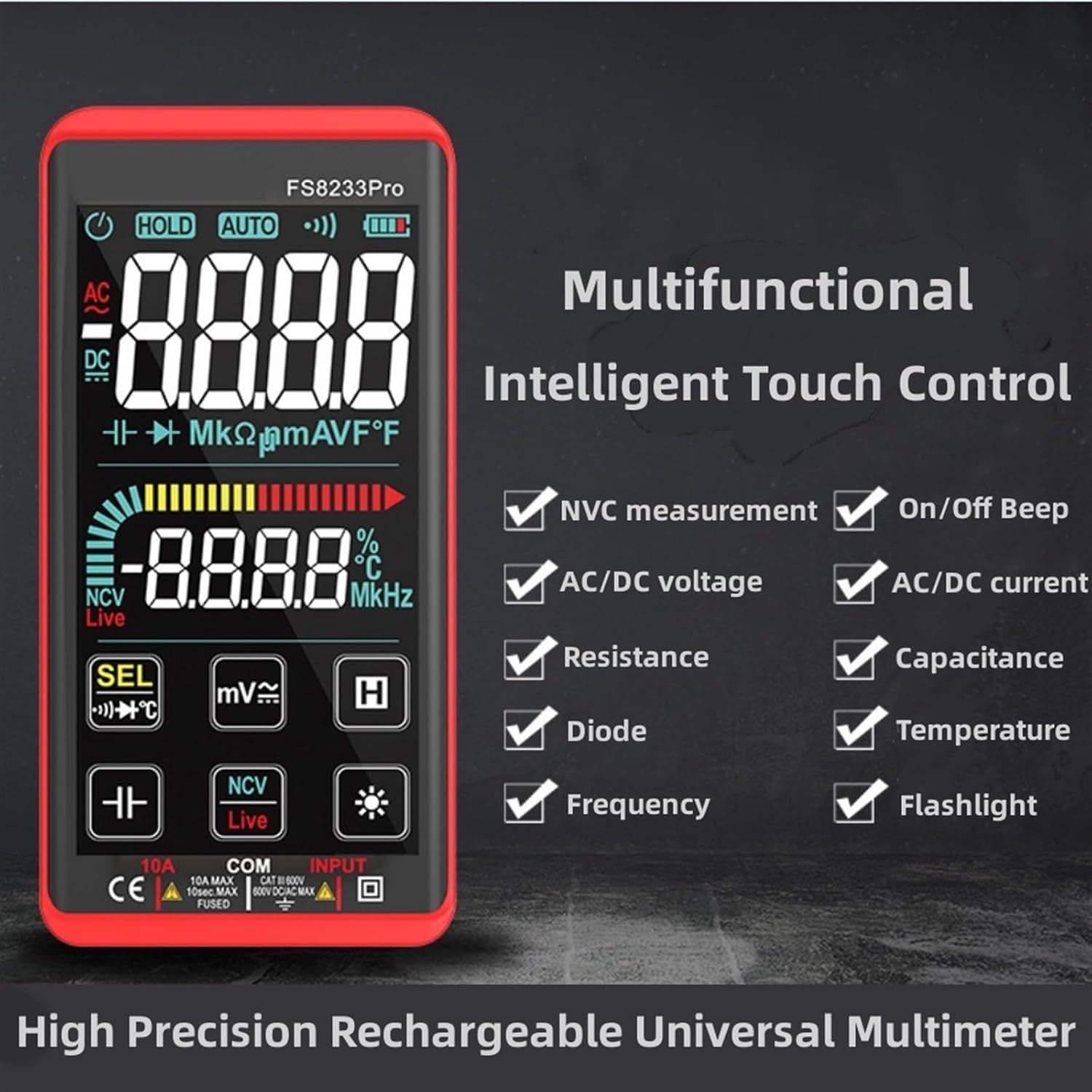
Image: A promotional image showcasing the multifunctional intelligent touch control features of the FS8233Pro, including NVC measurement, AC/DC voltage, resistance, diode, frequency, on/off beep, AC/DC current, capacitance, temperature, and flashlight.
5. Настройка
5.1 Першапачатковая зарадка
Before first use, fully charge the multimeter's internal lithium battery. Connect the provided USB charging cable to the multimeter's charging port and to a standard USB power adapter (not included) or a computer USB port. The battery indicator on the display will show charging status.
5.2 Падключэнне вымяральных правадоў
Insert the red test lead into the "INPUT" jack and the black test lead into the "COM" (common) jack. Ensure they are securely inserted.
6. Інструкцыя па эксплуатацыі
The FS8233Pro features automatic detection, simplifying measurement selection. Simply turn on the device and it will automatically identify the measurement type for most common functions.

Image: A hand interacting with the touch-sensitive display of the FS8233Pro multimeter, demonstrating its "Intelligent Movement Touch Sensing" for sensitive and fast measurements.
6.1 Уключэнне/выключэнне сілкавання
Press the power button (usually indicated by a power symbol) to turn the multimeter on or off. The device will automatically shut down after approximately 15 minutes of inactivity to conserve battery life.
6.2 AC Voltage (ACV) Measurement
- Connect the test leads in parallel to the AC voltagэлектронная крыніца.
- The multimeter will automatically detect AC voltage.
- Range: 0.5V-750V (Accuracy: 1%+5)
6.3 DC Voltage (DCV) Measurement
- Connect the test leads in parallel to the DC voltage source, observing polarity.
- The multimeter will automatically detect DC voltage.
- Range: 0.5V-1000V (Accuracy: 0.5%+3)
6.4 Вымярэнне супраціўлення
- Перад вымярэннем супраціўлення пераканайцеся, што ланцуг абясточаны.
- Падключыце вымяральныя дроты да кампанента, які трэба вымераць.
- Range: 0.1Ω-99.999MΩ (Accuracy: 1%+3)
6.5 Вымярэнне частоты
- Падключыце вымяральныя шчоткі да крыніцы сігналу.
- Range: 40Hz-10000Hz (Accuracy: 0.5%+3)
6.6 Вымярэнне ёмістасці
- Перад вымярэннем пераканайцеся, што кандэнсатар разраджаны.
- Падключыце вымяральныя дроты да вывадаў кандэнсатара.
- Range: 10nF-60000μF (Accuracy: 4.5%+5)
6.7 Вымярэнне тэмпературы
- Use the appropriate temperature probe (if included, or purchased separately) and connect it to the multimeter.
- Range: -40°C to 1000°C (Accuracy: 2%+5)
6.8 On & Off Beep (Continuity)
- Падключыце вымяральныя дроты да ланцуга або кампанента.
- If the resistance of the tested circuit is less than 50Ω, the auxiliary buzzer will sound, indicating continuity.
6.9 Дыёдны тэст
- Connect the test leads across the diode.
- The display will show the approximate diode forward voltagе значэнне.
6.10 NCV (бескантактавы аб'ёмtagд) Выяўленне
- Select the NCV function.
- Bring the top of the multimeter close to the AC voltagэлектронная крыніца.
- There are three alarm modes (visual and audible) according to the detected voltagэлектронная сіла.
6.11 Live Line Identification
- Select the Live function.
- Insert the red test lead into the suspected live line.
- If it is a live line, "Live" will appear on the screen, and an alarm sound will be emitted.
7. Тэхнічнае абслугоўванне
7.1 Ачыстка
Wipe the multimeter's casing з аб'явайamp cloth. Do not use abrasive cleaners or solvents. Ensure the device is off and disconnected from any power source before cleaning.
7.2 Захоўванне
Store the multimeter in a cool, dry place, away from direct sunlight and extreme temperatures. If storing for extended periods, ensure the battery is partially charged (around 50%) to prolong its lifespan.
7.3 Сыход за акумулятарам
The built-in lithium battery is designed for long life. Avoid fully discharging the battery frequently. Recharge as needed. If the device will not be used for a long time, charge it every 3 months to maintain battery health.
8. Выпраўленне непаладак
| праблема | Магчымая прычына | Рашэнне |
|---|---|---|
| Мультыметр не ўключаецца. | Акумулятар разраджаны. | Charge the multimeter using the provided USB cable. |
| Няправільныя паказанні. | Incorrect measurement mode; Damaged test leads; Environmental interference. | Ensure correct mode is selected (though often automatic); Check test leads for damage; Move away from strong electromagnetic fields. |
| Няма гукавога сігналу бесперапыннасці. | Resistance is too high; Test leads not making good contact. | Ensure resistance is below 50Ω; Re-seat test leads firmly. |
| Automatic shutdown occurs too quickly. | Inactivity timer. | The device is designed to shut down after approximately 15 minutes of inactivity. This is normal operation. |
9. Тэхнічныя характарыстыкі
| Параметр | Дыяпазон / значэнне | Дакладнасць |
|---|---|---|
| Пераменнага токуtagе (ACV) | 0.5В-750В | (1% + 5) |
| DC Voltagе (DCV) | 0.5В-1000В | (0.5% + 3) |
| Супраціў | 0.1 Ом-99.999 МОм | (1% + 3) |
| Частата | 40 Гц-10000 Гц | (0.5% + 3) |
| Ёмістасць | 10nF-60000μF | (4.5% + 5) |
| тэмпература | -40°C да 1000°C | (2% + 5) |
| Continuity Beep Threshold | <50Ω | Н/Д |
| Аўтаматычнае адключэнне | Прыбл. 15 хвіліны бяздзейнасці | Н/Д |
| Крыніца харчавання | Літыевая акумулятарная батарэя | Н/Д |
| Вытворца | IXITAB | Н/Д |
| мадэль | FS8233Pro | Н/Д |
10. Гарантыя і падтрымка
For warranty information and technical support, please refer to the contact details provided by your retailer or visit the official IXITAB webсайт. Захоўвайце чэк аб куплі як пацвярджэнне пакупкі для гарантыйных прэтэнзій.
For additional assistance, you may contact the seller directly through the platform where the product was purchased.
Ask a question about this manual
Ask about setup, troubleshooting, compatibility, parts, safety, or missing instructions. Manuals+ will review the question and use this page’s manual context to help answer it.