
TELLUR Obia PRO
TELLUR Obia PRO 60W Bluetooth Speaker User Manual
Model: Obia PRO | Brand: TELLUR
1. Уводзіны
This manual provides essential information for the safe and efficient operation of your TELLUR Obia PRO 60W Bluetooth Speaker. Please read this manual thoroughly before using the product and retain it for future reference.
2. Інфармацыя па бяспецы
- Не падвяргайце дынамік уздзеянню экстрэмальных тэмператур або прамых сонечных прамянёў на працягу доўгага часу.
- Пазбягайце падзення дынаміка і не падвяргайце яго моцным ударам.
- Не спрабуйце разбіраць або мадыфікаваць дынамік. Гэта прывядзе да анулявання гарантыі.
- Трымайце дынамік далей ад медыцынскіх прылад.
- Пераканайцеся, што вечка зараднага порта шчыльна зачынена, калі вы знаходзіцеся паблізу вады, каб забяспечыць воданепранікальнасць IPX6.
- Выкарыстоўвайце толькі пазначаны кабель для зарадкі і адаптар сілкавання.
3. Змесціва ўпакоўкі
Праверце наяўнасць усіх прадметаў у камплекце:
- TELLUR Obia PRO 60W Bluetooth Speaker
- USB-кабель для зарадкі
- Аўдыёкабель 3.5 мм AUX
- Кіраўніцтва карыстальніка (гэты дакумент)
4. Прадукт скончыўсяview і элементы кіравання
Азнаёмцеся з кампанентамі дынаміка і кнопкамі кіравання.

Малюнак 4.1: Фронт view of the TELLUR Obia PRO speaker, showcasing the main grille, control panel, and integrated LED lights on the handle and side woofers.
4.1 Панэль кіравання

Малюнак 4.2: Падрабязны view of the control buttons located on the top panel of the speaker.
- Зменшыць гучнасць (-) / Папярэдні трэк: Націсніце коратка, каб паменшыць гучнасць. Націсніце і ўтрымлівайце, каб перайсці да папярэдняй кампазіцыі.
- Павелічэнне гучнасці (+) / Наступны трэк: Press briefly to increase volume. Press and hold to go to the next track.
- LED Light Mode Button: Націсніце, каб пераключацца паміж рознымі рэжымамі святлодыёднага падсвятлення.
- Кнопка харчавання: Press and hold to power on/off. Briefly press to play/pause music.
- TWS (True Wireless Stereo) Button: Press to activate TWS pairing mode.
- Кнопка рэжыму (M): Press to switch between Bluetooth, USB, and AUX input modes.
4.2 Парты ўводу/вываду
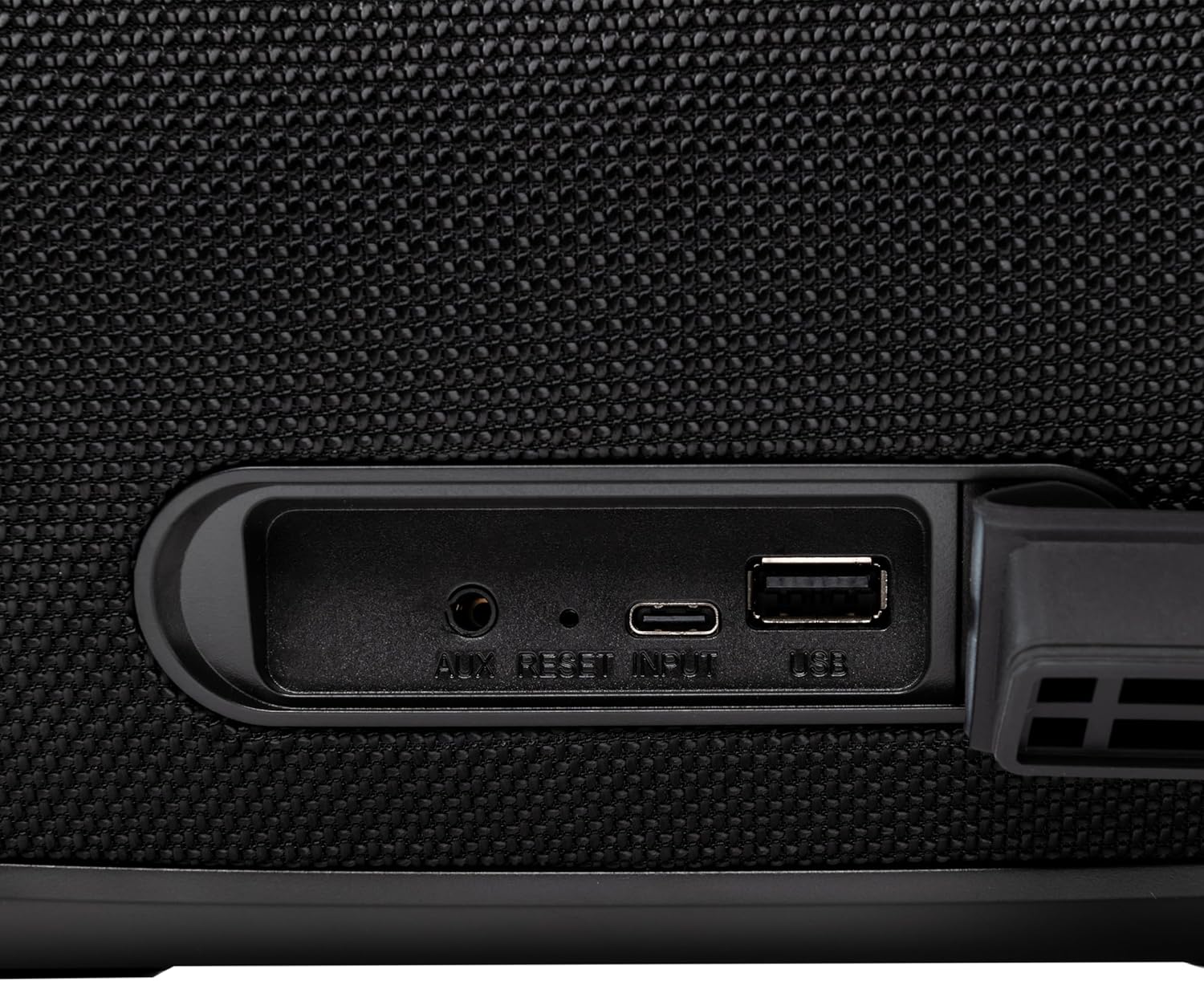
Малюнак 4.3: Close-up of the protected input/output ports on the rear of the speaker.
- Порт AUX-IN: Для падлучэння знешніх аўдыёпрылад праз аўдыёкабель 3.5 мм.
- Кнопка скіду: Use a thin object to press and reset the speaker if necessary.
- Уваход USB-C: Для зарадкі калонкі.
- Порт USB-A: For playing MP3 audio files from a USB drive or for power bank functionality.
5. Настройка
5.1 Зарадка дынаміка
Before initial use, fully charge the speaker. The speaker also functions as a power bank to charge other devices via its USB-A port.
- Connect the USB charging cable to the USB-C input port on the speaker.
- Падключыце другі канец кабеля да сумяшчальнага адаптара харчавання USB (не ўваходзіць у камплект).
- The charging indicator light will illuminate. It will turn off once charging is complete.
- The battery level can be displayed on your connected phone when paired via Bluetooth.
5.2 Уключэнне/выключэнне
- Каб уключыць: Націсніце і ўтрымлівайце Кнопка харчавання for approximately 3 seconds until you hear an audible prompt and the LED lights activate.
- Каб выключыць: Націсніце і ўтрымлівайце Кнопка харчавання for approximately 3 seconds until you hear an audible prompt and the LED lights turn off.
6. Інструкцыя па эксплуатацыі
6.1 Спалучэнне па Bluetooth
The speaker uses Bluetooth v5.3 for stable wireless connection up to 10 meters.
- Ensure the speaker is powered on and in Bluetooth mode (indicated by a flashing blue LED). If not, press the Кнопка рэжыму (M) каб пераключыцца ў рэжым Bluetooth.
- Уключыце Bluetooth на мабільнай прыладзе (смартфоне, планшэце і г.д.).
- Пошук даступныя прылады Bluetooth і выберыце "TELLUR Obia PRO" са спісу.
- Once paired, the speaker will emit an audible confirmation, and the blue LED will stop flashing.
- Пры ўключэнні дынамік аўтаматычна падключыцца да апошняй спалучанай прылады, калі такая прылада даступная.

Малюнак 6.1: The TELLUR Obia PRO speaker wirelessly connected to a smartphone, ready for audio playback.
6.2 Функцыя сапраўднага бесправаднога стэрэа (TWS)
TWS allows you to pair two Obia PRO speakers for a stereo sound experience.
- Ensure both Obia PRO speakers are powered on and in Bluetooth mode, but not yet paired with any device.
- На адным дынаміку (гэта будзе асноўны дынамік) націсніце кнопку Кнопка TWS. The speaker will enter TWS pairing mode, indicated by a flashing light.
- The two speakers will automatically connect to each other. Once connected, you will hear an audible confirmation, and the TWS indicator light on both speakers will become solid.
- Now, connect your mobile device to the primary speaker via Bluetooth as described in Section 6.1. The audio will play in stereo across both speakers.
6.3 Multiple Link Technology
This technology allows connecting an unlimited number of Obia PRO speakers wirelessly for a synchronized audio experience. Refer to the manufacturer's website or specific instructions for detailed setup of Multiple Link.
6.4 USB Playback (MP3)
Прайграванне аўдыё ў фармаце MP3 files directly from a USB flash drive (up to 128GB).
- Устаўце USB-назапашвальнік з MP3 fileу порт USB-A.
- Націсніце Кнопка рэжыму (M) to switch to USB mode. The speaker will automatically begin playing music from the USB drive.
- Выкарыстоўвайце Павялічыць/паменшыць гучнасць і Кнопка харчавання (for play/pause) to control playback.
6.5 Падключэнне AUX-IN
Connect non-Bluetooth devices using the 3.5mm AUX audio cable.
- Connect one end of the 3.5mm AUX audio cable to the AUX-IN port on the speaker.
- Падключыце другі канец да аўдыёвыхаду вашай знешняй прылады (напрыклад, MP3-плэера, ноўтбука).
- Націсніце Кнопка рэжыму (M) каб пераключыцца ў рэжым AUX.
- Кіруйце прайграваннем і гучнасцю з вашай знешняй прылады.
6.6 Гучная сувязь
When connected to a smartphone via Bluetooth, the speaker's built-in microphone allows for hands-free calls.
- Адказ/завяршэнне выкліку: Каротка націсніце Кнопка харчавання.
- Адхіліць выклік: Націсніце і ўтрымлівайце Кнопка харчавання на працягу 2 секунд.
6.7 святлодыёдных рэжымаў святла
The speaker features integrated LED lights with multiple display modes.
- Націсніце Кнопка рэжыму святлодыёднай падсветкі to cycle through available light patterns and colors.
- Націсніце і ўтрымлівайце Кнопка рэжыму святлодыёднай падсветкі to turn the lights off or on.

Малюнак 6.2: A user interacting with the LED light mode button to change the speaker's lighting effects.
6.8 Equalizer Settings (Indoor/Outdoor)
The speaker allows for equalizer customization for different environments. Specific controls for this are not detailed in the provided data, but typically involve a dedicated button or a combination of existing buttons. Refer to the product's quick start guide or manufacturer's website for precise instructions on adjusting the equalizer.
7. Тэхнічнае абслугоўванне
7.1 Ачыстка
- Працярыце дынамік мяккай сухой тканінай.
- Не выкарыстоўвайце абразіўныя ачышчальнікі, спірт або хімічныя растваральнікі.
7.2 Воданепранікальнасць (IPX6)
The Obia PRO speaker is rated IPX6, meaning it is protected against high-pressure water jets from any direction. This makes it suitable for outdoor use and environments where it might be exposed to splashes or rain.
- Ensure the rubber cover for the charging and AUX ports is securely closed before exposing the speaker to water.
- Не апускайце дынамік у ваду.
- Пасля кантакту з вадой вытрыце дынамік насуха перад зарадкай.
7.3 Сыход за акумулятарам
- Каб падоўжыць тэрмін службы батарэі, пазбягайце частай поўнай разрадкі батарэі.
- Рэгулярна зараджайце дынамік, нават калі ён не выкарыстоўваецца, каб падтрымліваць акумулятар у працоўным стане.
- Захоўвайце дынамік у прахалодным, сухім месцы, калі ён не выкарыстоўваецца працяглы час.
8. Выпраўленне непаладак
| праблема | Магчымая прычына | Рашэнне |
|---|---|---|
| Дынамік не ўключаецца. | Нізкі акумулятар. | Цалкам зарадзіце дынамік. |
| Немагчыма падключыцца праз Bluetooth. | Дынамік не ў рэжыме спалучэння; Bluetooth прылады выключаны; занадта далёка ад дынаміка. | Ensure speaker is in Bluetooth mode (flashing LED). Turn on Bluetooth on your device. Move device closer to speaker (within 10m). |
| Няма гуку. | Занадта нізкая гучнасць; выбраны няправільны рэжым; прылада не прайгравае. | Increase speaker and device volume. Press Кнопка рэжыму (M) to select correct input. Ensure audio is playing on the connected device. |
| Памылка спалучэння TWS. | Speakers already paired to a device; not both Obia PRO models. | Disconnect both speakers from any Bluetooth devices. Ensure both speakers are Obia PRO models. Try TWS pairing again. |
| Прайграванне з USB не працуе. | USB drive not formatted correctly; unsupported file type; drive capacity too large. | Ensure USB drive is formatted to FAT32. Only MP3 files are supported. Max capacity 128GB. |
9. Тэхнічныя характарыстыкі
| Назва мадэлі | Obia PRO |
| Марка | ТЭЛУР |
| Выходная магутнасць | 60W (2x 20W RMS subwoofers, 2x 10W RMS tweeters) |
| Версія Bluetooth | v5.3 |
| Далёкасць бесправадной сувязі | Да 10 метраў |
| АЧХ | 80 МГц (Note: This value is unusual for speaker frequency response and may be a typo in source data. Typically measured in Hz-kHz.) |
| Імпеданс | 4 Ом |
| Аўдыё рэжымы | Bluetooth, USB (MP3), AUX-IN |
| Падтрымка USB | USB 2.0/3.0, up to 128GB (MP3 format) |
| Воданепранікальнасць | IPX6 |
| Ёмістасць батарэі | 5400 мАг |
| Час прайгравання | Да 12 гадзін (пры ўмеранай гучнасці) |
| Функцыя Power Bank | Yes, via USB-A port |
| Памеры (Д х Ш х У) | 37.7 х 17 х 18 см |
| Вага | 3.48 кг |
| Матэрыял | Пластыкавыя |
| Колер | Чорны |
Заўвага: тэхнічныя характарыстыкі могуць быць зменены без папярэдняга паведамлення.
10. Гарантыя і падтрымка
TELLUR products are manufactured to the highest quality standards. For information regarding warranty terms, technical support, or service, please refer to the warranty card included with your product or visit the official TELLUR webсайт.
Кантактная інфармацыя: Калі ласка, наведайце www.tellur.com каб атрымаць апошнюю інфармацыю аб падтрымцы.