
Mastfuyi FY12DMM
Mastfuyi FY12DMM Thermal Imager Multimeter User Manual
Model: FY12DMM | Brand: Mastfuyi
1. Уводзіны
The Mastfuyi FY12DMM is a versatile 2-in-1 device combining a high-resolution thermal imager with a comprehensive digital multimeter. This instrument is designed for professionals and enthusiasts requiring precise measurements and visual thermal analysis in various fields, including electrical, mechanical, construction, and automotive diagnostics. This manual provides essential information for safe and effective operation.
2. Інфармацыя па бяспецы
Always adhere to the following safety precautions to prevent personal injury or damage to the device.
- Прачытайце і зразумейце ўсе інструкцыі перад выкарыстаннем.
- Не выкарыстоўвайце прыладу, калі яна выглядае пашкоджанай або працуе няправільна.
- Ensure proper test lead connection before taking any measurements.
- Не перавышайце максімальныя ўваходныя значэнні для любой функцыі.
- Use caution when working with live electrical circuits.
- Захоўвайце прыладу сухім і чыстым.
- Only use accessories and replacement parts specified by the manufacturer.
3. Змесціва ўпакоўкі
Праверце наяўнасць усіх прадметаў у камплекце:
- 1 x Mastfuyi FY12DMM Thermal Imager Multimeter
- 1 х кабель для зарадкі (USB тыпу C)
- 1 х футляр для пераноскі
- 1 х Кіраўніцтва карыстальніка (гэты дакумент)
- Вымяральныя дроты (чырвоны і чорны)
Заўвага: The flexible AC current clamp is not included in the standard package.

4. Прылада скончанаview
The Mastfuyi FY12DMM integrates thermal imaging and digital multimeter functionalities into a single, portable unit. Its design focuses on ease of use and comprehensive diagnostic capabilities.

Асноўныя кампаненты ўключаюць:
- 3.98-inch TFT LCD Touch Screen: A full-view display for clear visualization of thermal images, multimeter readings, and intuitive menu navigation.
- Thermal Imager Lens: The optical component responsible for capturing infrared radiation.
- Multimeter Input Jacks: Standard ports for connecting test leads for electrical measurements.
- Кнопка харчавання: Кіруе станам харчавання прылады.
- Кола навігацыі/кнопкі: Provides alternative control for menu selection and parameter adjustments.
- Порт USB Type-C: Used for charging the internal battery and transferring data to a computer.

5. Настройка
5.1 Першапачатковая зарадка
Перад першым выкарыстаннем цалкам зарадзіце прыладу.
- Connect the supplied USB Type-C charging cable to the device's charging port.
- Падключыце другі канец кабеля да стандартнага адаптара харчавання USB (не ўваходзіць у камплект) або да USB-порта кампутара.
- Індыкатар зарадкі загарыцца. Дайце прыладзе зарадзіцца, пакуль індыкатар не пакажа поўную зарадку.

5.2 Уключэнне/выключэнне сілкавання
- Каб уключыць: націсніце і ўтрымлівайце кнопку харчавання, пакуль не падсвяціцца экран.
- Каб выключыць прыладу: націсніце і ўтрымлівайце кнопку харчавання, пакуль не з'явіцца паведамленне аб выключэнні, затым пацвердзіце.
6. Operating the Thermal Imager
6.1 Асноўныя метады цеплавізійнай візуалізацыі
Upon powering on, the device typically defaults to thermal imaging mode, displaying a real-time thermal image with temperature readings.
- Дыяпазон тэмператур: Measures temperatures from -20℃ to 550℃ (-4℉ to 1022℉).
- ІЧ-раздзяленне: Features a 320 x 320 pixel infrared resolution for clear and detailed thermal images.
- Частата абнаўлення: Operates at 25Hz, providing a smooth, real-time thermal video feed.
- Цеплавая адчувальнасць (NETD): With a sensitivity of less than 60mk, the device can detect subtle temperature differences.
The device can perform microscopic detection at a component level, though a macro lens is not included as a standard accessory. If detailed close-up thermal imaging is required, a corresponding macro lens package would need to be acquired separately.

6.2 Thermal Palettes
The device offers 15 distinct thermal palettes to enhance the visualization of temperature differences. Selecting the appropriate palette can significantly improve the clarity of thermal patterns for specific applications.
- Access palette options via the touchscreen menu or navigation controls.
- Experiment with palettes like Iron Red, Rainbow, White Hot, and Black Hot to find the most suitable display for your inspection.
6.3 Рэгуляванне каэфіцыента выпраменьвання
Accurate temperature measurements depend on correct emissivity settings. The emissivity value (adjustable from 0.01 to 1.0) should match the material surface being measured.
- Locate the emissivity setting in the thermal imaging menu.
- Consult standard emissivity tables for common materials or adjust the value to achieve the most accurate readings for your specific target.
6.4 High and Low Temperature Alarm
The intelligent alarm function allows you to set custom temperature thresholds. The device will trigger immediate audible and visual alerts if temperatures exceed or fall below these predefined safety ranges.
- Access the alarm settings through the thermal imaging interface.
- Configure the upper and lower temperature limits to suit your monitoring requirements.
7. Праца з мультыметрам
The FY12DMM includes a 20,000-count digital multimeter for precise electrical measurements.
7.1 Падключэнне вымяральных правадоў
- Insert the red test lead into the "VΩmA" input jack.
- Устаўце чорны вымяральны шнур у ўваходны раз'ём "COM" (агульны).
- For AC current measurements with an optional clamp, refer to the clamp's instructions.
7.2 Функцыі вымярэння
Use the touchscreen or navigation to select the desired measurement function. The device supports auto-ranging for most functions.
- DC Voltage: Да 1000 В.
- Пераменнага токуtage: Да 750 В.
- Супраціў: Да 200 МОм.
- Ёмістасць: Up to 99.999mF.
- Дыёдны тэст: Checks diode functionality.
- Тэст бесперапыннасці: Audible indication for continuity.
- Flexible AC Current: Up to 2000A (requires optional clamp).
- тэмпература: -20℃ to 1300℃ (-4℉ to 2372℉) using a K-type thermocouple (not included).
Прылада мае Трымай function to freeze the current reading and Дыяпазон measurement modes for manual range selection if desired.
8. Кіраванне дадзенымі
8.1 Захоўванне малюнкаў
The FY12DMM has a built-in memory card capable of storing up to 30,000 images in BMP format.
- To save a thermal image, press the designated capture button on the screen.
- Images are automatically saved to the internal memory.

8.2 Exporting Data
Stored images and recorded waveform data can be exported to a computer for further analysis.
- Connect the device to a computer using the USB Type-C cable.
- Прылада павінна адлюстроўвацца як здымная прылада захоўвання дадзеных.
- Copy the desired BMP image files or data logs to your computer.
9. Тэхнічнае абслугоўванне
9.1 Ачыстка
- Працірайце знешнія паверхні прылады мяккай тканінайamp тканіна. Не выкарыстоўвайце абразіўныя ачышчальнікі або растваральнікі.
- Gently clean the thermal imager lens with a lens cleaning cloth.
- Перад чысткай пераканайцеся, што прылада выключана і адключана ад любой крыніцы сілкавання.
9.2 Сыход за акумулятарам
- Рэгулярна зараджайце акумулятар, нават калі прылада рэдка выкарыстоўваецца, каб падтрымліваць яго працаздольнасць.
- Avoid storing the device in extreme temperatures.
10. Выпраўленне непаладак
| праблема | Магчымая прычына | Рашэнне |
|---|---|---|
| Прылада не ўключаецца. | Нізкі або разраджаны акумулятар. | Charge the device fully using the supplied USB Type-C cable. |
| Няправільныя паказчыкі тэмпературы. | Incorrect emissivity setting; dirty lens. | Adjust emissivity for the target material; clean the thermal imager lens. |
| Multimeter readings are unstable or incorrect. | Poor test lead connection; incorrect function selected. | Ensure test leads are securely connected; verify the correct measurement function is selected. |
| Cannot transfer data to computer. | Faulty USB cable; incorrect connection mode. | Try a different USB Type-C cable; ensure the device is properly connected and recognized by the computer. |
11. Тэхнічныя характарыстыкі
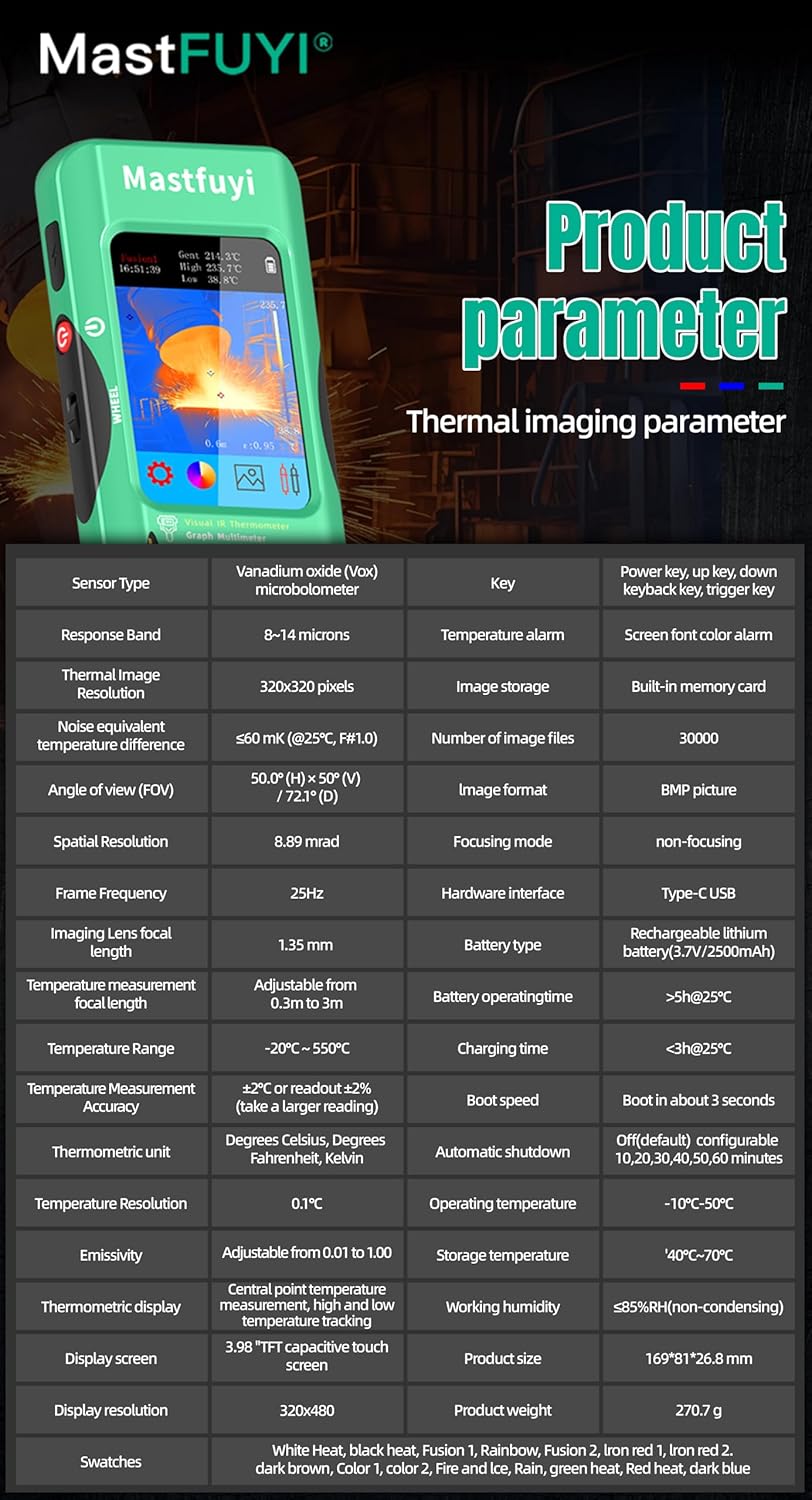
11.1 Infrared Camera Specifications
| Асаблівасць | Спецыфікацыя |
|---|---|
| Памер дысплея | 3.98-цалевы ВК-экран TFT |
| Дазвол ВК | 320 х 320 пікселяў |
| Дазвол экрана | 320 х 480 пікселяў |
| Кут View (FOV) | 50.0°(H) x 50.0°(V) / 72.1°(D) |
| Прасторавае разрозненне (IFOV) | 8.89 мрад |
| Дыяпазон тэмператур | Ад -20 да 550 ℃ (ад -4 да 1022 ℉) |
| Цеплавая адчувальнасць/NETD | Less than 60mk |
| Частата абнаўлення | 25 Гц |
| Налады адлегласці | 0.3 - 3 метраў |
| Эмістычнасць | 0.01 - 1.0 (adjustable) |
| Thermal Palettes | 15 |
| Number of Storage Images | 19,000 (internal memory) |
11.2 Digital Multimeter Specifications
| Асаблівасць | Дыяпазон | дазвол | Дакладнасць |
|---|---|---|---|
| MAX Дысплей | 20000 адлікаў | ||
| DC Voltage | 20mV/200mV/2V/20V/200V/1000V | ад 0.001 мВ да 0.1 В | ад ±(0.05%+3) да ±(0.5%+3) |
| Пераменнага токуtage | 20mV/200mV/2V/20V/200V/750V | ад 0.001 мВ да 0.1 В | ад ±(0.1%+3) да ±(0.5%+3) |
| Flexible AC Current | 200A/2000A | 0.1A/1A | ±(1.0%+5) |
| Супраціў | Ад 200 Ом да 200 МОм | Ад 0.01 Ом да 0.01 МОм | ад ±(0.2%+3) да ±(5%+5) |
| Ёмістасць | ад 999.99 нФ да 99.999 мФ | ад 0.01 нФ да 0.001 мФ | ад ±(2%+5) да ±(5%+20) |
| тэмпература | -20℃~1300℃/-4℉-2372℉ | 1 ℃ / 1 ℉ | ±(2%+5) |
| Дыёд | так | ||
| Пераемнасць | так | ||

11.3 Агульныя тэхнічныя характарыстыкі
- Магутнасць: Акумулятар ёмістасцю 2500 мАг (убудаваны)
- Памер: 169 х 81 х 26.8 мм
- Вага: 270 г
- Operating System Languages: English, Spanish, German, French, Italian, Japanese, Chinese (selectable)

12. Гарантыя і падтрымка
For warranty information and technical support, please refer to the warranty card included with your product or visit the official Mastfuyi webсайт.
Visit the Mastfuyi Store on Amazon каб атрымаць больш прадуктаў і рэсурсаў падтрымкі.