
1. Прадукт скончыўсяview
The VIMIN VM-S250501M is a 2.5G Web Managed Ethernet Switch designed for high-performance network environments. It features five 2.5 Gigabit RJ45 ports and one 10 Gigabit SFP+ port, providing flexible connectivity options for various devices. This switch supports multiple speeds (100Mbps, 1Gbps, 2.5Gbps) with intelligent auto-negotiation, making it suitable for 2.5G NAS, gaming PCs, WiFi 6 routers, and 4K video streaming. It incorporates essential Layer 2 management features such as Link Aggregation, IGMP Snooping, Quality of Service (QoS), and VLAN support, all accessible through a user-friendly web-based graphical interface.
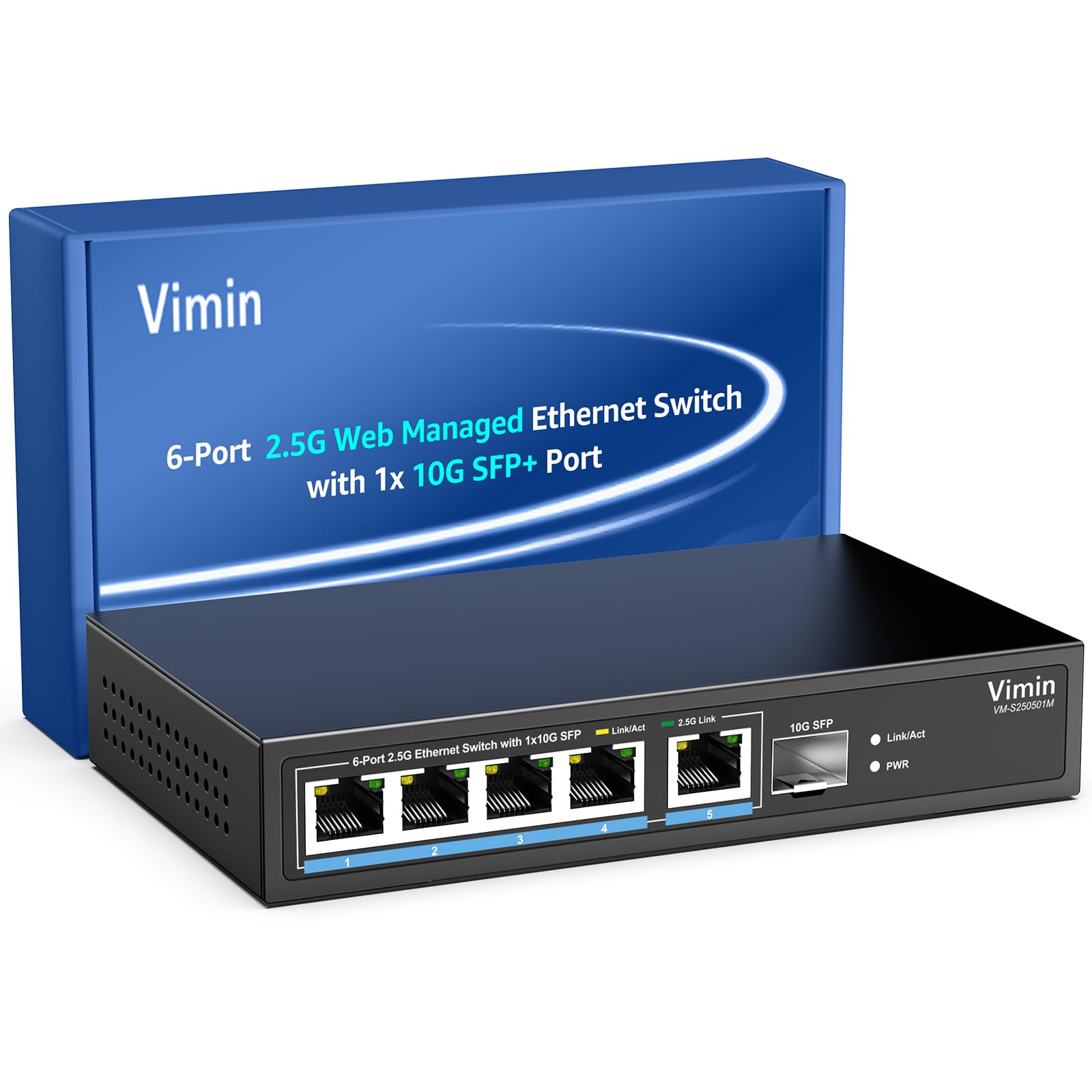
Малюнак 1: Спераду view of the VIMIN VM-S250501M switch, showing the 2.5G RJ45 ports, 10G SFP+ port, and LED indicators.

Figure 2: Illustration highlighting the durability, high compatibility, and versatility of the switch.
2. Інструкцыі па ўсталёўцы
2.1 Змест пакета
Праверце, ці ёсць у вашай упакоўцы наступныя рэчы:
- 1 x VIMIN VM-S250501M 2.5G Web Кіраваны камутатар Ethernet
- 1 х адаптар сілкавання
- 1 х Кіраўніцтва карыстальніка

Figure 3: The switch, power cable, and user manual are included in the package.
2.2 Фізічная ўстаноўка
The switch can be placed on a desktop or mounted on a wall. Ensure proper ventilation around the device.
- Размяшчэнне на працоўным стале: Пастаўце выключальнік на роўную ўстойлівую паверхню.
- Насценны мантаж: The switch features two mounting holes at the base for wall installation. Use appropriate screws (not included) to secure the device to a wall.
2.3 Падключэнне сілкавання
- Connect the power adapter to the DC 12V/1A power port on the rear panel of the switch.
- Падключыце другі канец адаптара харчавання да звычайнай электрычнай разеткі.
- The Power LED indicator on the front panel will illuminate when the switch is powered on.
2.4 Падключэнне сеткавых прылад
Connect your network devices (e.g., computers, NAS, routers, access points) to the switch using appropriate Ethernet cables.
- Парты RJ45 (1-5): Use Category 5e (Cat5e) or Category 6 (Cat6) UTP cables for optimal performance with 1G/2.5G connections. For 100Mbps, Cat5 cables are sufficient.
- SFP+ Port (6): Insert a compatible 1G/2.5G/10G SFP+ optical fiber module (not included) into the SFP+ slot, then connect a fiber optic cable.

Figure 4: Illustrates connecting devices to the switch and recommended cable types for different speeds.
3. Кіраванне перамыкачом
3.1 Святлодыёдныя індыкатары
The front panel LEDs provide real-time status information:
- 5*2.5G Ports (RJ45):
- Yellow: Indicates a 10/100/1000Mbps link or activity.
- Green: Indicates a 2.5Gbps link.
- 1*10G SFP (SFP+ Port):
- Green: Indicates a 1G/2.5G/10G link.
- Flashing: Indicates data transmission.
- PWR (магутнасць):
- Уключана: прылада ўключана.
- Выключана: прылада выключана.

Figure 5: Detailed explanation of the LED indicators on the switch.
3.2 Доступ да Web Інтэрфейс кіравання
The switch can be configured and managed via a web-based graphical user interface (GUI).
- Ensure your computer is connected to one of the switch's RJ45 ports.
- Адкрыйце a web браўзер (напрыклад, Chrome, Firefox, Edge).
- In the address bar, enter the default IP address: 192.168.1.199.
- Press Enter. A login page will appear.
- Увядзіце імя карыстальніка і пароль па змаўчанні:
- імя карыстальніка: адмін
- Пароль: адмін
- Click "Log In" to access the management interface.
Рэкамендуецца змяніць пароль па змаўчанні пасля першапачатковага ўваходу ў мэтах бяспекі.

Малюнак 6: Здымак экрана web старонка ўваходу ў інтэрфейс кіравання.
3.3 Basic Management Features
The web interface provides access to various Layer 2 management functions:
- Агрэгаванне спасылак: Combine multiple physical links into a single logical link for increased bandwidth and redundancy. Supports static link aggregation.
- Jumbo Frame: Support for larger Ethernet frames (up to 12KB) to improve network efficiency for large data transfers.
- VLAN (віртуальная лакальная сетка): Segment your network into smaller, isolated broadcast domains. Supports up to 32 VLANs (on 4K VLAN IDs), MTU/Port/802.1Q VLAN.
- Якасць абслугоўвання (QoS): Prioritize network traffic to ensure critical applications receive sufficient bandwidth. Supports port-based, 802.1p, and DSCP priority, with 4 priority queues, rate limiting, and storm control.
- Адсочванне IGMP: Optimize multicast traffic delivery, preventing unnecessary flooding of multicast packets to all ports.
- Зеркаванне порта: Copy traffic from one or more source ports to a destination port for network monitoring and analysis.
- Тэст кабеля: A diagnostic tool to check the status and length of connected Ethernet cables.

Малюнак 7: Закончанаview of the basic management features available through the web інтэрфейс.
4. Тэхнічнае абслугоўванне
4.1 Агульны догляд
- Keep the switch in a cool, dry environment, away from direct sunlight, heat sources, and moisture.
- Забяспечце дастатковую цыркуляцыю паветра вакол прылады, каб прадухіліць перагрэў.
- Clean the exterior of the switch with a soft, dry cloth. Do not use liquid cleaners or aerosols.
4.2 Абнаўленне прашыўкі
Periodically check the VIMIN official webсайт для абнаўленняў прашыўкі. Абнаўленні прашыўкі могуць забяспечыць новыя функцыі, паляпшэнне прадукцыйнасці і бяспекі. Уважліва выконвайце інструкцыі, якія пастаўляюцца з пакетам абнаўлення прашыўкі.
4.3 Скід налад прылады
If the switch is not functioning correctly or you forget the login credentials, you can reset it to factory default settings. Locate the "Reset" button on the rear panel of the switch. With the switch powered on, use a paperclip or a similar pointed object to press and hold the Reset button for approximately 5-10 seconds until the LEDs flash, then release. The switch will restart with factory default settings.
5. Выпраўленне непаладак
5.1 Няма харчавання
- Пераканайцеся, што адаптар сілкавання надзейна падключаны як да камутатара, так і да спраўнай электрычнай разеткі.
- Праверце працаздольнасць разеткі, падключыўшы да яе іншую прыладу.
- Праверце адаптар сілкавання на наяўнасць бачных пашкоджанняў.
5.2 No Link/Connectivity
- Check the Ethernet cables connected to the switch and your devices. Ensure they are securely plugged in and not damaged.
- Verify the Link/Act LEDs on the switch for the connected ports. If they are off, there might be a cable issue or the connected device is not powered on/configured correctly.
- Try using a different Ethernet cable or port.
- Ensure the connected device's network adapter is enabled and configured correctly.
5.3 Павольная хуткасць сеткі
- Ensure you are using Cat5e or Cat6 cables for 1G/2.5G connections. Lower category cables may limit speed.
- Check the Link/Act LED color for the connected port. A yellow LED on a 2.5G port indicates a 1G or lower connection.
- Verify that your connected devices (e.g., network card, NAS) support 2.5G or 10G speeds.
- Check for network congestion or high traffic on your network.
- Consider updating the switch firmware.
5.4 Немагчыма атрымаць доступ Web Інтэрфейс
- Ensure your computer is on the same network segment as the switch. The default IP is 192.168.1.199, so your computer's IP should be in the 192.168.1.x range (e.g., 192.168.1.100) with a subnet mask of 255.255.255.0.
- Verify that the Ethernet cable is properly connected and the Link/Act LED is on.
- Ачысціце кэш браўзера або паспрабуйце іншы браўзер.
- If you have changed the switch's IP address and forgotten it, or forgotten the login password, perform a factory reset (refer to Section 4.3).
6. Тэхнічныя характарыстыкі
| мадэль | VM-S250501M |
| Стандарты | IEEE 802.3/802.3u/802.3ab/802.3bz/802.3x/802.3cb |
| Парты | 5 x 10/100/1000/2500 Mbps RJ45, 1 x 10G SFP+ slot |
| Камутацыйны патэнцыял | 45 Гбіт/с |
| Табліца MAC-адрасоў | 4K |
| Хуткасць перасылкі пакетаў | 33.48 Мпікс |
| Рамка Jumbo | 12 КБ |
| Буфер пакетаў | 8 Мбіт |
| Электразабеспячэнне | 12 В/1 А пастаяннага току |
| Network Cable (Max 100m) |
|
| Спосаб мантажу | Desktop and Wall Mount |
| Працоўная тэмпература | 0 ℃ ~ 45 ℃ (32 ℉ ~ 113 ℉) |
| Тэмпература захоўвання | -40℃ ~ 70℃ (-40℉ ~ 158℉) |
| Працоўная вільготнасць | 10% ~ 90% без кандэнсацыі |
| Вільготнасць пры захоўванні | 5% ~ 95% без кандэнсацыі |
| Вага | 380 г |
| Памеры (Д х Ш х У) | 160 х 95 х 30 мм (6.3 х 3.7 х 1.2 цалі) |
| Матэрыял корпуса | Метал |
| Колер | Чорны |
7. Гарантыя і падтрымка
7.1 Гарантыя на выраб
The VIMIN VM-S250501M 2.5G Web Managed Ethernet Switch comes with a адзін год гарантыі з даты пакупкі. Гэтая гарантыя распаўсюджваецца на вытворчыя дэфекты і гарантуе, што прадукт адпавядае зададзеным стандартам прадукцыйнасці пры нармальным выкарыстанні. Калі ласка, захавайце пацвярджэнне пакупкі для прэтэнзій па гарантыі.
7.2 Тэхнічная падтрымка
VIMIN provides пажыццёвая тэхнічная падтрымка for this product. If you encounter any issues or have questions regarding the setup, operation, or troubleshooting of your switch, please contact our support team.
Кантактная інфармацыя:
- электронная пошта: support@vimintech.com
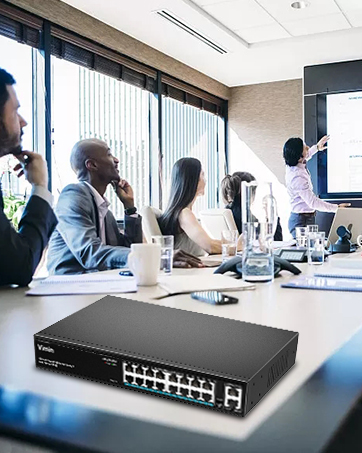
Figure 8: VIMIN support information, including email contact.