
Lisowod L01Pro
Lisowod Mini Projector User Manual
Model: L01Pro
Партатыўны смарт-праектар
1. Уводзіны
Дзякуй за пакупкуasing the Lisowod Mini Projector. This compact and powerful device is designed to provide a vivid 1080P FHD viewing experience with advanced features like automatic keystone correction and electric focus. Its portable design, complete with a convenient strap, makes it ideal for travel and various entertainment needs. This manual will guide you through the setup, operation, and maintenance of your new projector.
2. Важная інфармацыя па бяспецы
- Не падвяргайце праектар уздзеянню дажджу або вільгаці, каб прадухіліць узгаранне або паражэнне электрычным токам.
- Забяспечце належную вентыляцыю. Не блакуйце вентыляцыйныя адтуліны.
- Выкарыстоўвайце толькі адаптар сілкавання, які пастаўляецца з праектарам.
- Пазбягайце глядзець прама ў аб'ектыў праектара, калі lamp уключаны, бо яркае святло можа пашкодзіць вашы вочы.
- Трымайце праектар далей ад крыніц цяпла і прамых сонечных прамянёў.
- Не спрабуйце разбіраць або рамантаваць праектар самастойна. Звяртайцеся па любыя паслугі па абслугоўванні да кваліфікаванага персаналу.
3. Змесціва ўпакоўкі
Калі ласка, уважліва праверце змесціва ўпакоўкі. Калі якія-небудзь прадметы адсутнічаюць або пашкоджаныя, звярніцеся да прадаўца.
- Lisowod Mini Projector (L01Pro)
- Адаптар сілкавання
- Кабель HDMI
- Пульт дыстанцыйнага кіравання
- Кіраўніцтва карыстальніка
4. Прадукт скончыўсяview
Кампаненты праектара

Малюнак 4.1: Фронт view of the Lisowod Mini Projector, showcasing its compact design, lens, and key features like 1080P FHD, Auto Keystone, Electric Focus, 2.4+5G Wi-Fi, and Bluetooth connectivity.
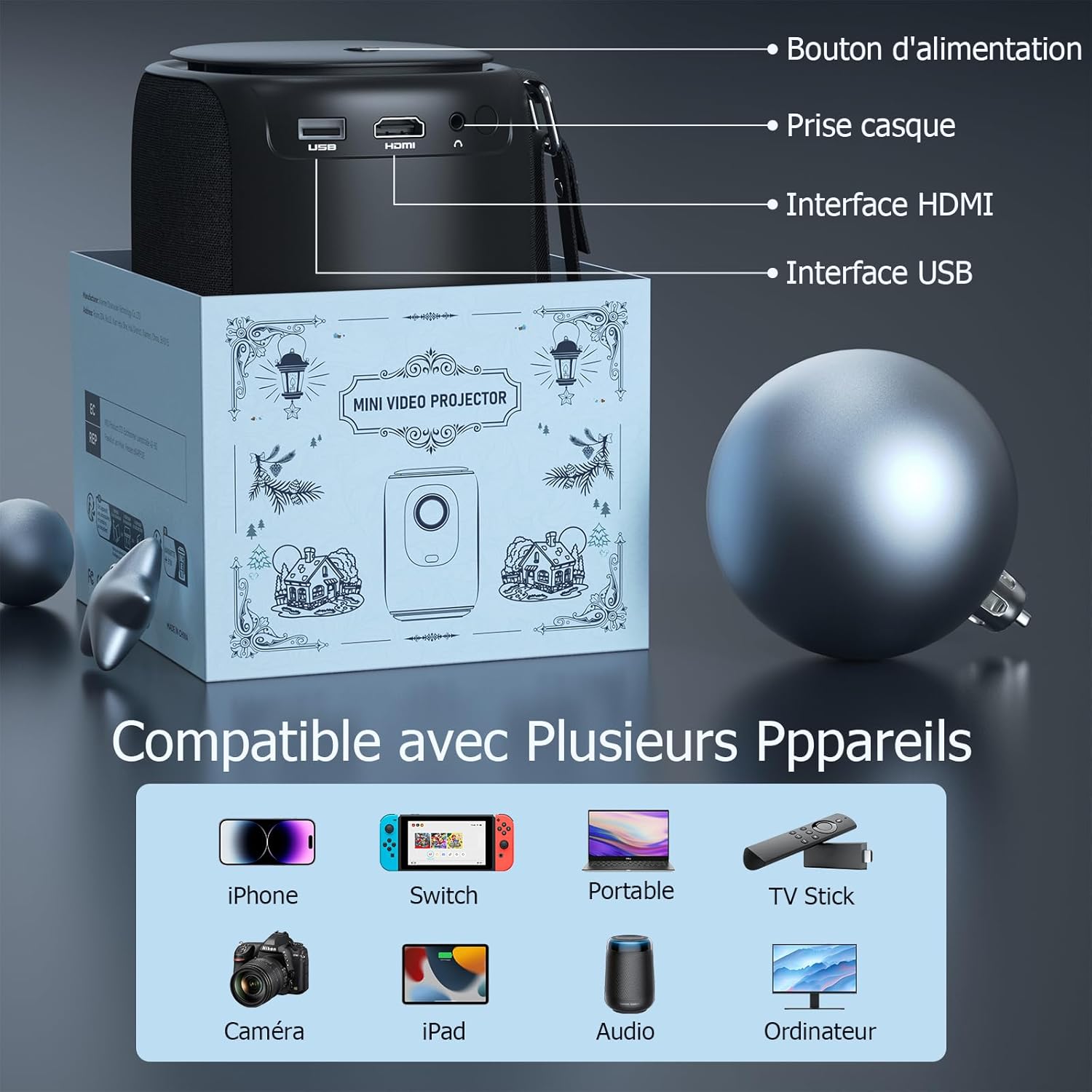
Малюнак 4.2: Тыл view of the projector, indicating the power button, headphone jack, HDMI interface, and USB interface for various connections.
Асноўныя характарыстыкі
- 1080P FHD Display: Delivers vivid and immersive images.
- Automatic Keystone Correction (±50°): Automatically corrects distorted images vertically for a perfect rectangular display.
- Электрычны фокус: Achieve clear images quickly with a single click on the remote control, eliminating manual adjustments.
- Двухдыяпазонны Wi-Fi (2.4G+5G): Provides smoother and lower latency connectivity for streaming and gaming.
- Bidirectional Bluetooth & Integrated Stereo Speakers: Can be used as a Bluetooth speaker and offers Hi-Fi sound effects.
- Portable Strap Design: Convenient for carrying the projector during travel.
5. Кіраўніцтва па наладцы
5.1 Уключэнне
- Падключыце адаптар сілкавання да ўваходнага порта сілкавання праектара.
- Падключыце адаптар сілкавання да насценнай разеткі.
- Націсніце кнопку харчавання на праектары або пульце дыстанцыйнага кіравання, каб уключыць яго.
5.2 Пачатковае размяшчэнне
Place the projector on a stable, flat surface. Ensure there is adequate space around the projector for ventilation.
5.3 Рэгуляванне фокусу і трапецаедальнага скажэння
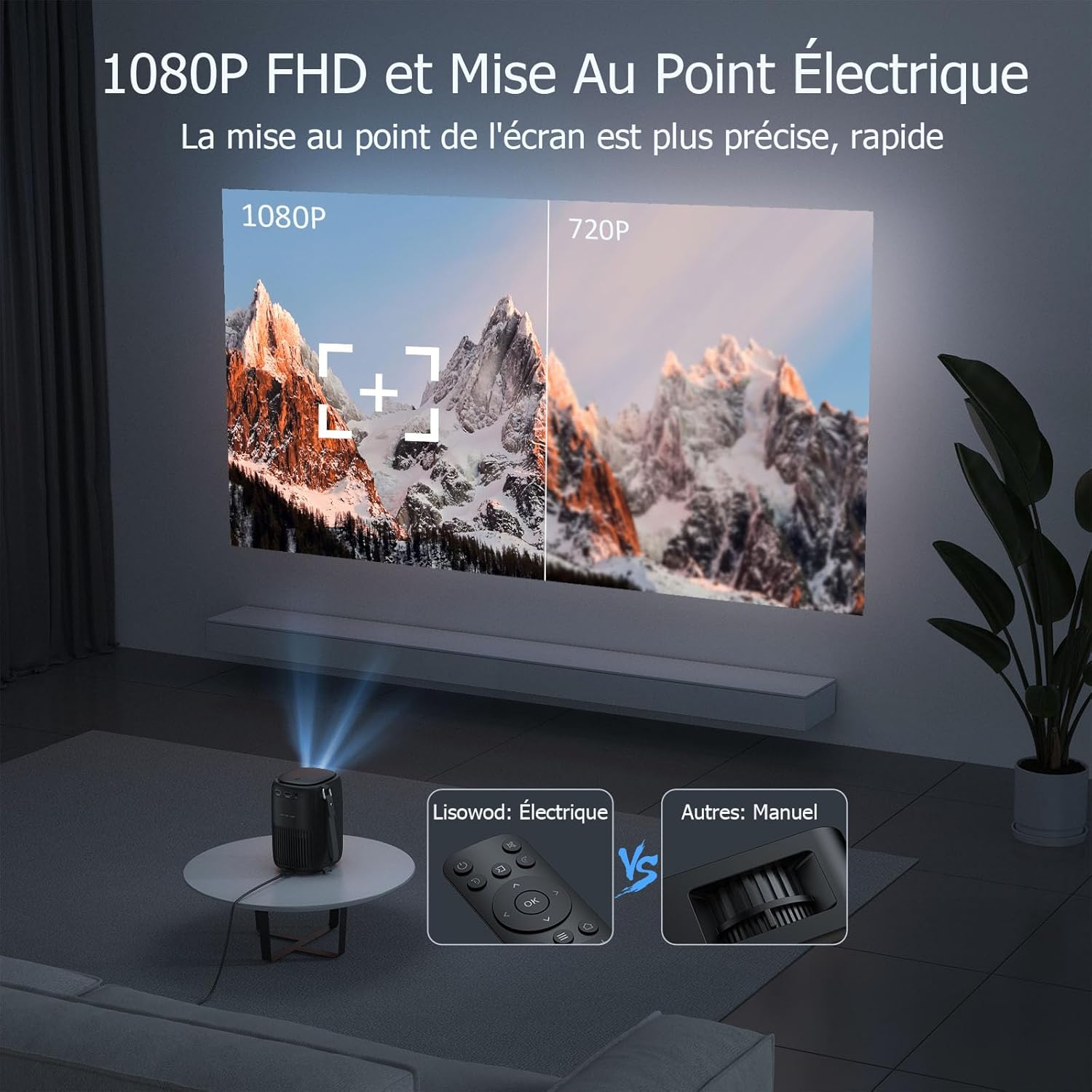
Малюнак 5.1: Illustrates the precision of 1080P FHD and the ease of electric focus compared to manual focus.

Малюнак 5.2: Demonstrates the automatic keystone correction feature, which adjusts the image shape automatically.
- Электрычны фокус: Use the remote control to adjust the focus. The built-in high-precision infrared sensor allows for quick and clear image acquisition with a single click.
- Аўтаматычная карэкцыя трапецічнага дыяметра: The projector features automatic keystone correction, which automatically adjusts the image vertically (up and down) if the projector is not perfectly aligned with the screen.
6. Інструкцыя па эксплуатацыі
6.1 Падключэнне прылад
The projector is compatible with a variety of devices:
Малюнак 6.1: The projector supports connections with various devices including iPhone, Switch, Laptops, TV Sticks, Cameras, iPads, Audio devices, and Computers.
- HDMI: Connect laptops, game consoles, TV sticks, or other media players using the provided HDMI cable.
- USB: Устаўце USB-назапашвальнік для прайгравання медыяфайлаў files непасрэдна.
- Смартфон/планшэт: Connect your smartphone or tablet for screen mirroring (specific adapter or app may be required, refer to device instructions).
- Аўдыявыхад: Connect external speakers or headphones via the headphone jack for enhanced audio.
6.2 Падключэнне Wi-Fi

Малюнак 6.2: Demonstrates the advantage of 2.4G+5G Wi-Fi for smoother and lower latency performance.
- Navigate to the Wi-Fi settings in the projector's menu.
- Select your desired Wi-Fi network (supports both 2.4GHz and 5GHz).
- Увядзіце пароль і падключыцеся.
6.3 Bluetooth Audio

Малюнак 6.3: Highlights the projector's bidirectional Bluetooth and integrated stereo speakers, allowing it to function as a Bluetooth speaker.
- Перайдзіце ў налады Bluetooth у меню праектара.
- Уключыце Bluetooth і знайдзіце даступныя прылады.
- Выберыце Bluetooth-калонку або навушнікі для спалучэння.
6.4 Using Streaming Services (Netflix, Amazon Prime, etc.)
Due to copyright restrictions, direct casting or HDMI connection from a phone/tablet for services like Netflix, Amazon Prime, etc., may not display video (only audio). To enjoy videos from these platforms, you must connect a dedicated TV stick (e.g., Amazon Fire TV Stick, Google Chromecast) to the projector's HDMI port.
7. Тэхнічнае абслугоўванне і догляд
- Ачыстка аб'ектыва: Выкарыстоўвайце мяккую тканіну без ворса, спецыяльна прызначаную для аптычных лінзаў. Не выкарыстоўвайце абразіўныя ачышчальнікі або растваральнікі.
- Чыстка корпуса праектара: Wipe the surface with a soft, dry cloth. For stubborn stains, use a slightly damp тканінай, а затым старанна высушыце.
- Вентыляцыя: Пераканайцеся, што вентыляцыйныя адтуліны чыстыя ад пылу і смецця. Выкарыстоўвайце мяккую шчотку або сціснутае паветра, каб акуратна ачысціць іх.
- захоўванне: Калі праектар не выкарыстоўваецца працяглы час, захоўвайце яго ў прахалодным, сухім месцы, пажадана ў арыгінальнай упакоўцы або ахоўным чахле.
8. Выпраўленне непаладак
| праблема | Магчымая прычына | Рашэнне |
|---|---|---|
| Не адлюстроўваецца выява | Power cable not connected; Input source incorrect; Device not powered on. | Check power connection; Select correct input source (HDMI, USB); Ensure connected device is on. |
| Відарыс размыты | Focus not adjusted; Projector too far/close to screen. | Use the remote control to adjust electric focus; Adjust projection distance. |
| Выява скажоная (трапецыяпадобная) | Праектар не перпендыкулярны экрану. | The projector has automatic keystone correction. Ensure it's on a stable surface. If manual adjustment is needed, check menu settings. |
| Няма гуку | Volume too low; Muted; External audio device not connected properly; Source device audio settings. | Increase volume; Unmute; Check external speaker connection; Adjust audio output on source device. |
| Cannot play Netflix/Amazon Prime Video | Copyright restrictions on direct casting/HDMI from phone/tablet. | Connect a dedicated TV stick (e.g., Amazon Fire TV Stick, Google Chromecast) to the projector's HDMI port. |
| Пульт дыстанцыйнага кіравання не працуе | Батарэі разраджаныя/нізкія; перашкода паміж пультам дыстанцыйнага кіравання і праектарам. | Replace batteries; Remove any obstructions; Point remote directly at the projector's IR receiver. |
9. Тэхнічныя характарыстыкі
| Асаблівасць | Спецыфікацыя |
|---|---|
| Марка | Лісавод |
| Нумар мадэлі | L01Pro |
| Максімальнае разрозненне дысплея | 1920 x 1080 (1080P Full HD) |
| Тэхналогія падлучэння | HDMI, USB, Wi-Fi (2.4G+5G), Bluetooth |
| Тып дысплея | ВК |
| Каэфіцыент кантраснасці выявы | 20000:1 |
| Яркасць | 158 люмен |
| Формаў-фактар | Партатыўны |
| Тып мацавання | Настольнае мацаванне |
| Уключаныя кампаненты | Adapter, HDMI Cable, Remote Control |
| Сумяшчальныя прылады | Laptop, Game Console, Smartphone, Other Media Players, Speaker |
10. Гарантыя і падтрымка
Your Lisowod Mini Projector is covered by a standard manufacturer's warranty. Please refer to the warranty card included in your package for specific terms and conditions, including the warranty period and coverage details.
For technical support, troubleshooting assistance, or warranty claims, please contact Lisowod customer service through the retailer where you purchased the product or visit the official Lisowod webсайт для кантактнай інфармацыі.
Please have your model number (L01Pro) and purchase information ready when contacting support.
Ask a question about this manual
Ask about setup, troubleshooting, compatibility, parts, safety, or missing instructions. Manuals+ will review the question and use this page’s manual context to help answer it.