
СГІН СГІН-М17С
SGIN 17 inch Laptop User Manual
Мадэль: SGIN-M17S
1. Уводзіны
Welcome to the user manual for your new SGIN 17 inch Laptop. This guide provides essential information to help you set up, operate, maintain, and troubleshoot your device. Please read this manual carefully before using your laptop to ensure proper function and safety.
1.1 Інфармацыя па бяспецы
- Не падвяргайце ноўтбук уздзеянню экстрэмальных тэмператур, вільготнасці або прамых сонечных прамянёў.
- Не кладзіце цяжкія прадметы на ноўтбук.
- Трымайце вадкасці далей ад прылады, каб пазбегнуць паражэння электрычным токам або пашкоджанняў.
- Выкарыстоўвайце толькі арыгінальны адаптар сілкавання, які пастаўляецца з вашым ноўтбукам.
- Не спрабуйце разбіраць або рамантаваць ноўтбук самастойна. Звярніцеся да кваліфікаванага спецыяліста па абслугоўванні.
- Забяспечце належную вентыляцыю падчас выкарыстання, каб прадухіліць перагрэў.
2. Прадукт скончыўсяview
Familiarize yourself with the components and ports of your SGIN 17 inch Laptop.

Малюнак 2.1: Спераду view of the SGIN 17 inch Laptop, showcasing its large 17.3-inch display, full-size keyboard, and touchpad.
2.1 Кампаненты і парты
Your laptop is equipped with various ports for connectivity and expansion.
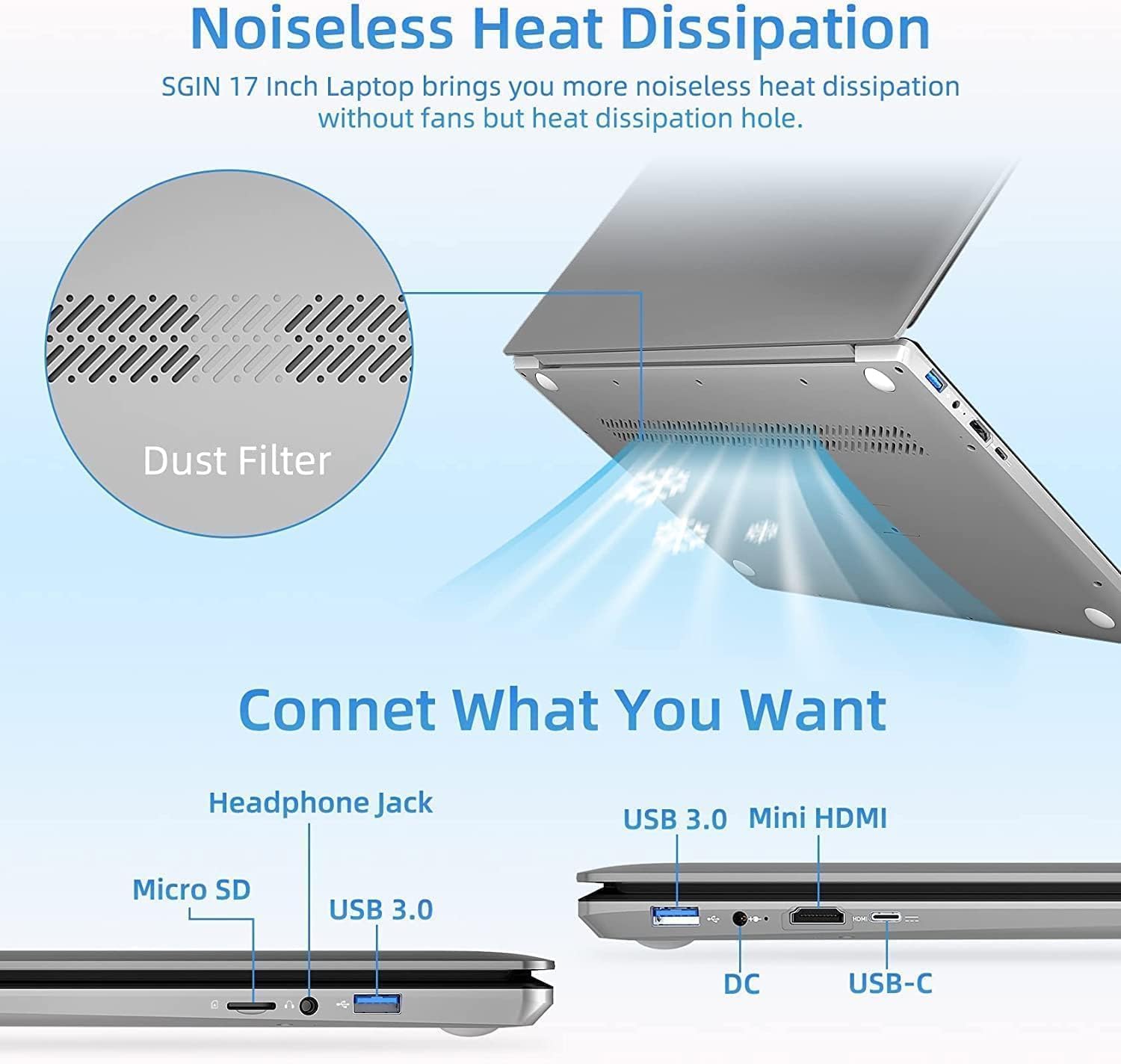
Малюнак 2.2: бок view of the SGIN 17 inch Laptop highlighting the various input/output ports including USB 3.0, USB-C, Mini HDMI, Headphone Jack, Micro SD card slot, and DC power input.
- Дысплей: 17.3-inch Full HD (1920x1080) LED screen.
- Webкамера: Інтэграваны webкамера для відэазванкоў і канферэнцый.
- Клавіятура: Full-size keyboard with numeric keypad for comfortable typing.
- Сэнсарная панэль: Multi-touch enabled touchpad for precise navigation.
- Порты USB 3.2: For high-speed data transfer and connecting peripherals.
- Порт тыпу C: Versatile port for data, display, and power delivery.
- Порт Mini HDMI: Для падлучэння да знешніх дысплеяў або праектараў.
- Раз'ём для навушнікаў: Для вываду гуку на навушнікі або знешнія дынамікі.
- Слот для карты Micro SD: Для пашырэння памяці або перадачы дадзеных з карт памяці.
- Порт пастаяннага току: Для падлучэння адаптара харчавання для зарадкі ноўтбука.
3. Настройка
3.1 Першапачатковая зарадка
Before first use, it is recommended to fully charge your laptop's battery. Connect the provided power adapter to the DC-in port on the laptop and then plug it into a power outlet. The charging indicator light will illuminate.
3.2 Першая загрузка і ўстаноўка аперацыйнай сістэмы
- Націсніце кнопку харчавання, каб уключыць ноўтбук.
- Follow the on-screen instructions to complete the initial setup of the Windows 8.1 operating system. This includes selecting your language, region, accepting terms, and setting up user accounts.
- Connect to a Wi-Fi network when prompted to enable internet access.
4. Кіраванне ноўтбукам
4.1 Кіраванне харчаваннем
- Уключэнне: Націсніце кнопку харчавання, размешчаную на клавіятурнай панэлі.
- Выключэнне: Націсніце кнопку «Пуск», затым «Харчаванне» > «Выключыць сістэму».
- Рэжым сну: Націсніце кнопку «Пуск», затым «Харчаванне» > «Спячы рэжым» або зачыніце вечка ноўтбука.
- Перазапуск: Націсніце кнопку «Пуск», затым «Харчаванне» > «Перазагрузка».
4.2 Выкарыстанне клавіятуры і сэнсарнай панэлі

Малюнак 4.1: Буйны план view of the SGIN 17 inch Laptop's full-size keyboard and integrated numeric keypad, designed for comfortable and efficient typing.
The laptop features a full-size keyboard for comfortable typing and a dedicated numeric keypad for data entry. The touchpad supports multi-touch gestures for intuitive navigation, including scrolling, zooming, and switching applications.
4.3 Падключэнне да сетак
Каб падключыцца да сеткі Wi-Fi:
- Націсніце на значок Wi-Fi у сістэмным трэі (правы ніжні кут экрана).
- Выберыце патрэбную сетку са спісу.
- Увядзіце ключ бяспекі сеткі (пароль), калі будзе прапанавана, а затым націсніце «Падключыцца».
4.4 Падключэнне вонкавага дысплея
Use the Mini HDMI port to connect your laptop to an external monitor or projector. Connect one end of a Mini HDMI cable to your laptop and the other end to the display device. You may need to adjust display settings in Windows to extend or duplicate your screen.
4.5 Перадача дадзеных
Utilize the USB 3.2 ports for connecting external hard drives, USB flash drives, and other peripherals for fast data transfer. The Micro SD card slot allows for easy access to data on compatible memory cards.
5. Тэхнічнае абслугоўванне
5.1 Чыстка ноўтбука
- Выкарыстоўвайце мяккую безворсовую тканіну, злёгку dampпрамыйце вадой або сродкам для чысткі экранаў, каб ачысціць дысплей.
- Для клавіятуры і корпуса выкарыстоўвайце мяккую сухую тканіну. Пазбягайце абразіўных ачышчальнікаў.
- Periodically use compressed air to clear dust from vents to maintain optimal cooling.
5.2 Сыход за акумулятарам

Figure 5.1: Illustration of the SGIN 17 inch Laptop's battery capacity (7.6V 8000mAh, 38Wh) and estimated usage time (up to 8 hours of video playback).
- Каб падоўжыць тэрмін службы батарэі, пазбягайце частай поўнай разрадкі батарэі.
- Захоўвайце ноўтбук у прахалодным, сухім месцы, калі ён не выкарыстоўваецца працяглы час.
- З часам выкарыстання ёмістасць батарэі памяншаецца, гэта нармальна.
5.3 Захоўванне і зварот
When transporting your laptop, use a protective sleeve or bag to prevent scratches and impacts. Avoid exposing the laptop to strong magnetic fields.
6. Выпраўленне непаладак
This section addresses common issues you might encounter and provides basic solutions.
| праблема | Магчымая прычына | Рашэнне |
|---|---|---|
| Ноўтбук не ўключаецца. | Акумулятар разраджаны або адаптар харчавання падключаны няправільна. | Connect the power adapter and ensure it's plugged into a working outlet. Allow it to charge for a few minutes before attempting to power on again. |
| Дысплей пусты або мігціць. | Incorrect display settings, loose cable (if external monitor), or driver issue. | Press Fn + F7 (or similar function key) to cycle through display modes. Restart the laptop. Update graphics drivers if possible. |
| Праблемы з падключэннем да Wi-Fi. | Адаптар Wi-Fi выключаны, няправільны пароль або праблема з маршрутызатарам. | Ensure Wi-Fi is enabled (Fn + F5 or check settings). Re-enter Wi-Fi password. Restart your router and laptop. |
| Ноўтбук працуе павольна. | Too many applications open, low storage space, or malware. | Close unnecessary applications. Free up disk space. Run a virus scan. |
Калі праблема не знікне пасля выкарыстання гэтых рашэнняў, звярніцеся ў службу падтрымкі кліентаў.
7. Тэхнічныя характарыстыкі
Detailed specifications for your SGIN 17 inch Laptop (SGIN-M17S).

Figure 7.1: Diagram illustrating the Intel Core i3-5005U Processor, which powers the SGIN 17 inch Laptop, providing efficient performance.
| Асаблівасць | Спецыфікацыя |
|---|---|
| Назва мадэлі | SGIN-M17S |
| Памер экрана | 17.3 цалі |
| Дазвол экрана | 1920 x 1080 пікселяў (Full HD) |
| Працэсар | Intel Core i3-5005U (2.4 ГГц) |
| АЗП | 4 ГБ DDR4 SDRAM |
| Жорсткі дыск | 128 GB SSD (NVMe interface) |
| Графічны супрацэсар | Intel HD Graphics 5500 |
| Аперацыйная сістэма | Windows 8.1 |
| Бесправадны тып | 802.11b Wi-Fi |
| акумулятар | 1 Lithium Ion battery (8000Wh, 38Wh, up to 8 hours video play) |
| Вага прадмета | 6.34 фунта |
| Памеры прадукту | 17.3 х 10 х 0.6 цалі |
8. Гарантыя і падтрымка
8.1 Інфармацыя аб гарантыі
Your SGIN 17 inch Laptop comes with a Гарантыя 1 год from the date of purchase. This warranty covers manufacturing defects and malfunctions under normal use. It does not cover damage caused by misuse, accidents, unauthorized repairs, or natural disasters.
Калі ласка, захавайце доказы пакупкі для прэтэнзій па гарантыі.
8.2 Падтрымка кліентаў
For technical assistance, warranty claims, or any other inquiries, please contact SGIN customer support through the official channels provided at the time of purchase or on the SGIN official website. When contacting support, please have your laptop's model number (SGIN-M17S) and purchase details ready.
Ask a question about this manual
Ask about setup, troubleshooting, compatibility, parts, safety, or missing instructions. Manuals+ will review the question and use this page’s manual context to help answer it.