
1. Уводзіны
This manual provides detailed instructions for the safe and effective use of your iJoy Disney Winnie The Pooh Wireless Bluetooth Speaker. Please read this manual thoroughly before operating the device and retain it for future reference.
2. Што ў скрынцы
Carefully unpack your speaker and ensure all items are present:
- iJoy Disney Winnie The Pooh Wireless Bluetooth Speaker
- USB-кабель для зарадкі
- Backup AUX Cable
- Кіраўніцтва карыстальніка (гэты дакумент)

Image: The speaker shown next to its retail packaging, illustrating the product and its box.
3. Прадукт скончыўсяview
3.1 кнопкі кіравання
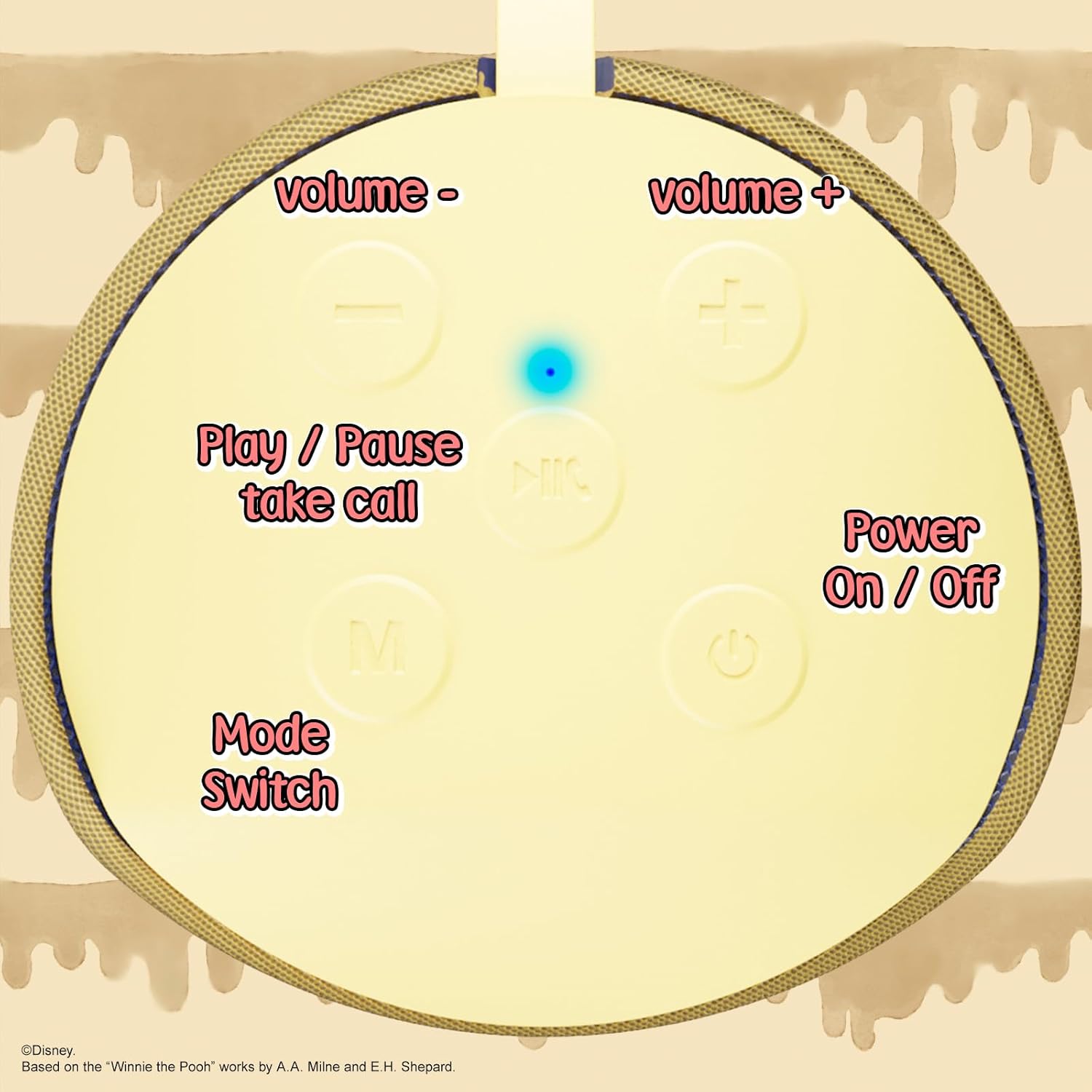
Image: A close-up of the speaker's top panel, displaying the control buttons.
- Кнопка ўключэння/выключэння: Націсніце і ўтрымлівайце, каб уключыць або выключыць дынамік.
- Кнопка прайгравання/паўзы: Press to play or pause audio. Also used to answer or end phone calls.
- Кнопка павелічэння гучнасці (+): Націсніце, каб павялічыць гучнасць. Націсніце і ўтрымлівайце, каб перайсці да наступнай кампазіцыі.
- Кнопка памяншэння гучнасці (-): Націсніце, каб паменшыць гучнасць. Націсніце і ўтрымлівайце, каб перайсці да папярэдняй кампазіцыі.
- Mode Switch (M) Button: Press to switch between Bluetooth, FM Radio, SD Card, and USB modes.
3.2 Парты і індыкатары

Выява: Падрабязны view of the speaker's rear panel, highlighting the AUX port, SD card slot, USB port, and Micro USB charging port.
- AUX порт: For connecting external audio devices via the provided 3.5mm AUX cable.
- Слот для SD-карты: Insert a microSD card for direct audio playback.
- Порт USB: Insert a USB flash drive for direct audio playback.
- Порт для зарадкі Micro USB: Падключыце сюды кабель USB для зарадкі дынаміка.
- Святлодыёдны індыкатар: Indicates charging status and Bluetooth pairing status.
4. Настройка
4.1 Зарадка дынаміка
- Connect the Micro USB end of the charging cable to the speaker's Micro USB charging port.
- Падключыце стандартны USB-кабель да USB-адаптара сілкавання (не ўваходзіць у камплект) або да USB-порта кампутара.
- The LED indicator light will illuminate during charging and turn off once fully charged.
- Поўная зарадка звычайна займае каля 2 гадзін.
4.2 Спалучэнне па Bluetooth
- Пераканайцеся, што дынамік цалкам зараджаны.
- Press and hold the Power On/Off button to turn on the speaker. You will hear an audible prompt, and the LED indicator will flash, indicating it's in pairing mode.
- На мабільнай прыладзе (смартфоне, планшэце і г.д.) уключыце Bluetooth.
- Пошук available Bluetooth devices. The speaker will appear as "iJoy Winnie The Pooh Speaker" or similar.
- Select the speaker from the list to pair. Once successfully paired, you will hear a confirmation sound, and the LED indicator will stop flashing and remain solid.
- Пры ўключэнні дынамік аўтаматычна падключыцца да апошняй спалучанай прылады, калі Bluetooth прылады актыўны і знаходзіцца ў зоне дзеяння.
5. Інструкцыя па эксплуатацыі
5.1 Рэжым Bluetooth
After successful pairing, you can stream audio wirelessly from your device to the speaker. Use your device's controls or the speaker's Play/Pause, Volume Up/Down buttons to manage playback.
5.2 Рэжым FM-радыё
- Націсніце кнопку Mode (M), каб пераключыцца ў рэжым FM-радыё.
- Націсніце кнопку прайгравання/паўзы, каб аўтаматычна сканаваць і захоўваць даступныя FM-станцыі.
- Для пераключэння паміж захаванымі станцыямі выкарыстоўвайце кнопкі павелічэння гучнасці (+) і памяншэння гучнасці (-) (кароткае націсканне).
5.3 SD Card / USB Playback
- Insert a microSD card into the SD card slot or a USB flash drive into the USB port.
- The speaker will automatically switch to the corresponding mode and begin playing audio files. If not, press the Mode (M) button to select the correct mode.
- Use the speaker's Play/Pause, Volume Up/Down buttons to control playback.
5.4 Рэжым AUX
- Connect one end of the provided 3.5mm AUX cable to the speaker's AUX port.
- Падключыце другі канец да раздыма для навушнікаў аўдыяпрылады.
- The speaker will automatically switch to AUX mode. If not, press the Mode (M) button.
- Control playback and volume primarily from your connected audio device.
5.5 Званкі ў рэжыме гучнай сувязі
Пры падключэнні да смартфона праз Bluetooth:
- Адказаць на званок: Націсніце кнопку Play/Pause адзін раз.
- Завяршыць выклік: Націсніце кнопку прайгравання/паўзы адзін раз падчас размовы.
- Адхіліць выклік: Націсніце і ўтрымлівайце кнопку Прайграванне/Паўза.
6. Тэхнічнае абслугоўванне
- Працірайце дынамік мяккай сухой тканінай. Не выкарыстоўвайце абразіўныя ачышчальнікі або растваральнікі.
- The speaker is IPX4 splashproof, meaning it can withstand splashes of water. Do not submerge it in water.
- Захоўвайце дынамік у прахалодным сухім месцы, калі ён не выкарыстоўваецца.
- Пазбягайце ўздзеяння на дынамік экстрэмальных тэмператур, прамых сонечных прамянёў або высокай вільготнасці.
7. Выпраўленне непаладак
| праблема | Магчымая прычына | Рашэнне |
|---|---|---|
| Дынамік не ўключаецца | Нізкі акумулятар | Цалкам зарадзіце дынамік. |
| Немагчыма падключыць прыладу праз Bluetooth | Speaker not in pairing mode / Device Bluetooth off / Too far from device | Ensure speaker is in pairing mode (flashing LED). Turn on Bluetooth on your device. Move speaker closer to device (within 30 feet). |
| Няма гуку | Volume too low / Incorrect mode / Device not playing audio | Increase speaker and device volume. Press 'M' button to select correct mode. Ensure audio is playing on your connected device. |
| Слабы прыём FM-радыё | Weak signal / Interference | Move the speaker to a different location. The AUX cable can act as an antenna; try connecting it. |
8. Тэхнічныя характарыстыкі

Image: The speaker with visual indicators showing its height of 6.3 inches and width of 2.9 inches.
| Асаблівасць | Дэталь |
|---|---|
| Нумар мадэлі | SS-KH7C-FS4O |
| Тэхналогія падлучэння | Bluetooth |
| Далёкасць бесправадной сувязі | Да 30 футаў (10 метраў) |
| Тып дынаміка | Вежа |
| Максімальная выхадная магутнасць дынаміка | 20 ват |
| Рэжым выхаду гуку | Мона |
| Ёмістасць батарэі | 800 Міліamp Гадзіны |
| Час зарадкі | Прыкладна 2 гадзін |
| Час гульні | Up to 3 Hours (depending on volume and usage) |
| Узровень воданепранікальнасці | IPX4 (абаронены ад пырскаў) |
| Памеры прадукту | 3" Г х 3" Ш х 6" В (7.62 см Г х 7.62 см Ш х 15.24 см В) |
| Вага прадмета | 8 унцыі (226.8 грам) |
| Уключаныя кампаненты | Bluetooth Speaker, USB Charging Cable, Backup AUX Cable, Owners Manual |
| Асаблівасці | Built-in Microphone, LED Indicator Lights, Portable, SD Card Slot, USB Port, FM Radio |
9. Гарантыя і падтрымка
9.1 Інфармацыя аб гарантыі
This iJoy Disney Winnie The Pooh Wireless Bluetooth Speaker comes with a 90-day manufacturer's warranty from the date of purchase. This warranty covers manufacturing defects and workmanship under normal use. It does not cover damage caused by misuse, accidents, unauthorized modifications, or normal wear and tear.
9.2 Падтрымка кліентаў
For technical assistance, warranty claims, or further inquiries, please contact iJoy customer support through their official website or the retailer where the product was purchased. Please have your model number (SS-KH7C-FS4O) and proof of purchase ready.