
CAMECHO CAMA3041A3MI2
CAMECHO Android 13 Car Radio (Model CAMA3041A3MI2) User Manual
Падрабязныя інструкцыі па ўсталёўцы, эксплуатацыі і абслугоўванні.
Уводзіны
This manual provides detailed instructions for the installation, operation, and maintenance of your CAMECHO Android 13 Car Radio. Please read this manual thoroughly before using the product to ensure proper functionality and safety. This unit features a 9-inch capacitive touchscreen, Android 13 operating system, 2GB RAM, 64GB ROM, built-in Wireless Carplay & Android Auto, GPS, WiFi, Bluetooth, FM/RDS radio, and supports steering wheel control and a rear view камера.
Сумяшчальнасць з аўтамабілем
This CAMECHO car radio is designed for specific Volkswagen, Skoda, and Seat models. Please refer to the compatibility chart below to ensure your vehicle is supported. The image also illustrates the visual transformation from a standard car console to one with the CAMECHO unit installed.

выява: Compatibility chart for various Volkswagen, Skoda, and Seat models, including Golf, Polo, Passat, Octavia, and Leon. The image also displays a comparison of the car console before and after the CAMECHO car radio installation.
Сумяшчальныя мадэлі:
Для Volkswagen
- Амарок (2010-2013)
- Кэдзі (2003-2013)
- Гольф V (2003-2008)
- Гольф VI (2008-2013)
- Гольф Плюс (2003-2013)
- Гольф-кабрыялет (2011-2013)
- Гольф-універсал (2010-2013)
- Гольф GTI (2010-2012)
- Гольф R (2010-2013)
- Гольф-маёнтак (2009-2012)
- Пасат (2005-2013)
- Passat Універсал (2005-2013)
- Седан Passat (2006-2013)
- Passat Wagon (2007-2013)
- Passat Alltrack (2012-2013)
- Passat CC (2008-2013)
- Jetta (2005, 2007-2013)
- Jetta GLI (2006-2013)
- Туран (2003-2013)
- Тыгуан (2007-2013)
- Шаран (2010-2013)
- Сірока (2008-2013)
- ЭОС (2006-2013)
- WT5 Transporter (2010-2014)
- Polo (2009-2013)
- Седан Polo (2012-2013)
- Пола V 6R (2009-2013)
- New Beetle 2 (2011-2013)
- Трус (2007-2013)
- Транспартнік T5 (2010-2013)
- WT5 Caravelle 2010 Multivan T5 (2010-2013)
- Жук (2011-2013)
For Skoda
- Octavia Limousine (2004-2006)
- Octavia II III (to 2010)
- Octavia Combi (2004-2006)
- Актавія (2009-2012)
- Fabia Limousine (2004-2008)
- Фабія (2011-2013)
- Румстэр (2006-2010)
- Patrick (2004-2008)
- Выдатна (2008-2013)
- Еці (2009-2015)
For Seat
- Altea (2004, 2005, 2007-2012)
- Альтэа XL (2007-2013)
- Леон (2006-2013)
- Таледа (2004-2015)
- Альгамбра (2010-2016)
Асноўныя характарыстыкі прадукту
- Сістэма Android 13: Equipped with the latest Android 13 operating system, 4-core processor, 2GB RAM, and 64GB ROM for fast and smooth performance.
- 9-цалевы ёмістны сэнсарны экран: High-resolution 1024x600 display for clear visuals and responsive touch control.
- Бесправадны Carplay і Android Auto: Seamlessly integrate your smartphone for navigation, music, messages, and voice control (Siri/Google Assistant) via Bluetooth and WiFi.
- GPS-навігацыя: Supports offline maps (e.g., Here Wego) and online navigation via WiFi connection, allowing access to Play Store apps like YouTube and Facebook.
- Тыл View Падтрымка камеры: Includes an AHD rear camera with waterproof, 170° wide-angle, and night vision capabilities. Automatically displays the camera feed when reversing.
- Кіраванне рулём (SWC): Compatible with original steering wheel buttons for convenient and safe operation of radio functions.
- Злучэнне Bluetooth: Built-in Bluetooth with an external microphone for hands-free calling, music streaming, and phonebook synchronization.
- FM/RDS-радыё: High-quality FM/RDS radio tuner with 18 preset channels.
- HiFi Audio Effect: Features an equalizer for customized audio output.
- Функцыя падзелу экрана: Allows running two applications simultaneously on the screen.
Настройка і ўстаноўка
Installation of the CAMECHO Android 13 Car Radio requires technical knowledge and experience with car electronics. It is highly recommended to have the unit installed by a qualified professional to ensure correct wiring and avoid damage to your vehicle or the product.
Агульныя этапы ўстаноўкі:
- Падрыхтоўка: Перад пачаткам любых электрамантажных работ адключыце акумулятар аўтамабіля.
- Выдаліць стары блок: Carefully remove your existing car radio and trim panels.
- Падключэнне правадоў: Connect the provided power cables, RCA cables, USB cables, GPS antenna, and camera input to the corresponding ports on the new unit and your vehicle's wiring harness. The included Canbus decoder ensures compatibility with your vehicle's systems, including steering wheel controls.
- Усталюйце заднюю камеру (неабавязкова): If installing the rear camera, route the camera cable from the back of the vehicle to the head unit and connect it to the camera input.
- Мацаванне блока: Securely mount the CAMECHO car radio into the dashboard opening.
- Паўторнае падключэнне батарэі: Зноў падключыце акумулятар аўтамабіля.
- Initial Power On & Test: Turn on the ignition and power on the unit. Test all functions, including audio, touchscreen, GPS, Bluetooth, and camera.
For detailed wiring diagrams and specific vehicle instructions, please consult a professional installer or refer to vehicle-specific resources.
Інструкцыя па эксплуатацыі
1. Бесправадны Carplay і Android Auto
Connect your smartphone to the car radio via Bluetooth and WiFi to activate Wireless Carplay or Android Auto. This allows safe access to your phone's navigation, music, messages, and other features while driving. Voice control (Siri for Apple Carplay, Google Assistant for Android Auto) is supported for hands-free operation.

выява: Visual representation of Apple Carplay and Android Auto interfaces, demonstrating their appearance and functionality on the car radio display.
2. GPS-навігацыя і Wi-Fi
The unit supports GPS navigation with pre-installed offline maps (e.g., Here Wego). Connect to a WiFi network (e.g., via your phone's hotspot) to download online maps from the Play Store, browse the internet, and access various applications like YouTube and Facebook.

выява: The car radio screen showing GPS navigation in action, along with icons for various online applications accessible via WiFi.
3. Bluetooth Hands-Free і музыка
Pair your smartphone via Bluetooth for hands-free calling and audio streaming. The external microphone ensures clear call quality. You can access your phonebook and stream music directly to the car radio.

выява: A composite image showing the Bluetooth calling interface, music streaming, FM/RDS radio tuning, and the HiFi equalizer settings on the car radio.
4. FM/RDS-радыё
Tune into your favorite FM radio stations. The RDS (Radio Data System) feature provides additional information like station name and song title where available. You can save up to 18 preset channels.
5. Кіраванне рулём (SWC)
The unit supports your vehicle's original steering wheel controls. After installation, you may need to configure the SWC settings in the radio's menu to map the buttons correctly. This allows you to control volume, switch tracks, answer calls, and more without taking your hands off the wheel.

выява: The car radio interface displaying options for configuring steering wheel controls and a view of the rear camera feed with parking guidelines.
6. Задняя View Камера
When the vehicle is shifted into reverse gear, the car radio automatically displays the feed from the included AHD rear camera. The camera features a waterproof design, 170° wide-angle view, and night vision for enhanced safety during parking maneuvers.
7. HiFi Audio Effect
Utilize the built-in equalizer to customize your audio experience. Adjust bass, treble, and other sound parameters to achieve your preferred sound profile.
8. Функцыя падзелу экрана
The split screen feature allows you to run two applications simultaneously on the 9-inch display. For example, you can have navigation open on one side and music playback on the other.

выява: A visual representation of the split screen function, demonstrating how the car radio display can be divided to show two different applications simultaneously.
Тэхнічнае абслугоўванне
- Ачыстка экрана: Выкарыстоўвайце мяккую безворсовую тканіну, злёгку dampвадой або сродкам для чысткі экранаў, спецыяльна прызначаным для электронікі. Пазбягайце выкарыстання агрэсіўных хімічных рэчываў або абразіўных матэрыялаў.
- Генеральная ўборка: Keep the unit free from dust and debris. Use a soft, dry cloth for general cleaning.
- Абнаўленні праграмнага забеспячэння: Periodically check for software updates through the unit's settings menu or the manufacturer's webсайт, каб забяспечыць аптымальную прадукцыйнасць і доступ да новых функцый.
- Пазбягайце экстрэмальных тэмператур: Do not expose the unit to extreme temperatures or direct sunlight for prolonged periods, as this can affect its lifespan and performance.
Ліквідацыю непаладак
Калі ў вас узніклі праблемы з аўтамагнітолай CAMECHO, звярніцеся да наступных распаўсюджаных крокаў па ліквідацыі непаладак:
- Няма харчавання:
- Праверце ўсе электрычныя злучэнні і засцерагальнікі.
- Пераканайцеся, што акумулятар аўтамабіля правільна падключаны і зараджаны.
- Няма гуку:
- Праверце падключэнне дынамікаў.
- Праверце ўзровень гучнасці і налады адключэння гуку.
- Пераканайцеся, што выбрана правільная крыніца гуку.
- Сэнсарны экран не рэагуе:
- Перазапусціце прыладу, выключыўшы запальванне аўтамабіля і зноў запусціўшы яго.
- Perform a factory reset if the issue persists (note: this will erase all custom settings).
- GPS не працуе:
- Пераканайцеся, што антэна GPS правільна падключана і мае выразны сігнал view неба.
- Check GPS settings in the unit's menu.
- Праблемы з падключэннем Bluetooth:
- Пераканайцеся, што Bluetooth уключаны як на аўтамабільнай радыё, так і на вашым смартфоне.
- Выдаліце папярэднія спалучэнні і паспрабуйце зноў спалучэнне.
- Ensure your phone is within range.
- Не адлюстроўваецца выява з камеры задняга віду:
- Check the camera's power and video connections.
- Ensure the reverse gear signal wire is correctly connected.
Калі гэтыя дзеянні не вырашаць праблему, звярніцеся ў службу падтрымкі кліентаў для атрымання дадатковай дапамогі.
Тэхнічныя характарыстыкі
| Асаблівасць | Дэталь |
|---|---|
| Нумар мадэлі | CAMA3041A3MI2 |
| Аперацыйная сістэма | Android 13 |
| АЗП | 2 ГБ |
| ПЗУ | 64 ГБ |
| Памер экрана | 9 цалі |
| Дазвол экрана | 1024x600 |
| Тэхналогія падлучэння | Bluetooth, WiFi |
| Тып кантролера | Ручное кіраванне |
| Асаблівасці | Built-in Bluetooth, Lane assistance |
| Сумяшчальныя прылады | Смартфон |
| Тып раздыма | RCA |
| Рэжым выхаду гуку | Стэрэа |
| Колькасць каналаў | 4 |
| Выходная магутнасць | 180 ват |
| Памеры ўпакоўкі | 28.1 х 21.1 х 10.9 см |
| Вага прадмета | 1.25 кг |
Змест пакета
The following items are included in your CAMECHO Android 13 Car Radio package:
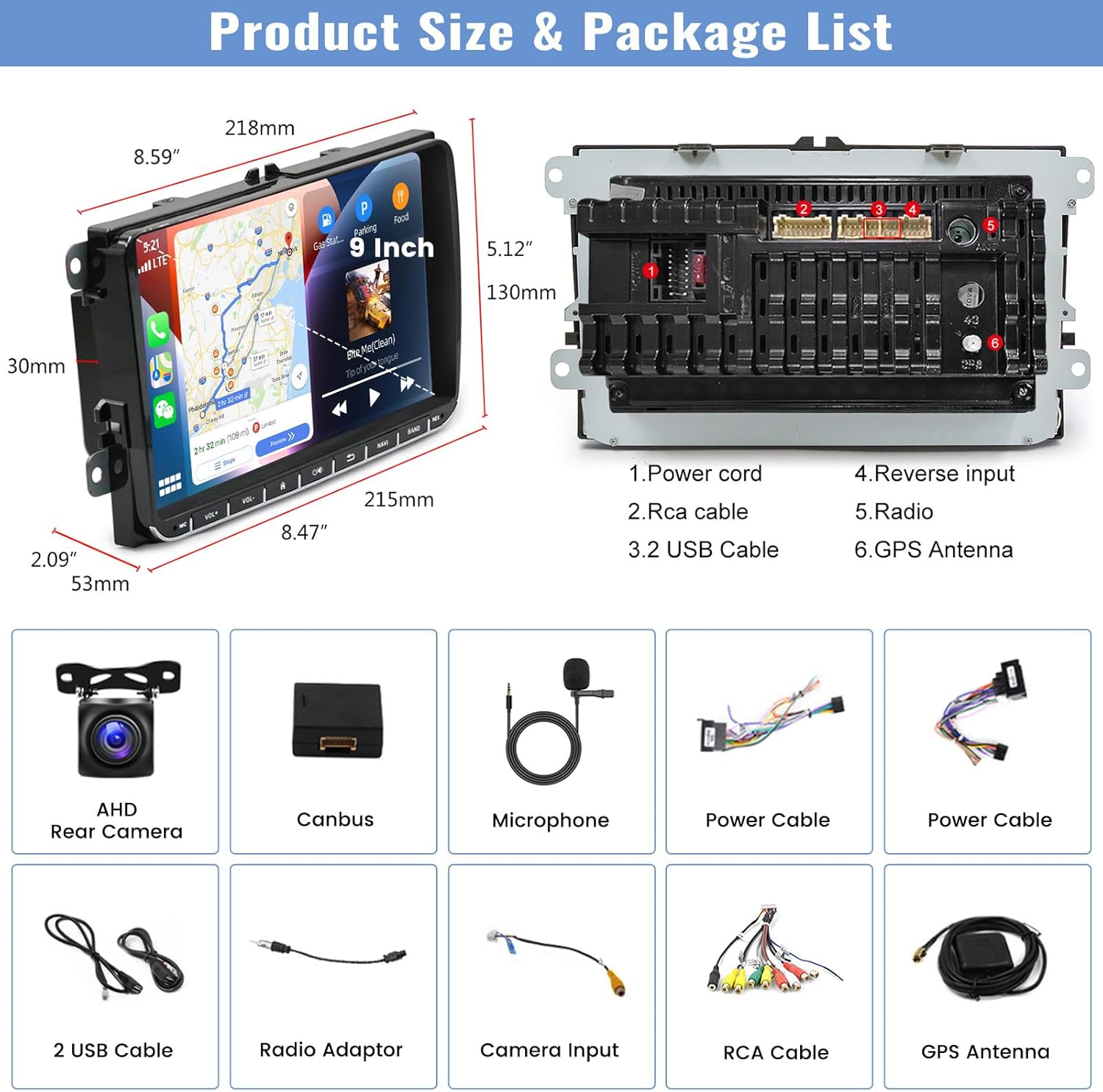
выява: An illustration detailing the dimensions of the 9-inch car radio unit and a comprehensive list of all accessories included in the package.
- CAMECHO 9-inch Android 13 Car Radio Unit
- Задняя камера AHD
- Дэкодэр CANbus
- Знешні мікрафон
- Power Cable (x2, likely different types for compatibility)
- 2 USB-кабелі
- Radio Adaptor
- Уваходны кабель камеры
- Камплект кабеляў RCA
- GPS антэна
Гарантыя і падтрымка
Your CAMECHO Android 13 Car Radio comes with a Гарантыя 1 год з даты пакупкі. Гэтая гарантыя распаўсюджваецца на вытворчыя дэфекты і няспраўнасці пры нармальным выкарыстанні.
For warranty claims, technical support, or any questions regarding the product, please contact CAMECHO customer service through the retailer where you purchased the product or visit the official CAMECHO website for contact information. Please have your model number (CAMA3041A3MI2) and proof of purchase ready when contacting support.