
Уводзіны
This manual provides essential instructions for the proper setup, operation, and maintenance of your 3nStar PTA0157-432 All-in-One POS System. Please read this manual thoroughly before using the device to ensure optimal performance and longevity.
Інфармацыя па бяспецы
Observe the following safety precautions to prevent damage to the device or injury to yourself and others:
- Не падвяргайце прыладу ўздзеянню вады або празмернай вільгаці.
- Пазбягайце размяшчэння прылады побач з крыніцамі цяпла або пад прамымі сонечнымі прамянямі.
- Use only the provided AC adapter.
- Не спрабуйце адкрываць або рамантаваць прыладу самастойна. Звяртайцеся да кваліфікаванага персаналу па любыя паслугі па абслугоўванні.
- Забяспечце належную вентыляцыю вакол прылады падчас працы.
Змест пакета
Праверце наяўнасць усіх прадметаў у камплекце:
- 3nStar PTA0157-432 All-in-One POS System
- Адаптар пераменнага току
- Кіраўніцтва карыстальніка (гэты дакумент)
Прадукт скончаныview
The 3nStar PTA0157-432 is a 15.6-inch All-in-One Point of Sale system designed for various business environments. It features a 10-point capacitive touchscreen, runs on Android 11, and is powered by a Quad-Core processor with 4GB RAM and 32GB storage. Integrated Wi-Fi and Bluetooth connectivity are also included.

Малюнак 1: Спераду view of the 3nStar PTA0157-432 All-in-One POS System, showcasin15.6-цалевы дысплей і ўбудаваную падстаўку.

Figure 2: A user interacting with the 10-point capacitive touchscreen of the POS system, demonstrating its touch responsiveness.

Малюнак 3: Задняя частка view of the 3nStar POS System, showing the ventilation slots and the sturdy integrated stand.
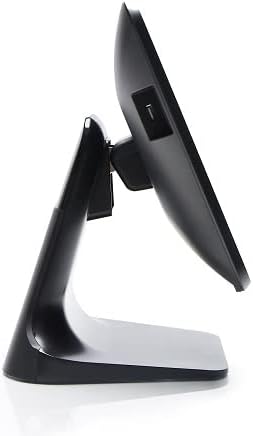
Малюнак 4: Бакавы прафесіяналfile of the 3nStar POS System, highlighting its slim design and adjustable screen angle.
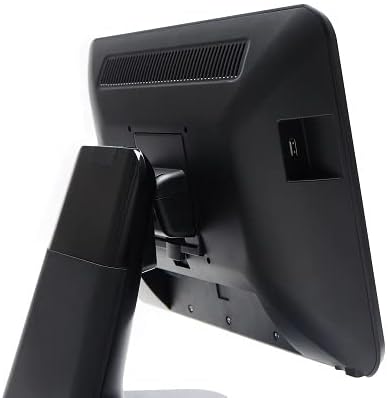
Малюнак 5: Задняя частка view of the 3nStar POS System, illustrating the location of various connectivity ports for peripherals.
Настройка
- Распакаваць сістэму: Carefully remove the POS system and all accessories from the packaging.
- Position the System: Place the POS system on a stable, flat surface, ensuring adequate ventilation around the device.
- Падключыце харчаванне: Connect the AC adapter to the power input port on the back of the POS system, then plug the adapter into a standard electrical outlet.
- Першапачатковае ўключэнне: Press the power button, usually located on the side or back of the display. The system will boot up to the Android 11 operating system.
- Першапачатковая канфігурацыя: Follow the on-screen prompts to complete the initial Android setup, including language selection, Wi-Fi connection, and Google account setup (optional).
- Падключэнне перыферыйных прылад: Connect any necessary peripherals such as barcode scanners, receipt printers, or cash drawers to the available USB or other designated ports. Refer to the peripheral's manual for specific connection instructions.
Інструкцыя па эксплуатацыі
The 3nStar PTA0157-432 operates on Android 11, providing a familiar and intuitive user experience.
Базавая навігацыя
- Сэнсарны экран: Use your fingers to tap, swipe, pinch, and zoom on the 15.6-inch capacitive display.
- Галоўны экран: Access your installed applications and widgets from the main home screen.
- Скрыня праграм: Swipe up from the bottom of the screen or tap the app drawer icon to view усе ўсталяваныя прыкладання.
- Апавяшчэнні: Правядзіце пальцам уніз ад верхняй часткі экрана, каб атрымаць доступ да апавяшчэнняў і хуткіх налад.
Падключэнне да Wi-Fi
- Перайсці да Налады > Сетка і інтэрнэт > Wi-Fi.
- Уключыць/выключыць Wi-Fi On.
- Выберыце патрэбную сетку са спісу і ўвядзіце пароль, калі будзе прапанавана.
Падключэнне прылад Bluetooth
- Перайсці да Налады > Падключаныя прылады > Параметры злучэння > Bluetooth.
- Пераключыць Bluetooth On.
- Пераканайцеся, што ваша прылада Bluetooth знаходзіцца ў рэжыме спалучэння.
- Select the device from the list to pair.
Using POS Software
The system is designed to run various Android-compatible Point of Sale applications. Install your preferred POS software from the Google Play Store or other trusted sources. Refer to your specific POS software's documentation for detailed usage instructions.
Тэхнічнае абслугоўванне
Ачыстка прылады
- экран: Выкарыстоўвайце мяккую безворсовую тканіну, злёгку dampвадой або сродкам для чысткі экранаў, спецыяльна прызначаным для электронных дысплеяў. Не распыляйце ачышчальнік непасрэдна на экран.
- Цела: Wipe the exterior surfaces with a soft, dry cloth. Avoid abrasive cleaners or solvents.
- Вентыляцыя: Ensure ventilation slots are free from dust and debris to prevent overheating. Use compressed air if necessary.
Абнаўлення праграмнага забеспячэння
Regularly check for and install system updates for Android 11 to ensure optimal performance, security, and compatibility. Go to Налады > сістэма > Абнаўленне сістэмы.
Кіраванне сховішчам
Monitor the 32GB internal storage to ensure sufficient space for applications and data. Delete unnecessary files or uninstall unused applications to free up space. Go to Налады > Захоўванне.
Ліквідацыю непаладак
| праблема | Магчымая прычына | Рашэнне |
|---|---|---|
| Прылада не ўключаецца. | Power cable not connected properly; AC adapter malfunction. | Ensure the AC adapter is securely connected to the device and a working power outlet. Test the outlet with another device. |
| Сэнсарны экран не рэагуе. | Software glitch; screen dirty; physical damage. | Restart the device. Clean the screen with a soft cloth. If the issue persists, contact support. |
| Праблемы з падключэннем да Wi-Fi. | Няправільны пароль; па-за зонай дзеяння; праблема з маршрутызатарам. | Verify Wi-Fi password. Ensure the device is within range of the router. Restart the router and the POS system. |
| Peripheral (e.g., printer) not detected. | Incorrect connection; driver issue; peripheral not powered on. | Check physical connections. Ensure the peripheral is powered on. Install necessary drivers or apps for the peripheral. Restart the POS system. |
Тэхнічныя характарыстыкі
| Асаблівасць | Дэталь |
|---|---|
| Нумар мадэлі | PTA0157-432 |
| Аперацыйная сістэма | Android 11 |
| Памер экрана | 15.6 цалі |
| Дазвол экрана | 1920 x 1080 пікселяў |
| Сэнсарны экран | 10-кропкавы ёмістны |
| Працэсар | Quad-Core (Rockchip 3568, 2 GHz) |
| АЗП | 4 ГБ LPDDR4 |
| Захоўванне | 32GB SSD (Flash Memory) |
| Графіка | Інтэграваная графіка |
| Сувязь | Wi-Fi, Bluetooth |
| Памеры прадукту (ДxШxВ) | 10 х 13 х 16 цалі |
| Вага прадмета | 11 фунта |
| Колер | Чорны |
Гарантыя і падтрымка
For warranty information, technical support, or service inquiries, please refer to the official 3nStar webсайт або звярніцеся да аўтарызаванага прадаўца. Захоўвайце чэк аб куплі як пацверджанне пакупкі для гарантыйных прэтэнзій.
Online resources and frequently asked questions may be available on the manufacturer's support page: Падтрымка 3nStar