
1. Уводзіны
Thank you for choosing the GoodTop 5 Port 2.5Gb Ethernet Switch. This unmanaged multi-gigabit switch is designed to enhance your network performance with high-speed 2.5G Ethernet ports and a 10G SFP+ slot. Its plug-and-play functionality, durable metal housing, and fanless design make it an ideal solution for various networking environments, from home offices to server rooms. This manual provides essential information for setting up, operating, and maintaining your switch.
2. Змесціва ўпакоўкі
- GoodTop 5 Port 2.5Gb Ethernet Switch
- Адаптар сілкавання (12 В)
- Non-slip Mats (4 pieces)
- Кіраўніцтва карыстальніка
3. Прадукт скончыўсяview
The GoodTop 5 Port 2.5Gb Ethernet Switch features a compact design with essential ports and indicators for easy network management.
3.1 Размяшчэнне пярэдняй панэлі
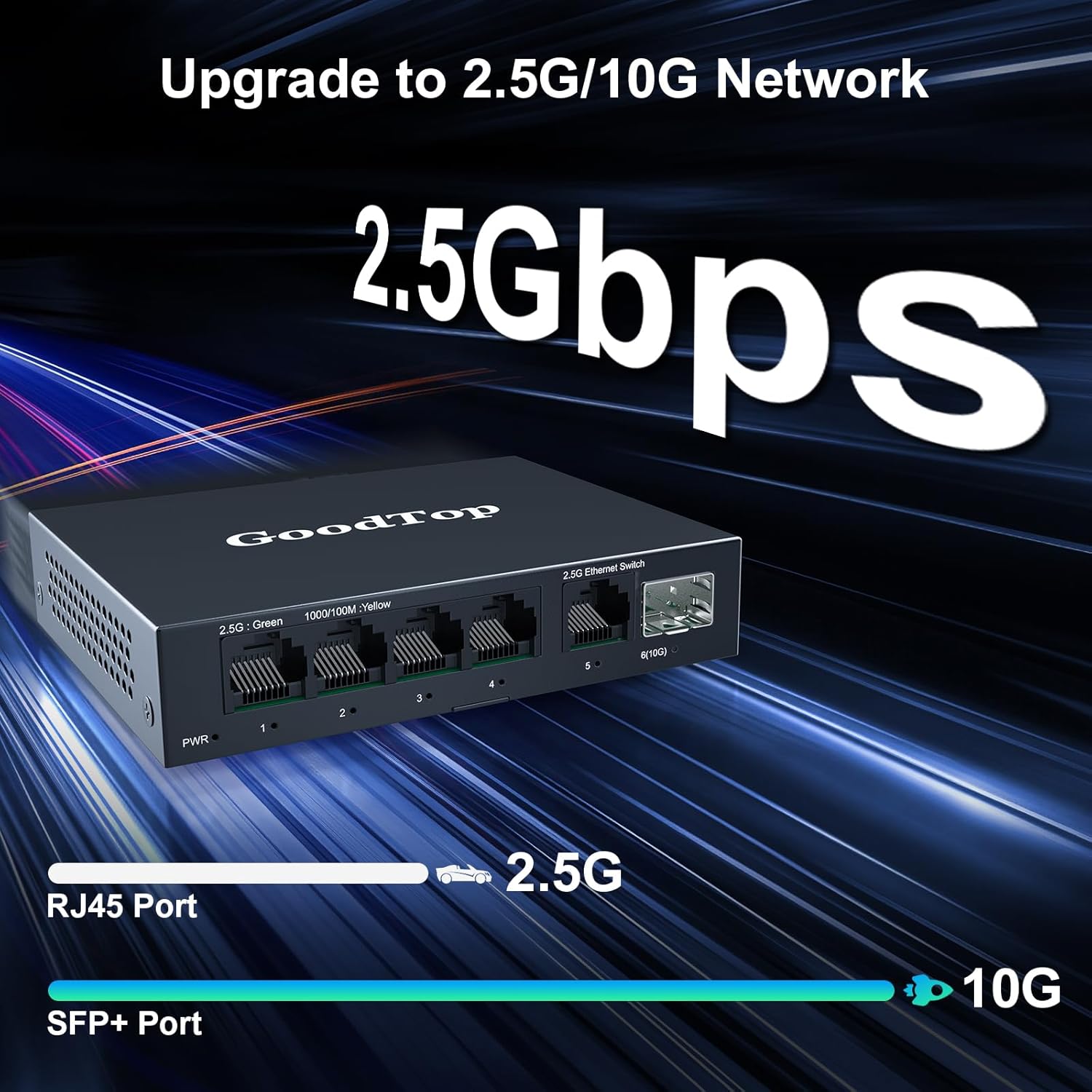
This image shows the front panel of the GoodTop 5 Port 2.5Gb Switch, highlighting the PWR indicator, five 2.5G Ethernet ports (labeled 1-5), and one 10G SFP+ slot (labeled 6(10G)). The LED indicators for 2.5G (Green) and 1000/100M (Yellow) are also visible.
- Святлодыёд PWR: Паказвае стан харчавання.
- 1-5 (2.5G RJ45 Ports): Five 2.5 Gigabit Ethernet ports supporting 10/100/1000Mbps/2.5G adaptive speed and Auto MDI/MDIX.
- 6 (10G SFP+ Slot): One 10 Gigabit SFP+ slot supporting 10M/100M/1G/2.5G/10G speed. Compatible with GoodTop RJ45 copper modules, optical fiber SFP+ modules, 10G DAC, and AOC cables.
3.2 Performance and Internal Components

This image illustrates the key performance specifications of the switch, including 45Gbps bandwidth, 8Mbit packet buffer, 4K MAC address table, and 33.48Mpps packet forwarding rate. It also shows the switch connected to various devices like a 2.5G NAS, WiFi 6 AP, WiFi 6 Router, 4K Video source, 2.5G/10G PC, and Firewall.

Унутраны view of the switch's circuit board, detailing the RTL8221B and RTL8372N chipsets, a heatsink, the five 2.5G RJ45 ports, and the 10G SFP+ slot. This highlights the core components responsible for the switch's performance.
4. Настройка і ўстаноўка
4.1 Падключэнне харчавання
- Connect the provided 12V power adapter to the DC 12V port on the switch.
- Plug the power adapter into a standard electrical outlet. The PWR LED on the front panel will illuminate, indicating the switch is powered on.
4.2 Сеткавае падключэнне
- Connect your network devices (e.g., computers, NAS, routers, access points) to the 2.5G RJ45 ports (1-5) using standard Ethernet cables. The switch supports Auto MDI/MDIX, so you can use either straight-through or crossover cables.
- For 10G connectivity, insert a compatible SFP+ module (e.g., RJ45 copper, optical fiber) or a 10G DAC/AOC cable into the 10G SFP+ slot (6). Connect the other end to your 10G-capable device.
4.3 Размяшчэнне і мантаж
The switch can be placed on a desktop or mounted on a wall.
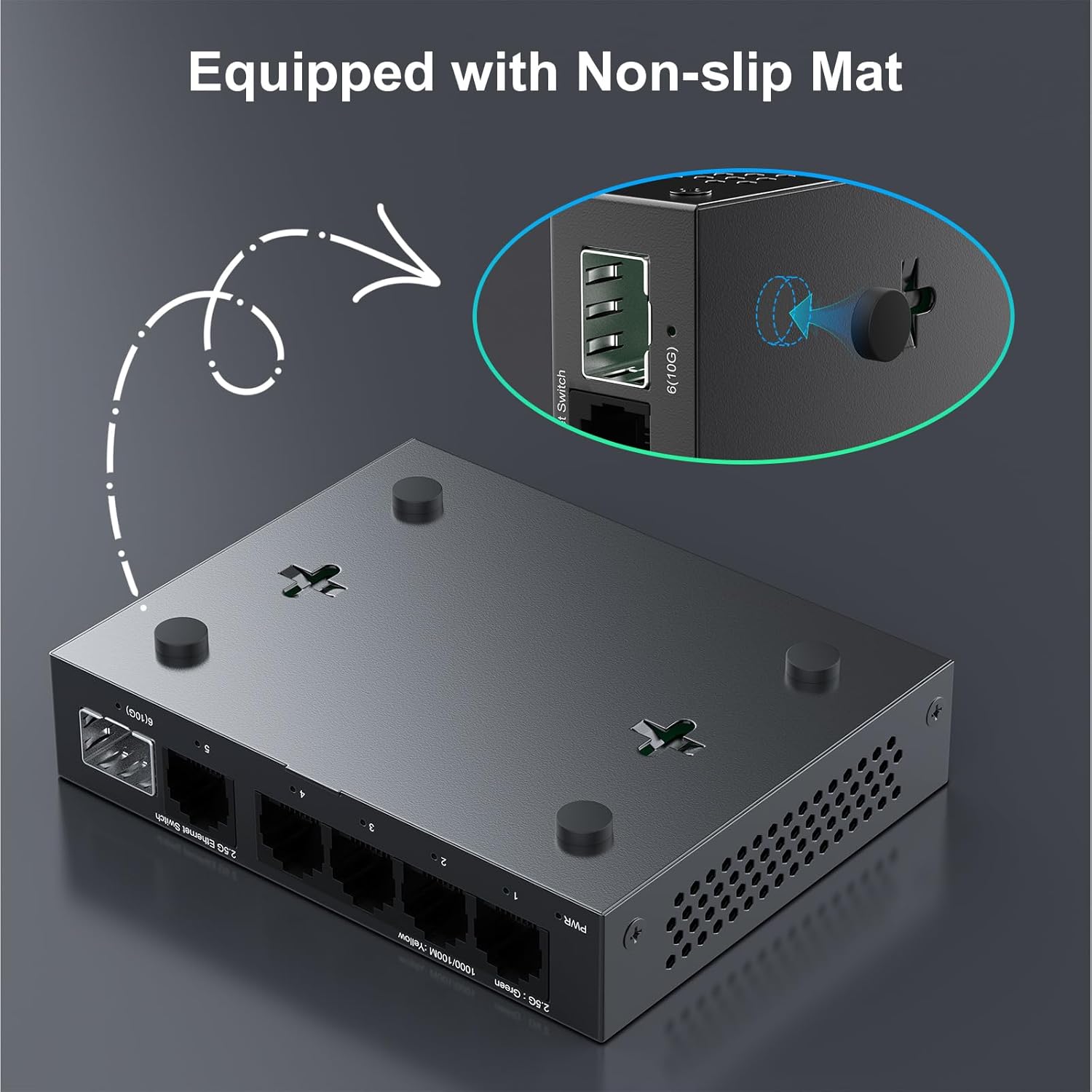
This image demonstrates the application of the included non-slip mats to the bottom of the switch, ensuring stability when placed on a desktop or other flat surface.

This image displays the versatility of the switch's mounting options, showing it both as a desktop unit and wall-mounted. Dimensions are provided for the compact design, indicating its suitability for various installations.
- Размяшчэнне на працоўным стале: Attach the included non-slip mats to the bottom of the switch to prevent it from sliding.
- Насценны мантаж: Use appropriate screws (not included) with the mounting holes on the bottom of the switch to secure it to a wall. Ensure the mounting surface is sturdy.
4.4 Наладка скончанаview Відэа
Гэта відэа дае візуальнае ўяўленне праview of the GoodTop 5 Port 2.5Gb Switch, demonstrating its features, connectivity, and potential applications in a network environment.
5. Аперацыя
5.1 Plug and Play
The GoodTop 5 Port 2.5Gb Ethernet Switch is an unmanaged device, meaning no configuration is required. Simply connect your devices and power on the switch, and it will automatically detect and establish network connections.
5.2 Святлодыёдныя індыкатары
- PWR (магутнасць):
- На: Перамыкач уключаны.
- Выключана: Выключальнік выключаны.
- RJ45 Port LEDs (1-5): Each RJ45 port has two LEDs, typically indicating link speed and activity.
- Green LED (2.5G): Indicates a 2.5Gbps link. Blinks for activity.
- Yellow LED (1000/100M): Indicates a 100Mbps or 1000Mbps link. Blinks for activity.
- SFP+ Port LED (6): Indicates link status and activity for the 10G SFP+ slot.
- На: A link is established.
- Міргае: Data activity is occurring.
6. Тэхнічнае абслугоўванне і догляд
6.1 Fanless Design
The switch features a fanless design, ensuring silent operation. Heat is dissipated efficiently through the metal casing and ventilation holes. Ensure adequate airflow around the device and avoid blocking the vents.

This graphic illustrates the low power consumption of the GoodTop switch, showing it consumes less than 12W at full load and between 1.3W to 1.4W in idle mode.
6.2 Агульны догляд
- Keep the switch in a cool, dry place, away from direct sunlight and heat sources.
- Avoid exposing the switch to water or excessive moisture.
- Працірайце вонкавыя паверхні мяккай сухой тканінай. Не выкарыстоўвайце вадкія або аэразольныя ачышчальнікі.
7. Выпраўленне непаладак
- Няма харчавання:
- Пераканайцеся, што адаптар сілкавання надзейна падключаны як да камутатара, так і да спраўнай электрычнай разеткі.
- Праверце працаздольнасць разеткі, падключыўшы да яе іншую прыладу.
- No Link/Slow Speed on RJ45 Port:
- Праверце, ці надзейна падключаны кабель Ethernet як да порта камутатара, так і да сеткавай прылады.
- Ensure the Ethernet cable is not damaged. Try a different cable.
- Verify the connected device is powered on and its network adapter is functioning correctly.
- Check the RJ45 port LEDs on the switch. If no LED is lit, there is no link. If only the Yellow LED is lit, the link is 100/1000Mbps, not 2.5G. Ensure your device supports 2.5G.
- No Link/Slow Speed on SFP+ Port:
- Ensure the SFP+ module or DAC/AOC cable is correctly inserted and compatible with the switch and the connected device.
- Check the SFP+ port LED. If it's off, there's no link.
- Note that some special GPON/XGSPON modules from certain Internet Service Providers might not be supported.
- General Network Issues:
- Restart the switch by unplugging and re-plugging the power adapter.
- Restart all connected network devices.
8. Тэхнічныя характарыстыкі
| Асаблівасць | Спецыфікацыя |
|---|---|
| Нумар мадэлі | 5 Port 2.5Gb Switch |
| Марка | GoodTop |
| Колькасць партоў | 6 (5 х 2.5 Гбіт/с RJ45, 1 х 10 Гбіт/с SFP+) |
| Тып інтэрфейсу | RJ45, SFP+ |
| Хуткасць перадачы даных | 45 гігабіт у секунду (камутуючая ёмістасць) |
| Матэрыял корпуса | Метал |
| Памеры прадукту | 4.47 см Д х 3.54 см Ш х 0.98 см В |
| Вага прадмета | 0.45 кілаграма (15.8 унцыі) |
| тtage | 12 вольт |
| Максімальнае энергаспажыванне | 12 ват |
| Верхняя адзнака тэмпературы | 40 градусы па Цэльсіі |
| Сумяшчальныя прылады | Router, NAS, PCs, Access Points, Servers |
| Асаблівасці | Unmanaged, Plug & Play, Fanless Design, Auto MDI/MDIX |
9. Гарантыя і падтрымка
GoodTop products are designed for reliability and performance. For warranty information, technical support, or any questions regarding your 5 Port 2.5Gb Ethernet Switch, please refer to the official GoodTop website or contact our customer support team through the retailer where you purchased the product. Please have your model number and purchase details ready when contacting support.