
YD-MB01
Bike Computer User Manual
Model: YD-MB01
Брэнд: Generic
1. Уводзіны
Thank you for choosing the Generic YD-MB01 Bike Computer. This device is a wired bicycle computer designed to provide essential cycling data, including speed, distance, and time. It features a clear LCD display and is built with dust and waterproof capabilities for reliable performance in various outdoor conditions. This manual will guide you through the installation, operation, and maintenance of your new bike computer.

Image: The YD-MB01 Bike Computer mounted on a bicycle handlebar, demonstrating its use during a ride.
2. Змесціва ўпакоўкі
Калі ласка, пераканайцеся, што ўсе наступныя прадметы ўваходзяць у ваш пакет:
- 1 x Bike Computer Unit
- 1 x Sensor Connector Cable
- 1 x Wheel Magnet
- 6 x Cable Ties (Straps)
- 1 х Падручнік па англійскай мове

Image: All included components of the YD-MB01 Bike Computer package.
3. Тэхнічныя характарыстыкі прадукту
| Спецыфікацыя | Дэталь |
|---|---|
| Назва мадэлі | YD-MB01 |
| Матэрыял прадукту | АБС-пластык |
| Тып дысплея | Лічбавы ВК-дысплей |
| Тып датчыка | Cadence Sensor (Wired) |
| Ёмістасць батарэі | 150 мАг |
| Колер | Чорны |
| Тып мацавання | Мацаванне на руль |
| Рэйтынг воданепранікальнасці | Life grade waterproof (Do not soak for long periods) |
| Увод чалавечага інтэрфейсу | Гузікі |
4. Настройка і ўстаноўка
Follow these steps to properly install your bike computer for accurate data tracking:
- Абараніце базу: Attach the computer's mounting base to your bicycle handlebar using the provided cable ties. Ensure it is firmly secured and positioned for easy viewінж.
- Устаўце камп'ютарны блок: Slide the bike computer unit onto the secured mounting base until it clicks into place.
- Усталюйце магнітную галоўку: Attach the small magnet to one of the spokes on your front wheel. Position it so that it will pass closely by the sensor.
- Install and Adjust the Sensor Probe: Mount the sensor probe to the front fork of your bicycle using cable ties. Position the sensor so that the magnetic head on the spoke passes within 3mm of the sensor's detection area. Proper alignment and distance are crucial for accurate speed and distance readings.

Image: Step-by-step visual guide for installing the bike computer components.
Важна: After installation, rotate the wheel to ensure the magnet passes the sensor smoothly and consistently. Adjust the sensor's position if necessary to maintain the optimal 3mm gap.
5. Інструкцыя па эксплуатацыі
The YD-MB01 Bike Computer is designed for ease of use with its large LCD display and simple two-button interface. Access all measurements and settings with minimal effort.
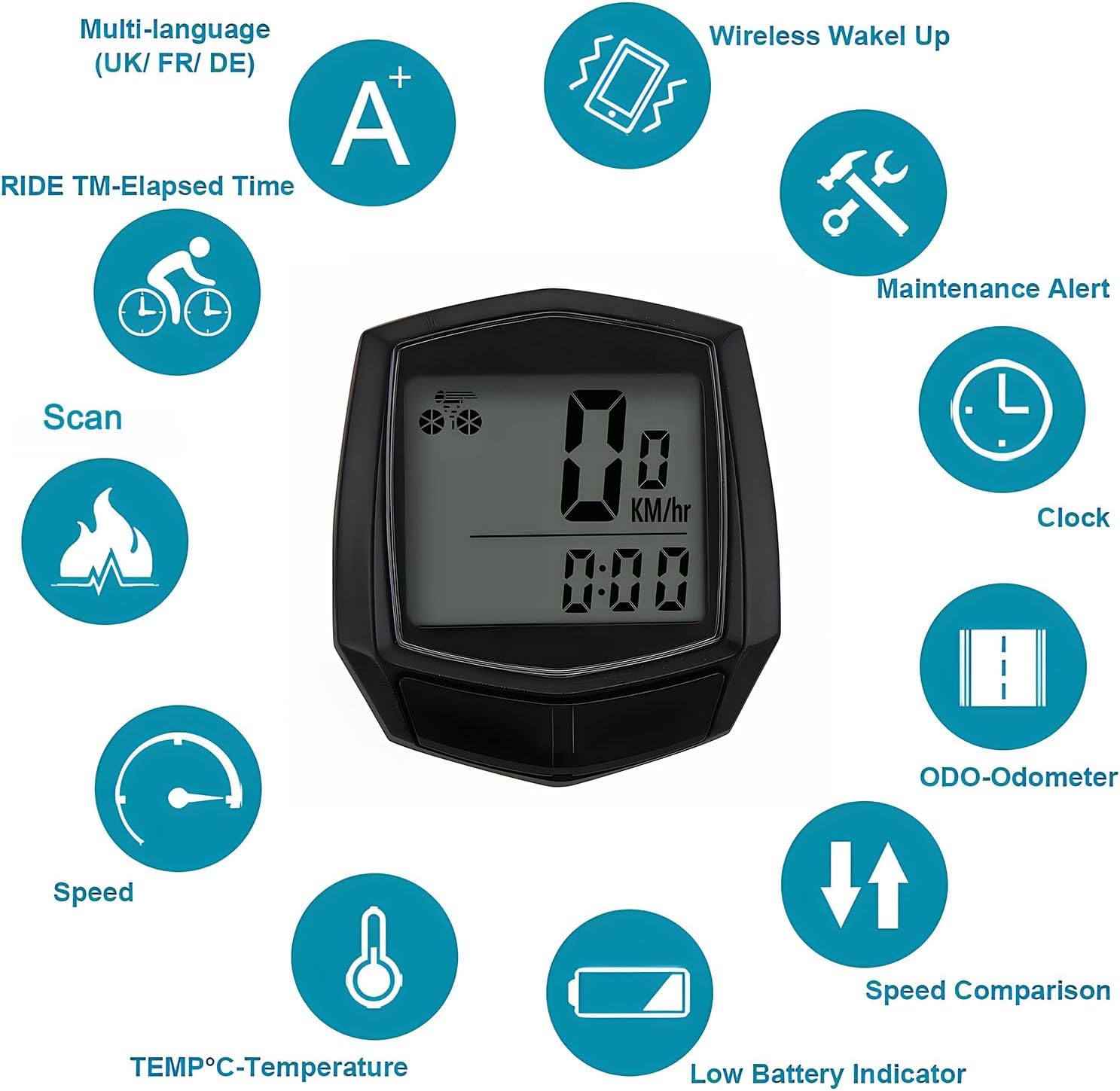
Выява: Зверхуview of the multi-functional display and its various indicators.
Асноўныя функцыі:
- хуткасць: Паказвае бягучую хуткасць язды.
- Адометр (ODO): Tracks total accumulated distance.
- Trip Distance (DST): Measures distance for the current ride.
- Trip Time (TM): Records elapsed time for the current ride.
- гадзіннік: Паказвае бягучы час.
- Тэмпература (TEMP): Паказвае тэмпературу навакольнага асяроддзя.
- Індыкатар разраду батарэі: Папярэджвае, калі зарад батарэі нізкі.
- Параўнанне хуткасці: Indicates if current speed is faster or slower than average.
- Папярэджанне аб тэхнічным абслугоўванні: Reminds for routine maintenance.
Рэжым эканоміі батарэі:
To conserve battery life, the bike computer automatically enters a power-saving mode. If no signal is received (i.e., no movement detected) for 300 seconds (5 minutes), the display will dim or turn off, and the device will enter a low-power state. It will automatically wake up when movement is detected again.

Image: Illustration of the bike computer transitioning into battery saving mode.
Setting Up Tire Size:
For accurate speed and distance measurements, it is essential to set the correct tire circumference. Refer to the detailed instructions in the included English Manual for specific steps on how to customize the computer for your tire size. This typically involves entering a numerical value corresponding to your wheel's circumference in millimeters.
6. Тэхнічнае абслугоўванне
The YD-MB01 Bike Computer is designed to be durable and waterproof for everyday cycling. Proper care will ensure its longevity and accurate performance.

Image: The bike computer demonstrating its waterproof feature.
- Воданепранікальнасць: The device is life-grade waterproof, meaning it can withstand splashes, rain, and brief exposure to water. However, it is not designed for prolonged submersion. Avoid intentionally soaking the device in water for extended periods.
- Сушка: After riding in wet conditions, dry the bike computer as soon as possible with a soft, clean cloth to prevent water spots or potential long-term issues.
- Уборка: Ачысціце дысплей і casinг з мяккім, дamp cloth. Do not use abrasive cleaners, solvents, or harsh chemicals, as these can damage the plastic and display.
- Замена батарэі: The device uses a 150mAh battery. When the low battery indicator appears, replace the battery according to the instructions in the included English Manual.
- захоўванне: When not in use for extended periods, store the bike computer in a cool, dry place away from direct sunlight and extreme temperatures.
7. Выпраўленне непаладак
If you encounter any issues with your bike computer, please refer to the following common problems and their solutions:
- No Speed or Distance Reading:
- Ensure the sensor and magnet are correctly installed and aligned. The gap between them should be less than 3mm.
- Check that the sensor cable is securely connected to the computer unit.
- Verify that the computer unit is properly seated in its mounting base.
- Няправільныя паказанні:
- Confirm that the correct tire circumference has been entered into the computer settings. Refer to the manual for calibration instructions.
- Re-check the magnet and sensor alignment and distance.
- Display Not Working or Faint:
- Check the battery level. If the low battery indicator is on, replace the battery.
- Ensure the computer is not in battery-saving mode (rotate the wheel to wake it up).
- Verify the computer unit is securely connected to its base.
- Пранікненне вады:
- While waterproof, prolonged immersion is not recommended. If water enters the unit, dry it immediately. If issues persist, contact customer support.
8. Гарантыя і падтрымка
This Generic YD-MB01 Bike Computer comes with a manufacturer's warranty. Please refer to the specific warranty details provided in the included English Manual for terms, conditions, and duration.
For technical support, troubleshooting assistance beyond this manual, or warranty claims, please contact Generic customer service. Keep your purchase receipt as proof of purchase for warranty purposes.
Ask a question about this manual
Ask about setup, troubleshooting, compatibility, parts, safety, or missing instructions. Manuals+ will review the question and use this page’s manual context to help answer it.