
1. Уводзіны
Thank you for choosing the EasySMX T37 Wireless Switch Pro Controller. This manual provides detailed instructions for setting up, operating, maintaining, and troubleshooting your controller. Please read this manual carefully before use to ensure optimal performance and longevity of your device. This controller is compatible with Nintendo Switch, Switch Lite, and Switch OLED consoles.
2. Прадукт скончыўсяview
The EasySMX T37 is a wireless gamepad designed for an enhanced gaming experience on Nintendo Switch systems. It features an ergonomic design, dual turbo vibration, and 6-axis gyro motion control.

Выява 2.1: Спераду view of the EasySMX T37 Wireless Switch Pro Controller, showcasing its ergonomic shape and button layout.
3. Настройка
3.1 Спалучэнне з Nintendo Switch
- Уключыце кансоль Nintendo Switch.
- У меню HOME абярыце Кантралёры > Змяніць захоп/парадак.
- On the EasySMX T37 controller, press and hold the Кнопка SYNC (located on the top edge of the controller) for 3 seconds until the LED indicators start flashing rapidly.
- Once the controller is successfully paired, the player LED(s) on the bottom of the controller will light up solid.
3.2 Зарадка кантролера
Connect the provided USB-C charging cable to the USB-C port on the controller and the other end to a USB power source (e.g., Switch dock, USB wall adapter, computer USB port). The LED indicators will show charging status and turn off when fully charged.
4. Інструкцыя па эксплуатацыі
4.1 Асноўныя элементы кіравання
The controller features standard button layouts for Nintendo Switch compatibility:
- Кнопкі A/B/X/Y: Кнопкі дзеянняў.
- D-Pad: Накіраваны ўвод.
- Левы/правы аналагавыя джойсцікі: Кіраванне рухам і камерай.
- L/R/ZL/ZR Buttons: Плячовыя і спускавыя кнопкі.
- Кнопка HOME: Returns to the Switch HOME Menu.
- CAPTURE Button: Робіць скрыншоты.
- PLUS (+) / MINUS (-) Buttons: Start/Select functions.

Image 4.1: A user holding the EasySMX T37 controller, demonstrating the comfortable grip and accessible button placement during gameplay.
4.2 Функцыя Турба
The Turbo function allows for rapid, automatic pressing of a button, useful in action or arcade games.
- Актываваць Турба: Press and hold the desired action button (A/B/X/Y/L/R/ZL/ZR), then press the Кнопка турба (T button). The button will now auto-fire.
- Адрэгулюйце хуткасць Turbo: Утрымліваючы Кнопка турба, перанесці Right Analog Stick Up or Down to cycle through three speeds: 5 shots/s, 12 shots/s, and 20 shots/s.
- Дэактываваць Турба: Repeat the activation step (hold the action button, then press the Turbo button) or press and hold the Кнопка турба for 5 seconds to clear all Turbo settings.
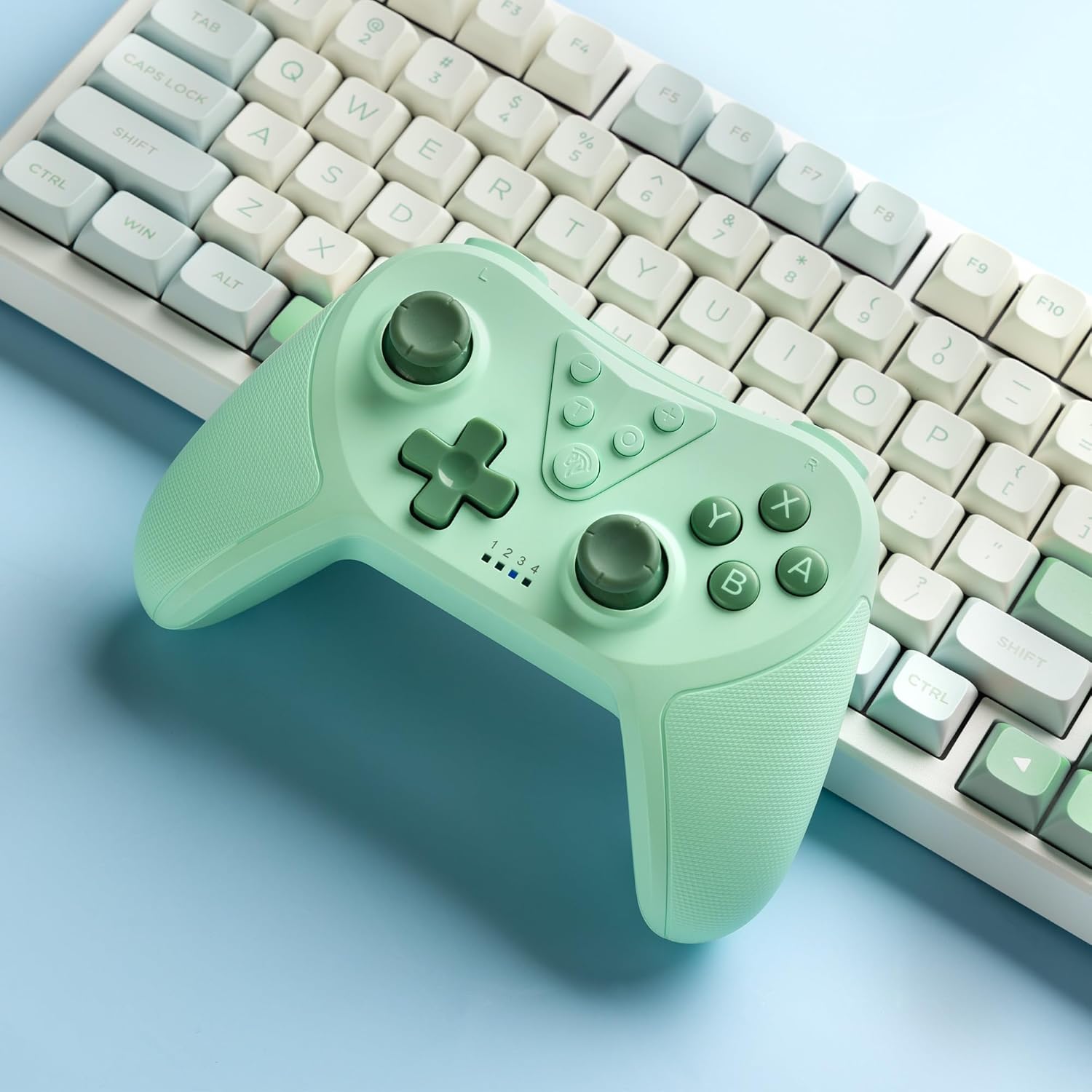
Image 4.2: Illustration of the Turbo function on the EasySMX T37 controller, showing the three adjustable speeds: 5, 12, and 20 shots per second.
4.3 Рэгуляванне вібрацыі
The controller features dual motors for adjustable vibration feedback, enhancing immersion in games.
- Адрэгулюйце інтэнсіўнасць вібрацыі: Націсніце і ўтрымлівайце Кнопка турба, затым перамясціце Left Analog Stick Up or Down to cycle through four vibration levels: 0% (off), 30%, 70%, and 100%.

Image 4.3: Visual representation of the Dual Vibration feature on the EasySMX T37 controller, indicating four intensity levels from 0% to 100%.
4.4 6-Axis Gyro Motion Control
The built-in 6-axis gyroscope provides precise motion sensing, allowing for intuitive control in games that support motion input.

Image 4.4: Illustration depicting the 6-Axis Gyro Motion Control feature of the EasySMX T37 controller, showing how it interacts with a game on the Nintendo Switch screen.
5. Тэхнічнае абслугоўванне
- Уборка: Для чысткі кантролера выкарыстоўвайце мяккую сухую тканіну. Пазбягайце выкарыстання агрэсіўных хімічных рэчываў або абразіўных матэрыялаў.
- захоўванне: Захоўвайце кантролер у прахалодным, сухім месцы, удалечыні ад прамых сонечных прамянёў і экстрэмальных тэмператур.
- Сыход за батарэяй: Каб падоўжыць тэрмін службы батарэі, пазбягайце частай поўнай разрадкі кантролера. Рэгулярна зараджайце яго, нават калі ён не выкарыстоўваецца працяглы час.
- Пазбягайце кропель: Абараняйце кантролер ад падзенняў і ўдараў, якія могуць пашкодзіць унутраныя кампаненты.
6. Выпраўленне непаладак
6.1 Кантролер не падключаецца
- Пераканайцеся, што кантролер зараджаны.
- Verify the Switch console is updated to the latest system version.
- Try re-pairing the controller by following the steps in Section 3.1.
- If issues persist, try resetting the controller by inserting a thin object into the small reset hole (if present, usually on the back) for a few seconds.
6.2 Buttons Unresponsive or Lagging
- Пераканайцеся, што кантролер цалкам зараджаны.
- Move closer to the Switch console to ensure a strong wireless connection.
- Праверце на наяўнасць фізічных перашкод або смецця вакол кнопак.
- Re-pair the controller.
6.3 Controller Not Charging
- Ensure the USB-C cable is securely connected to both the controller and the power source.
- Паспрабуйце выкарыстоўваць іншы кабель USB-C або адаптар сілкавання.
- Пераканайцеся, што крыніца харчавання спраўная.
7. Тэхнічныя характарыстыкі
- мадэль: Т37
- Падключэнне: Бесправадная сувязь (Bluetooth)
- Сумяшчальнасць: Nintendo Switch, Switch Lite, Switch OLED
- Асаблівасці: Dual Turbo Function, Adjustable Vibration, 6-Axis Gyro Motion Control, Ergonomic Design
- Product Identifier (ASIN): B0CTTWN84L
8. Гарантыя і падтрымка
For warranty information, technical support, or further assistance, please refer to the official EasySMX webсайт або звярніцеся непасрэдна ў службу падтрымкі кліентаў. Захоўвайце чэк аб куплі для прэтэнзій па гарантыі.