
Уводзіны
This manual provides detailed instructions for the proper use and maintenance of your Levenhuk Atom DNB250 Digital Day and Night Vision Binoculars. Please read this manual thoroughly before operating the device to ensure optimal performance and longevity. The Levenhuk Atom DNB250 offers high-definition imaging for both day and night observations, featuring optical and digital magnification, infrared illumination, and recording capabilities.
Змест пакета
Акуратна распакуйце скрынку і пераканайцеся, што ўсе пералічаныя ніжэй прадметы наяўныя і ў добрым стане. Калі якія-небудзь прадметы адсутнічаюць або пашкоджаныя, звярніцеся да прадаўца.
- Levenhuk Atom DNB250 Digital Night Vision Binoculars
- Сумка для пераноскі
- Шыйны рэмень
- Здымная акумулятарная батарэя
- USB-кабель Type-C
- Чыстка працірайце
- Кіраўніцтва карыстальніка
- Гарантыйны талон
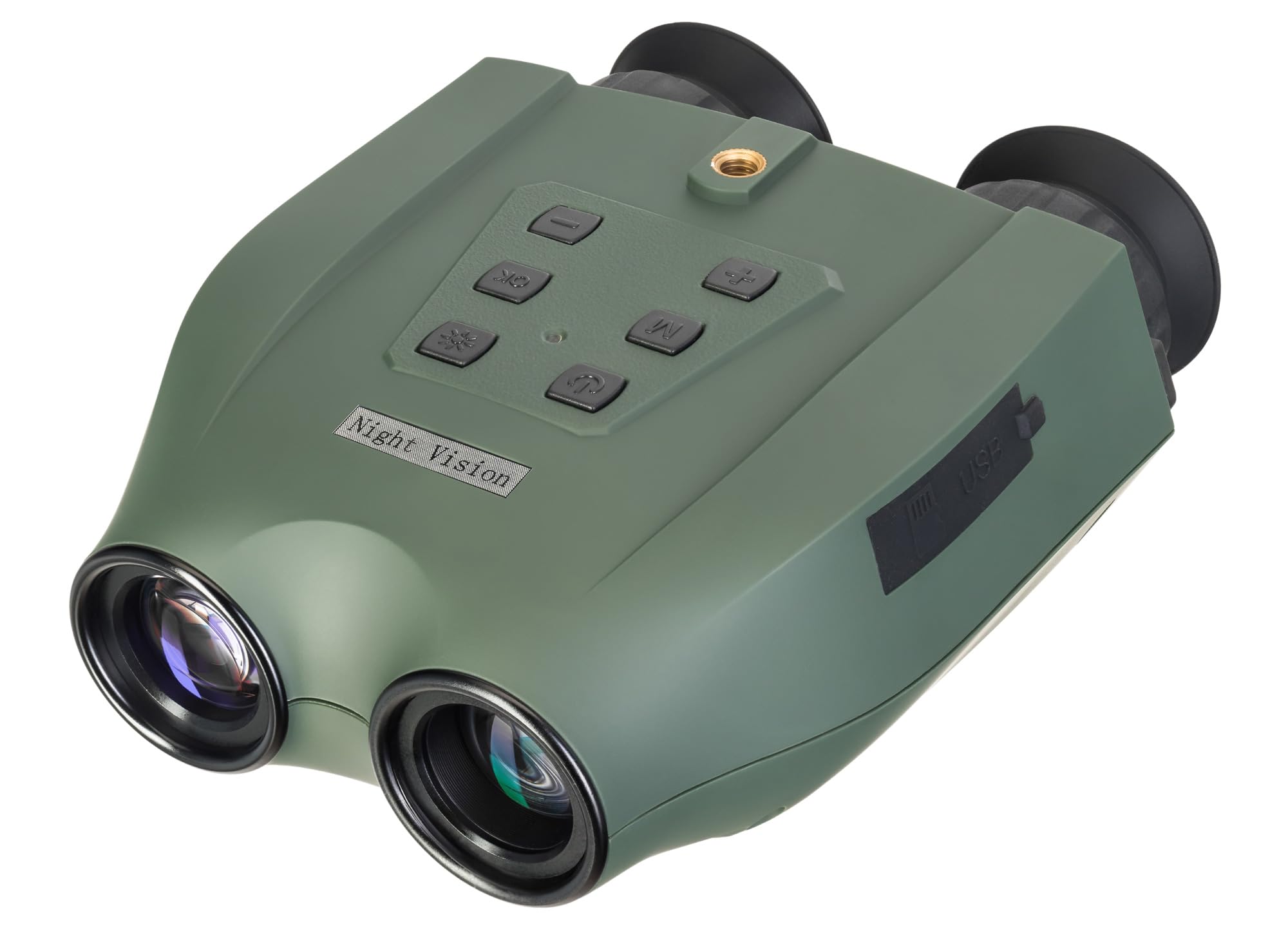
Image: Levenhuk Atom DNB250 Digital Night Vision Binoculars with all included accessories laid out.
Прадукт скончаныview
Элементы кіравання і парты

Выява: Уверсе view of the binoculars highlighting the control panel.
- Кнопка харчавання: Уключае або выключае прыладу.
- ІЧ кнопка: Activates and adjusts the infrared illuminator brightness levels.
- Кнопка ОК: Confirms selections and takes photos/starts video recording.
- Кнопка меню: Доступ да меню налад прылады.
- Zoom In/Up Button (+): Increases digital magnification or navigates up in menus.
- Zoom Out/Down Button (-): Decreases digital magnification or navigates down in menus.

Выява: Збоку view of the binoculars showing the USB-C port and microSD card slot.
- Слот для карты MicroSD: For inserting a memory card (up to 128GB, not included) to store photos and videos.
- Порт USB Type-C: Для зарадкі прылады і перадачы дадзеных на кампутар.
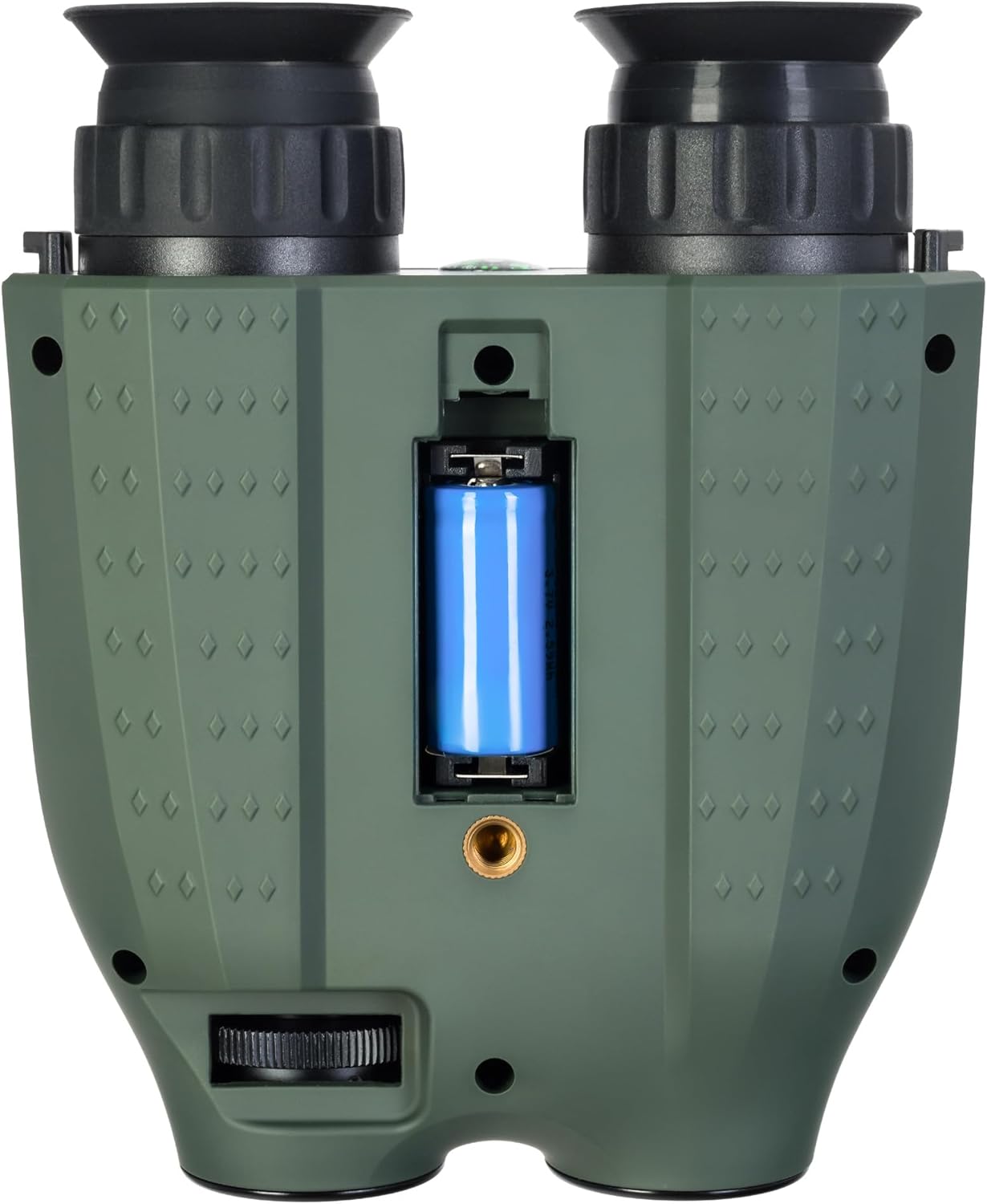
Выява: Ніжняя частка view of the binoculars showing the battery compartment and tripod mounting thread.
- Батарэйны адсек: Houses the removable rechargeable battery.
- Tripod Mounting Thread: Дазваляе мацаванне да стандартнага штатыва.
Настройка
1. Устаноўка батарэі
- Locate the battery compartment on the bottom of the device.
- Адкрыйце крышку адсека.
- Insert the provided rechargeable battery, ensuring correct polarity.
- Надзейна зачыніце крышку батарэйнага адсека.
2. Усталёўка карты памяці
A microSD card (up to 128GB) is required for storing photos and videos. It is not included in the package.
- Знайдзіце слот для карты microSD на бакавой панэлі прылады.
- Акуратна ўстаўце карту microSD у слот, пакуль яна не ўстане на месца са пстрычкай.
- Каб выняць, націсніце на карту ўнутр, пакуль яна не выскочыць.
3. Зарадка акумулятара
Before first use, fully charge the battery. The device can be charged using the supplied USB Type-C cable.
- Connect the USB Type-C cable to the device's USB port.
- Connect the other end of the cable to a USB power source (e.g., computer, wall adapter - not included).
- Індыкатар зарадкі будзе паказваць стан зарадкі.
Аперацыя
1. Уключэнне / выключэнне харчавання
- To power on, press and hold the Power Button until the display activates.
- To power off, press and hold the Power Button again until the display shuts down.
2. Рэгуляванне фокусу
Adjust the focus by rotating the eyepiece rings until the image appears clear on the internal displays.
3. Magnification (Optical and Digital Zoom)
The device features 6x optical magnification and up to 8x digital zoom.
- Выкарыстоўвайце Zoom In (+) і Zoom Out (-) buttons to adjust the digital magnification.
4. Infrared (IR) Illumination
The infrared illuminator enhances visibility in low-light or complete darkness. It has three brightness levels.
- Націсніце ВК-кнопка to cycle through the IR brightness levels (Low, Medium, High, Off).
- The IR illuminator automatically adapts to lighting conditions.
5. Фота- і відэаздымка
The built-in recorder captures observations as photos (JPG, up to 8000x6000px) and videos (AVI, up to 2560x1440px).
- To take a photo: Press the Кнопка ОК адзін раз.
- To start video recording: Press and hold the Кнопка ОК. Press again to stop recording.
- Captured media is stored on the inserted microSD card.
6. Рэжымы адлюстравання
The binoculars are equipped with two color IPS screens that can be used together or separately.
- Day shooting provides full-color images.
- Night shooting provides monochrome images for enhanced visibility in darkness.
Відэа: Оверview of the Levenhuk Atom DNB250 Digital Night Vision Binoculars, demonstrating key features such as night vision range, magnification, high-resolution screen, photo/video capture, IR illumination, battery life, and mounting options.
Варыянты мантажу
The Levenhuk Atom DNB250 can be used handheld or mounted for stable observation.
- Мацаванне штатыва: The device features a standard tripod mounting thread on its base, allowing it to be attached to a tabletop tripod (included) or any compatible full-size tripod for extended, stable viewзапіс і запіс.
- Мацаванне шлема: The NVD can also be mounted on a helmet for hands-free operation (helmet mount not included).
Тэхнічнае абслугоўванне і догляд
- Уборка: Use the provided cleaning wipe to gently clean the lenses and external surfaces. Avoid abrasive materials or harsh chemicals.
- захоўванне: When not in use, store the binoculars in the carrying pouch in a cool, dry place, away from direct sunlight and extreme temperatures.
- Сыход за батарэяй: Выміце батарэю, калі прылада не будзе выкарыстоўвацца на працягу доўгага часу.
- Трываласць: The device features a lightweight and durable ABS plastic body with a polymer coating for increased damage resistance and a reliable grip.
Ліквідацыю непаладак
| праблема | Магчымая прычына | Рашэнне |
|---|---|---|
| Прылада не ўключаецца. | Low or uncharged battery; incorrectly installed battery. | Charge the battery; ensure battery is installed with correct polarity. |
| Выява размытая. | Improper focus adjustment. | Adjust the eyepiece rings until the image is clear. |
| Немагчыма запісваць фота/відэа. | No microSD card; full microSD card; faulty microSD card. | Insert a microSD card; delete old files or use a new card; try a different card. |
| Poor night vision performance. | IR illuminator off or on low setting. | Increase IR brightness using the IR button. |
Тэхнічныя характарыстыкі
| Асаблівасць | Дэталь |
|---|---|
| Нумар мадэлі | 83055 |
| Аптычнае павелічэнне | 6x |
| Лічбавы зум | 1-8x |
| Дыяметр лінзы аб'ектыва | 21.3 мм |
| Дыяпазон начнога бачання | Да 300 метраў |
| Day Vision Range | Да 1000 метраў |
| Інфрачырвоны асвятляльнік | Yes, with 3 brightness levels |
| Дазвол фота | Up to 8000 x 6000px (JPG) |
| Дазвол відэа | Up to 2560 x 1440px (AVI) |
| Падтрымка карты памяці | MicroSD да 128 ГБ (не ўваходзіць у камплект) |
| Тып батарэі | Removable 700mAh rechargeable battery |
| Battery Life (Night) | Up to 2 hours (IR activated) |
| Battery Life (Day) | Да 10 гадзін |
| Матэрыял | Акрыланітрылбутадыенстырол (АБС) |
| Тып мацавання | Мацаванне штатыва |
| Памеры (Д х Ш х У) | 17 х 7 х 17.5 см |
| Вага | 700 грамаў |
Гарантыя і падтрымка
Levenhuk provides a lifetime warranty for all elements of this device, reflecting its commitment to high quality and standards. For warranty claims or technical support, please refer to the warranty card included in your package or visit the official Levenhuk webсайт.