
1. Уводзіны
The Minolta MND60V VLOG Camera Kit is designed for capturing high-quality photos and videos. This kit includes a 64MP camera capable of 4K Ultra HD video at 60 frames per second, along with essential accessories such as a tripod, external microphone, LED light, and wide-angle/macro lenses. This manual provides instructions for setting up, operating, and maintaining your camera kit to ensure optimal performance.

Image 1.1: The Minolta MND60V VLOG Camera Kit, showcasing its core capabilities for high-resolution photography and video recording.
2. Змесціва ўпакоўкі
Перш чым пачаць, пераканайцеся, што ўсе пералічаныя ніжэй прадметы ўваходзяць у камплект:
- Minolta MND60V Camera
- Accessory Mount Arms
- Святлодыёдны відэаліхтар
- Сумка для пераноскі
- Tripod Pouch
- Стэрэа мікрафон
- Плечавы рэмень
- Карта памяці 32 ГБ
- Штатыў з дыстанцыйным кіраваннем
- Літый-іённы акумулятар
- Адаптар пераменнага току
- Wide-angle + Macro Lens
- USB-кабелі
- Кіраўніцтва карыстальніка (гэты дакумент)
- Гарантыйны талон

Image 2.1: All components included in the Minolta MND60V VLOG Camera Kit.
3. Настройка
3.1 Зарадка акумулятара
- Insert the Lithium-Ion Battery into the camera.
- Connect the AC Adaptor to the camera's USB port and plug it into a power outlet.
- Індыкатар зарадкі загарыцца. Пасля поўнай зарадкі індыкатар зменіць колер або выключыцца.
3.2 Устаўка карты памяці
The camera supports Micro SD cards. A 32GB card is included.
- Locate the memory card slot on the camera (refer to the camera diagram).
- Устаўце карту Micro SD залацістымі кантактамі ўніз да пстрычкі.
- Каб выняць, акуратна націсніце на карту, пакуль яна не выскочыць.
3.3 Прымацаванне аксесуараў
The kit includes various accessories to enhance your recording experience.

Image 3.1: Minolta MND60V camera with all accessories mounted.
- Штатыў: Attach the camera to the tripod's mounting screw. The tripod can be used as a stand, a selfie stick, or a power source with its built-in 2,500mAh battery.
- Знешні мікрафон: Mount the stereo microphone onto one of the accessory mount arms and plug its cable into the camera's microphone input jack.
- Святлодыёдны відэаліхтар: Mount the LED light onto another accessory mount arm. Ensure it is charged or has fresh batteries if applicable.
- Wide-angle + Macro Lens: Screw the desired lens onto the front of the camera's main lens.
4. Кіраванне камерай
4.1 Уключэнне/выключэнне сілкавання
Press and hold the power button located on the camera body to turn the camera on or off.
4.2 Basic Photo and Video Recording
- Выбар рэжыму: Use the mode dial or menu to select between photo and video modes.
- Апраўленне: Use the 3-inch LCD screen to compose your shot. The screen can be flipped for self-recording.
- Запіс/Затвор: Press the dedicated record button for video or the shutter button for photos.
4.3 Using the LCD Screen
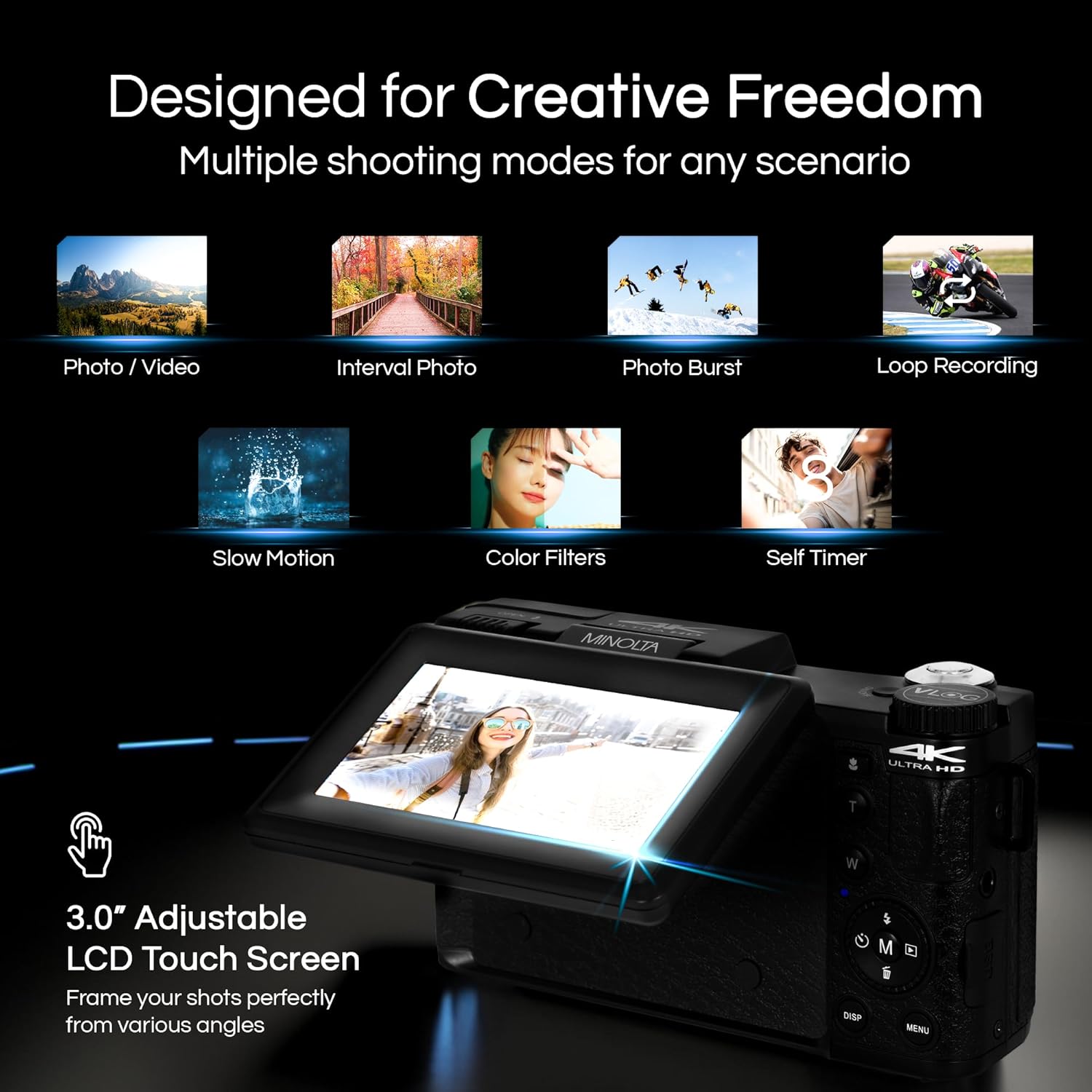
Image 4.1: The adjustable LCD screen showing various shooting modes.
The 3-inch LCD screen provides a live view, access to menus, and playback options. It can be rotated and flipped, making it suitable for vlogging and shooting from various angles. Navigate menus using the touch screen or physical buttons.
4.4 Функцыя маштабавання
The camera features 16x digital zoom. Use the zoom lever (often marked 'W' for Wide and 'T' for Telephoto) to adjust the focal length. Note that digital zoom may reduce image quality compared to optical zoom.

Малюнак 4.2: Прыкладample of using digital zoom to capture distant details.
4.5 Special Features and Modes

Image 4.3: Icons illustrating the camera's creative modes.
The MND60V offers several creative modes:
- Запаволены рух: Запісвае відэа з больш высокай частатой кадраў для запаволенага прайгравання.
- цыклічны запіс: Continuously records video, overwriting the oldest files, калі карта памяці поўная.
- Пакадравая здымка: Captures a series of photos at set intervals and combines them into a video.
- Выбар сцэны: Pre-set modes optimized for specific shooting conditions (e.g., portrait, landscape).
- Аўтаспуск: Delays the shutter release for a few seconds, allowing you to get into the shot.
4.6 Выкарыстанне пульта дыстанцыйнага кіравання
The included tripod features a built-in wireless remote. This allows you to start/stop recording or take photos from a distance, ideal for group shots or vlogging.
4.7 Перадача Files
Connect the camera to a computer using the provided USB cable. The camera will appear as a removable drive, allowing you to copy photos and videos to your computer.
5. Тэхнічнае абслугоўванне
5.1 Чыстка камеры
- Выкарыстоўвайце мяккую, сухую тканіну для чысткі корпуса камеры.
- Для лінзы выкарыстоўвайце спецыяльную сурвэтку і раствор для чысткі лінзаў. Не дакранайцеся да паверхні лінзы пальцамі.
- Не выкарыстоўвайце агрэсіўныя хімікаты або абразіўныя матэрыялы.
5.2 Сыход за акумулятарам
- Перад першым выкарыстаннем цалкам зарадзіце акумулятар.
- Захоўвайце батарэю ў прахалодным сухім месцы, калі яна не выкарыстоўваецца.
- Пазбягайце ўздзеяння на батарэю экстрэмальных тэмператур.
5.3 Захоўванне
When not in use, store the camera and its accessories in the provided carrying case to protect them from dust, moisture, and physical damage.
6. Выпраўленне непаладак
If you encounter issues with your Minolta MND60V camera, refer to the following common problems and solutions:
| праблема | Магчымая прычына | Рашэнне |
|---|---|---|
| Камера не ўключаецца. | Battery is drained or incorrectly inserted. | Пераканайцеся, што акумулятар цалкам зараджаны і правільна ўстаўлены. |
| Photos/Videos are blurry. | Autofocus issue, insufficient light, or camera shake. | Ensure proper lighting. Allow camera to focus before capturing. Use the tripod for stability. Avoid excessive digital zoom in low light. |
| Акумулятар хутка разраджаецца. | Frequent use of screen/LED light, cold environment, or aging battery. | Reduce screen brightness. Turn off LED light when not needed. Keep battery warm in cold conditions. Consider a replacement battery if performance significantly degrades. |
| Памылка карты памяці. | Карта перапоўненая, пашкоджаная або несумяшчальная. | Format the memory card (this will erase all data). Try a different compatible Micro SD card. |
| No audio in video recordings. | External microphone not connected or faulty. | Ensure the external microphone is securely plugged into the camera's microphone input. Check microphone settings in the camera menu. |
7. Тэхнічныя характарыстыкі
Key technical specifications for the Minolta MND60V VLOG Camera Kit:
| Асаблівасць | Спецыфікацыя |
|---|---|
| Нумар мадэлі | MND60V |
| Эфектыўнае рашэнне | 64 МП |
| Дазвол відэа | 4K (3840 Pixels Effective Video Resolution) |
| Частата кадраў відэа | 60 FPS (for 4K) |
| Тэхналогія фотадатчыка | CMOS (2/3-inch Photo Sensor Size) |
| Дысплей | 3-цалевы ВК-экран |
| Тып фокусу | Аўтафокус |
| Лічбавы зум | 16x |
| Тып аб'ектыва | Wide Angle (Minimum/Maximum Focal Length: 3.95 mm) |
| Максімальная дыяфрагма | 1.8 ф |
| Стабілізацыя выявы | Лічбавы |
| Тып флэш-памяці | Micro SD |
| Тэхналогія падлучэння | USB |
| Фармат захопу відэа | MP4 |
| Падтрымоўваны аўдыяфармат | AAC |
| Падтрымліваюцца фарматы выявы | JPEG |
| Крыніца харчавання | Lithium-Ion Battery (1 AAA battery required for remote, included) |
| Вага прадмета | 3.5 фунта |
| Колер | Чорны |
| Асаблівасці | Anti-Shake, Built-In Flash, Microphone Input, Remote Control, Slow Motion, Time Lapse, Timer |
8. Інфармацыя аб гарантыі
The Minolta MND60V VLOG Camera Kit comes with a Limited 1 Year Manufacturer Warranty. Please refer to the included Warranty Card for detailed terms and conditions, including coverage, limitations, and how to make a claim.
9. Падтрымка кліентаў
For further assistance, technical support, or inquiries regarding your Minolta MND60V VLOG Camera Kit, please visit the official Minolta webсайт або звярніцеся ў службу падтрымкі кліентаў. Кантактную інфармацыю звычайна можна знайсці ў гарантыйным талоне або на сайце вытворцы webсайт.