
1. Уводзіны
The OSD Audio DAC-X200 is a powerful 2-channel Class D stereo amplifier designed to deliver high-fidelity audio. It features a built-in Hi-Res 24bit/192khz DAC, offering superior digital audio conversion. With versatile input options including USB, Optical, and RCA, and A/B speaker switching, this amplifier is suitable for various home audio setups, from driving bookshelf speakers to powering floorstanding units.
2. Інструкцыі па тэхніцы бяспекі
- Крыніца харчавання: Падключайце прыладу толькі да пазначанай крыніцы харчавання.tage.
- Вентыляцыя: Забяспечце належную вентыляцыю. Не блакуйце вентыляцыйныя адтуліны.
- Вада і вільгаць: Не падвяргайце прыладу ўздзеянню дажджу, вільгаці або празмернай вільготнасці.
- Крыніцы цяпла: Трымайце прыладу далей ад крыніц цяпла, такіх як радыятары, абагравальнікі, пліты або іншыя прыборы, якія выпрацоўваюць цяпло.
- Уборка: Чысціце толькі сухой анучай.
- Абслугоўванне: Не спрабуйце самастойна абслугоўваць гэты прадукт. Звярніцеся да ўсіх абслугоўванняў кваліфікаванага абслуговага персаналу.
- Размяшчэнне: Place the unit on a stable, flat surface. Avoid placing heavy objects on top of the ampзадымнік.
3. Змесціва ўпакоўкі
Праверце наяўнасць усіх прадметаў у камплекце:
- OSD Audio DAC-X200 Ampзадымнік
- Кароткае кіраўніцтва
- Сілавы кабель
- Пульт дыстанцыйнага кіравання (калі ўваходзіць у камплект вашай мадэлі)
4. Прадукт скончыўсяview
4.1 Пярэдняя панэль
Пярэдняя панэль забяспечвае доступ да асноўных элементаў кіравання для штодзённай працы.

Малюнак 4.1: Фронт view of the DAC-X200 amplifier, showing the power button, speaker selectors, balance, and volume controls.

Малюнак 4.2: Detail of the front panel, highlighting the Power button and Speaker A/B selection buttons.

Малюнак 4.3: Detail of the front panel, showing the Balance and Volume control knobs.
4.2 Задняя панэль
The rear panel houses all input and output connections for audio sources and speakers.
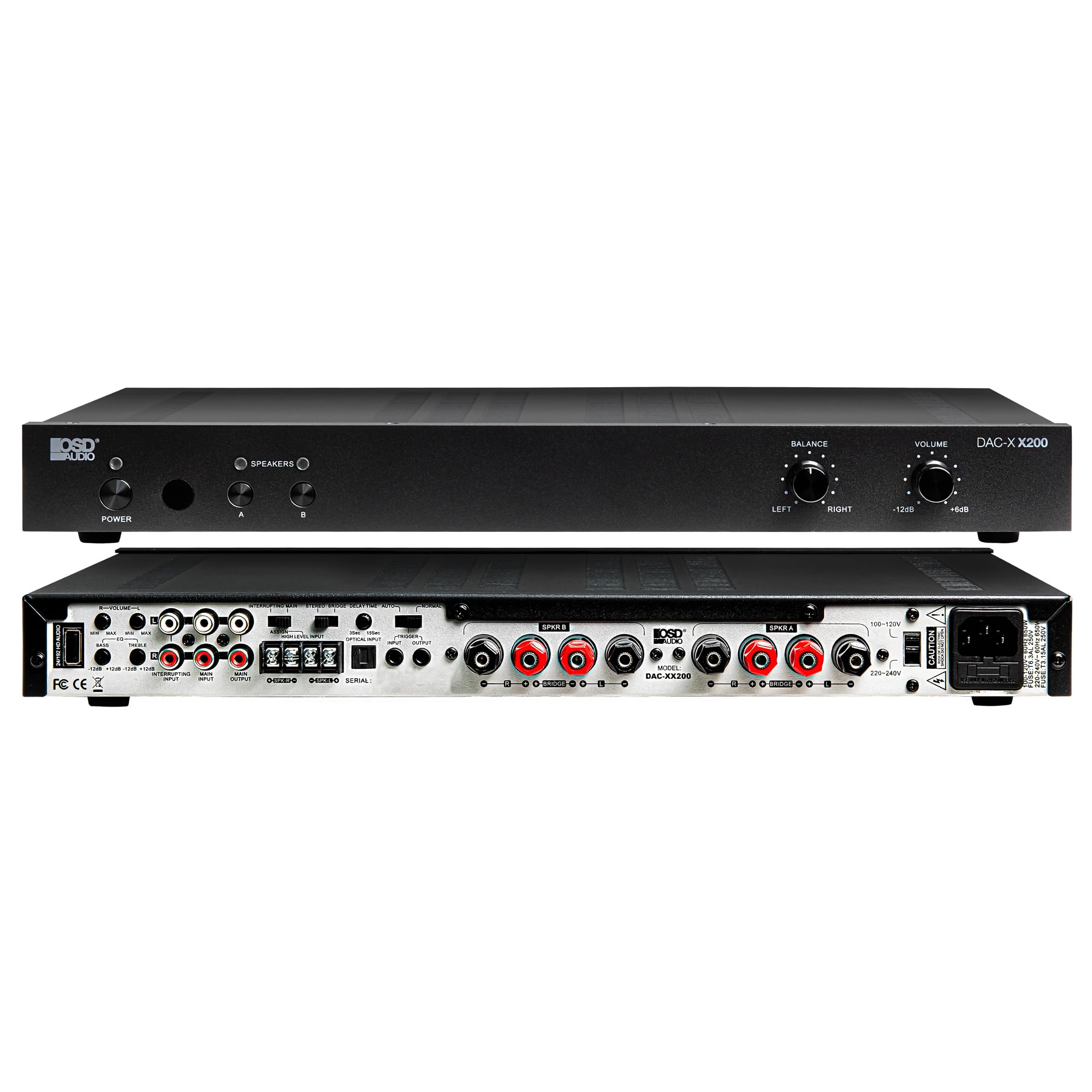
Малюнак 4.4: Тыл view of the DAC-X200 amplifier, displaying various audio inputs (USB, Optical, RCA), speaker outputs, and power input.

Малюнак 4.5: Detail of the rear panel inputs, including USB, Optical, and RCA connections.

Малюнак 4.6: Detail of the rear panel speaker output terminals for Speaker A and Speaker B.
5. Настройка
5.1 Размяшчэнне
Place the DAC-X200 on a flat, stable surface with adequate space around it for ventilation. Avoid enclosed cabinets or areas with poor airflow to prevent overheating.
5.2 Падключэнне дынамікаў
- Забяспечце ampвыратавальнік выключаны і адключаны ад сеткі.
- Падключыце пасіўныя калонкі да СПІКЕР А і/або СПІКЕР Б terminals on the rear panel. Observe correct polarity (+ to + and - to -).
- For optimal performance, use high-quality speaker wire.
5.3 Падключэнне аўдыёкрыніц
The DAC-X200 supports multiple input types:
- USB ўвод: Connect a computer or other USB audio source using a Type A to Type A USB 2.0 cable.
- Аптычны ўваход: Connect digital audio sources like TVs or CD players using an optical cable.
- Уваходы RCA: Connect analog audio sources such as music streamers, turntables (with a pre-amp), or other devices using RCA cables.
5.4 Падключэнне харчавання
After all audio and speaker connections are made, connect the supplied power cable to the ampда разеткі сілкавання выпраменьвальніка, а затым да адпаведнай разеткі пераменнага току.
6. Інструкцыя па эксплуатацыі
6.1 Уключэнне/выключэнне сілкавання
Націсніце УЛАДА кнопку на пярэдняй панэлі, каб уключыць amplifier on or off. The power indicator light will illuminate when the unit is on.
6.2 Выбар уводу
The DAC-X200 features smart source switching, automatically detecting and switching to an active input. If multiple inputs are active, you may need to manually select the desired input using the remote control (if applicable) or by cycling through inputs.
6.3 Рэгулятар гучнасці
Adjust the overall output volume using the АБ'ЁМ knob on the front panel. Rotate clockwise to increase volume and counter-clockwise to decrease it.
6.4 Рэгулятары тону
Выкарыстоўвайце БАЛАНС knob to adjust the left/right channel balance. The DAC-X200 also includes bass and treble adjustment knobs (located on the rear panel or accessible via remote, depending on model variation) to fine-tune the sound to your preference or room acoustics.
6.5 A/B Speaker Switching
Націсніце A or B buttons on the front panel to select which set of speakers (Speaker A, Speaker B, or both) are active. This allows for multi-room audio configurations.
7. Тэхнічнае абслугоўванне
- Уборка: Выкарыстоўвайце мяккую сухую тканіну для ачысткі вонкавага боку ampНе выкарыстоўвайце вадкія ачышчальнікі або аэразолі.
- Вентыляцыя: Перыядычна правярайце вентыляцыйныя адтуліны на наяўнасць пылу і смецця.
- захоўванне: Калі прылада захоўваецца працяглы час, адключыце яе ад электрычнай разеткі і захоўвайце ў прахалодным, сухім месцы.
8. Выпраўленне непаладак
| праблема | Магчымая прычына | Рашэнне |
|---|---|---|
| Няма ўлады | Power cable not connected; Power outlet not active; Ampвыключальнік. | Check power cable connection; Test power outlet; Press the Power button. |
| Няма гуку | Incorrect input selected; Speaker cables loose; Volume too low; Speakers A/B not selected. | Select correct input; Check speaker connections; Increase volume; Ensure Speaker A or B is active. |
| Скажоны гук | Input signal too high; Speaker impedance mismatch; Faulty cable. | Reduce source volume; Verify speaker impedance (8̣ or 4̣); Replace audio cables. |
| Input not switching automatically | Multiple active sources; Specific source not detected. | Manually select input; Ensure only one source is playing if auto-switching is desired. |
9. Тэхнічныя характарыстыкі
- мадэль: ЦАП-X200
- Выходная магутнасць: 100W RMS per channel at 8̣; 225W RMS per channel at 4̣; 450W bridged mono
- Колькасць каналаў: 2
- ЦАП: Hi-Res 24bit/192khz, DSD formats supported
- Уваходы: USB, Optical, RCA
- Зоны дынамікаў: A/B Switching
- Памеры (Д х Ш х У): 16.7 х 10 х 2 цалі
- Тып матэрыялу: Пластыкавыя
- UPC: 810074881173
10. Інфармацыя аб гарантыі
OSD Audio products are designed for reliability and performance. This product is covered by a limited warranty against defects in materials and workmanship. Please refer to the official OSD Audio website or your purchase documentation for specific warranty terms and conditions, including duration and coverage details. Keep your proof of purchase for warranty claims.
11. Падтрымка
For technical assistance, troubleshooting not covered in this manual, or service inquiries, please contact OSD Audio customer support. You can find contact information, FAQs, and additional resources on the official OSD Audio webсайт.
Webсайт: www.osdaudio.com