
Generic57erpqmvgc-11
User Manual for Generic Mobile Electrical Circuit Breaker (10A)
Model: Generic57erpqmvgc-11
1. Уводзіны
This manual provides essential information for the safe and effective use of your Generic Mobile Electrical Circuit Breaker. Please read this manual thoroughly before installation and operation, and retain it for future reference. This device is designed to monitor and control household appliances, offering both remote and manual control capabilities.
2. Інфармацыя па бяспецы
ПАПЯРЭДЖАННЕ: Небяспека паражэння электрычным токам. Устаноўка і абслугоўванне павінны выконвацца толькі кваліфікаваным персаналам.
- Always disconnect power before installing or servicing the circuit breaker.
- Забяспечыць абtage and current ratings of the circuit breaker match your application requirements. This model is rated for 90-240V and 10A.
- Не выкарыстоўвайце прыладу, калі яна выглядае пашкоджанай.
- The PA66 shell is high temperature resistant and flame retardant, but proper ventilation is still required.
- This device provides short circuit and overload protection. However, it is not a substitute for proper electrical wiring and safety practices.
3. Прадукт скончыўсяview
The Generic Mobile Electrical Circuit Breaker is a smart device designed for efficient power management and safety in your home. It features robust construction and intelligent control options.
Асноўныя характарыстыкі:
- Асноўнае прызначэнне: Monitors and controls household appliances, enabling remote and scheduled operation.
- матэрыял: Utilizes copper for excellent conductivity and a durable PA66 flame-retardant shell.
- Timing Modes: Offers three distinct timing modes: timing, countdown, and cycle timing for advanced scheduling.
- Каляровы індыкатар: Equipped with a color indicator for easy monitoring of operational status.
- Абарона: Includes built-in short circuit and overload protection.
- Ўстаноўка: Designed for rail installation with a secure positioning clip.
- кантроль: Supports both remote (via mobile phone) and manual control.
Кампаненты прадукту:

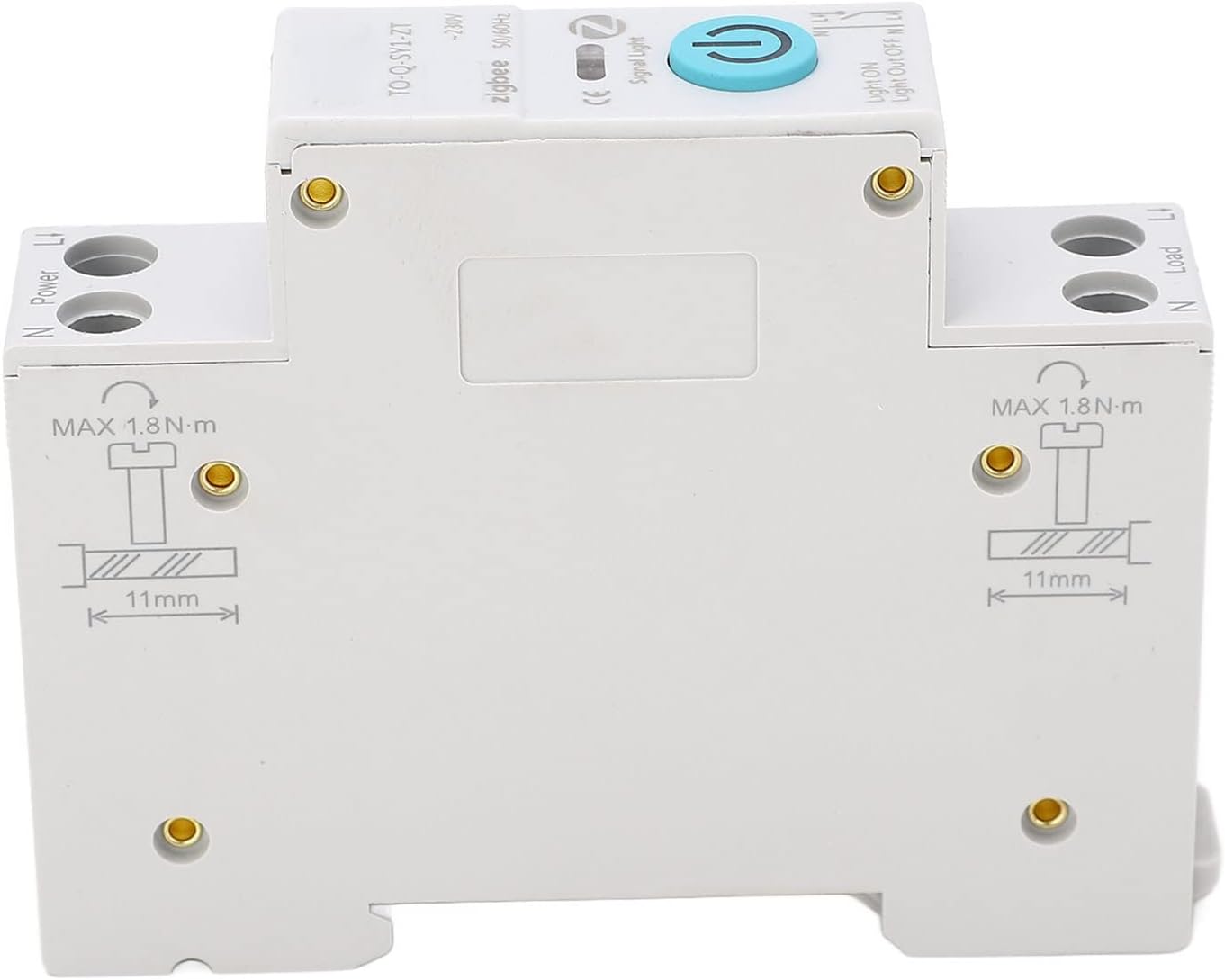
4. Настройка і ўстаноўка
The circuit breaker is designed for rail installation. Follow these steps carefully for proper setup.
- Адключэнне сілкавання: Before beginning installation, ensure that the main power supply to the circuit where the breaker will be installed is completely disconnected. Verify with a voltagэлектронны тэстар.
- Мантаж: Securely attach the circuit breaker to a standard DIN rail. The device features a positioning clip design for a firm and reliable connection.
- Праводка:
- Connect the incoming power supply to the "Power" terminals (N and L1) at the top of the circuit breaker.
- Connect the appliance or load to the "Load" terminals (N and L1) at the bottom of the circuit breaker.
- Ensure all wire connections are tight and secure. The recommended maximum torque for terminal screws is 1.8 N·m.
- Strip wires to approximately 11mm before inserting into terminals for optimal contact.
- Праверка: Double-check all connections to ensure they are correct and secure.
- Аднаўленне харчавання: Пасля завяршэння і праверкі ўстаноўкі аднавіце падачу электраэнергіі на ланцуг.

5. Інструкцыя па эксплуатацыі
The circuit breaker supports both manual and remote control operations.
5.1 Ручное кіраванне
To manually switch the circuit breaker ON or OFF, press the blue power button located on the front of the device. The color indicator light will change to reflect the current status (e.g., "Light ON" or "Light Out OFF").
5.2 Remote Control (Mobile Phone)
This circuit breaker is designed for remote control via a mobile phone application. While the specific app is not detailed here, the general process involves:
- Ўстаноўка прыкладання: Download and install the compatible mobile application on your smartphone. (Refer to the separate user manual provided with the product for app details and QR codes if available).
- Спалучэнне прылад: Follow the app's instructions to pair the circuit breaker with your mobile device. This typically involves a discovery mode on the breaker and a pairing process within the app.
- Выдаленая аперацыя: Once paired, you can remotely switch the connected appliances ON or OFF through the app interface.
- Timing Modes: Utilize the app to set up the three timing modes:
- Час: Schedule specific ON/OFF times for the appliance.
- Зваротны адлік: Set a countdown timer for the appliance to switch ON or OFF after a specified duration.
- Час цыклу: Program repetitive ON/OFF cycles for automated control.
The mobile phone control simplifies appliance management, making daily life more convenient.
6. Тэхнічнае абслугоўванне
The Generic Mobile Electrical Circuit Breaker requires minimal maintenance. Regular checks can ensure its longevity and safe operation.
- Уборка: Periodically clean the exterior of the device with a dry, soft cloth. Do not use liquid cleaners or solvents.
- Праверкі злучэння: Annually, or as needed, verify that all wire connections are still tight and secure. Loose connections can lead to overheating or malfunction.
- Умовы навакольнага асяроддзя: Ensure the operating environment remains within suitable temperature and humidity ranges to prevent damage to the internal components.
- Няма частак, якія абслугоўваюцца карыстальнікам: Do not attempt to open or repair the circuit breaker yourself. There are no user-serviceable parts inside. Unauthorized opening will void any warranty.
7. Выпраўленне непаладак
If you encounter issues with your circuit breaker, refer to the following common problems and solutions:
| праблема | Магчымая прычына | Рашэнне |
|---|---|---|
| Прылада не ўключаецца. | Няма электразабеспячэння; няспраўная праводка; унутраная няспраўнасць. | Check main power supply. Verify all wire connections are secure. If problem persists, contact support. |
| Часта спрацоўвае аўтаматычны выключальнік. | Overload; short circuit; faulty appliance. | Reduce load on the circuit. Check connected appliances for faults. Consult an electrician if tripping continues. |
| Не працуе пульт дыстанцыйнага кіравання. | App not paired; poor Wi-Fi/Zigbee signal; app malfunction. | Ensure device is paired correctly in the app. Check network connectivity. Restart the app or your mobile device. |
| Timing functions are inaccurate. | Incorrect settings in app; network synchronization issues. | Verify timing settings in the mobile application. Ensure stable network connection for time synchronization. |
If the issue is not resolved by the above steps, please contact customer support.
8. Тэхнічныя характарыстыкі
| Атрыбут | Дэталь |
|---|---|
| Нумар мадэлі | Generic57erpqmvgc-11 |
| Тып прадмета | Міні-выключальнік |
| Марка | Радавыя |
| Матэрыял | PA66 (Shell), Copper (Conductivity) |
| тtage Рэйтынг | 90-240В |
| Бягучы рэйтынг | 10 Amps (for this variant) |
| Тып кіравання | Remote Control, Manual Control |
| Электрод | 1P+N (N pole channel) |
| Тып аўтаматычнага выключальніка | Стандартны |
| Колькасць палякаў | 1 |
| Вага прадмета | 3.88 унцыі |
| Памеры ўпакоўкі | 3.54 х 2.76 х 0.79 цалі |
| Дата першай даступнасці | 18 лютага 2024 г |
9. Гарантыя і падтрымка
For warranty information and customer support, please refer to the contact details provided at the point of purchase or on the product packaging. Typically, the manufacturer offers a limited warranty against defects in materials and workmanship from the date of purchase.
For technical assistance or troubleshooting beyond what is covered in this manual, please contact the seller or manufacturer directly. Keep your purchase receipt as proof of purchase for warranty claims.
Прадавец: Zwenyn
Палітыка вяртання: 30 дзён (вяртанне грошай/замена)
Ask a question about this manual
Ask about setup, troubleshooting, compatibility, parts, safety, or missing instructions. Manuals+ will review the question and use this page’s manual context to help answer it.