
1. Прадукт скончыўсяview
The LIORQUE Digital Kitchen Timer Model YGH5249 is a multi-functional device designed to assist with various timing needs. It features a large LCD display, adjustable alarm volume, and multiple placement options. This timer can function as a countdown timer, a count-up stopwatch, and a digital clock.

Выява 1.1: Спераду view of the LIORQUE Digital Kitchen Timer, highlighting its large LCD screen and control buttons.
Асноўныя характарыстыкі:
- Функцыянальнасць 3-у-1: Timer, Stopwatch, and Clock modes.
- Вялікі ВК-дысплей: Ensures clear readability of time.
- Рэгуляваная гучнасць будзільніка: Three levels (Mute, Low, High) to suit different environments.
- Карыстальніцкі рэжым: Save frequently used countdown times for quick access.
- Універсальнае размяшчэнне: Magnetic back, foldable stand, and lanyard hole for flexible use.
- Delay Reminder: Automatically starts counting up after countdown finishes.
- Auto-Restore: Remembers the last set countdown time.

Image 1.2: Visual representation of the timer's main features and functions.
2. Усталёўка і ўстаноўка батарэі
The timer requires 2 AAA batteries (included) for operation. Follow these steps to install them:
- Знайдзіце вечка батарэйнага адсека на задняй панэлі таймера.
- Адкрыйце крышку.
- Устаўце дзве батарэйкі тыпу ААА, сочачы за правільнай палярнасцю (+ і -), як паказана ўнутры адсека.
- Надзейна зачыніце крышку батарэйнага адсека.
The timer will power on automatically once batteries are installed.
3. Інструкцыя па эксплуатацыі
3.1 Switching Modes (Timer/Stopwatch/Clock)
The LIORQUE timer offers three modes: Timer (countdown), Stopwatch (count-up), and Clock. To switch between Timer mode and Clock mode, press and hold the ST/SP button for 2 seconds. The timer will display the current time in Clock mode or the timer interface in Timer mode.

Image 3.1: Switching between Counting Mode and Clock Mode.
3.2 Setting Countdown Timer
- Ensure the timer is in Timer mode (displaying H:M:S).
- Выкарыстоўвайце 1H, 5M, 1M, і 5S buttons to set the desired countdown time. Each press adds the corresponding time increment.
- Націсніце ST/SP кнопку, каб пачаць зваротны адлік.
- To pause the countdown, press ST/SP зноў. Націсніце яшчэ раз, каб аднавіць.
- Каб скінуць таймер да нуля, націсніце кнопку СКІД кнопка.
- When the countdown reaches zero, the alarm will sound for 1 minute.
3.3 Using Stopwatch (Count-Up)
- Ensure the timer is in Timer mode and reset to 00:00:00.
- Націсніце ST/SP button to start counting up.
- Каб прыпыніць секундамер, націсніце ST/SP зноў. Націсніце яшчэ раз, каб аднавіць.
- Каб скінуць секундамер да нуля, націсніце кнопку СКІД кнопка.

Image 3.2: Illustration of Count-up and Countdown modes.
3.4 Shortcut Setting
The timer allows for quick setting of common intervals:
- Прэса 1H на працягу 1 гадзіны.
- Прэса 5M на працягу 5 хвілін.
- Прэса 1M на працягу 1 хвіліны.
- Прэса 5S на працягу 5 секунд.

Малюнак 3.3: Прыкладamples of using shortcut buttons for quick time setting.
3.5 Нестандартны рэжым
The Custom Mode allows you to save a frequently used countdown time for instant recall.
- In Timer mode, set your desired countdown time using the 1H, 5M, 1M, і 5S кнопкі.
- Націсніце і ўтрымлівайце ЗЫХОД button for 2 seconds. The timer will remember this setting.
- Each subsequent short press of the ЗЫХОД button will automatically load the saved time.

Image 3.4: Setting and recalling a custom timer value.
3.6 Рэгуляванне гучнасці сігналу трывогі
The timer features a 3-level alarm volume adjustment (Mute, Low, High). A switch on the side of the timer allows you to select the desired volume level.

Image 3.5: Volume adjustment switch and its three settings.
3.7 Варыянты размяшчэння
The LIORQUE timer offers flexible placement options:
- Магнітны: Attach the timer to metal surfaces like refrigerators using its strong magnetic back.
- Стэнд: Use the integrated foldable stand to place the timer on any flat surface, such as a countertop or desk.
- Адтуліна для шнурка: Hang the timer using a rope through the designated lanyard hole.
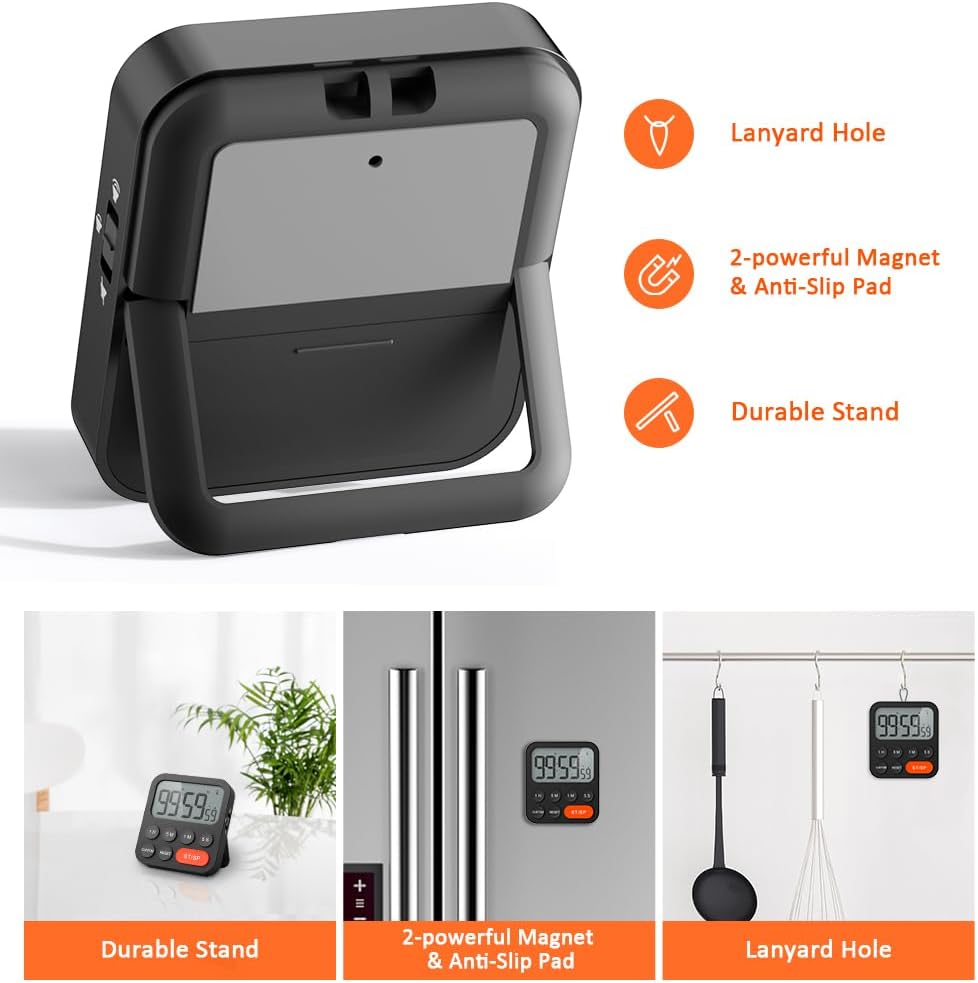
Image 3.6: Various ways to place and use the timer.
3.8 дадатковых функцый
- Delay Reminder: After a countdown finishes, the timer will automatically start counting up, indicating the elapsed time since the alarm.
- Auto-Restore: Once a countdown is complete and the alarm has sounded, pressing the ST/SP button will restore the timer to the last set countdown time, making it convenient for repetitive tasks.

Image 3.7: Explanation of Delay Reminder and Auto-restore features.
4. Тэхнічнае абслугоўванне
- Clean the timer with a soft, dry cloth. Do not use abrasive cleaners or immerse in water.
- Replace batteries when the display becomes dim or the timer functions erratically.
- Store the timer in a cool, dry place when not in use for extended periods.
5. Выпраўленне непаладак
- Таймер не адказвае: Праверце, ці правільна ўсталяваныя батарэйкі і ці дастаткова яны зараджаныя. Пры неабходнасці замяніце іх.
- Alarm too quiet/loud: Adjust the volume switch on the side of the timer to your preferred level.
- Дысплей пусты: Ensure batteries are installed and functional. If the issue persists, contact customer support.
6. Тэхнічныя характарыстыкі
| Асаблівасць | Дэталь |
|---|---|
| Марка | ЛІОРК |
| Нумар мадэлі | YGH5249 |
| Колер | Чорны |
| Памеры прадукту | 0.94"D x 0.94"H |
| Вага прадмета | 4.2 унцыі |
| Крыніца харчавання | 2 батарэйкі AAA (у камплекце) |
| Колькасць налад | 3 (Том) |
| Памер экрана | 1E+1 сантыметры |
7. Гарантыя і падтрымка
For warranty information or technical support, please refer to the product packaging or contact LIORQUE customer service through their official website or the retailer where the product was purchased. Keep your purchase receipt for warranty claims.