
FLEXISPOT QS1M-1675-IE
FLEXISPOT Lite Electric Standing Desk User Manual
Model: QS1M-1675-IE
Уводзіны
Thank you for choosing the FLEXISPOT Lite Electric Standing Desk. This manual provides essential information for the safe and efficient assembly, operation, and maintenance of your new desk. Please read this manual thoroughly before use and retain it for future reference.
The FLEXISPOT Lite Electric Standing Desk is designed to promote a healthier working environment by allowing seamless transitions between sitting and standing positions. Its robust construction and intuitive controls ensure a comfortable and productive workspace.
Інструкцыі па тэхніцы бяспекі
- Перад зборкай пераканайцеся, што ўсе кампаненты наяўныя і не пашкоджаныя. Не выкарыстоўвайце, калі якія-небудзь дэталі адсутнічаюць або зламаныя.
- Трымайце дзяцей і хатніх жывёл далей ад стала падчас працы, каб пазбегнуць траўмаў.
- Do not place hands or other objects near the moving parts of the desk frame during height adjustment.
- Ensure the power cord is properly connected and not damaged. Do not operate the desk with a damaged cord or plug.
- Do not overload the desk. Refer to the specifications section for maximum weight capacity.
- Only use the desk on a level surface to ensure stability.
- Адключыце электрычнасць перад чысткай або любым тэхнічным абслугоўваннем.
Змест пакета
Калі ласка, пераканайцеся, што ўсе наступныя кампаненты ўваходзяць у ваш пакет:
- Desktop (160 x 75 cm, White+Maple)
- Desk Legs/Frame (Alloy Steel)
- Электрарухавік і блок кіравання
- Панэль кіравання
- Адаптар сілкавання і кабель
- Падстаўка для кубкаў
- Кручок для захоўвання
- Cable Management Accessories (Cable ties, Bundle Clamp)
- Зборныя элементы (шрубы, шасцігранныя ключы і г.д.)
- Кіраўніцтва карыстальніка
Малюнак 1: Скончанаview of desk components, including the desktop, frame, and control panel, ready for assembly.
Ўстаноўка і зборка
Follow these steps to assemble your FLEXISPOT Lite Electric Standing Desk. It is recommended to have two people for assembly, especially when handling the desktop.
- Распакуйце кампаненты: Carefully remove all parts from the packaging and lay them out on a clean, soft surface to prevent scratches. Refer to the "Package Contents" section to ensure all parts are present.
- Attach Lifting Columns to Feet: Secure the lifting columns to the desk feet using the provided screws and tools. Ensure they are firmly attached.
- Падключыце перакладзіну: Attach the crossbar between the two lifting columns. This forms the main frame of the desk.
- Усталюйце блок кіравання і рухавік: Mount the control box and motor onto the designated areas of the desk frame. Connect the motor cables to the control box.
- Прымацаваць працоўны стол: Carefully place the desktop upside down on a soft surface. Position the assembled frame onto the desktop, aligning the pre-drilled holes. Secure the frame to the desktop using the provided screws.
- Усталяваць панэль кіравання: Mount the control panel to the underside of the desktop in an easily accessible location. Connect its cable to the control box.
- Далучыць аксэсуары: Install the cup holder and storage hook to the desired locations on the desktop edge.
- Кабельнае кіраванне: Use the provided cable management accessories to organize and secure all cables, including the power cord.
- Пасада пісьмовага стала: With assistance, carefully flip the desk upright and place it in its desired location. Ensure it is on a stable, level surface.
- Падключыце харчаванне: Plug the power adapter into the control box, then plug the power cord into a wall outlet.
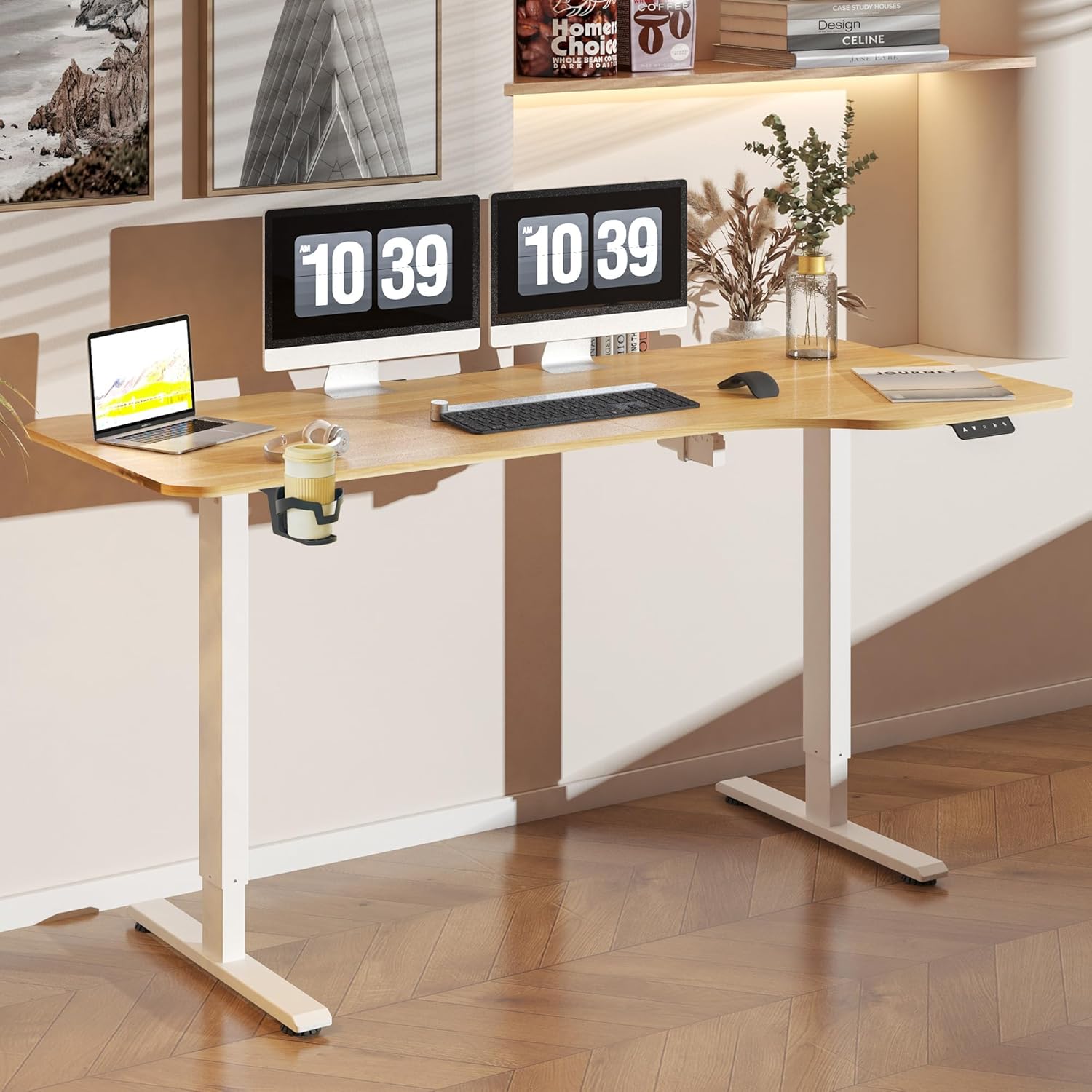
Малюнак 2: The FLEXISPOT Lite Electric Standing Desk fully assembled and set up in a modern home office environment.
Інструкцыя па эксплуатацыі
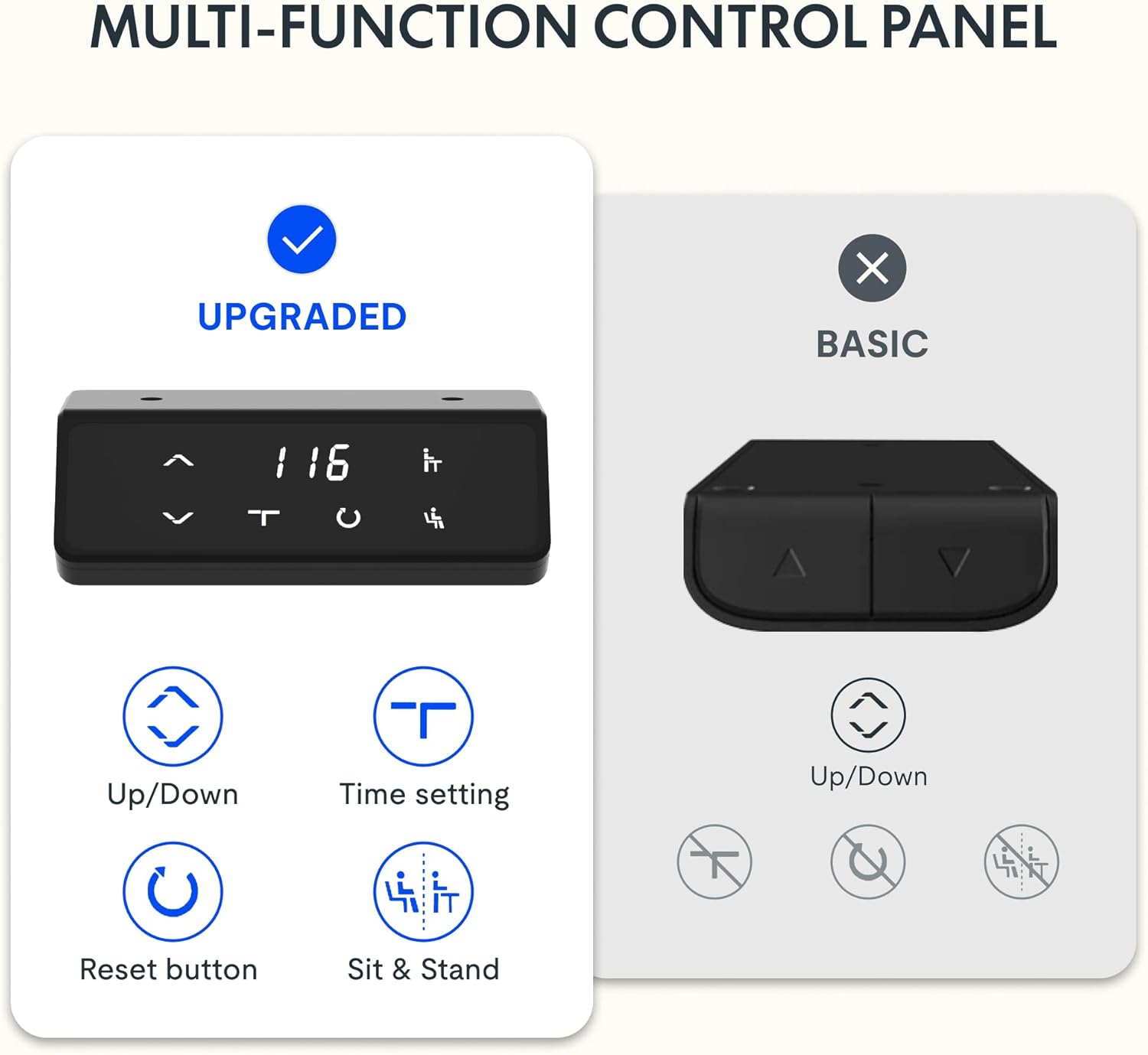
Панэль кіравання скончыласяview

Малюнак 3: Падрабязны view of the desk's control panel, showing buttons for Up/Down adjustment, Time Setting, Reset, and Sit & Stand memory presets.
Your FLEXISPOT Lite Electric Standing Desk features an intuitive control panel for easy height adjustment and memory functions.
- Up/Down Buttons (⌃ / ⌄): Press and hold these buttons to manually adjust the desk height upwards or downwards. Release the button to stop at the desired height.
- Налады памяці: The control panel allows you to save and recall preferred height settings.
- Adjust the desk to your desired height (e.g., a comfortable sitting or standing position) using the Up/Down buttons.
- Press and hold the 'Sit & Stand' button (person icon) for approximately 3-5 seconds until the display flashes or beeps, indicating the height is saved.
- To recall a saved height, simply press the 'Sit & Stand' button. The desk will automatically move to the last saved height. (If your model supports multiple presets, consult the full product manual for specific instructions on saving and recalling each position.)
- Reset Button (R): If the desk encounters an error or does not respond correctly, a reset may be required.
- Press and hold the 'R' button (often indicated by a circle icon or 'Reset' text).
- The desk will move to its lowest position, then slightly rise. Release the button once this sequence is complete. The desk is now reset.
- Time Setting (T): This button, often labeled with a clock icon, may be used to set a timer for sit/stand reminders, if available on your model. Consult the full product manual for detailed instructions on using this feature.

Малюнак 4: The FLEXISPOT Lite Electric Standing Desk in use, highlighting the accessible placement of the control panel for easy height adjustments.
Асаблівасці
Дыяпазон рэгулявання вышыні
The desk offers a wide range of height adjustment to accommodate various user preferences and activities, from a minimum of 71 cm to a maximum of 117 cm.

Малюнак 5: Visual representation of the desk's height adjustment capabilities, illustrating the minimum and maximum heights.
Убудаваныя аксэсуары
- Трымальнік кубка: A convenient cup holder is included to keep your beverages secure and prevent spills on your workspace.
- Storage Hook: A practical hook is provided for hanging headphones, bags, or other items, helping to keep your desktop clear and organized.

Малюнак 6: Падрабязны view of the integrated cup holder and storage hook, designed for convenience and organization.
Кіраванне кабелем
The desk includes features to help manage and organize your cables, ensuring a tidy and safe workspace.
- Cable Management Tray/Clips: Utilize the provided cable management solutions to route and secure power cords and peripheral cables.
- Bundle Clamp/Grommet: The desktop features a grommet hole and clamp for neatly passing cables through the desk surface.

Малюнак 7: Examples of the desk's cable management features, including a cable routing system and a desktop grommet for organized wiring.
Тэхнічнае абслугоўванне
- Уборка: Працярыце паверхню стала і раму мяккай губкайamp тканінай. Пазбягайце абразіўных ачышчальнікаў або агрэсіўных хімічных рэчываў, якія могуць пашкодзіць пакрыццё.
- агляд: Перыядычна правярайце ўсе шрубы і злучэнні, каб пераканацца ў іх зацягнутасці. Пры неабходнасці падцягвайце.
- Кабельнае кіраванне: Сачыце за тым, каб кабелі не былі заціснуты і не заблыталіся, асабліва падчас рэгулявання вышыні.
- Сыход за рухавіком: The electric motor is designed for maintenance-free operation. Do not attempt to open or service the motor or control box.
Ліквідацыю непаладак
| праблема | Магчымая прычына | Рашэнне |
|---|---|---|
| Стол не рухаецца. | Power cord disconnected; motor cable loose; overload. | Check power connections. Ensure motor cables are securely plugged in. Reduce weight on the desk. Perform a reset. |
| Стол рухаецца няроўна або выдае незвычайныя гукі. | Loose connections; obstruction; uneven load. | Check all assembly screws. Ensure no objects are obstructing the lifting columns. Distribute weight evenly on the desktop. Perform a reset. |
| Error code displayed on control panel. | Канкрэтная сістэмная памылка. | Refer to the specific error code in the full product manual (if available) or contact customer support. Often, a reset can resolve minor errors. |
| Не працуюць загадзя настроеныя налады памяці. | Presets not saved correctly; system glitch. | Re-save your desired height presets. Perform a reset if the issue persists. |
Тэхнічныя характарыстыкі
| Асаблівасць | Дэталь |
|---|---|
| Нумар мадэлі | QS1M-1675-IE |
| Памер працоўнага стала | 160 х 75 см |
| Матэрыял для працоўнага стала | Вуд |
| Матэрыял каркаса | Легаваная сталь |
| Колер | White+Maple |
| Мінімальная вышыня | 71 см |
| Максімальная вышыня | 117 см |
| Максімальная грузападымальнасць | 150 фунта (прыблізна 68 кг) |
| Узровень шуму рухавіка | Менш за 50 дБ |
| Патрабуецца зборка | так |
Гарантыя і падтрымка
FLEXISPOT stands behind the quality of its products. Your FLEXISPOT Lite Electric Standing Desk comes with the following warranty:
- 5-гадовая гарантыя: Applies to the desk frame.
- 3-гадовая гарантыя: Applies to controllers and motors.
For warranty claims, technical support, or any questions regarding your product, please contact FLEXISPOT customer service. Please have your model number (QS1M-1675-IE) and proof of purchase ready.

Малюнак 8: Official FLEXISPOT warranty details, outlining coverage for the desk frame, controllers, and motors.