
Уводзіны
The Discovery Bright Doodles LCD Art Tablet provides a mess-free and engaging platform for creative expression. Designed for children aged 3 and up, this portable drawing pad allows users to draw, write, and doodle without the need for paper or ink. Its intuitive design and durable construction make it suitable for various environments, from home to travel.
This manual provides essential information on setting up, operating, and maintaining your LCD Art Tablet to ensure optimal performance and longevity.
Інфармацыя па бяспецы
- This product is intended for children aged 3 years and older. Adult supervision is recommended.
- Не падвяргайце планшэт уздзеянню экстрэмальных тэмператур, прамых сонечных прамянёў або вільгаці.
- Avoid dropping the tablet or subjecting it to strong impacts, as this may damage the LCD screen.
- Only use the provided stylus or a similar non-abrasive, blunt instrument to draw on the screen. Sharp objects can permanently damage the display.
- Трымайце батарэйкі ў месцах, недаступных для маленькіх дзяцей. У выпадку праглынання неадкладна звярніцеся па медыцынскую дапамогу.
Змест пакета
Калі ласка, праверце ўпакоўку, каб пераканацца ў наяўнасці ўсіх прадметаў:
- 1 x Discovery Bright Doodles LCD Art Tablet
- 1 x Tethered Stylus
- 1 х Інструкцыя па эксплуатацыі (гэты дакумент)

Image: The Discovery Bright Doodles LCD Art Tablet shown alongside its retail packaging. The tablet is blue with a black screen displaying colorful doodles, and a green tethered stylus is visible.
Настройка
Ўстаноўка акумулятара
The Discovery Bright Doodles LCD Art Tablet requires 2 AAA batteries (not included) for operation. Follow these steps to install them:
- Знайдзіце батарэйны адсек на задняй панэлі планшэта.
- Using a small screwdriver (not included), carefully open the battery compartment cover.
- Устаўце 2 батарэйкі тыпу ААА, сочачы за правільнай палярнасцю (+/-), як паказана ўнутры адсека.
- Замяніце крышку батарэйнага адсека і замацуеце яе шрубай.
Заўвага: Заўсёды выкарыстоўвайце новыя батарэйкі і адказна ўтылізуйце старыя. Не змешвайце старыя і новыя батарэйкі, а таксама батарэйкі розных тыпаў.
Інструкцыя па эксплуатацыі
Drawing on the Tablet
Use the included tethered stylus to draw or write on the LCD screen. You can also use your fingertip. The screen will display colorful lines as you draw.

Image: A child's hand holding the green stylus and drawing colorful lines on the black screen of the blue Discovery Bright Doodles LCD Art Tablet.
Erasing the Screen
To clear the entire screen and start a new drawing, press the erase button located on the bottom edge of the tablet. The screen will instantly clear.
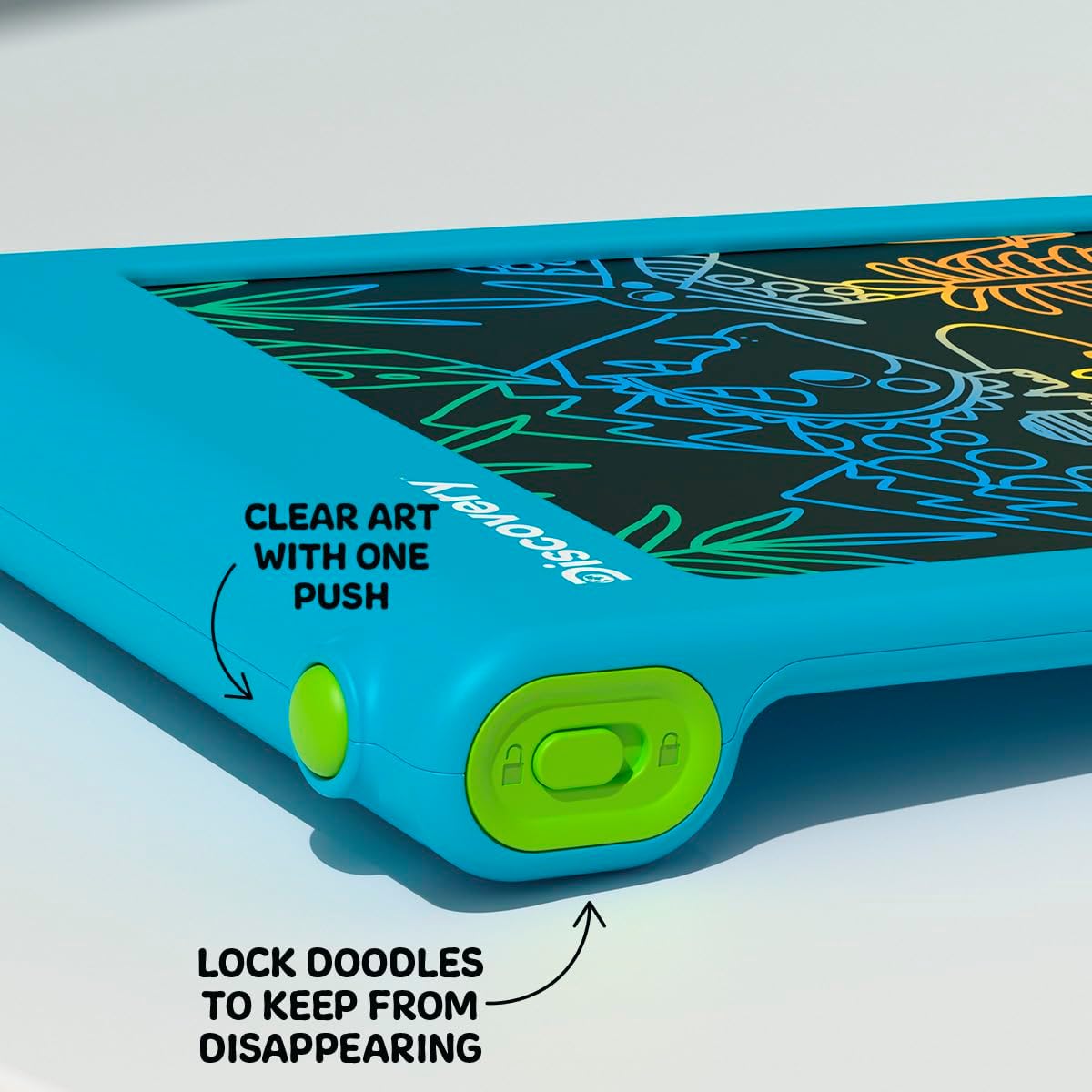
Выява: буйны план view of the bottom edge of the tablet, showing the round green erase button and the rectangular green screen lock switch with an open and closed padlock icon.
Функцыя блакіроўкі экрана
The tablet features a screen lock switch to prevent accidental erasing. This is useful for preserving artwork or notes.
- каб замак the screen: Slide the screen lock switch (located next to the erase button) to the position showing a closed padlock icon. While locked, pressing the erase button will not clear the screen.
- каб разблакаваць the screen: Slide the screen lock switch to the position showing an open padlock icon. The erase button will now function normally.
Савет: Always ensure the screen is unlocked before attempting to erase your drawing.
Сховішча для стылуса
The included stylus is tethered to the tablet to prevent loss. When not in use, the stylus can be neatly stored in the designated slot on the side of the tablet.

Выява: буйны план view of the side of the tablet, showing the green tethered stylus inserted into its storage slot.
Тэхнічнае абслугоўванне
Уборка
To clean the tablet, gently wipe the screen and casing with a soft, dry, lint-free cloth. Do not use abrasive cleaners, solvents, or chemical sprays, as these can damage the screen or casing.
Замена батарэі
If the erase function stops working or the screen becomes dim, it may be time to replace the batteries. Refer to the "Battery Installation" section under Setup for instructions.
Ліквідацыю непаладак
- Screen does not clear when erase button is pressed:
- Check if the screen lock switch is in the "locked" position. Slide it to the "unlocked" position.
- Пераканайцеся, што батарэйкі ўсталяваны правільна і не разраджаны. Пры неабходнасці замяніце батарэйкі.
- Drawing lines are faint or inconsistent:
- Гэта можа сведчыць аб нізкім узроўні зараду батарэі. Заменіце батарэі.
- Ensure you are using the stylus or a suitable blunt object with appropriate pressure.
- Stylus is lost:
- The stylus is tethered to the tablet to prevent loss. If it becomes detached, a replacement stylus may be available from the manufacturer or a compatible alternative can be used.
Тэхнічныя характарыстыкі
| Нумар мадэлі | 1017870 |
| Марка | Адкрыццё |
| Памеры прадукту | 9.7 х 6.2 х 0.1 цалі |
| Вага прадмета | 1.12 фунта |
| Рэкамендаваны ўзрост | 3 гады і вышэй |
| Крыніца харчавання | 2 х ААА батарэі (не ўключаны) |
| Асаблівасць | ВК-экран з падсветкай |
| Вытворца | Merchsource |
Гарантыя і падтрымка
For warranty information or technical support, please refer to the contact details provided on the product packaging or visit the official Discovery brand webсайт. Калі ласка, захавайце пацвярджэнне пакупкі для любых гарантыйных прэтэнзій.