
Уводзіны
Thank you for choosing the VTech ES2051 Digital Cordless Phone. This manual provides comprehensive instructions for setting up, operating, and maintaining your new phone system. The ES2051 is designed for ease of use, featuring a digital answering machine, call blocking capabilities, volume amplification, and an antibacterial plastic construction for enhanced hygiene.
Please read this manual thoroughly before using your phone to ensure proper operation and to take full advantagе з яго асаблівасцей.
Інфармацыя па бяспецы
Заўсёды выконвайце асноўныя меры бяспекі пры выкарыстанні гэтага вырабу, каб знізіць рызыку пажару, паражэння электрычным токам і траўмаў людзей.
- Не выкарыстоўвайце гэты прадукт паблізу вады ці калі вы вільготныя.
- Avoid using the phone during a thunderstorm. There may be a remote risk of electric shock from lightning.
- Не выкарыстоўвайце гэты прадукт для паведамлення аб уцечцы газу ў непасрэднай блізкасці ад уцечкі.
- Use only the power adapter and batteries provided with this product.
- Не кідайце батарэйкі ў агонь. Яны могуць выбухнуць. Праверце мясцовыя правілы, каб атрымаць спецыяльныя інструкцыі па ўтылізацыі.
- Перад чысткай адключыце прадукт ад насценнай разеткі. Не выкарыстоўвайце вадкія або аэразольныя ачышчальнікі. Выкарыстоўвайце рэкламуamp тканіна для чысткі.
Змест пакета
Пераканайцеся, што ўсе прадметы прысутнічаюць у вашай упакоўцы:
- Main Base Unit with Digital Answering Machine
- Cordless Handset(s) (typically two for this model)
- Handset Charger(s) (for additional handsets)
- Адаптар(ы) харчавання
- Тэлефонны шнур
- NiMH AAA Rechargeable Batteries (4 included)
- Кіраўніцтва карыстальніка (гэты дакумент)
Настройка
1. Падключэнне базавага блока
- Plug the small end of the power adapter into the power jack on the back of the base unit.
- Plug the large end of the power adapter into a wall outlet not controlled by a wall switch.
- Plug one end of the telephone line cord into the telephone jack on the back of the base unit.
- Падключыце другі канец тэлефоннага шнура да тэлефоннай разеткі.
2. Installing and Charging Batteries
- Адкрыйце крышку батарэйнага адсека на задняй панэлі трубкі.
- Insert the supplied NiMH AAA batteries, observing the correct polarity (+ and -).
- Зачыніце крышку батарэйнага адсека.
- Place the handset in the base unit or charger to charge. The handset will beep, indicating it is charging.
- Allow the handset to charge for at least 16 hours before initial use. For optimal battery performance, keep the handset in the charger when not in use.

Image: The VTech ES2051 Digital Cordless Phone system, showing the main base with one handset and a charging cradle for the second handset, ready for setup.
Інструкцыя па эксплуатацыі
Здзяйсненне і прыём званкоў
- Каб зрабіць званок: Прэса ГОВОР / МІГАЦЬ or СПІКЕР, а затым набярыце нумар тэлефона.
- Каб адказаць на званок: Прэса ГОВОР / МІГАЦЬ or СПІКЕР калі званіць тэлефон.
- Каб завяршыць выклік: Прэса ВЫКЛ/АЧЫСТКА or place the handset back in the base/charger.
Лічбавы аўтаадказчык
The integrated digital answering machine can record up to 30 minutes of messages. It automatically answers calls when you are unavailable.
- Прайграванне паведамленняў: Прэса ПРАЙГРАЦЬ/СТОП на базавым блоку.
- Выдаленне паведамленняў: Прэса ВЫДАЛІЦЬ падчас прайгравання паведамлення.
- Запіс аб'явы: Follow the instructions in the full manual for custom outgoing message recording.

Image: A woman interacting with the VTech ES2051 phone, highlighting the digital message counter on the base unit, which indicates the number of new messages.
Блакіроўшчык выклікаў
The selective call blocking feature allows you to block up to 100 unwanted numbers, preventing them from ringing your phone.
- Каб заблакаваць нумар: During a call or from the Caller ID log, press the БЛОК ВЫЗОВА button (often represented by a specific icon) and follow the on-screen prompts to add the number to the blacklist.
- Кіраванне заблакіраванымі нумарамі: Access the call block list through the handset menu to review or remove blocked numbers.

Image: A visual representation of the call blocker feature, showing a family in a kitchen setting with an icon indicating unwanted calls are being blocked.
Аб'ём Ampзадымнік
Аб'ём amplification feature enhances incoming sounds and voices, improving clarity and volume in the handset earpiece. This is particularly useful for users with hearing impairments or those who prefer a louder audio experience.
- Activating/Adjusting: Падчас размовы націсніце адпаведную кнопку ПАВЕЛІЧЭННЕ АБ'ЁМУ button (often indicated by a speaker icon with a plus sign) or use the volume up/down keys to increase the earpiece volume.
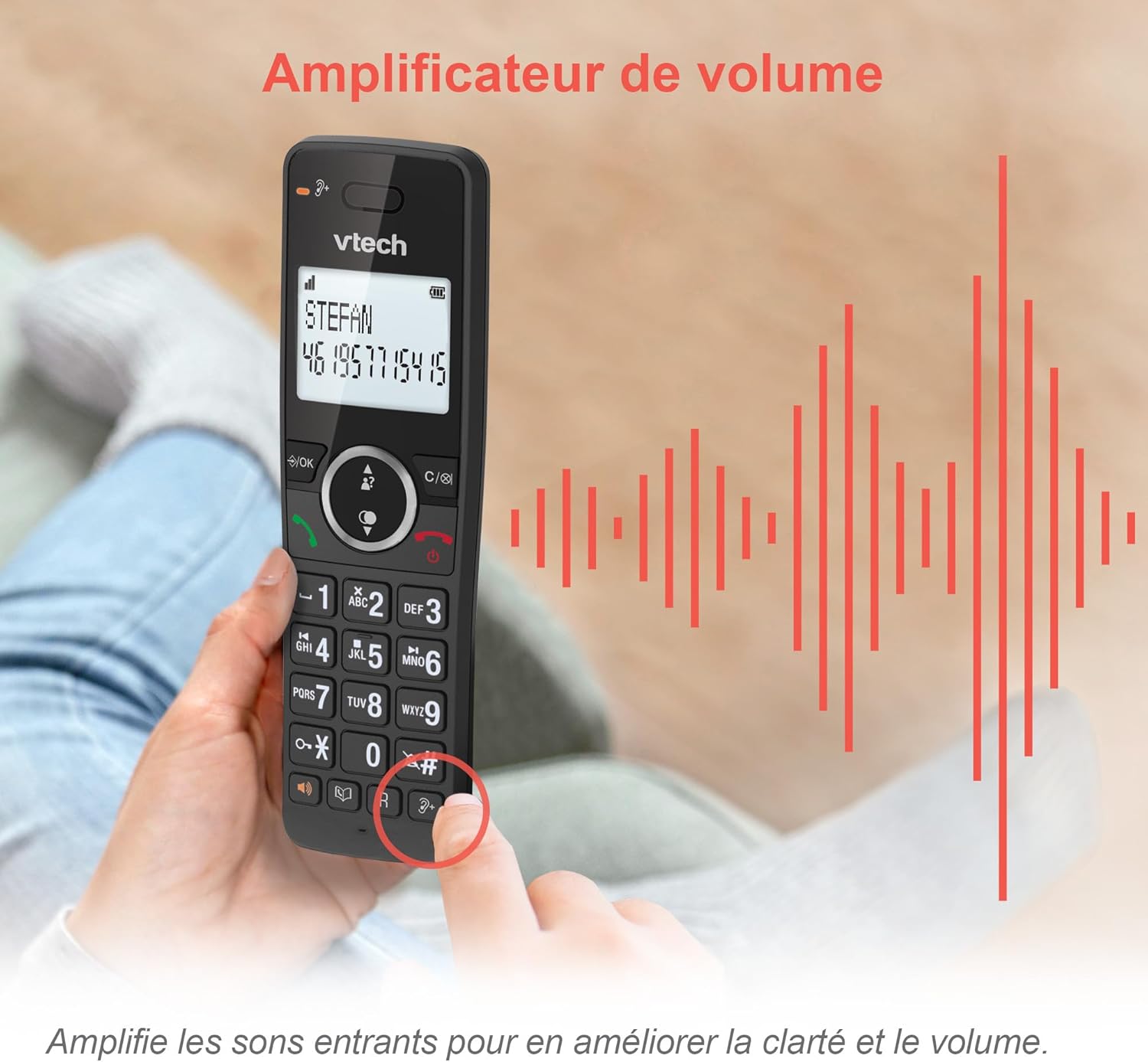
Image: A hand holding the VTech ES2051 handset, with graphic sound waves emanating from the earpiece, illustrating the volume ampфункцыя ліфікацыі.
Conference Function
The conference function allows multiple users to participate in a single conversation. You can set up a three-way conference call with two internal callers (handsets) and one external caller.
- Пачатак канферэнц-сувязі: Refer to the detailed instructions in the full manual for specific steps on how to add a third party to an ongoing call.

Image: Three people engaged in a conversation, visually representing the three-way conference call capability of the VTech ES2051 phone system.
Дамафон
The intercom feature allows you to communicate between handsets within your home without using the landline. This is useful for calling family members in different rooms.
- Выкарыстанне дамафона: Націсніце ІНТЭРКОМ button (if available) or access the intercom function through the handset menu, then select the desired handset to call.
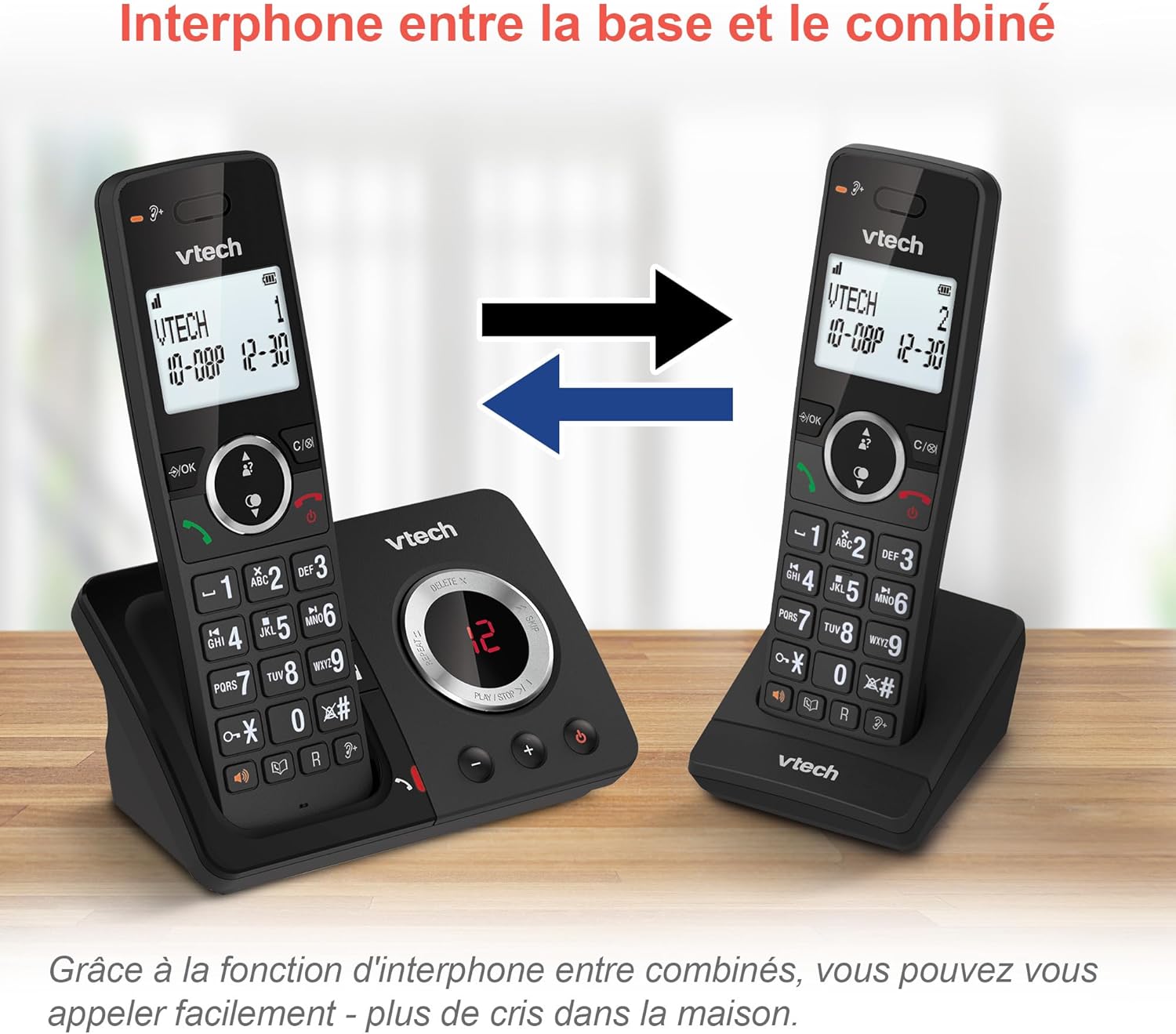
Image: A diagram showing two VTech ES2051 handsets with arrows indicating communication between them, illustrating the intercom feature.
Phonebook and Call Features
The phone includes a 100-name and number phonebook, 8 speed dial keys, and a backlit screen and keypad for easy visibility.
- Storing Contacts: Navigate to the phonebook menu to add, edit, or delete contacts.
- Хуткі набор: Assign frequently called numbers to the 8 speed dial keys for quick access.
- Caller ID Log: Review the last 20 incoming calls with Caller ID information.
- Паўторны набор: Access the list of the last 10 dialed numbers for quick redialing.

Выява: Калаж з малюнкаўasing various VTech ES2051 phone features, including the 100-entry phonebook, call display, redial function, and an 18-hour talk time battery life indicator.
Рэжым ЭКА
The ECO mode automatically adjusts and minimizes the radio frequency power based on the distance between the handset and the base unit. This feature helps conserve energy and reduce power consumption.
Тэхнічнае абслугоўванне
Чыстка тэлефона
The VTech ES2051 is made with antibacterial plastic and features a seamless, easy-to-clean design. To clean your phone:
- Unplug the base unit from the wall outlet and telephone line.
- Wipe the phone surfaces with a soft, damp тканіна. Не выкарыстоўвайце вадкія або аэразольныя ачышчальнікі.
- Ensure the phone is completely dry before plugging it back in.
Сыход за батарэяй
- Use only the supplied rechargeable NiMH AAA batteries.
- Не выкідвайце батарэі ў агонь.
- Калі тэлефон не будзе выкарыстоўвацца працяглы час, выміце батарэйкі, каб прадухіліць іх уцечку.
Ліквідацыю непаладак
If you experience any issues with your VTech ES2051 phone, try the following troubleshooting steps:
| праблема | Рашэнне |
|---|---|
| Няма сігналу набору | Ensure the telephone line cord is securely plugged into both the base unit and the wall jack. Check if other phones on the same line are working. |
| Немагчыма рабіць або прымаць званкі | Check the power connection to the base unit. Ensure the handset batteries are charged. If using a DSL service, you may need a DSL filter. |
| Handset displays "Out of Range" or "No Power at Base" | Move the handset closer to the base unit. Ensure the base unit's power adapter is securely plugged in. |
| Аўтаадказчык не запісвае паведамленні | Check if the answering machine is turned ON. Ensure there is enough recording time available (max 30 minutes). |
| Дрэнная якасць гуку або шум ад шуму | Move the handset closer to the base unit. Avoid placing the base unit near other electronic devices (e.g., microwaves, Wi-Fi routers) that may cause interference. |
If the problem persists after trying these steps, please refer to the VTech support webсайт або звярніцеся ў службу падтрымкі кліентаў для атрымання дадатковай дапамогі.
Тэхнічныя характарыстыкі
| Асаблівасць | Дэталь |
|---|---|
| Марка | VTech |
| Нумар мадэлі | ES2051 |
| Колер | чорны |
| Тып тэлефона | Бесправадная |
| Тып аўтаадказчыка | Лічбавы |
| Час запісу на аўтаадказчык | Да 30 хвілін |
| Сумяшчальныя прылады | Landlines, Answering Machine |
| Батарэі | 4 батарэйка AAA - у камплекце |
| Склад батарэі | NiMH |
| Крыніца харчавання | Харчаванне ад батарэі |
| Матэрыял | Пластык (антыбактэрыйны) |
| Тып дазвону | Простая клавіятура |
| Памеры прадмета (Д х Ш х У) | 18.3 х 13.5 х 11 сантыметраў |
| Краіна паходжання | Кітай |
Гарантыя і падтрымка
VTech products are manufactured to high-quality standards. For information regarding warranty coverage, please refer to the warranty card included with your product or visit the official VTech webсайт для вашага рэгіёну.
For technical support, frequently asked questions, or to download the full user manual, please visit the VTech support section online or contact their customer service helpline. Contact details can typically be found on the VTech webсайце або на ўпакоўцы прадукту.