
amazon basics B0CX226DLQ
Кіраўніцтва карыстальніка бесправадной Bluetooth-клавіятуры Amazon Basics
Model: B0CX226DLQ
Уводзіны
This manual provides essential information for the setup, operation, and maintenance of your amazon basics Wireless Bluetooth Keyboard. Designed for seamless multi-device connectivity, this keyboard allows you to effortlessly switch between up to three devices running on iOS, Windows, or Android operating systems. Its compact and lightweight design, combined with noiseless keys and a built-in rechargeable battery, makes it an ideal solution for versatile typing needs on the go.

Выява: зверху ўніз view of the amazon basics Wireless Bluetooth Keyboard, showcasing its compact layout and grey and black color scheme.
Змест пакета
Пасля адкрыцця ўпакоўкі пераканайцеся, што ўсе наступныя рэчы наяўныя:
- 1 x amazon basics Wireless Bluetooth Keyboard
- 1 х зарадны кабель USB Type-C
- 1 х Кіраўніцтва карыстальніка (гэты дакумент)
Настройка
1. Зарадка клавіятуры
The keyboard features a built-in rechargeable battery. Before first use, it is recommended to fully charge the keyboard.
- Locate the Type-C charging port on the side of the keyboard.
- Connect one end of the provided USB Type-C charging cable to the keyboard's charging port.
- Падключыце другі канец кабеля да крыніцы харчавання USB (напрыклад, USB-порт кампутара, насценны адаптар USB).
- Індыкатар зарадкі загарыцца. Пасля поўнай зарадкі індыкатар можа змяніць колер або выключыцца ў залежнасці ад мадэлі.

Выява: Крупны план view of the keyboard, highlighting the Type-C charging port and the ON/OFF power switch.
2. Уключэнне / выключэнне харчавання
To power on the keyboard, slide the ON/OFF switch located on the side of the keyboard to the "ON" position. To power off, slide it to the "OFF" position.
3. Спарванне Bluetooth
The keyboard supports connection to up to three devices simultaneously. Follow these steps to pair your devices:
- Пераканайцеся, што клавіятура ўключана.
- Націсніце Fn адначасова з адной з клавіш канала Bluetooth (BT1, BT2, або BT3) for approximately 3-5 seconds until the corresponding indicator light flashes rapidly. This indicates the keyboard is in pairing mode.
- На вашай прыладзе (смартфоне, планшэце, ноўтбуку) перайдзіце ў налады Bluetooth і ўключыце Bluetooth.
- Пошук available devices. The keyboard will appear as "amazon basics Keyboard" or similar.
- Select the keyboard from the list to connect. If prompted, enter the displayed code on the keyboard and press Увайдзіце.
- Пасля падключэння індыкатар перастане міргаць і будзе гарэць некалькі секунд, перш чым выключыцца.
- Repeat these steps for up to two additional devices using the other BT channel keys.

Image: The keyboard positioned between a laptop, tablet, and smartphone, visually representing its multi-device connectivity feature.
Кіраванне клавіятурай
1. Пераключэнне паміж прыладамі
After pairing multiple devices, you can easily switch between them:
- Проста націсніце Fn адначасова з клавішай патрэбнага канала Bluetooth (BT1, BT2, або BT3) to switch to the corresponding paired device.
- The keyboard will automatically connect to the selected device.
2. Сумяшчальнасць з аперацыйнымі сістэмамі
The keyboard is designed to be compatible with various operating systems. Some keys may have dual functions or specific behaviors depending on the OS.
- iOS: Compatible with iPhones and iPads.
- Windows: Fully functional with Windows PCs and laptops.
- Android: Works seamlessly with Android smartphones and tablets.
- MacOS: Compatible with MacBooks and iMacs.
- Chrome OS: Supports Chrome OS devices.
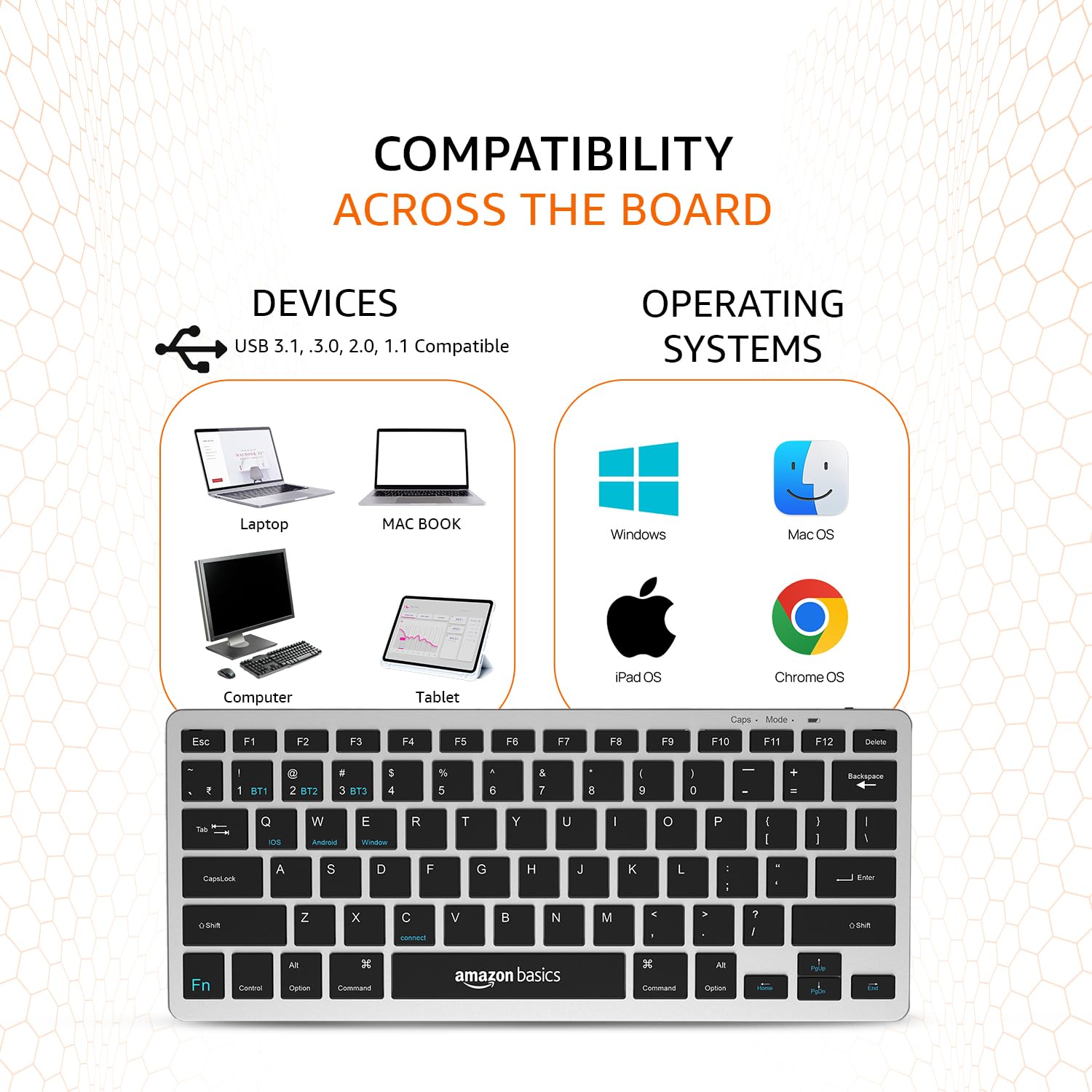
Image: A visual representation of the keyboard's broad compatibility, showing various device types and operating system logos it supports.
3. Спецыяльныя функцыянальныя клавішы
The keyboard features a dedicated Fn key that, when pressed in combination with other keys, activates special functions. Refer to the keycap legends for specific functions (e.g., media controls, volume, screen brightness).
Тэхнічнае абслугоўванне
Правільнае абслугоўванне забяспечвае даўгавечнасць і аптымальную прадукцыйнасць вашай клавіятуры.
- Уборка: Выкарыстоўвайце мяккую, сухую тканіну без ворса для працірання паверхні клавіятуры. Для выдалення ўстойлівага бруду злёгкуampПрацярыце тканіну вадой або мяккім неабразіўным ачышчальнікам. Пазбягайце празмернай вільготнасці.
- Сыход за батарэяй: To preserve battery life, avoid fully discharging the keyboard frequently. If storing for an extended period, charge the battery to about 50% and power off the keyboard.
- захоўванне: Store the keyboard in a cool, dry place away from direct sunlight, extreme temperatures, and corrosive materials.
- Апрацоўка: Avoid dropping the keyboard or subjecting it to strong impacts. Do not attempt to disassemble the keyboard, as this will void the warranty.
Ліквідацыю непаладак
If you encounter issues with your amazon basics Wireless Bluetooth Keyboard, refer to the following common troubleshooting steps:
- Клавіятура не падключаецца/не спалучаецца:
- Пераканайцеся, што клавіятура ўключана і цалкам зараджана.
- Пераканайцеся, што Bluetooth уключаны на вашай прыладзе.
- Move the keyboard closer to your device to ensure it's within range.
- Forget or remove the keyboard from your device's Bluetooth list and attempt to re-pair it.
- Try pairing with a different device to rule out an issue with your primary device's Bluetooth.
- Keys Not Responding or Double Typing:
- Check the keyboard's battery level and recharge if low.
- Ensure the keyboard is properly connected to your device. Try switching to another BT channel and back.
- Clean the keys and surrounding areas to remove any debris that might be obstructing key presses.
- Перазагрузіце клавіятуру (выключыце/уключыце), а таксама падключаную прыладу.
- Затрымка або адтэрмінаваны адказ:
- Ensure there are no other strong wireless signals or devices interfering with the Bluetooth connection.
- Reduce the distance between the keyboard and your device.
- Check for any pending software updates on your device that might improve Bluetooth performance.
- Праблемы з зарадкай:
- Verify that the Type-C cable is securely connected to both the keyboard and the power source.
- Паспрабуйце выкарыстоўваць іншы порт USB або адаптар сілкавання.
- Пераканайцеся, што зарадны кабель не пашкоджаны.
If the issue persists after trying these steps, please contact amazon basics customer support for further assistance.
Тэхнічныя характарыстыкі
| Асаблівасць | Дэталь |
|---|---|
| Марка | асновы амазонкі |
| мадэль | Wireless Bluetooth Keyboard (B0CX226DLQ) |
| Тэхналогія падлучэння | Bluetooth |
| Раскладка клавіш | Кампактная раскладка з 78 клавішамі |
| Тып ключа | Noiseless Keys |
| Сумяшчальныя прылады | Ноўтбук, планшэт, смартфон |
| Сумяшчальнасць аперацыйнай сістэмы | iOS, Windows, Android, Mac OS, Chrome OS |
| Тып батарэі | Built-in Rechargeable Lithium Polymer |
| Энергетычная каштоўнасць батарэі | 1.48 Вт гадзін |
| Порт для зарадкі | USB Type-C |
| Матэрыял | Высокаякасны АБС |
| Памеры прадукту (ДxШxВ) | 28.5 см х 12 см х 1.45 см |
| Вага прадмета | 290 г |
| Краіна паходжання | Індыя |
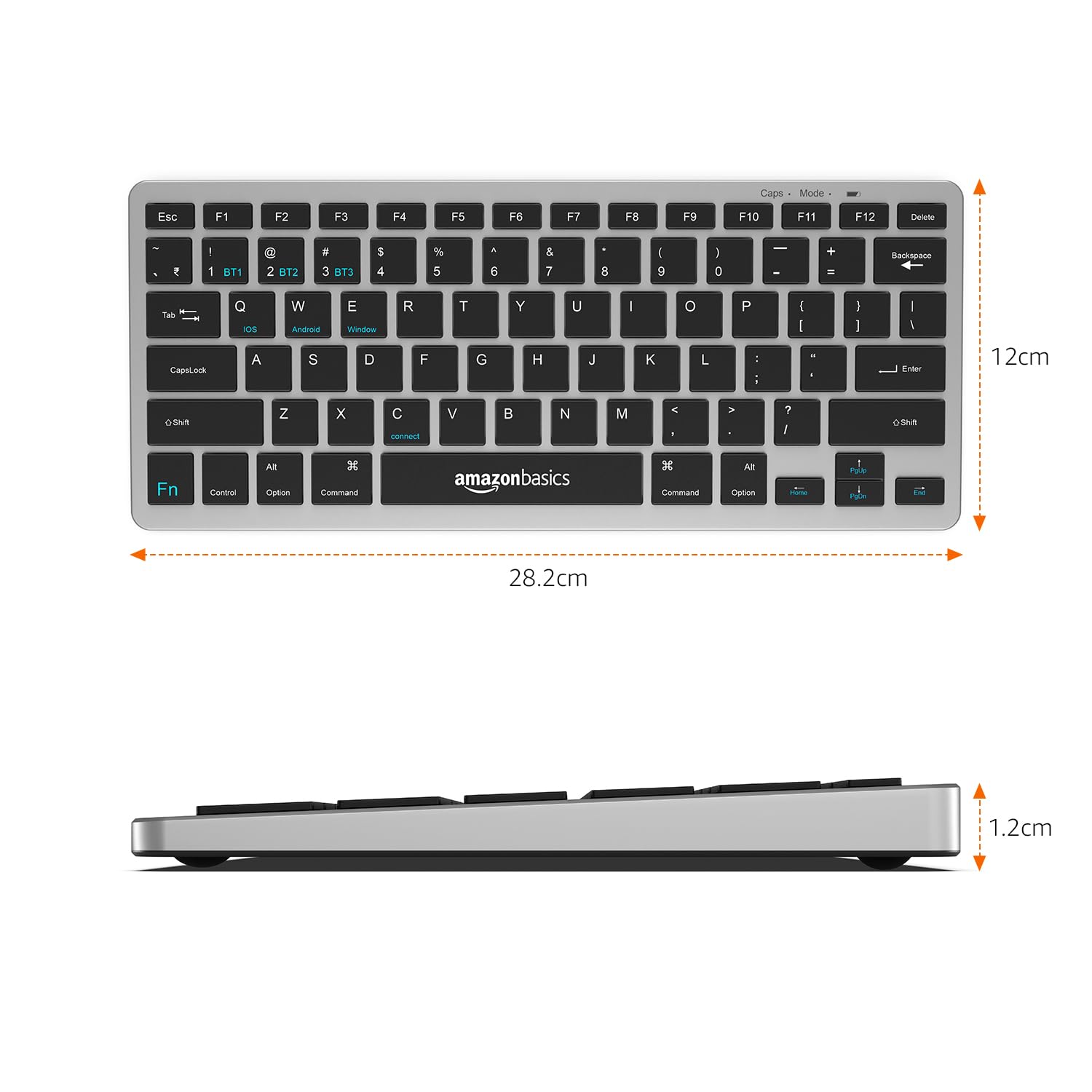
Image: The keyboard with overlaid measurements indicating its length (28.5 cm), width (12 cm), and thickness (1.2 cm).
Гарантыя і падтрымка
For information regarding the product warranty, please refer to the warranty card included in your package or contact amazon basics customer support directly. Warranty terms and conditions may vary by region and purchase date.
If you require further assistance, have questions, or need to report an issue that cannot be resolved using the troubleshooting guide, please contact amazon basics customer support through their official webсайт або кантактную інфармацыю, прадастаўленую пры пакупцы.
For the latest support information and FAQs, visit the official amazon basics support page.
Ask a question about this manual
Ask about setup, troubleshooting, compatibility, parts, safety, or missing instructions. Manuals+ will review the question and use this page’s manual context to help answer it.