
1. Уводзіны
Thank you for choosing the Inefala DAB/DAB+ Car Radio Adapter. This device upgrades your car's audio system by providing access to digital radio broadcasts (DAB/DAB+), Bluetooth hands-free calling, and various music playback options including TF card and AUX input/output. Please read this manual carefully before use to ensure proper installation and operation.
2. Асаблівасці прадукту
- DAB/DAB+ Digital Radio: Enjoy stable reception and high signal-to-noise ratio, delivering pure, noise-free, CD-like sound quality. Access multi-regional music with familiar and new channels.
- 2.4-цалевы каляровы ВК-экран: Displays images, program names, and real-time station information for easy navigation.
- Функцыянальнасць Bluetooth: Enables convenient and safe hands-free phone calls and Bluetooth music streaming while driving.
- Падтрымка TF-карт: Play MP3 music directly from a TF (MicroSD) card.
- AUX-уваход/выхад: High-quality audio output via AUX. (AUX cable not included).
- FM-перадатчык: Transmit DAB/DAB+ audio to your car's FM radio.
- Гнуткі мантаж: Can be mounted on the air vent or central console using the included suction cup mount.

Image: The Inefala DAB/DAB+ Car Radio Adapter displaying its main features: DAB+, Bluetooth, TF Card support, and AUX connectivity.

Image: A comparison highlighting the advantages of DAB+ digital radio over traditional FM radio, including digital signal propagation, CD-like sound quality, higher noise immunity, and improved coverage with more channels.
3. Змесціва ўпакоўкі
Калі ласка, пастаўце галачку для наступных пунктаў:
- Inefala DAB/DAB+ Car Radio Adapter Unit
- Mounting Bracket (for dashboard)
- Трымальнік магніта
- Mounting Bracket (for air vent)
- Аўтамабільная зарадная прылада
- Кабель USB
- DAB Receiver (Antenna)

Image: A visual representation of the Inefala DAB/DAB+ Car Radio Adapter and its complete package contents, including various mounting options, cables, and the DAB antenna.
4. Кіраўніцтва па наладцы
4.1 Устаноўка антэны
- Before installation, verify if DAB/DAB+ radio signals are available in your region.
- Carefully install the DAB signal receiver (antenna) in the upper left or right corner of your car's windshield. Ensure the antenna cable is routed neatly and securely.
4.2 Мантаж прылады
Выберыце адзін з наступных варыянтаў мантажу:
- Мацаванне на прыборнай панэлі: Attach the dashboard mounting bracket to a clean, flat surface on your dashboard. Secure the adapter unit to the bracket.
- Мацаванне для паветраводы: Attach the air vent mounting bracket to a suitable air vent. Secure the adapter unit to the bracket.
4.3 Падключэнне харчавання
- Connect the car charger to your vehicle's 12V power outlet (cigarette lighter socket).
- Connect the USB cable from the car charger to the Inefala DAB/DAB+ adapter. The device will power on automatically.
4.4 Initial Setup and DAB Scan
- Turn on your car's FM radio.
- On the Inefala DAB/DAB+ adapter, set the FM transmission channel to an unused frequency on your car's FM radio. Ensure both devices are tuned to the same frequency to avoid interference.
- Long-press the 'M' button on the adapter to initiate a scan for available DAB/DAB+ radio stations. The device will automatically store the found stations.

Image: The Inefala DAB/DAB+ Car Radio Adapter mounted on a car dashboard, with the DAB antenna visible on the windshield, illustrating a typical installation.
5. Інструкцыя па эксплуатацыі
5.1 Праца з радыё DAB/DAB+
- After scanning, use the navigation buttons on the adapter to browse through the available DAB/DAB+ stations.
- The 2.4-inch LCD screen will display station information, program details, and other relevant data.
5.2 Bluetooth Hands-Free and Music
- Спалучэнне: Enable Bluetooth on your smartphone and search for available devices. Select the Inefala adapter (e.g., "DAB C6 PLUS") to pair.
- Гучная сувязь: Once paired, you can answer, reject, or redial calls directly from the adapter's interface. The built-in microphone allows for clear communication.
- Музыка Bluetooth: Stream audio from your smartphone to the adapter, which then transmits it to your car radio via FM or AUX.
5.3 TF Card Music Playback
- Устаўце карту TF (MicroSD), якая змяшчае аўдыё ў фармаце MP3 files into the designated slot on the adapter.
- The device will automatically switch to TF card mode or allow you to select it from the menu.
- Use the navigation buttons to play, pause, skip tracks, and adjust volume.
5.4 AUX Input/Output
- AUX выхад: Connect an AUX cable (not included) from the adapter's AUX output port to your car's AUX input port for a direct wired audio connection, bypassing FM transmission.
- Уваход AUX: Connect an external audio device (e.g., MP3 player) to the adapter's AUX input port to play audio through the adapter.
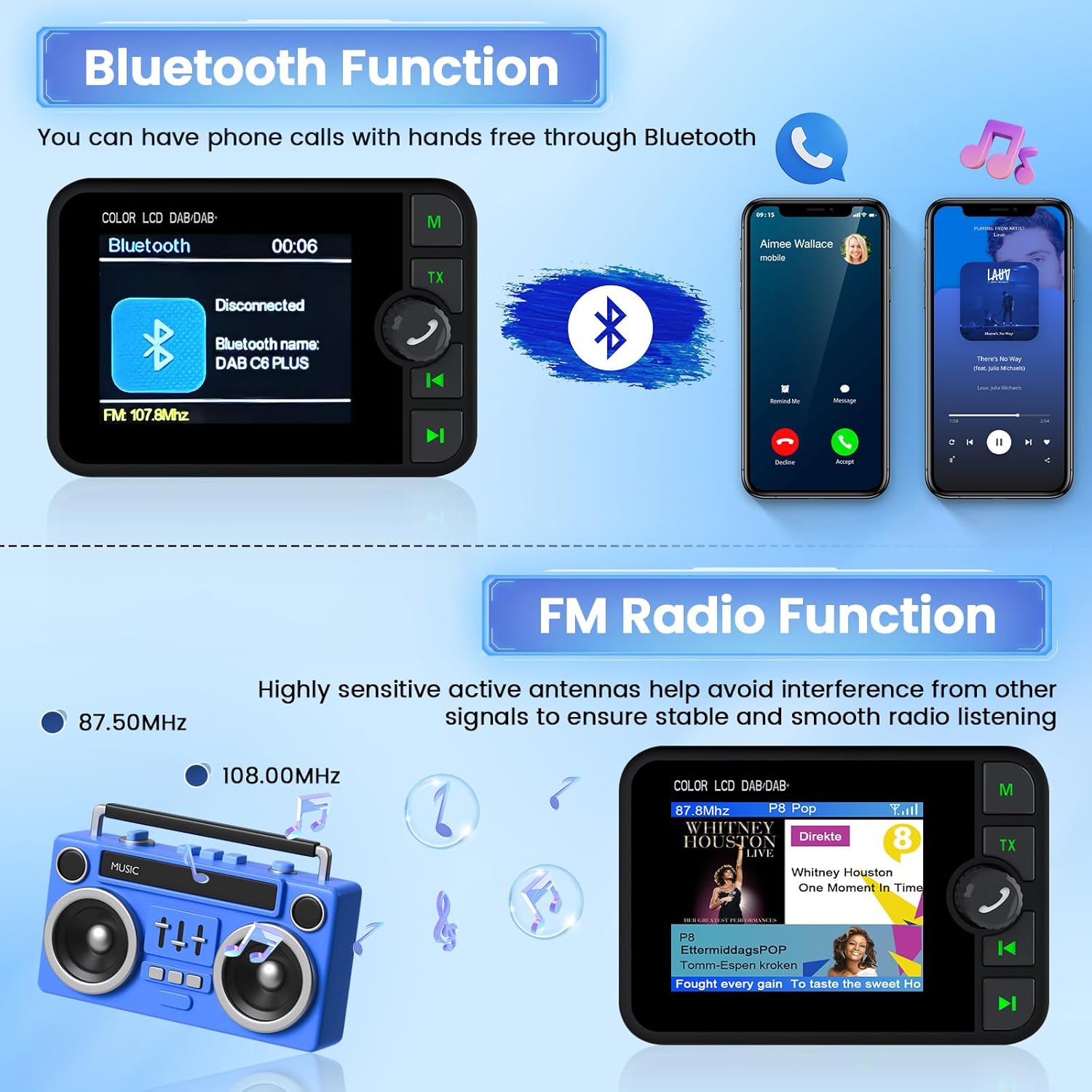
Image: The adapter's screen displaying Bluetooth connection status and an incoming call, alongside a visual of the FM radio function with station information.

Image: Visuals illustrating how to use FM transmission to your car radio, connect an AUX cable for direct audio, and insert a TF card for music playback.
6. Тэхнічнае абслугоўванне
- Падтрымлівайце чысціню прылады, праціраючы яе мяккай сухой тканінай. Пазбягайце выкарыстання агрэсіўных хімікатаў або абразіўных ачышчальнікаў.
- Пераканайцеся, што ўсе кабелі надзейна падключаны і не пераціснуты або пашкоджаны.
- Пазбягайце працяглага ўздзеяння экстрэмальных тэмператур, прамых сонечных прамянёў або вільгаці на прыладу.
7. Выпраўленне непаладак
- No DAB/DAB+ signal or intermittent reception:
- Ensure the DAB antenna is correctly installed and positioned in the upper corner of the windshield.
- Check the antenna cable connection to the adapter for any looseness or damage. A poor connection can lead to frequent signal interruptions.
- Verify DAB/DAB+ coverage in your area. Signal strength can vary by location.
- Perform a new station scan by long-pressing the 'M' button.
- Няма гуку або дрэнная якасць гуку:
- Ensure the adapter's FM transmission frequency matches your car radio's frequency.
- Adjust the volume on both the adapter and your car radio.
- If using AUX, ensure the AUX cable is properly connected and selected as the input source on your car radio.
- Check for any interference from other electronic devices in the car.
- Bluetooth not connecting or dropping connection:
- Ensure Bluetooth is enabled on your smartphone and the adapter is in pairing mode.
- Delete previous pairings on your phone and try pairing again.
- Move your phone closer to the adapter.
- Restart both the adapter and your smartphone.
- TF card not recognized:
- Пераканайцеся, што TF-карта ўстаўлена правільна.
- Check if the TF card is formatted correctly (FAT32 is usually recommended).
- Try a different TF card to rule out card issues.
8. Тэхнічныя характарыстыкі
| Марка | Інэфала |
| Нумар мадэлі | 0bf88878-2d29-40ea-80fc-e10e668cafe1 |
| Тэхналогія падлучэння | DAB 2.4", Bluetooth |
| Тып кантролера | Кнопка |
| Асаблівасць | Integrated Bluetooth, DAB |
| Сумяшчальныя прылады | Смартфон |
| Тып раздыма | USB тыпу A |
| Рэжым выхаду гуку | Стэрэа |
| Выходная магутнасць | 5 ват |
| Метад кантролю | Дакранацца |
| Тып аўдыявыхаду | Bluetooth, Headphone |
| Бесправадныя тэхналогіі | Bluetooth |
| Краіна паходжання | Кітай |
| Памеры прадмета Д х Ш х У | 1.5 Г х 8.4 Ш х 1.5 У сантыметраў |
| Колер | Чорны |
9. Гарантыя і падтрымка
9.1 Інфармацыя аб гарантыі
This Inefala product comes with a Гарантыя 24 месяцаўКалі ласка, захавайце пацвярджэнне пакупкі для прэтэнзій па гарантыі.
9.2 Тэхнічная падтрымка
For any technical inquiries or assistance, Inefala offers lifetime online support. We aim to respond to all inquiries within 24 hours.
To contact support, please visit the product page on Amazon and look for the 'Ask a question' link under the seller information. Alternatively, you can refer to the contact details provided with your purchase documentation.

Image: A visual guide on how to locate the seller and ask a question on the Amazon product page for support.