Уводзіны
This manual provides detailed instructions for the ECONTROLLY RMF-TX810U Voice Remote Control. This replacement remote is designed for seamless compatibility with various Sony 4K Ultra HD TV models, offering convenient control and voice command functionality. Please read this manual thoroughly to ensure proper use and to maximize your remote control's features.
Прадукт скончаныview
Макет пульта дыстанцыйнага кіравання
The RMF-TX810U remote control features a standard layout with dedicated buttons for power, volume, channel, navigation, and quick access to streaming services. It also includes a voice control button for enhanced interaction with your television.
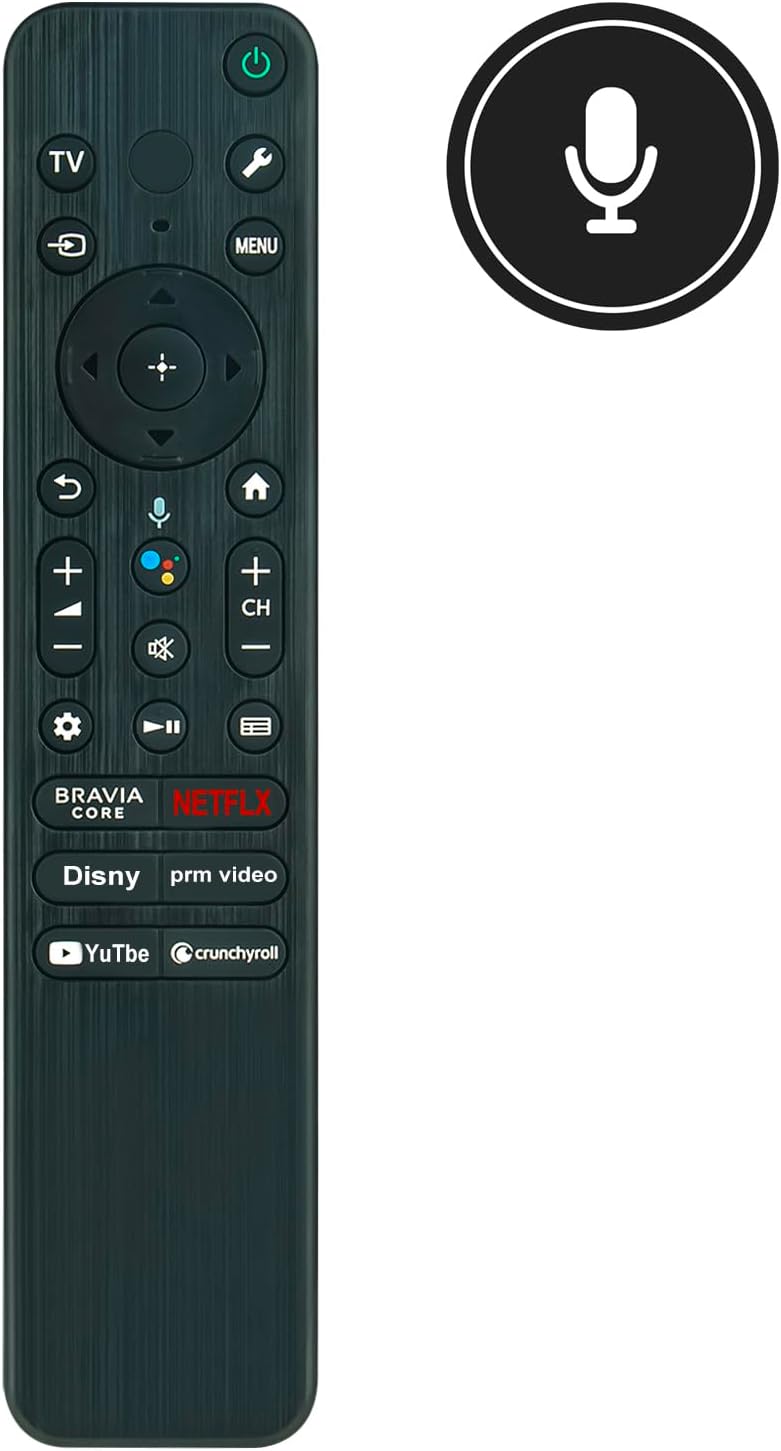
Малюнак 1: Фронт view of the RMF-TX810U remote control, highlighting the voice control microphone icon.

Малюнак 2: Вуглавы view of the remote, illustrating its comfortable grip and button placement.

Малюнак 3: A different perspective of the remote control's front face.
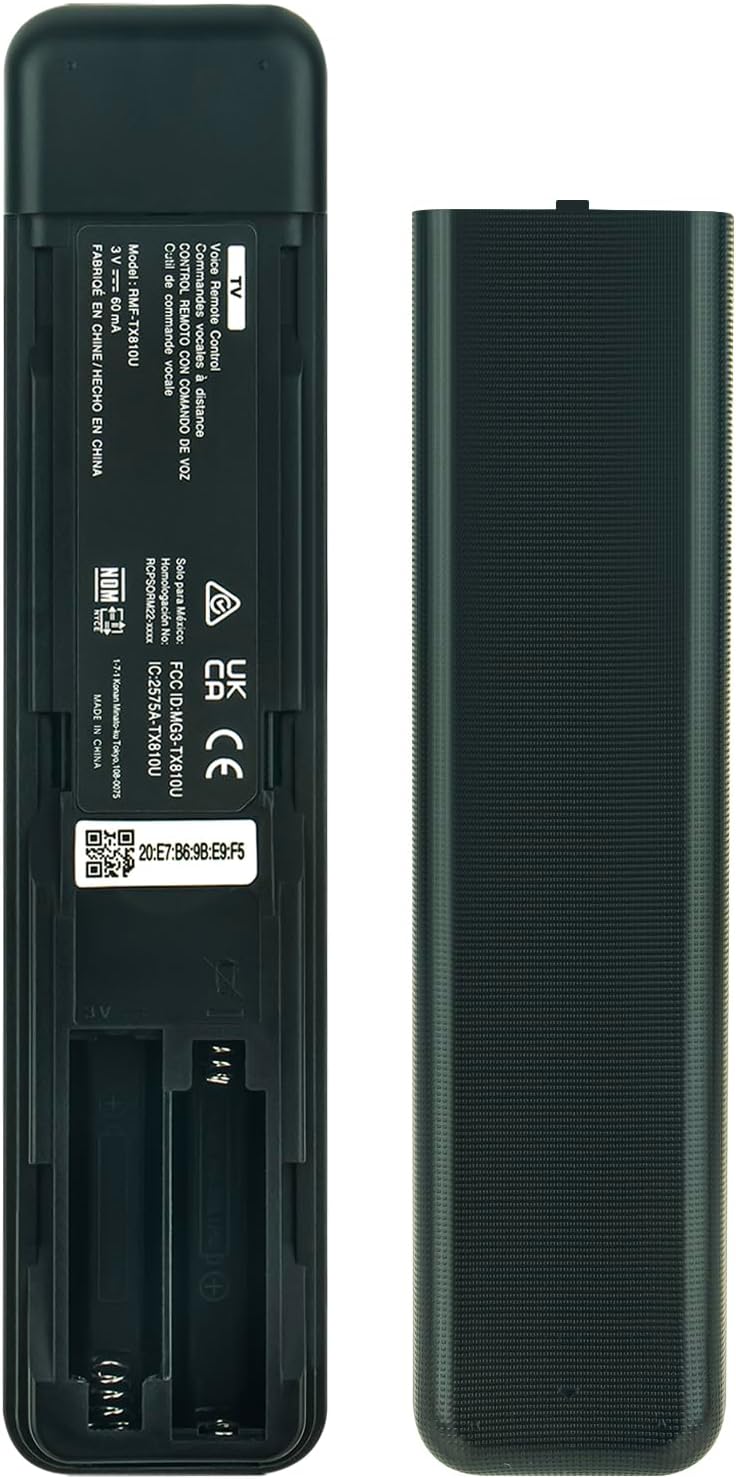
Малюнак 4: Тыл view of the remote, with the battery cover removed to show the battery slots.

Малюнак 5: Бокавы профіfile of the remote control, demonstrating its ergonomic contour.
Настройка
Устаўка батарэй
- Знайдзіце батарэйны адсек на задняй панэлі пульта дыстанцыйнага кіравання (гл. малюнак 4).
- Зрушыце вечка батарэйнага адсека ўніз і зніміце яго.
- Устаўце дзве шчолачныя батарэйкі тыпу AAA, пераканаўшыся, што станоўчы (+) і адмоўны (-) кантакты правільна сумяшчаюцца з пазнакамі ўнутры адсека.
- Устаўце вечка батарэйнага блока на месца, зрушыўшы яе назад да шчоўкнення.
Заўвага: This replacement remote control does not require programming or setup. Once batteries are inserted, it is ready for immediate use with compatible Sony 4K Ultra HD TV models.
Інструкцыя па эксплуатацыі
Асноўныя функцыі
- Кнопка харчавання (⏻): Уключае або выключае тэлевізар.
- Кнопка тэлевізара: Switches the input source to TV.
- Кнопка налад (⚙): Accesses TV settings menu.
- Кнопка ўводу (↶): Пераключэнне даступных крыніц уваходнага сігналу (HDMI, AV і г.д.).
- Кнопка меню: Opens the main menu or context-sensitive options.
- Навігацыйная панэль (Уверх, Уніз, Улева, Управа, Enter): Выкарыстоўваецца для навігацыі па меню і выбару элементаў.
- Кнопка "Назад" (↶): Вяртанне да папярэдняга экрана або меню.
- Кнопка "Дадому" (⌂): Вяртаецца на галоўны экран тэлевізара.
- Павышэнне/Памяншэнне гучнасці (+/-): Рэгулюе ўзровень гучнасці тэлевізара.
- Кнопка адключэння гуку (🔇): Уключае або выключае гук тэлевізара.
- Канал уверх/уніз (CH +/-): Змяняе тэлеканалы.
- Playback Controls (Play/Pause, Fast Forward, Rewind): Кіруе прайграваннем мультымедыя.
- Dedicated App Buttons (BRAVIA CORE, Netflix, Disney, Prime Video, YouTube, Crunchyroll): Забяспечвае прамы доступ да гэтых праграм для струменевай перадачы.
Галасавое кіраванне
Каб выкарыстоўваць функцыю галасавога кіравання:
- Націсніце і ўтрымлівайце Галасавая кнопка (значок мікрафона) на пульце дыстанцыйнага кіравання.
- Speak clearly into the microphone located on the remote.
- Release the Voice Button when you have finished speaking.
Your TV will process the voice command, allowing you to search for content, control playback, or access functions hands-free.
Тэхнічнае абслугоўванне
Уборка
Каб ачысціць пульт дыстанцыйнага кіравання, акуратна працярыце яго мяккай сухой тканінай. Не выкарыстоўвайце вадкія ачышчальнікі, спрэі або абразіўныя матэрыялы, бо яны могуць пашкодзіць паверхню пульта дыстанцыйнага кіравання або ўнутраныя кампаненты.
Замена батарэі
Замяняйце батарэйкі, калі пульт дыстанцыйнага кіравання становіцца павольным або перастае працаваць. Заўсёды замяняйце абедзве батарэйкі адначасова на новыя шчолачныя батарэйкі тыпу AAA. Не выкарыстоўвайце разам старыя і новыя батарэйкі, а таксама батарэйкі розных тыпаў.
Захоўванне
Калі пульт дыстанцыйнага кіравання не будзе выкарыстоўвацца працяглы час, выміце батарэйкі, каб прадухіліць уцечку і магчымае пашкоджанне прылады.
Ліквідацыю непаладак
- Пульт не адказвае:
- Праверце, ці правільна ўстаўлены батарэйкі з захаваннем палярнасці.
- Заменіце батарэі на новыя.
- Пераканайцеся, што паміж пультам дыстанцыйнага кіравання і інфрачырвоным прымачом тэлевізара няма перашкод.
- Накіруйце пульт непасрэдна на тэлевізар.
- Праблемы з галасавым кіраваннем:
- Ensure you are pressing and holding the Voice Button while speaking.
- Гаварыце выразна і на нармальнай гучнасці.
- Праверце налады тэлевізара, каб пераканацца, што ўключана галасавое кіраванне.
- Абмежаваны дыяпазон:
- The remote has a maximum range of 33 feet (10 meters). Ensure you are within this range.
- Obstacles between the remote and the TV can reduce effective range.
If you continue to experience issues, please refer to the Warranty and Support section for contact information.
Тэхнічныя характарыстыкі
| Марка | ЭЛЕКТРОННАЯ |
| Нумар мадэлі | RMF-TX810U |
| Сумяшчальныя прылады | Sony 4K Ultra HD TVs (e.g., KD65X77CL, KD43X77L, KD85X77L, KD50X77L, KD75X77L, KD75X77CL, KD55X77L, KD-65X77L, KD-65X77CL, KD-43X77L, KD-85X77L, KD-50X77L, KD-75X77L, KD-75X77CL, KD-55X77L, KD65X77L) |
| Тэхналогія падлучэння | Інфрачырвоны |
| Максімальны дыяпазон | 33 футаў (10 метраў) |
| Тып батарэі | 2 шчолачныя батарэйкі тыпу AAA (не ўключаны) |
| Асаблівасць | Эрганамічны, галасавое кіраванне |
| Колер | Чорны |
Гарантыя і падтрымка
For any questions regarding your ECONTROLLY RMF-TX810U remote control, including compatibility concerns or operational issues not covered in this manual, please contact the seller or manufacturer directly. They can provide further assistance and information regarding product warranty and support services.
If you are unsure about your TV model's compatibility, please feel free to contact us for guidance. We are committed to helping you find the correct remote control and resolving any queries you may have after receiving your item.