
Уводзіны
Дзякуй за пакупкуasing the WIITHINK WCD-9949 Portable CD Player Boombox. This device offers versatile audio playback options including CD, FM radio, Bluetooth, USB, and AUX input. Designed for ease of use and portability, it provides a rich audio experience for various settings. Please read this manual carefully to ensure proper operation and maintenance of your new boombox.
Інфармацыя па бяспецы
- Не падвяргайце прыладу ўздзеянню дажджу або вільгаці, каб прадухіліць пажар або паражэнне электрычным токам.
- Не блакуйце вентыляцыйныя адтуліны. Забяспечце дастатковую прастору вакол прылады для належнай цыркуляцыі паветра.
- Выкарыстоўвайце толькі насадкі/аксэсуары, указаныя вытворцам.
- Адключайце прыладу ад сеткі падчас навальніцы або калі яна не выкарыстоўваецца на працягу доўгага часу.
- Не адчыняйце прыладу casing. Па ўсіх пытаннях тэхнічнага абслугоўвання звяртайцеся да кваліфікаванага персаналу.
- Утылізуйце батарэйкі належным чынам. Не падвяргайце батарэйкі ўздзеянню празмернага нагрэву.
Змест пакета
Праверце наяўнасць усіх прадметаў у камплекце:
- 1 x WIITHINK WTB791 Portable CD Radio Boombox (Batteries Not Included)
- 1 х пульт дыстанцыйнага кіравання (батарэі не ўваходзяць у камплект)
- 1 х кабель харчавання
- 1 х лінія AUX
- 1 х Кіраўніцтва карыстальніка
- 1 х ўпаковачная скрынка
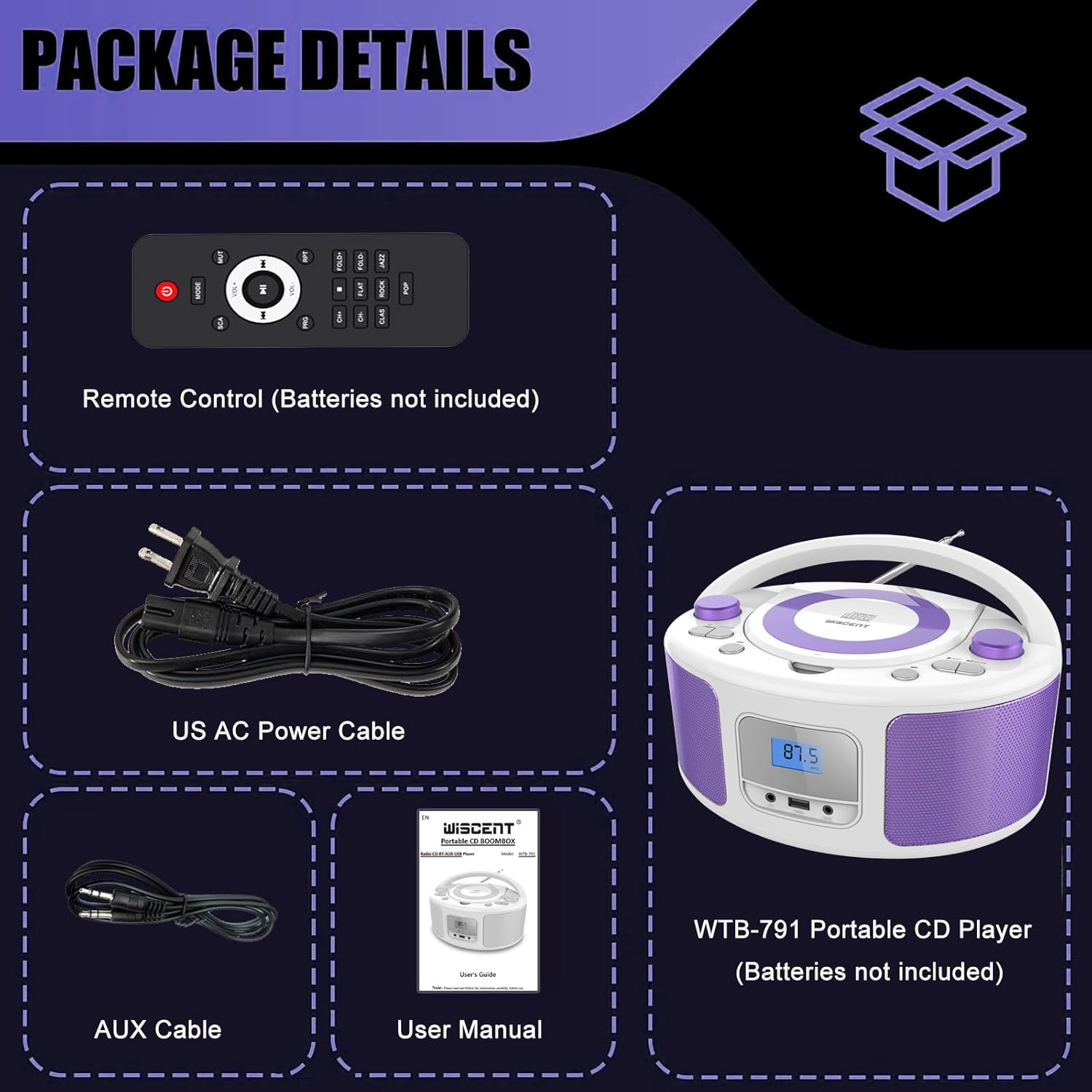
Image: Contents of the WIITHINK WCD-9949 Boombox package, showing the boombox, remote control, power cable, AUX cable, and user manual.
Прадукт скончаныview
Familiarize yourself with the main components of your boombox.

Выява: спераду view of the WIITHINK WCD-9949 Boombox, highlighting key features such as CD player, Bluetooth, USB port, AUX input, headphone jack, LCD display, FM radio, and power options.
- Top-Loading CD Player: For playing CDs, CD-R/RW, MP3 CDs, and audiobook CDs.
- FM-радыё цюнэр: Для праслухоўвання FM-радыёстанцый.
- Bluetooth: Для бесправадной струменевай перадачы аўдыё з сумяшчальных прылад.
- USB ўвод: For playing MP3/WMA music files from USB flash drives (FAT32 format, up to 128GB).
- AUX-уваход (3.5 мм): Для падлучэння знешніх аўдыёпрылад.
- Раз'ём для навушнікаў (3.5 мм): Для прыватнага праслухоўвання.
- ВК-дысплей: Shows current mode, track number, and radio frequency.
- Кнопкі кіравання: Power, Mode, Play/Pause, Skip/Search, Repeat, Scan, EQ/Function.
- Рэгулятары гучнасці: Адрэгулюйце ўзровень выхаднога гуку.
- Ручка налады: Adjusts FM radio frequency.
- Тэлескапічная антэна: Для паляпшэння прыёму FM-радыё.
- Ручка для пераноскі: Для зручнасці пераноскі.
Настройка
Powering the Boombox
Your boombox can be powered by AC power or batteries.
AC Power (Wall Outlet)
- Ensure the boombox is turned off.
- Insert one end of the provided AC power cable into the AC IN jack on the back of the boombox.
- Падключыце другі канец кабеля харчавання пераменнага току да звычайнай разеткі.

Выява: Задняя частка view of the boombox, indicating the AC IN jack for power connection and the battery compartment.
Battery Power (Portable Use)
- Ensure the boombox is turned off and disconnected from AC power.
- Знайдзіце батарэйны адсек на ніжняй частцы прылады.
- Адкрыйце крышку батарэйнага адсека.
- Insert 4 x UM2-C 1.5V batteries (not included), ensuring correct polarity (+/-).
- Надзейна зачыніце крышку батарэйнага адсека.
Заўвага: Выміце батарэйкі, калі прылада не будзе выкарыстоўвацца працяглы час, каб прадухіліць уцечку і пашкоджанне.
Інструкцыя па эксплуатацыі
Агульная аперацыя
- Уключэнне/выключэнне харчавання: Націсніце УЛАДА для ўключэння або выключэння прылады.
- Выберыце рэжым: Націсніце РЭЖЫМ button repeatedly to cycle through available modes: CD, FM, Bluetooth (BT), USB, AUX. The selected mode will be displayed on the LCD screen.
- Наладзіць гучнасць: Павярнуць АБ'ЁМ па гадзіннікавай стрэлцы, каб павялічыць гучнасць, і супраць гадзіннікавай стрэлкі, каб паменшыць гучнасць.
- Рэжымы эквалайзера: Націсніце Эквалайзер/Весялосць button to select different equalizer presets: ROCK / POP / FLAT / CLASS / JAZZ.

Выява: Зверхуview of the boombox's multiple playback modes and features.
Прайграванне кампакт-дыскаў
- Націсніце РЭЖЫМ button to select CD mode. "CD" will appear on the display.
- Акуратна адчыніце вечка адсека для кампакт-дыскаў, падняўшы яго.
- Змесціце кампакт-дыск (CD, CD-R/RW, MP3 CD, аўдыёкніжны CD) на шпіндзель этыкеткай уверх.
- Close the CD compartment cover. The CD will begin playing automatically.
- Прайграванне/Паўза: Націсніце ПРАЙГРАЦЬ/Паўза кнопку для прыпынення або аднаўлення прайгравання.
- Прапусціць трэкі: Націсніце ПЕРАХОДЗІЦЬ НАПЕРАД or ПРАПУСК НАЗАД кнопкі для пераходу да наступнага або папярэдняга трэка.
- Паўтарыць: Націсніце RPT button to repeat the current track (Repeat 1) or all tracks (Repeat All).
- Праграма прайгравання: Refer to the detailed user manual for programming specific track orders.

Image: Close-up of the top-loading CD player with a disc inside, ready for playback.
Праца FM-радыё
- Націсніце РЭЖЫМ button to select FM radio mode. The FM frequency will appear on the display.
- Для аптымальнага прыёму выцягніце тэлескапічную антэну.
- Аўтаматычнае сканаванне: Націсніце і ўтрымлівайце СКАНІРАВАЦЬ button to automatically scan and save available FM stations (up to 30 presets).
- Ручная настройка: Павярнуць ЦЮНІНГ ручку для ручной рэгулявання частаты.
- Выберыце Прадсталёўку: Выкарыстоўвайце ПРАДУСТАНОЎКА +/- buttons on the remote control to navigate through saved stations.

Image: Visual representation of the FM radio feature, showing the frequency range and preset capabilities.
Спалучэнне Bluetooth
- Націсніце РЭЖЫМ button to select Bluetooth mode. "BT" will flash on the display, indicating it's ready for pairing.
- На прыладзе з падтрымкай Bluetooth (смартфоне, планшэце і г.д.) уключыце Bluetooth і знайдзіце даступныя прылады.
- Select "WTB-791" from the list of devices.
- Once paired, "BT" will stop flashing and remain solid. You can now stream audio wirelessly.
- Control playback (Play/Pause, Skip) using the boombox buttons or your connected device.

Image: The boombox displaying "BT" for Bluetooth mode, connected to a smartphone for wireless music streaming.
Прайграванне з USB
- Insert a USB flash drive (FAT32 format, up to 128GB) containing MP3/WMA audio files into the USB port on the front of the boombox.
- Націсніце РЭЖЫМ button to select USB mode. "USB" will appear on the display.
- Playback will start automatically. Use the Play/Pause and Skip buttons to control playback.
AUX ўваход
- Connect an external audio device (e.g., MP3 player, laptop) to the AUX IN jack on the front of the boombox using the provided 3.5mm AUX cable.
- Націсніце РЭЖЫМ button to select AUX mode. "AUX" will appear on the display.
- Control playback from your external device. Adjust volume using the boombox's volume knob.

Image: The boombox connected to multiple external devices via AUX input, demonstrating its versatility.
Выкарыстанне навушнікаў
For private listening, plug 3.5mm headphones (not included) into the HEADPHONE jack on the front of the boombox. The speakers will automatically mute.
Пульт дыстанцыйнага кіравання
The included remote control allows you to operate the boombox from a distance. Ensure batteries are inserted correctly (2 x AAA, not included). Functions include Power, Mode selection, Volume, Mute, Play/Pause, Skip/Search, Repeat, Scan, and EQ modes.

Image: The boombox and its remote control, highlighting the convenience of remote operation.
Тэхнічнае абслугоўванне
- Працірайце прыладу мяккай сухой тканінай. Не выкарыстоўвайце абразіўныя ачышчальнікі або растваральнікі.
- Keep the CD compartment clean and free of dust. Use a CD lens cleaner if necessary.
- Захоўвайце прыладу ў прахалодным, сухім месцы, удалечыні ад прамых сонечных прамянёў і экстрэмальных тэмператур.
Ліквідацыю непаладак
| праблема | Рашэнне |
|---|---|
| Няма ўлады | Check if the AC power cable is securely connected. If using batteries, ensure they are inserted correctly and not depleted. |
| Кампакт-дыск не прайграваецца | Ensure the CD is clean and free of scratches. Verify the CD is inserted correctly with the label side up. Close the CD compartment completely. Ensure CD mode is selected. |
| Дрэнны прыём FM-радыё | Extend and adjust the telescopic antenna. Try repositioning the unit. |
| Bluetooth не спалучаецца | Ensure the boombox is in Bluetooth mode and "BT" is flashing. Make sure your device's Bluetooth is enabled and within range. Forget previous pairings on your device and try again. |
| Праблемы з прайграваннем USB | Ensure the USB drive is formatted to FAT32 and contains compatible MP3/WMA files. The maximum capacity supported is 128GB. |
Тэхнічныя характарыстыкі
| Асаблівасць | Дэталь |
|---|---|
| Нумар мадэлі | WCD-9949 |
| Памеры прадукту (Д х Ш х У) | 7 х 10 х 5 цалі |
| Вага прадмета | 3.91 фунта |
| Тэхналогія падлучэння | Дапаможны, Bluetooth, USB |
| Тып дынаміка | Убудаваны |
| Выхадная магутнасць | 2x2 Вт RMS |
| Радыёчастата FM | 87.5-108 МГц |
| Крыніца харчавання | AC 100-240V~ / 4 x C batteries (not included) |
| Ёмістасць USB | Up to 128GB (FAT32 format only) |
Гарантыя і падтрымка
WIITHINK is committed to customer satisfaction. Your product comes with:
- Замена праз 18 месяц: For missing parts or defective products.
- Пажыццёвая тэхнічная падтрымка: Assistance with any product inquiries.
- Amazon Buyer-Seller Messaging: Available 7/24 for support.
For any inquiries, please go to Your Orders, find your order in the list, and click on "WIITHINK" to contact us.

Image: Details on WIITHINK's customer support, including replacement policy and technical assistance.
Афіцыйныя відэа пра прадукт
WIITHINK Direct - CD Radio Portable CD Player Boombox with Bluetooth
Video: An official product video from WIITHINK Direct showcasing the features and functionality of the CD Radio Portable CD Player Boombox with Bluetooth.