
1. Уводзіны
This manual provides detailed instructions for the safe and effective operation of your Andoer Mini WiFi Action Camera L11. This compact digital video camera is designed for capturing high-quality 1080P video at 30 frames per second, featuring a 0.96-inch LCD screen, built-in rechargeable battery, motion detection, and versatile mounting options. Please read this manual thoroughly before using the device.
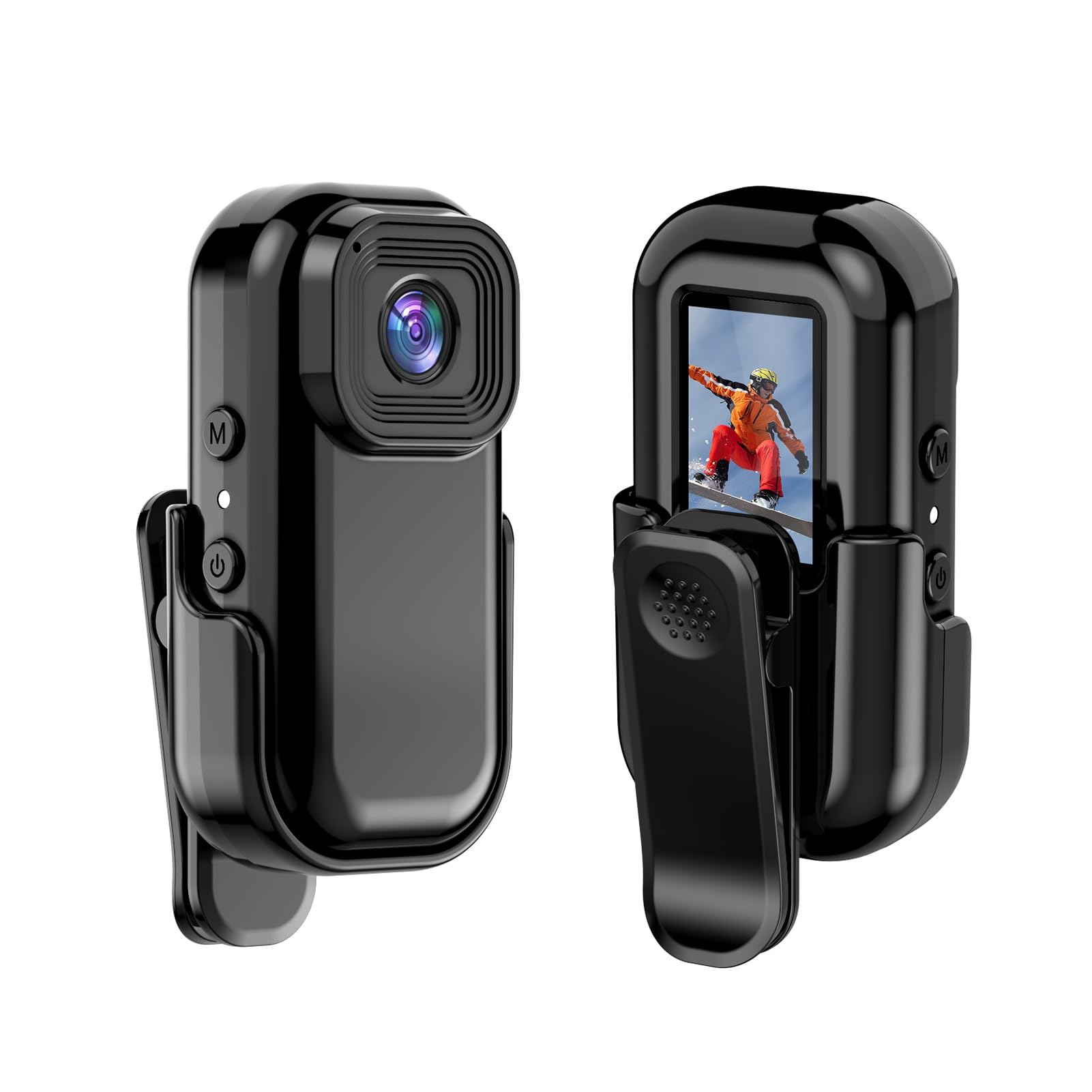
Выява: спераду і ззаду view of the Andoer Mini WiFi Action Camera L11, showing the lens and the 0.96-inch LCD screen.
2. Змесціва ўпакоўкі
Праверце, ці ўсе пералічаныя ніжэй прадметы ўваходзяць у камплект. Калі якія-небудзь прадметы адсутнічаюць або пашкоджаныя, звярніцеся ў службу падтрымкі кліентаў.
- 1 x Andoer Mini WiFi Action Camera L11
- 1 х Ахоўны чахол
- 1 x 1/4in Adapter Mount
- 1 x Back Clip Mount
- 1 х счытвальнік карт
- 1 х кабель Type-C
- 1 х Кіраўніцтва карыстальніка (гэты дакумент)
3. Асаблівасці прадукту
- Відэа высокай якасці: Records in 1080P at 30 frames per second, suitable for various applications including live broadcasting and video conferencing.
- Кампактны і партатыўны: Super mini size allows for easy portability and discreet placement.
- Magnetic Body: Features a magnetic base for secure attachment to smooth metal surfaces.
- Seamless WiFi Connectivity: Connects wirelessly to a dedicated app for live view і кантроль.
- Універсальны мантаж: Includes a 1/4-inch adapter mount and a back clip mount for diverse installation options.

Малюнак: Examples of application scenarios for the camera, including parachute jumping, cycling, parent-child activities, and skiing.

Image: The camera being used as a portable video recorder in various outdoor activities like camping, cycling, climbing, and sports.
4. Настройка
4.1 Зарадка акумулятара
Before first use, fully charge the camera's built-in 400mAh battery. Connect the provided Type-C cable to the camera's USB port and the other end to a standard USB power adapter (5V, ≥1A). The charging indicator light will typically show the charging status and turn off or change color when fully charged.
4.2 Устаўка карты памяці
The camera supports TF (Micro SD) cards up to 128GB. Ensure the card is formatted to FAT32 for optimal performance. Gently insert the TF card into the designated slot until it clicks into place. To remove, press the card in slightly until it springs out.
Note: A memory card is required for recording video and taking photos.
4.3 Уключэнне/выключэнне
- Каб уключыць: Press and hold the Power button (usually marked with a power symbol) for a few seconds until the screen illuminates.
- Каб выключыць: Press and hold the Power button again for a few seconds until the screen turns off.
5. Інструкцыя па эксплуатацыі
5.1 Асноўныя аперацыі
The 0.96-inch color display provides visual feedback for modes and settings. Use the navigation buttons (if present, typically 'M' for Mode and another for selection/shutter) to cycle through options and confirm selections.
5.2 Запіс відэа
In video mode, press the Shutter/Record button to start recording. Press it again to stop. Videos are saved in AVI format at 1920x1080P resolution. The camera supports loop recording with 3-minute segments.

Image: The camera's screen displaying a family scene, indicating video recording at 1920x1080P resolution.
5.3 Фотаздымка
Switch to photo mode using the Mode button. Press the Shutter button to capture a still image. Photos are saved in JPG format.

Image: Icons representing photo, video, and audio recording modes, illustrating the camera's ability to capture various moments.
5.4 Дэтэктар руху
The camera features motion detection capabilities. Refer to the on-screen menu or the dedicated app for instructions on how to activate and configure this feature. When enabled, the camera will automatically begin recording when motion is detected within its field of view.
6. Падключэнне да Wi-Fi
The Andoer L11 camera supports wireless WiFi connectivity for remote control and live viewing via a smartphone application. Follow these general steps:
- Download the official Andoer camera app from your device's app store (iOS or Android).
- Power on the camera and activate its WiFi mode (refer to the camera's on-screen menu).
- On your smartphone, go to WiFi settings and connect to the camera's WiFi network (SSID and password will be displayed on the camera screen or in the app).
- Open the Andoer app. You should now see a live view from the camera and be able to control recording and settings remotely.

Image: A smartphone displaying a live view from the camera, demonstrating the WiFi connectivity feature.
7. Варыянты мантажу
The Andoer L11 offers flexible mounting solutions:
- Магнітнае мацаванне: The camera body has a magnetic feature, allowing it to be securely attached to smooth metal surfaces like refrigerator doors or metal poles.
- 1/4-inch Adapter Mount: Use the included 1/4-inch adapter mount to attach the camera to standard tripods, monopods, or other accessories with a 1/4-inch screw.
- Back Clip Mount: The back clip mount allows you to attach the camera to clothing, backpacks, or other thin objects for hands-free recording.
8. Тэхнічнае абслугоўванне
- Уборка: Для чысткі корпуса камеры выкарыстоўвайце мяккую сухую тканіну. Для аб'ектыва выкарыстоўвайце спецыяльную тканіну і раствор для чысткі аб'ектываў. Пазбягайце выкарыстання агрэсіўных хімічных рэчываў.
- захоўванне: Захоўвайце камеру ў прахалодным, сухім месцы, удалечыні ад прамых сонечных прамянёў і экстрэмальных тэмператур.
- Сыход за батарэяй: Для працяглага захоўвання зараджайце акумулятар прыкладна да 50% кожныя некалькі месяцаў, каб падтрымліваць яго працаздольнасць.
- Абнаўленні прашыўкі: Check the official Andoer webперыядычна правярайце сайт на наяўнасць даступных абнаўленняў прашыўкі, каб забяспечыць аптымальную прадукцыйнасць і новыя функцыі.
9. Выпраўленне непаладак
| праблема | Магчымае рашэнне |
|---|---|
| Камера не ўключаецца. | Пераканайцеся, што акумулятар цалкам зараджаны. Падключыце да крыніцы харчавання і паспрабуйце яшчэ раз. |
| Немагчыма запісваць відэа/рабіць фота. | Check if a TF card is inserted and properly formatted. Ensure there is sufficient storage space. |
| Праблемы з падключэннем да Wi-Fi. | Ensure WiFi is enabled on the camera and your smartphone. Restart both devices. Verify the correct app is installed. |
| Дрэнная якасць відэа/малюнкаў. | Ensure the lens is clean. Check lighting conditions. Verify camera settings are correct (e.g., resolution). |
| Камера завісае або перастае рэагаваць. | Perform a soft reset by holding the power button until it turns off, then restart. If persistent, remove and reinsert the memory card. |
10. Тэхнічныя характарыстыкі
| Асаблівасць | Дэталь |
|---|---|
| Тып машыны | L11 |
| Ракурс аб'ектыва | 140 градусаў |
| TFT-дысплей | Каляровы дысплей 0.96 цалі |
| Дазвол відэа | 1920 * 1080P |
| акумулятар | 400 мАг |
| Відэа File фармат | AVI |
| Фармат фота | JPG |
| Колькаснае відэа | 3 хвілін |
| Запіс File фармат | WAV (Audio) |
| Працоўная вільготнасць | 30% |
| Працоўная тэмпература | Ад -25 да + 75 ° C (ад -13 да + 167 ° F) |
| Электразабеспячэнне | USB аб'ёмtage 5V, ток ≥1A |
| Карта памяці | TF карта, падтрымлівае да 128G |
| Тэхналогія падлучэння | Wi-Fi |
| Формаў-фактар | Кампактны |
| Вага прадмета | 4.2 унцый (прыблізна 119 г) |
| Памеры ўпакоўкі | 3.94 х 2.36 х 1.97 цалі |
11. Інфармацыя па бяспецы
- Do not expose the camera to extreme temperatures outside the specified operating range (-25°C to +75°C).
- Avoid operating the camera in humidity levels exceeding 30%.
- Keep the device away from water and other liquids unless explicitly stated as waterproof.
- Не спрабуйце разбіраць або мадыфікаваць камеру, бо гэта прывядзе да анулявання гарантыі і можа прывесці да пашкоджанняў.
- Use only the specified power supply (USB 5V, ≥1A) for charging.
- Захоўваць у месцах, недаступных дзецям.