
Уводзіны
This manual provides detailed instructions for the safe and effective use of your Andoer Portable Digital Camera. Please read this manual thoroughly before operating the device and retain it for future reference.
Змест пакета
Праверце, ці ўсе пералічаныя ніжэй прадметы ўваходзяць у вашу ўпакоўку:
- 1 x Andoer Digital Camera
- 1 х 32 Гб карта памяці
- 1 х USB-кабель (тыпу C)
- 1 х ачышчальная тканіна
- 1 х шнурок
- 1 х сумка для захоўвання
- 1 х Кіраўніцтва карыстальніка
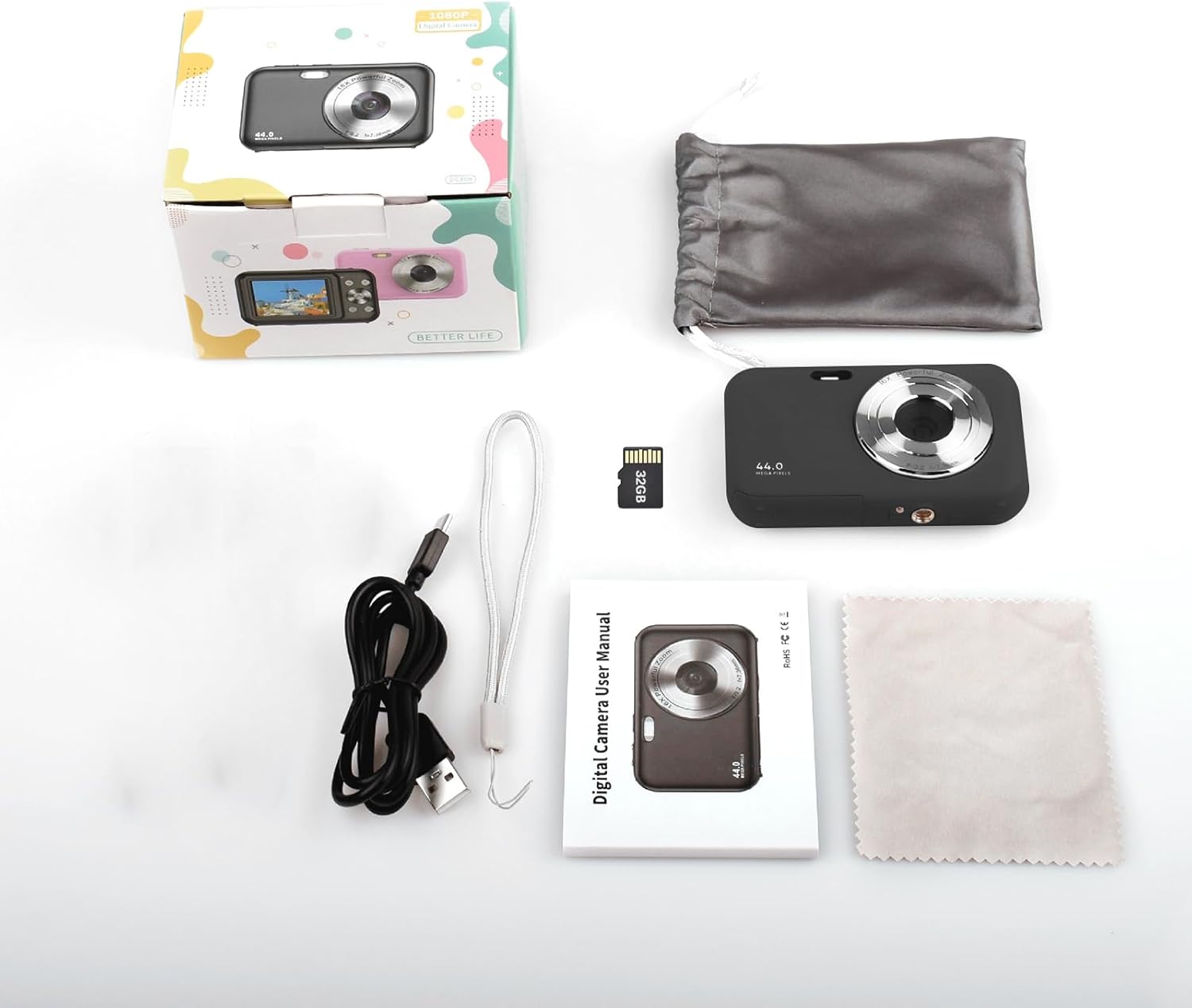
Image: Contents of the Andoer Digital Camera package.
Камера скончыласяview
Азнаёмцеся з рознымі часткамі вашай камеры.

Image: Multi-angle view of the Andoer Digital Camera, highlighting its compact design and button layout.
- Спераду: Lens, Flash, Microphone.
- Верх: Power Button, Shutter Button.
- Назад: 2.4-inch IPS Screen, Navigation Buttons (Up, Down, Left, Right, OK), Menu Button, Mode Button, Zoom (W/T).
- бок: USB Type-C Port.
- Унізе: Battery/Memory Card Compartment.
Настройка
1. Зарадка акумулятара
The camera is equipped with a built-in 700mAh rechargeable lithium battery. Before first use, fully charge the battery.
- Connect the included USB Type-C cable to the camera's USB port.
- Падключыце другі канец USB-кабеля да адаптара харчавання USB (не ўваходзіць у камплект) або да USB-порта кампутара.
- The charging indicator light will illuminate. It will turn off or change color once charging is complete.
Заўвага: The camera can be used while charging. A full charge provides approximately 150 minutes of continuous shooting or 90 minutes of video recording.

Image: Battery life information for the 700mAh battery.
2. Устаўка карты памяці
The camera supports a 32GB memory card (included). Ensure the camera is powered off before inserting or removing the memory card.
- Знайдзіце вечка адсека для батарэі/карты памяці на ніжняй панэлі камеры.
- Адкрыйце крышку.
- Insert the 32GB memory card into the designated slot with the metal contacts facing the correct direction (refer to the diagram inside the compartment if available) until it clicks into place.
- Надзейна зачыніце вечка аддзялення.
Важна: Format the memory card in the camera's settings menu before first use to ensure optimal performance.
Інструкцыя па эксплуатацыі
1. Уключэнне / выключэнне харчавання
- Каб уключыць, націсніце і ўтрымлівайце Кнопка харчавання on the top of the camera.
- Каб выключыць харчаванне, націсніце і ўтрымлівайце Кнопка харчавання again. The camera also features an auto power-off function (configurable in settings).
2. Фатаграфаванне
The camera captures photos up to 44MP resolution.
- Уключыце камеру.
- Ensure the camera is in photo mode (indicated on the 2.4-inch IPS screen). If not, press the Кнопка рэжыму пераключацца.
- Frame your shot using the IPS screen.
- Націсніце Кнопка засаўкі halfway down to focus, then press it fully to take the picture.

Малюнак: Example of a high-resolution photo taken with the 44MP camera.
3. Запіс відэа
The camera records videos in 1080P resolution.
- Уключыце камеру.
- Націсніце Кнопка рэжыму to switch to video recording mode.
- Націсніце Кнопка засаўкі to start recording. A red indicator will typically appear on the screen.
- Націсніце Кнопка засаўкі яшчэ раз, каб спыніць запіс.

Image: Screen view during 1080P video recording.
4. Выкарыстанне лічбавага зуму
The camera features 16X digital zoom.
- In photo or video mode, press the T (Telephoto) button для павелічэння.
- Націсніце W (Wide-angle) button каб паменшыць.

Image: Comparison of 1x and 16x digital zoom effects.
5. Іншыя функцыі
- Аўтаспуск: Set a delay (e.g., 2s, 5s, 10s) before a photo is taken. Access this option in the camera's menu.
- Бесперапынная здымка: Take multiple photos in quick succession. This setting is also found in the menu.
- Антытрэс: Digital image stabilization helps reduce blur from camera movement. This feature is typically enabled by default or can be toggled in settings.
- Прайграванне: Націсніце Кнопка прайгравання (often indicated by a triangle icon) to view photos and videos. Use the navigation buttons to browse.
- Налады меню: Націсніце Кнопка меню to access various camera settings, including resolution, white balance, exposure, date/time, and formatting the memory card.
Перадача Files to a Computer or Phone
You can transfer photos and videos from the camera to a computer or a mobile phone.
1. Via USB Cable (to Computer)
- Connect the camera to your computer using the provided USB Type-C cable.
- Уключыце камеру.
- The camera should appear as a removable disk or media device on your computer.
- Open the camera's folder and copy the desired files на ваш кампутар.
2. Via Memory Card Reader (to Computer/Phone)
For direct transfer from the memory card, you can use a card reader.
- Remove the memory card from the camera.
- Insert the memory card into a compatible card reader.
- Connect the card reader to your computer or mobile phone (via an OTG adapter if necessary).
- Доступ да files on the memory card and transfer them.

Image: OTG usage diagram for transferring files from memory card to phone.
Тэхнічнае абслугоўванне
- Чыстка корпуса камеры: Выкарыстоўвайце мяккую сухую тканіну для працірання корпуса камеры. Для ўстойлівага бруду злёгкуampпрамыйце тканіну вадой. Пазбягайце агрэсіўных хімічных рэчываў.
- Ачыстка аб'ектыва: Use the included cleaning cloth or a specialized lens cleaning cloth. Gently wipe the lens in a circular motion. Do not use abrasive materials.
- Сыход за экранам: The 2.4-inch IPS screen can be cleaned with a soft, lint-free cloth. Avoid pressing too hard.
- захоўванне: When not in use for extended periods, store the camera in the provided storage bag in a cool, dry place, away from direct sunlight and extreme temperatures.
- Сыход за батарэяй: Recharge the battery regularly, even if the camera is not used frequently, to maintain battery health. Avoid fully discharging the battery for long periods.
Ліквідацыю непаладак
| праблема | Магчымая прычына | Рашэнне |
|---|---|---|
| Камера не ўключаецца. | Батарэя разраджана або няправільна ўстаўлена. | Цалкам зарадзіце акумулятар. Пераканайцеся, што акумулятар правільна ўстаўлены. |
| Нельга рабіць фота/запісваць відэа. | Карта памяці перапоўненая, не ўстаўлена або пашкоджана. | Check memory card insertion. Delete unnecessary files or replace the card. Format the card (this will erase all data). |
| Выявы размытыя. | Аб'ектыў брудны, недастаткова святла або камера дрыжыць. | Clean the lens. Ensure adequate lighting. Hold the camera steady or enable anti-shaking. |
| Камера завісае або перастае рэагаваць. | Праграмны збой або разрад батарэі. | Remove and reinsert the battery (if possible) or press and hold the power button for 10 seconds to force a shutdown. Recharge the battery. |
| Немагчыма перадаць fileда кампутара. | Incorrect USB connection or driver issue. | Ensure the USB cable is securely connected. Try a different USB port or computer. Check if the camera is recognized as a device. |
Тэхнічныя характарыстыкі
| Асаблівасць | Дэталь |
|---|---|
| Дысплей | 2.4-цалевы экран IPS |
| Дазвол відэа | 1080P/720P/480P |
| Дазвол выявы | 44MP/42MP/36MP/24MP (Effective Still Resolution: 44 MP) |
| File фармат | JPG (Image), AVI (Video) |
| Электронны зум | 16X |
| Порт USB | Тып-C |
| акумулятар | 3.7V/ 700mAh Rechargeable Lithium Battery |
| Фокусная адлегласць | f=7.36 мм |
| Дыяфрагма | F/3.2 |
| Эканомія энергіі | Auto power off in 1Min/2Mins/3Mins/4Mins/5Mins/10Mins |
| Падтрымоўваная сістэма | Windows XP, Vista, 7, 8, 10, Mac 10.2 and above |
| Ёмістасць памяці | 32 ГБ (у камплекце) |
| Тэхналогія аўтафокусу | Выяўленне кантрасту |
| Стабілізацыя выявы | Лічбавы |
| Апісанне ўзроставага дыяпазону | Малыш |
Гарантыя і падтрымка
For warranty information and technical support, please refer to the contact details provided with your purchase documentation or visit the official Andoer webсайт. Захоўвайце пацвярджэнне пакупкі для прэтэнзій па гарантыі.