
VGN N75BLUE
VGN N75 Gaming Keyboard User Manual
Model: N75BLUE | Brand: VGN
1. Уводзіны
Welcome to the user manual for your VGN N75 Gaming Keyboard. This manual provides essential information on setting up, operating, maintaining, and troubleshooting your new keyboard. The VGN N75 is a compact, numeric keyless mechanical keyboard designed for an optimal gaming and typing experience.

Figure 1.1: VGN N75 Gaming Keyboard with RGB lighting enabled.

Малюнак 1.2: Пад вуглом view of the VGN N75 keyboard, highlighting its compact form factor.
2. Інфармацыя па бяспецы
Please read the following safety guidelines carefully before using your VGN N75 keyboard:
- Трымайце клавіятуру далей ад вадкасцей і празмернай вільгаці, каб пазбегнуць пашкоджанняў.
- Avoid exposing the keyboard to extreme temperatures (hot or cold).
- Do not attempt to disassemble or modify the keyboard. This may void your warranty and cause damage.
- Выкарыстоўвайце для падключэння толькі кабель USB-C, які ўваходзіць у камплект.
- Handle with care to prevent physical damage from drops or impacts.
3. Асаблівасці прадукту
The VGN N75 keyboard is engineered with several features to enhance your typing and gaming experience:
- Кампактны макет 75%: The US82 key numeric keyless design offers a space-saving solution compared to full-size keyboards, providing more desk space for mouse movement.
- Advanced Internal Construction: Features multiple buffer layers and specially tuned stabilizers for a smooth, quiet, and consistent typing experience.
- VGN "Dynamic Silver" Mechanical Switches: Equipped with VGN's original linear mechanical switches, offering a responsive feel and vibrant RGB illumination.
- Адметны дызайн: The "Caribbean Blue" model features striking keycap colors, adding a unique aesthetic to your setup.
- Integrated Metal Volume Knob: A conveniently located metal rotary knob allows for quick and precise volume adjustments, useful for both work and gaming.
- Наладжвальнае RGB асвятленне: Enjoy dynamic and customizable RGB backlight options to personalize your keyboard's appearance.

Figure 3.1: The compact 75% layout of the VGN N75, demonstrating its space-saving advantage over a traditional full-size keyboard.

Figure 3.2: Detail of the VGN N75's unique "Dynamic Silver" mechanical switches, known for their linear feel and RGB compatibility.

Figure 3.3: An exploded diagram illustrating the multiple buffer layers and components within the VGN N75 keyboard, contributing to its smooth and quiet operation.

Figure 3.4: Close-up of the metal volume knob, providing convenient audio control.
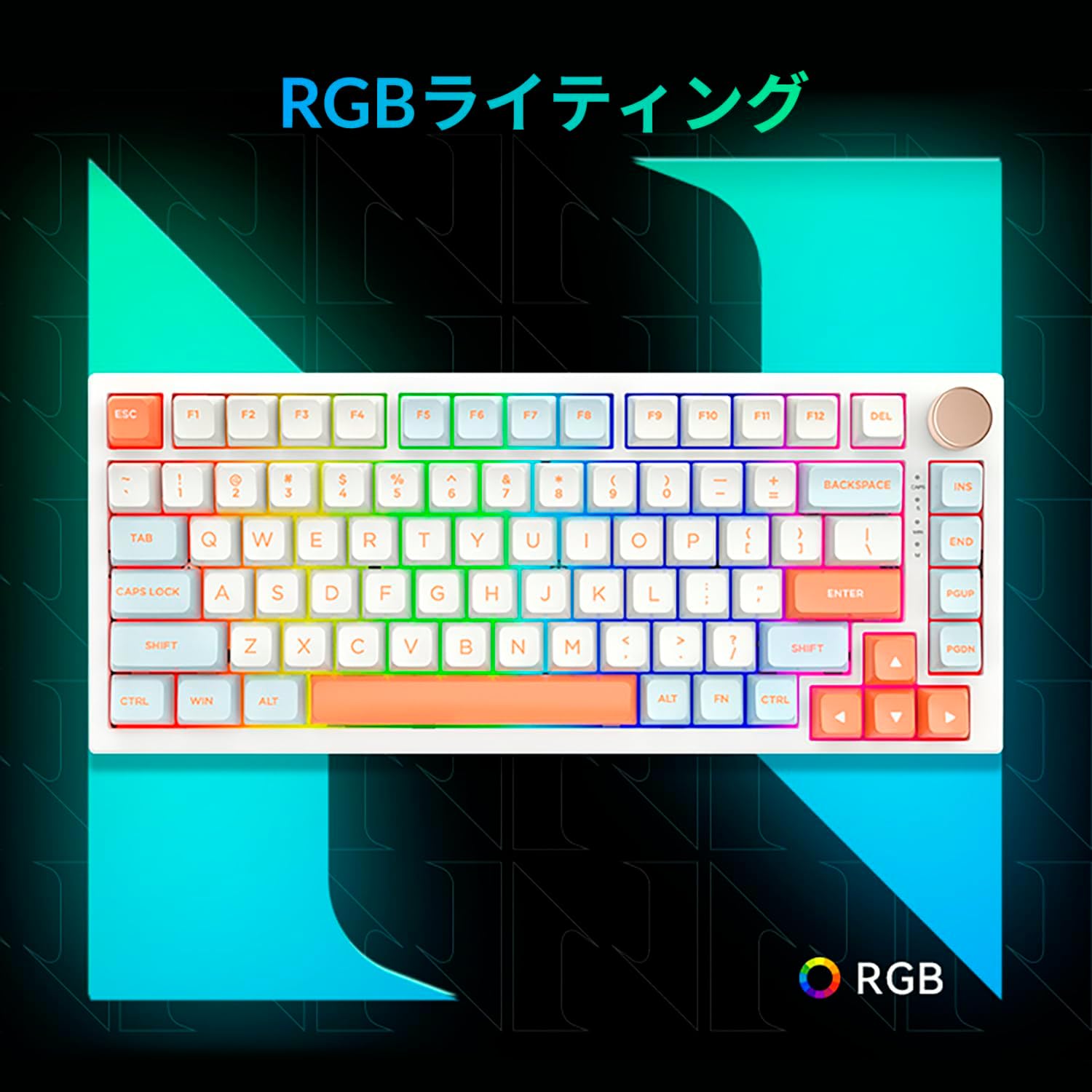
Figure 3.5: The VGN N75 keyboard displaying its customizable RGB lighting, enhancing the visual appeal.
4. Кіраўніцтва па наладцы
Follow these steps to set up your VGN N75 keyboard:
- Распакуйце клавіятуру: Carefully remove the keyboard and all included accessories (USB cable, keycap puller, replacement key) from the packaging.
- Падключыце кабель USB-C: Insert one end of the provided USB-C cable into the USB-C port on the keyboard.
- Падключыцеся да вашай прылады: Plug the other end of the USB-C cable into an available USB port on your computer or laptop.
- Усталёўка драйвера (аўтаматычная): The keyboard is plug-and-play. Your operating system should automatically detect and install the necessary drivers. No manual driver installation is typically required.
- Пачатковы тэст: Open a text editor or any application to test the keys and ensure all functions are working correctly.
5. Інструкцыя па эксплуатацыі
This section details the basic operation of your VGN N75 keyboard:
5.1. Асноўныя функцыі клавіш
The VGN N75 features a standard US82 key layout. All keys function as labeled. For specific key combinations or software-defined macros, refer to any accompanying software documentation (if applicable, not included in this manual).
5.2. Using the Rotary Knob
- Рэгулятар гучнасці: Павярніце ручку па гадзіннікавай стрэлцы, каб павялічыць гучнасць, і супраць гадзіннікавай стрэлкі, каб паменшыць гучнасць.
- Выключыць/уключыць гук: Націсніце кнопку, каб уключыць або выключыць гук.
5.3. Кіраванне RGB-падсветкай
The VGN N75 supports RGB lighting. While specific key combinations for lighting modes are not provided in the product description, most RGB keyboards allow cycling through effects using function key combinations (e.g., Fn + F-keys or dedicated lighting keys). Experiment with the 'Fn' key in combination with other keys (like arrow keys or Ins/Del/Home/End/PgUp/PgDn) to discover lighting controls.
6. Тэхнічнае абслугоўванне
Proper maintenance will extend the lifespan of your keyboard:
- Уборка:
- Адключыце клавіятуру ад кампутара перад чысткай.
- Выкарыстоўвайце мяккую безворсовую тканіну, злёгку dampened with water or a mild cleaning solution to wipe the keycaps and frame.
- Для выдалення пылу і смецця паміж клавішамі выкарыстоўвайце сціснутае паветра.
- Do not spray liquid directly onto the keyboard.
- Keycap and Switch Replacement:
- The keyboard comes with a keycap puller and a replacement key.
- To remove a keycap, gently use the keycap puller to grip the keycap and pull upwards.
- Каб замяніць каўпачок клавішы, сумясціце яго са штокам перамыкача і моцна націсніце, пакуль ён не зафіксуецца на месцы.
- Заўвага: The VGN N75 features hot-swappable switches, allowing for easy replacement without soldering. To remove a switch, use a switch puller (not explicitly listed as included, but implied by "hot-swappable") to gently pry it out. Align the new switch's pins with the sockets and press firmly until it seats correctly.
7. Выпраўленне непаладак
If you encounter issues with your VGN N75 keyboard, try the following solutions:
- Клавіятура не адказвае:
- Пераканайцеся, што кабель USB-C надзейна падключаны як да клавіятуры, так і да кампутара.
- Паспрабуйце падключыць клавіятуру да іншага USB-порта на вашым кампутары.
- Перазагрузіце кампутар.
- Праверце клавіятуру на іншым кампутары, каб выключыць праблему, характэрную для сістэмы.
- Ключы не рэгіструюцца:
- Праверце наяўнасць фізічных перашкод пад каўпачком клавішы.
- If a specific key is not working, consider replacing its switch if you have a switch puller and replacement switches.
- Праблемы з RGB-падсветкай:
- Пераканайцеся, што клавіятура мае належнае харчаванне.
- Try cycling through lighting modes using the keyboard's function key combinations.
- Rotary Knob Not Working:
- Check for any physical obstructions around the knob.
- Пераканайцеся, што клавіятура правільна падключана.
8. Тэхнічныя характарыстыкі
| Атрыбут | Дэталь |
|---|---|
| Марка | VGN |
| Нумар мадэлі | N75BLUE |
| серыял | N75 |
| Колер | Сіні |
| Апісанне клавіятуры | Механічны |
| Колькасць ключоў | 82 |
| Тэхналогія падлучэння | USB-C |
| Тып крыніцы харчавання | USB харчаванне |
| Сумяшчальныя прылады | Ноўтбук |
| Рэкамендаванае выкарыстанне прадукту | Гульнявая |
| Keyboard Backlight Colour Support | RGB |
| Матэрыял | Пластыкавыя |
| Уключаныя кампаненты | Keycap Puller, Replacement Key, USB Cable |
| Памеры ўпакоўкі | 42.1 х 18.8 х 6.5 см; 1.1 кг |
| Дата першай даступнасці | 22 сакавіка 2024 г |
9. Гарантыя і падтрымка
The VGN N75 Gaming Keyboard comes with a 1-year warranty from the date of purchase, as indicated in the product listing. This warranty covers manufacturing defects under normal use.
For warranty claims, technical support, or further inquiries, please contact your point of purchase or the official VGN support channels. Keep your proof of purchase for warranty validation.
Заўвага: Несанкцыянаваная разборка або мадыфікацыя вырабу можа прывесці да анулявання гарантыі.
Ask a question about this manual
Ask about setup, troubleshooting, compatibility, parts, safety, or missing instructions. Manuals+ will review the question and use this page’s manual context to help answer it.