
Уводзіны
Thank you for choosing the Mastech MS8233D Digital Multimeter. This manual provides essential information for the safe and effective operation, maintenance, and troubleshooting of your device. Please read this manual thoroughly before use and keep it for future reference.
Інфармацыя па бяспецы
УВАГА: Каб пазбегнуць паражэння электрычным токам або траўмаў, прачытайце і зразумейце ўсю інфармацыю па тэхніцы бяспекі перад выкарыстаннем гэтага вырабу.
- Заўсёды пераканайцеся, што мультыметр знаходзіцца ў правільным рэжыме і дыяпазоне, перш чым праводзіць вымярэнні.
- Не наносіце больш за намінальны аб'ёмtage, as marked on the meter, between terminals or between any terminal and earth ground. The MS8233D has a Safety Rating of CATII 600V.
- Будзьце асцярожныя пры працы з voltagвышэй за 30 В пераменнага току (RMS), 42 В пікавага або 60 В пастаяннага току. Такі аб'ёмtagуяўляюць небяспеку паражэння.
- Keep your fingers behind the probe barriers during measurements.
- Do not use the meter if it is damaged or if the case is open. Inspect the meter and test leads before use.
- Неадкладна замяніце батарэйку, калі з'явіцца індыкатар нізкага зараду батарэі, каб забяспечыць дакладныя паказанні.
- Не выкарыстоўвайце лічыльнік у асяроддзі выбухованебяспечных газаў, пароў або пылу.
Асноўныя характарыстыкі
The Mastech MS8233D Digital Multimeter offers a range of functionalities for various electrical measurements:
- Дысплей: 2000 counts for precise readings.
- Ранжыраванне: Auto and Manual Ranging capabilities.
- Дыёдны тэст: Features a Diode Open Voltage 1.5 В.
- Тэст бесперапыннасці: Audible buzzer for resistance less than 60Ω.
- Утрыманне дадзеных: Замарожвае паказанні, якія адлюстроўваюцца, для зручнасці.
- Аўтаматычнае выключэнне: Захоўвае тэрмін службы батарэі.
- Бескантактавы Voltagэлектроннае выяўленне (NCV): For identifying live wires without direct contact.
- Максімальнае вымярэнне: Records the highest value measured.
- Падсвятленне дысплея: Для бачнасці ва ўмовах нізкай асветленасці.
- Індыкатар нізкага ўзроўню батарэі: Паказвае, калі патрэбна замена батарэі.
- крыніца харчавання: Operates on 1x 9V 6F22 Battery.
- Сертыфікаты: Сумяшчальны з RoHS.
- Рэйтынг бяспекі: CATII 600В.
Малюнак 1: Спераду view of the Mastech MS8233D Digital Multimeter, highlighting the display, rotary function switch, and input terminals.
Прадукт скончаныview і кампаненты
The MS8233D multimeter is designed for ease of use and durability. Familiarize yourself with its main parts:

Малюнак 2: Закончанаview of the MS8233D Digital Multimeter, illustrating its physical dimensions, power supply, and typical applications in domestic, industrial, and electronics settings.
- ВК-дысплей: Паказвае паказанні вымярэнняў, адзінкі вымярэння і індыкатары функцый.
- Функцыя паваротнага перамыкача: Used to select the desired measurement function (e.g., ACV, DCV, Resistance, Diode, Continuity, Temperature, NCV).
- Уваходныя гнязда: Terminals for connecting test leads.
- Гняздо COM: Агульны (адмоўны) уваход для ўсіх вымярэнняў.
- Раз'ём VΩmA: Станоўчая уваходная клема для абtage, resistance, diode, continuity, and small current measurements.
- Раз'ём 10А: Positive input terminal for high current (up to 10A) measurements.
- Функцыянальныя кнопкі: For features like Data Hold, Backlight, and Range selection.
Настройка
Ўстаноўка акумулятара
The MS8233D requires one 9V 6F22 battery for operation. To install or replace the battery:
- Ensure the multimeter is turned off and disconnect all test leads from the input terminals.
- Знайдзіце вечка батарэйнага адсека на задняй панэлі глюкометра.
- З дапамогай адвёрткі адкруціце шрубу(ы) на вечку батарэйнага адсека і зніміце яе.
- Connect the new 9V battery to the battery clips, observing the correct polarity.
- Устаўце батарэйку ў адсек і зачыніце вечка, замацаваўшы яго шрубай (шрубамі).
Заўвага: The meter includes a low battery indicator. Replace the battery promptly when this indicator appears to maintain measurement accuracy.
Інструкцыя па эксплуатацыі
Before making any measurement, ensure the test leads are properly connected and the function switch is set to the desired range.
Вымярэнне DC Voltagе (DCV)
- Insert the red test lead into the VΩmA jack and the black test lead into the COM jack.
- Set the rotary switch to the desired DCV range (e.g., 200mV, 2V, 20V, 200V, 600V). If unsure, start with the highest range or use auto-ranging if available.
- Падключыце вымяральныя зонды да кампанента або ланцуга, які трэба вымераць, выконваючы палярнасць.
- Прачытайце тtagзначэнне на ВК-дысплеі.
Вымярэнне AC Voltagе (ACV)
- Insert the red test lead into the VΩmA jack and the black test lead into the COM jack.
- Усталюйце паваротны перамыкач у патрэбны дыяпазон пераменнага напружання (напрыклад, 2 В, 20 В, 200 В, 600 В).
- Падключыце вымяральныя зонды да кампанента або ланцуга, які трэба вымераць.
- Прачытайце тtagзначэнне на ВК-дысплеі.
Measuring DC/AC Current (DCA/ACA)
CAUTION: Never connect the meter in parallel to a voltagкрыніцы току пры вымярэнні току. Гэта можа пашкодзіць вымяральны прыбор і ланцуг.
- For currents up to 200mA, insert the red test lead into the VΩmA jack. For currents up to 10A, insert the red test lead into the 10A jack. Insert the black test lead into the COM jack.
- Set the rotary switch to the desired DC or AC current range (e.g., 200µA, 2000µA, 20mA, 200mA, 10A).
- Open the circuit where current is to be measured and connect the meter in series with the load.
- Прачытайце бягучае значэнне на ВК-дысплеі.
Вымярэнне супраціўлення (Ом)
- Insert the red test lead into the VΩmA jack and the black test lead into the COM jack.
- Усталюйце паваротны перамыкач у патрэбны дыяпазон супраціву (напрыклад, 200 Ом, 2 кОм, 20 кОм, 200 кОм, 2 МОм, 20 МОм).
- Перад вымярэннем супраціўлення пераканайцеся, што ланцуг або кампанент абясточаны.
- Падключыце вымяральныя зонды да кампанента.
- Прачытайце значэнне супраціўлення на ВК-дысплеі.
Дыёдны тэст
- Insert the red test lead into the VΩmA jack and the black test lead into the COM jack.
- Set the rotary switch to the Diode symbol (usually shared with Continuity).
- Падключыце чырвоны зонд да анода, а чорны зонд да катода дыёда.
- На дысплеі будзе адлюстроўвацца гучнасць прамой перадачыtagпадзенне напругі. Памяняйце месцамі зонды; на дысплеі павінна адлюстроўвацца «OL» (разамкнуты контур), калі дыёд спраўны.
Тэст бесперапыннасці
- Insert the red test lead into the VΩmA jack and the black test lead into the COM jack.
- Set the rotary switch to the Continuity symbol (usually shared with Diode).
- Падключыце вымяральныя зонды да ланцуга або кампанента.
- If the resistance is below approximately 60Ω, the buzzer will sound, indicating continuity. The display will also show the resistance value.
Бескантактавы выпtage (NCV) Выяўленне
- Set the rotary switch to the NCV function.
- Move the top part of the meter (NCV sensor area) close to the conductor suspected of having AC voltage.
- The meter will emit an audible beep and the NCV indicator will light up if AC voltagе выяўляецца.
Функцыя захоўвання дадзеных
Press the 'HOLD' button to freeze the current reading on the display. Press it again to release the hold and resume live measurements.
Функцыя падсвятлення
Press the 'LIGHT' button to turn on the display backlight. Press it again to turn it off. The backlight may automatically turn off after a short period to conserve battery.
Тэхнічнае абслугоўванне
Уборка
Працярыце корпус лічыльніка рэкламайamp тканінай і мяккім мыйным сродкам. Не выкарыстоўвайце абразіўныя рэчывы або растваральнікі. Перад выкарыстаннем пераканайцеся, што глюкометр цалкам сухі.
Замена батарэі
Refer to the 'Battery Installation' section under 'Setup' for instructions on replacing the 9V battery. Always replace the battery when the low battery indicator is displayed to ensure accurate readings and proper operation.
Замена засцерагальніка
The MS8233D is equipped with internal fuses to protect against overcurrent. If the current measurement function stops working, the fuse may need replacement. Fuse replacement should only be performed by qualified personnel. Use only fuses of the specified type and rating (e.g., F200mA/250V for mA range, F10A/250V for 10A range).
Ліквідацыю непаладак
| праблема | Магчымая прычына | Рашэнне |
|---|---|---|
| Няма дысплея або дысплей цьмяны | Разраджаны або нізкі акумулятар | Заменіце батарэю 9 В. |
| Няправільныя паказанні | Incorrect function/range selected; poor test lead connection; low battery | Verify function and range; check test lead connections; replace battery. |
| Вымярэнне току не працуе | Перагарэў засцерагальнік | Заменіце адпаведны засцерагальнік (гл. раздзел «Тэхнічнае абслугоўванне»). |
| 'OL' (Overload) displayed | Measurement exceeds selected range; open circuit (for continuity/resistance) | Select a higher range; check for open circuit. |
| Няма гукавога сігналу бесперапыннасці | Resistance too high; open circuit | Check for continuity; ensure resistance is below 60Ω. |
Тэхнічныя характарыстыкі
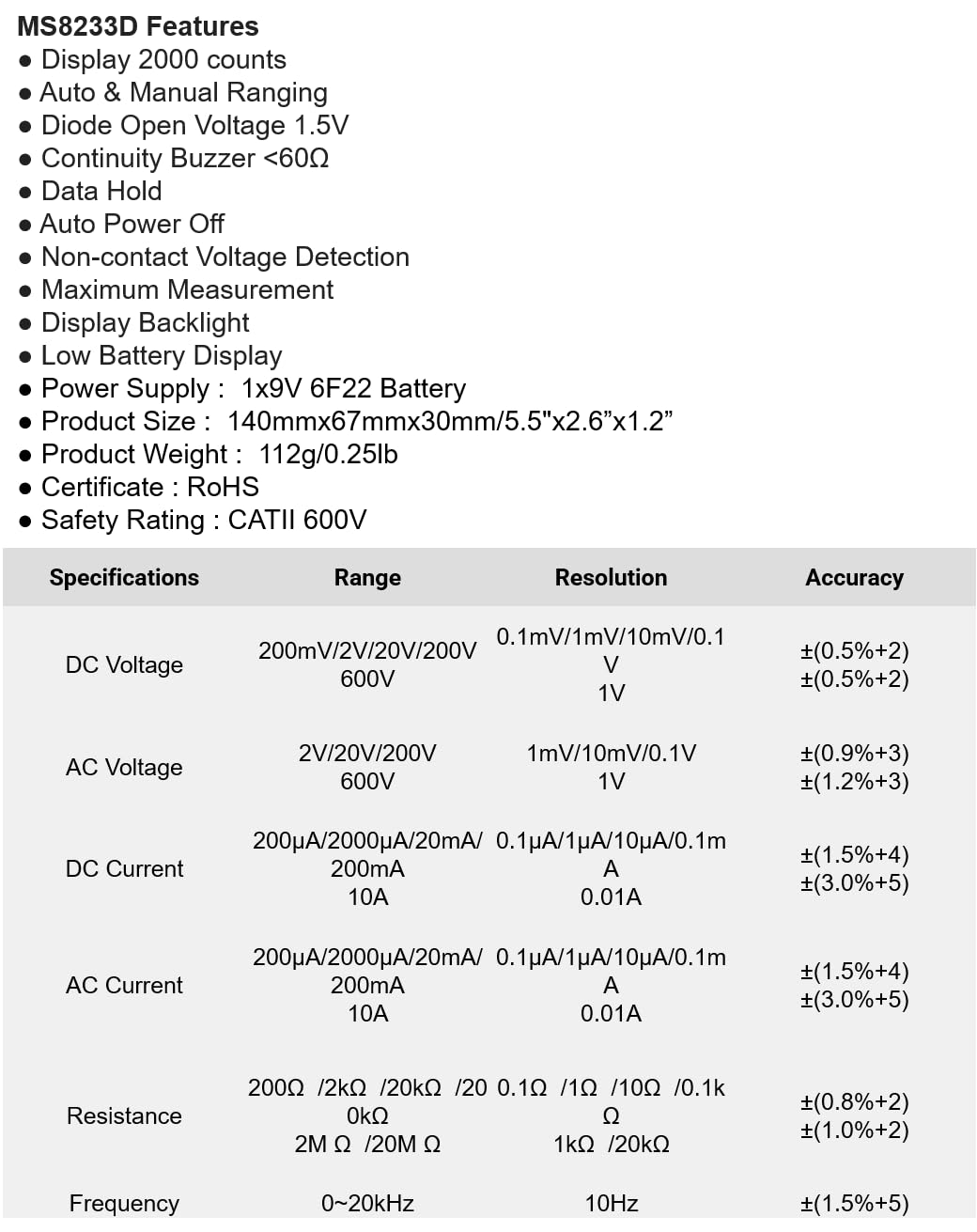
The following table details the measurement ranges, resolutions, and accuracies for the Mastech MS8233D Digital Multimeter:

Figure 3: Comprehensive specifications for the MS8233D, outlining measurement capabilities and precision.
| Асаблівасць | Спецыфікацыя |
|---|---|
| Дысплей | 2000 адлікаў |
| DC Voltage | 200 мВ / 2 В / 20 В / 200 В / 600 В |
| Пераменнага токуtage | 2В / 20В / 200В / 600В |
| Пастаянны ток | 200µA / 2000µA / 20mA / 200mA / 10A |
| Ток пераменнага току | 200µA / 2000µA / 20mA / 200mA / 10A |
| Супраціў | 200Ω / 2kΩ / 20kΩ / 200kΩ / 2MΩ / 20MΩ |
| Частата | 0-20 кГц |
| Дыёд адкрыты аб'ёмtage | 1.5В |
| Бесперапыннасць зумер | <60Ω |
| Электразабеспячэнне | 1x 9V 6F22 Battery |
| Памеры прадукту | 140 мм х 67 мм х 30 мм (5.5 цалі х 2.6 цалі х 1.2 цалі) |
| Вага прадукту | 112 г (0.25 фунта) |
| Рэйтынг бяспекі | CATII 600V |
| Сертыфікаты | CE, RoHS |
Гарантыя і падтрымка
For warranty information and technical support, please refer to the documentation provided with your purchase or contact the seller/manufacturer directly. Keep your purchase receipt as proof of purchase for any warranty claims.