
1. Уводзіны
The MASTECH MS8236 is a versatile 2-in-1 digital multimeter and network cable track tester designed for electrical and network diagnostics. This device combines the functions of a digital multimeter for measuring electrical parameters with a network cable tester for verifying cable integrity and a tone generator for tracing wires. It is suitable for professional and DIY use in various applications.
2. Інфармацыя па бяспецы
Always adhere to basic safety precautions when using this device to prevent personal injury or damage to the meter or equipment under test. Read all instructions carefully before use.
- Не перавышайце максімальныя ўваходныя значэнні, указаныя для кожнай функцыі.
- Будзьце асабліва асцярожныя пры працы з ланцугамі пад напругай.
- Перад вымярэннем пераканайцеся, што перамыкач функцый знаходзіцца ў правільным становішчы.
- Не выкарыстоўвайце вымяральны прыбор, калі ён выглядае пашкоджаным або калі вымяральныя правады пашкоджаны.
- Неадкладна замяняйце батарэйкі, калі з'явіцца індыкатар нізкага зараду батарэй, каб забяспечыць дакладныя паказанні.
- Avoid using the device in environments with high humidity, extreme temperatures, or explosive gases.
- Always disconnect power to the circuit before testing continuity or resistance.
3. Прадукт скончыўсяview
The MASTECH MS8236 integrates a digital multimeter with a detachable cable tracker/tone generator. The main unit features a clear digital display, function selector dial, and input jacks. The cable tracker assists in identifying and tracing network and telephone lines.
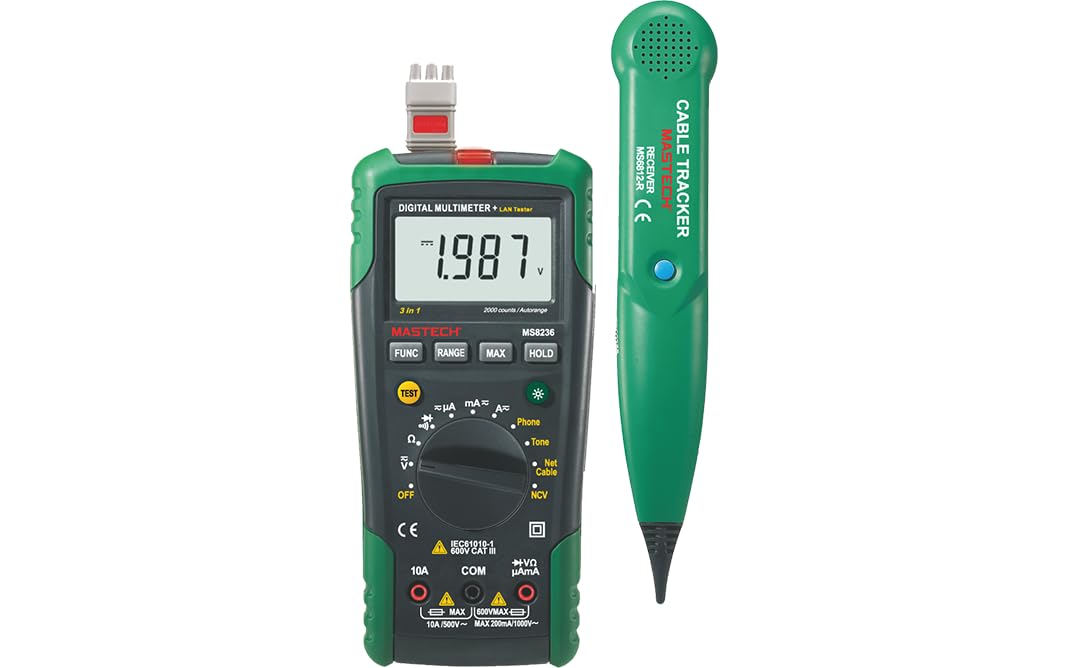
Figure 3.1: MASTECH MS8236 Digital Multimeter and Cable Tracker. The image shows the main multimeter unit on the left and the separate cable tracker unit on the right. Both are green and black.
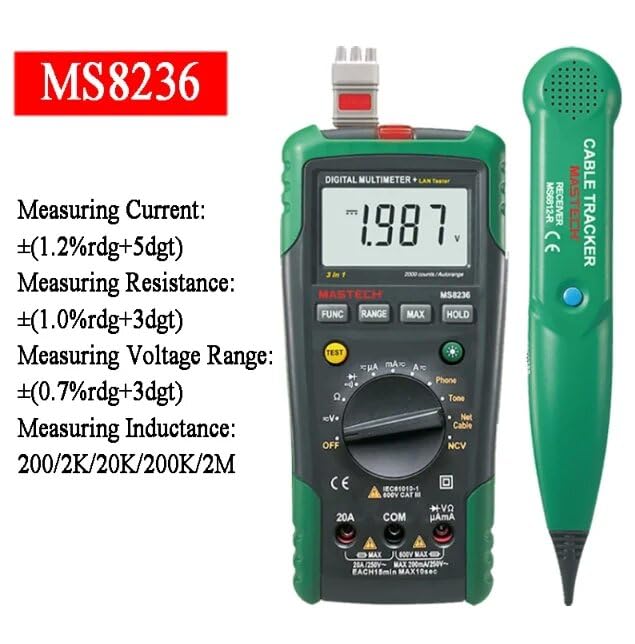
Figure 3.2: Close-up of the MASTECH MS8236 Multimeter Display and Controls. The display shows '1.987 V' and the function dial indicates various measurement modes including V, A, Ohm, Diode, Continuity, Phone, Net Cable, and NCV.
Асноўныя характарыстыкі:
- Дысплей: 2000 адлікаў
- Ranging: Auto & Manual
- Бескантактавы выпtage (NCV) дэтэктар
- Дыёд адкрыты аб'ёмtagе: 1.7 В.
- Зумер праверкі цэласнасці: актывуецца пры супраціўленні ніжэй за 70 Ом
- Функцыя ўтрымання дадзеных
- Дысплей з нізкім узроўнем зарадкі
- Падсвятленне дысплея
- Аўтаматычнае выключэнне
- Network Cable Check: Tests for open circuits, shorts, miss-wires, reversals, split pairs, and shield detection. Supports T568A, T568B, 10Base-T.
- Telephone Line Check: Identifies line states (Busy, Ringing, Clear) and continuity.
- Tone Function: For tracking cables and diagnosing break points.
4. Настройка
4.1. Распакаванне і праверка
Carefully unpack the MS8236 and all accessories. Inspect the device for any signs of damage. If any damage is found, contact your supplier immediately.
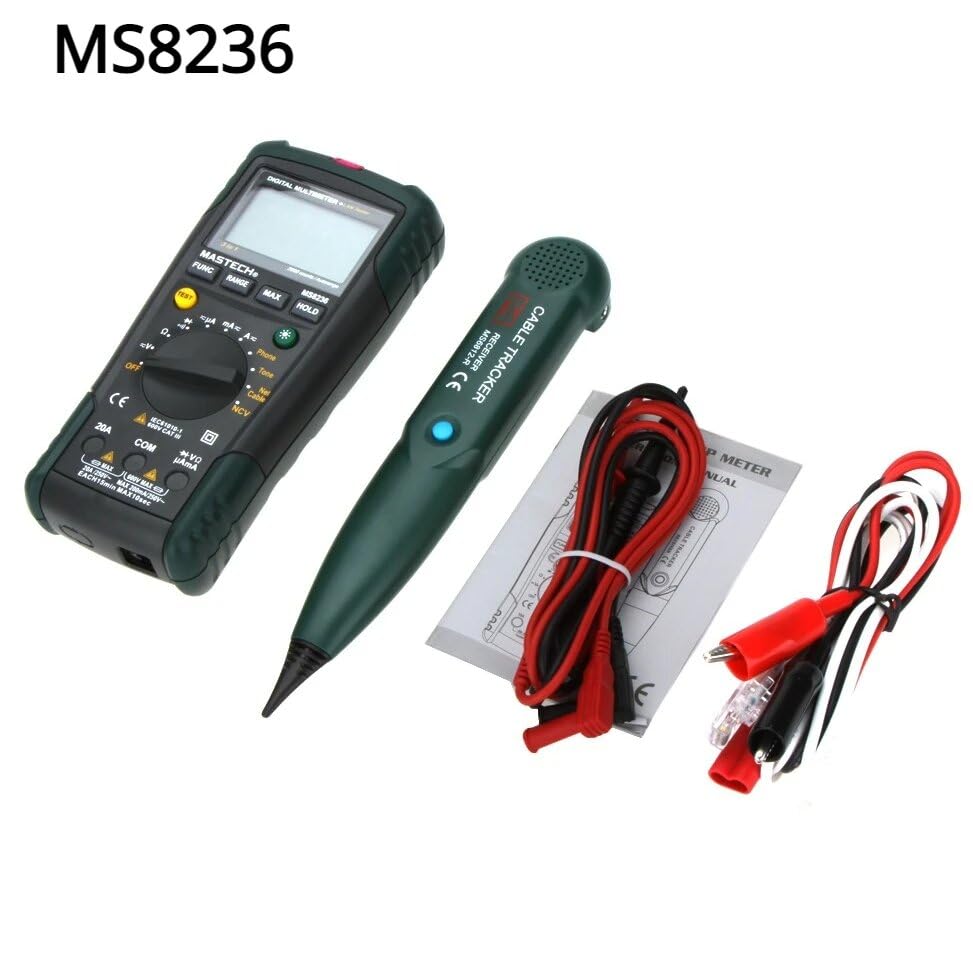
Figure 4.1: MASTECH MS8236 Kit Contents. The image displays the multimeter, cable tracker, red and black test leads, a network cable adapter, and a small instruction manual.
4.2. Устаноўка батарэі
The MS8236 requires 2 LR44 batteries, which are included. To install or replace batteries:
- Locate the battery compartment cover on the back of the multimeter unit.
- Выкарыстоўвайце адвёртку, каб адкрыць батарэйны адсек.
- Insert the 2 LR44 batteries, observing the correct polarity (+/-).
- Надзейна зачыніце крышку батарэйнага адсека.
5. Інструкцыя па эксплуатацыі
5.1. Basic Multimeter Functions
Connect the test leads to the appropriate input jacks (COM for black lead, VΩmA for red lead for most measurements, or 20A for high current). Select the desired function using the rotary switch.
- тtage Measurement (DCV/ACV): Turn the rotary switch to the 'V' position. Select DC or AC voltage if applicable. Connect test leads in parallel to the circuit.
- Current Measurement (DCA/ACA): Turn the rotary switch to the 'A' position. Select DC or AC current. Connect test leads in series with the circuit. Ensure the correct input jack (mA or 20A) is used.
- Вымярэнне супраціўлення (Ом): Turn the rotary switch to the 'Ω' position. Ensure the circuit is de-energized. Connect test leads across the component.
- Тэст дыёдаў (→|): Павярніце паваротны перамыкач на сімвал дыёда. Падключыце чырвоны провад да анода, а чорны — да катода дыёда.
- Праверка бесперапыннасці ()))): Turn the rotary switch to the continuity symbol. The buzzer will sound if the resistance is below approximately 70Ω.
5.2. Network Cable Check
This function tests the integrity of network cables (RJ45). It can detect open circuits, shorts, miss-wires, reversals, split pairs, and shield detection for T568A, T568B, and 10Base-T standards.
- Turn the rotary switch to the 'Net Cable' position.
- Connect one end of the network cable to the RJ45 port on the main multimeter unit.
- Connect the other end of the network cable to the RJ45 port on the remote cable tracker unit.
- Observe the display for test results, which will indicate the cable status. The device also features a debug mode for detailed fault identification.
5.3. Telephone Line Check
This function allows for checking the state of a working telephone line and its continuity.
- Turn the rotary switch to the 'Phone' position.
- Connect the telephone line to the appropriate port on the main unit.
- The device will identify the state of the line as Busy, Ringing, or Clear. It can also judge the continuity of the telephone cables or wires.
5.4. Tone Function
The tone function is used with the cable tracker to trace cables and wires and diagnose break points.
- Turn the rotary switch to the 'Tone' position.
- Connect the test leads or RJ11/RJ45 plug to the cable you wish to trace.
- Use the remote cable tracker unit to follow the cable. The tracker will emit an audible tone when it detects the signal from the main unit, helping to locate the cable and identify breaks.
5.5. Бескантактавы тtage (NCV) Выяўленне
The NCV function allows for detecting AC voltage without direct contact with the conductor.
- Turn the rotary switch to the 'NCV' position.
- Перамясціце верхнюю частку мультыметра бліжэй да крыніцы пераменнага току пад напругай.tagэлектронная крыніца.
- Прылада будзе паказваць наяўнасць аб'ёму пераменнага токуtagе. праз гукавы сігнал і/або візуальны індыкатар.
5.6. Дадатковыя функцыі
- Утрыманне дадзеных: Націсніце кнопку «HOLD», каб зафіксаваць бягучае паказанне на дысплеі. Націсніце яшчэ раз, каб адпусціць.
- Падсвятленне: Press the backlight button (often labeled with a light bulb symbol) to illuminate the display for better visibility in low-light conditions.
- Аўтаматычнае выключэнне: Прылада аўтаматычна выключыцца пасля пэўнага перыяду бяздзейнасці, каб зэканоміць час зарада батарэі.
6. Тэхнічнае абслугоўванне
6.1. Уборка
Працярыце корпус рэкламайamp тканінай і мяккім мыйным сродкам. Не выкарыстоўвайце абразіўныя рэчывы або растваральнікі. Перад выкарыстаннем пераканайцеся, што прылада цалкам высахла.
6.2. Замена батарэі
When the low battery indicator appears on the display, replace the batteries as described in Section 4.2. Remove batteries if the device will not be used for an extended period.
7. Выпраўленне непаладак
- Няма дысплея або цьмянае адлюстраванне: Праверце ўстаноўку батарэй і ўзровень зарада. Пры неабходнасці заменіце батарэйкі.
- Няправільныя паказанні: Ensure test leads are properly connected and the correct function is selected. Verify the circuit is de-energized for resistance/continuity tests.
- Network cable test failure: Ensure both ends of the cable are securely connected to the main unit and remote. Check for physical damage to the cable or connectors.
- No tone from cable tracker: Verify the main unit is in 'Tone' mode and properly connected to the cable. Check the cable tracker's battery.
8. Тэхнічныя характарыстыкі
The following table outlines the general and electrical specifications for the MASTECH MS8236.

Figure 8.1: MASTECH MS8236 Features and Specifications Table. This image provides detailed electrical specifications for DC Voltagе, AC Voltage, DC Current, AC Current, and Resistance, including ranges, resolutions, and accuracies.
| Параметр | Дыяпазон | дазвол | Дакладнасць |
|---|---|---|---|
| DC Voltage | 200mV/2V/20V/200V/600V | 0.1mV/1mV/10mV/100mV/1V | ±(0.5%+5) |
| Пераменнага токуtage | 200mV/2V/20V/200V/600V | 0.1mV/1mV/10mV/100mV/1V | ±(0.8%+5) |
| Пастаянны ток | 200µA/2000µA/20mA/200mA/2A/10A | 0.1µA/1µA/10µA/0.1mA/1mA/10mA | ±(1.2%+5) ±(2.0%+10) for 10A |
| Ток пераменнага току | 200µA/2000µA/20mA/200mA/2A/10A | 0.1µA/1µA/10µA/0.1mA/1mA/10mA | ±(1.5%+5) ±(3.0%+10) for 10A |
| Супраціў | 200Ω/2kΩ/20kΩ/200kΩ/2MΩ/20MΩ | 0.1Ω/1Ω/10Ω/100Ω/1kΩ/10kΩ | ±(1.0%+5) ±(1.5%+5) for 20MΩ |
| Дыёд адкрыты аб'ёмtage | 1.7В | ||
| Бесперапыннасць зумер | <70Ω | ||
| Дысплей | 2000 адлікаў | ||
| Ранжыраванне | Аўтаматычны і ручной | ||
| Бескантактавы выпtage Дэтэктар | так | ||
| Аўтаматычнае выключэнне | так | ||
| Утрыманне дадзеных | так | ||
| Дысплей з нізкім узроўнем зарадкі | так | ||
| Падсвятленне дысплея | так | ||
| Крыніца харчавання | 2 батарэі LR44 (у камплекце) | ||
| Памеры прадукту | 16 х 9 х 5 см | ||
| Вага прадмета | 500 г | ||
| Матэрыял | Акрыланітрылбутадыенстырол (АБС) | ||
| Сертыфікаты | CE, RoHS | ||
9. Гарантыя і падтрымка
For warranty information and technical support, please refer to the documentation provided with your purchase or contact the seller or manufacturer directly. Specific warranty terms may vary by region and retailer.