
TOPTECH STAR-115
STAR-115 15'' Woofer Portable Bluetooth Speaker
Інструкцыя карыстальніка
1. Уводзіны
Дзякуй за пакупкуasing the TOPTECH STAR-115 Portable Bluetooth Speaker. This powerful speaker is designed to deliver blazing sound with a vibrant flame light show, perfect for home use, outdoor gatherings, and parties. Please read this manual carefully before operating the device to ensure proper use and to maximize its performance and lifespan.
2. Інфармацыя па бяспецы
- Не падвяргайце дынамік уздзеянню вады або празмернай вільгаці. Гэты выраб не з'яўляецца воданепранікальным.
- Пазбягайце размяшчэння дынаміка побач з крыніцамі цяпла, такімі як радыятары, абагравальнікі, пліты або іншыя прыборы (у тым ліку ampLifiers), якія вырабляюць цяпло.
- Выкарыстоўвайце толькі насадкі/аксэсуары, указаныя вытворцам.
- Адключайце дынамік ад сеткі падчас навальніцы або калі ён не выкарыстоўваецца працяглы час.
- Не блакуйце вентыляцыйныя адтуліны. Усталюйце ў адпаведнасці з інструкцыямі вытворцы.
- Абараняйце сеткавы шнур ад наступання або заціскання, асабліва ў месцах вілкі, разеткі і месца выхаду з прылады.
- Звяртайцеся да кваліфікаванага абслугоўваючага персаналу. Тэхнічнае абслугоўванне патрабуецца, калі прылада была пашкоджана якім-небудзь чынам, напрыклад, пашкоджаны шнур сілкавання або вілка, была праліта вадкасць або ў прыладу ўпалі прадметы, прылада падвяргалася ўздзеянню дажджу або вільгаці, не працуе належным чынам , або быў адкінуты.
3. Змесціва ўпакоўкі
Калі ласка, пастаўце галачку для наступных пунктаў:
- STAR-115 Portable Bluetooth Speaker
- Пульт дыстанцыйнага кіравання
- Правадной мікрафон
- Адаптар сілкавання
- Кіраўніцтва карыстальніка (гэты дакумент)
- Гарантыйны талон
4. Прадукт скончыўсяview
Familiarize yourself with the various parts of your STAR-115 speaker.

Фронт view of the STAR-115 speaker, showcasing its 15-inch woofer and vibrant multi-color flame light display.
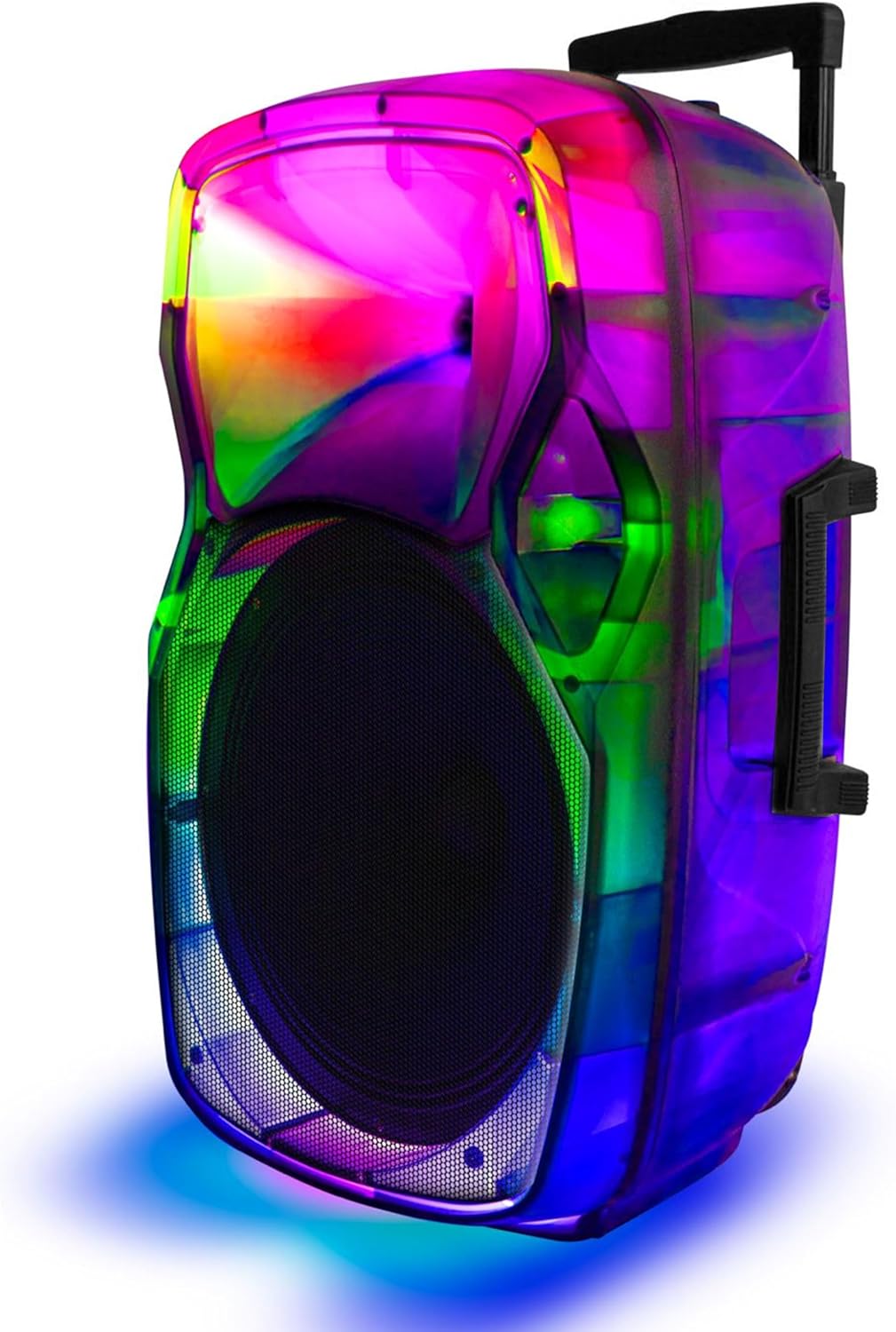
Збоку view of the STAR-115 speaker, highlighting its integrated handle and wheels for easy portability.
Control Panel (Top/Rear)
- Кнопка харчавання: Уключае/выключае дынамік.
- Кнопка рэжыму: Switches between Bluetooth, FM Radio, AUX, USB, and TF Card modes.
- Рэгулятар гучнасці: Рэгулюе галоўную гучнасць.
- Мікрафонны ўваход: Для падключэння праваднога мікрафона.
- Порт USB: Для USB-флэш-назапашвальнікаў.
- Слот TF карты: Для карт памяці TF (MicroSD).
- Уваход AUX: Для падлучэння знешніх аўдыёпрылад праз кабель 3.5 мм.
- Кнопка рэжыму святла: Controls the flame light effects.
- Кнопкі папярэдняга/наступнага трэка: Navigates through tracks in media playback modes.
- Кнопка прайгравання/паўзы: Кіруе прайграваннем.
5. Настройка
5.1 Зарадка дынаміка
Before first use, fully charge the speaker. Connect the provided power adapter to the speaker's charging port and plug it into a standard wall outlet. The charging indicator light will show the charging status (e.g., red for charging, off or green for fully charged).

The speaker features a reliable battery for extended playback. Ensure it is fully charged before use.
A full charge provides approximately 6 hours of battery life, depending on usage and volume levels.
5.2 Уключэнне/выключэнне
Націсніце і ўтрымлівайце Кнопка харчавання on the control panel to turn the speaker on or off.
6. Інструкцыя па эксплуатацыі
6.1 Злучэнне Bluetooth
The STAR-115 speaker is compatible with Bluetooth-enabled devices for wireless audio streaming.
- Уключыце дынамік. Ён аўтаматычна пяройдзе ў рэжым спалучэння Bluetooth, пра што будзе сведчыць мігценне святлодыёда.
- На мабільнай прыладзе (смартфоне, планшэце і г.д.) уключыце Bluetooth і знайдзіце даступныя прылады.
- Select "STAR-115" from the list of devices.
- Пасля падключэння дынамік выдасць гук пацверджання, а святлодыёдны індыкатар перастане міргаць.

Quick and easy connection via Bluetooth, USB, TF card, AUX, or FM Radio.
6.2 Прайграванне з USB/TF-карты
Insert a USB flash drive or TF (MicroSD) card into the respective port. The speaker will automatically switch to USB/TF mode and begin playing audio file(MP3, WAV і г.д.) з прылады захоўвання дадзеных.
- Use the Previous/Next Track buttons to navigate.
- Націсніце кнопку прайгравання/паўзы, каб кіраваць прайграваннем.
6.3 AUX ўваход
Connect an external audio device (e.g., MP3 player, laptop) to the speaker's AUX input using a 3.5mm audio cable. The speaker will automatically switch to AUX mode. Control playback from your connected device.
6.4 FM -радыё
Націсніце Кнопка рэжыму to switch to FM Radio mode. The speaker will automatically scan and save available radio stations. Use the Previous/Next Track buttons to switch between saved stations.
6.5 Выкарыстанне мікрафона
Connect the wired microphone to the Microphone Input port. Adjust the microphone volume using the dedicated knob on the control panel (if available) or the master volume.
6.6 Flame Light Operation
The STAR-115 features a multi-color flame light show. Press the Кнопка светлавога рэжыму to activate or change the lighting effects. Press again to cycle through different patterns or turn off the lights.

One click activation of multi-color disco lights adds extra excitement to your gathering.
6.7 Спалучэнне з сапраўдным бесправадным стэрэа (TWS)
For an unparalleled stereo sound experience, you can pair two STAR-115 speakers together.
- Пераканайцеся, што абодва дынамікі ўключаны і не падключаны да прылад Bluetooth.
- On one speaker (this will be the primary speaker), press and hold the TWS button (refer to control panel diagram if available, or try the Mode button for 3 seconds if no dedicated TWS button).
- Асноўны дынамік будзе шукаць другасны дынамік. Пасля падключэння абодва дынамікі выдаюць гук пацверджання.
- Цяпер падключыце мабільную прыладу да асноўнага дынаміка праз Bluetooth, як апісана ў раздзеле 6.1. Гук будзе прайгравацца праз абодва дынамікі ў стэрэагуку.

Pair two speakers to get true wireless stereo sound, creating a harmonious and immersive sound environment.
6.8 Выкарыстанне дыстанцыйнага кіравання
The included remote control allows for convenient operation from a distance. Functions include power on/off, mode selection, volume control, track navigation, play/pause, and light control.
7. Тэхнічнае абслугоўванне
7.1 Ачыстка
Працірайце вонкавую паверхню дынаміка мяккай сухой тканінай. Не выкарыстоўвайце абразіўныя ачышчальнікі, воск або растваральнікі, бо яны могуць пашкодзіць пакрыццё. Пазбягайце распылення вадкасцей непасрэдна на дынамік.
7.2 Захоўванне
When not in use for extended periods, store the speaker in a cool, dry place away from direct sunlight and extreme temperatures. It is recommended to charge the battery periodically (e.g., every 3 months) to maintain its health.
8. Выпраўленне непаладак
| праблема | Магчымая прычына | Рашэнне |
|---|---|---|
| Дынамік не ўключаецца. | Акумулятар разраджаны. | Падключыце дынамік да адаптара харчавання і зарадзіце яго. |
| Няма гуку. | Гучнасць занадта нізкая або выключаная. | Increase the volume on the speaker and your connected device. |
| Збой злучэння Bluetooth. | Speaker is not in pairing mode; device is too far; interference. | Ensure speaker is in pairing mode. Move device closer. Disconnect other Bluetooth devices. Try restarting both speaker and device. |
| USB/TF-карта не прайграваецца. | Няправільна file фармат; карта/дыск няправільна ўстаўлены; пашкоджаны files. | Забяспечыць files are in supported format (MP3, WAV). Reinsert the card/drive. Try a different card/drive. |
| Не працуе мікрафон. | Microphone not connected properly; microphone volume too low. | Пераканайцеся, што мікрафон цалкам падключаны. Адрэгулюйце гучнасць мікрафона. |
| Памылка спалучэння TWS. | Дынамікі ўжо падключаны да іншых прылад; занадта далёка адна ад адной. | Ensure both speakers are disconnected from other Bluetooth devices. Place them close together during pairing. |
9. Тэхнічныя характарыстыкі
| Асаблівасць | Дэталь |
|---|---|
| Назва мадэлі | ЗВЕЗДА-115 |
| Тып дынаміка | НЧ-дынамік |
| Дыяметр НЧ-дынаміка | 15 цалі |
| Тэхналогія падлучэння | Bluetooth |
| Тэхналогія бесправадной сувязі | Bluetooth |
| Дыяпазон Bluetooth | 33 футаў (10 метр) |
| Крыніца харчавання | Харчаванне ад батарэі |
| Тэрмін службы батарэі | 6 гадзін |
| Максімальная выхадная магутнасць дынаміка | 150 ват |
| Рэжым выхаду гуку | Стэрэа |
| Уключаныя кампаненты | Remote control, wired microphone, adapter, user manual, warranty card |
| Памеры прадукту | 1"D x 1"W x 1"H (Note: This appears to be a placeholder, actual dimensions may vary) |
| Колер | Чорны |
| Воданепранікальны | ХЛУСНЯ |
| Вытворца | Top Tech Audio |
| UPC | 755824425859 |
10. Гарантыя і падтрымка
10.1 Інфармацыя аб гарантыі
This product comes with a Limited Warranty. Please refer to the included Warranty Card for detailed terms and conditions, including coverage period and what is covered. Keep your purchase receipt as proof of purchase for warranty claims.
10.2 Падтрымка кліентаў
If you encounter any issues not covered in this manual or require further assistance, please contact TOPTECH customer support. Contact information can typically be found on the product packaging, warranty card, or the official TOPTECH webсайт.
Для атрымання дадатковай інфармацыі вы можаце наведаць TOPTECH Store on Amazon.
Ask a question about this manual
Ask about setup, troubleshooting, compatibility, parts, safety, or missing instructions. Manuals+ will review the question and use this page’s manual context to help answer it.